Inaccurate Wifi bars

GreenAsus

New member
Local time
5:35 AM
Messages
16
Location
Australia, Victoria
Hey guys, I'm just looking for a solution to why my wifi bars wont show an accurate amount of wifi bars in the task bar. I know i should only have 3 bars in my lounge room because when i disconnect it shows that my wifi is only three bars then when i connect to the wifi is says i have full bars. Why is this? Is it fixable?
 

My Computer

Computer Manufacturer/Model Number
Asus K53E
OS
Windows 7 Home Premium 64bit
CPU
i3 2.10GHz
Memory
4GB
Hard Drives
C-186GB
D- 254GB
Total- 440GB
Wow you guys are helpful..
 

My Computer

Computer Manufacturer/Model Number
Asus K53E
OS
Windows 7 Home Premium 64bit
CPU
i3 2.10GHz
Memory
4GB
Hard Drives
C-186GB
D- 254GB
Total- 440GB
Hello,

Perhaps most of us were on vacation or pre-occupied? :D

If you still need assistance please try the following tasks and provide us some info:

Update your Wi-Fi adapter's driver to the latest by downloading the driver from the Manufacturer's site.

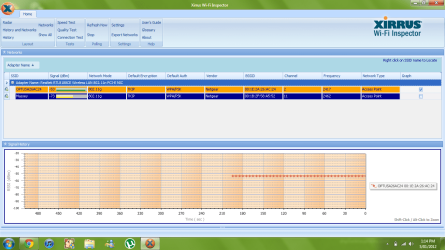
Install and run Xirrus Wi-Fi Inspector from one of your wireless computers.
Double click the Xirrus Icon on your Desktop, Tap the Printscreen key on your keyboard, open up Paint then choose Edit from the Menu and select Paste, then SAVE it. Upload and attach the file here.
 

My Computer

Computer Manufacturer/Model Number
Lenovo Desktop/Samsung Laptop
OS
Win7 & Win8 64bit
CPU
Intel i5
Internet Speed
Charter-20 Mbps
Antivirus
Avast
Browser
FF, IE9 and Chrome
Hello,

Perhaps most of us were on vacation or pre-occupied? :D

If you still need assistance please try the following tasks and provide us some info:

Update your Wi-Fi adapter's driver to the latest by downloading the driver from the Manufacturer's site.

Install and run Xirrus Wi-Fi Inspector from one of your wireless computers.
Double click the Xirrus Icon on your Desktop, Tap the Printscreen key on your keyboard, open up Paint then choose Edit from the Menu and select Paste, then SAVE it. Upload and attach the file here.

Hows that?
 

Attachments

  • internet.png
    internet.png
    61.9 KB · Views: 31

My Computer

Computer Manufacturer/Model Number
Asus K53E
OS
Windows 7 Home Premium 64bit
CPU
i3 2.10GHz
Memory
4GB
Hard Drives
C-186GB
D- 254GB
Total- 440GB
Thanks for the Xirrus snap shot. It's showing that you have an excellent signal.

Also, have you done this?
Update your Wi-Fi adapter's driver to the latest by downloading the driver from the Manufacturer's site.
 

My Computer

Computer Manufacturer/Model Number
Lenovo Desktop/Samsung Laptop
OS
Win7 & Win8 64bit
CPU
Intel i5
Internet Speed
Charter-20 Mbps
Antivirus
Avast
Browser
FF, IE9 and Chrome
I dont know which one to do
 

My Computer

Computer Manufacturer/Model Number
Asus K53E
OS
Windows 7 Home Premium 64bit
CPU
i3 2.10GHz
Memory
4GB
Hard Drives
C-186GB
D- 254GB
Total- 440GB
  1. Open Device Manager by clicking the Start button
    4f6cbd09-148c-4dd8-b1f2-48f232a2fd33_818.jpg
    , clicking Control Panel, clicking System and Security, and then, under System, clicking Device Manager.*
    18abb370-ac1e-4b6b-b663-e028a75bf05b_48.jpg
    If you're prompted for an administrator password or confirmation, type the password or provide confirmation.
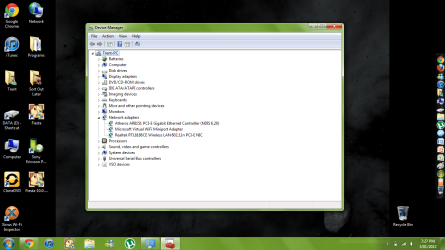
  2. Double-click Network Adapters, in here what type of Network Adapters do you have?
You may also do a Print screen and post it here.
 

My Computer

Computer Manufacturer/Model Number
Lenovo Desktop/Samsung Laptop
OS
Win7 & Win8 64bit
CPU
Intel i5
Internet Speed
Charter-20 Mbps
Antivirus
Avast
Browser
FF, IE9 and Chrome
Hows that?
 

Attachments

  • network.png
    network.png
    125.5 KB · Views: 21

My Computer

Computer Manufacturer/Model Number
Asus K53E
OS
Windows 7 Home Premium 64bit
CPU
i3 2.10GHz
Memory
4GB
Hard Drives
C-186GB
D- 254GB
Total- 440GB
Here's the download page for your Realtek Wi-Fi adapter. Choose the first one - 'Windows driver auto installation program'
Realtek
 

My Computer

Computer Manufacturer/Model Number
Lenovo Desktop/Samsung Laptop
OS
Win7 & Win8 64bit
CPU
Intel i5
Internet Speed
Charter-20 Mbps
Antivirus
Avast
Browser
FF, IE9 and Chrome
Hey guys, I'm just looking for a solution to why my wifi bars wont show an accurate amount of wifi bars in the task bar. I know i should only have 3 bars in my lounge room because when i disconnect it shows that my wifi is only three bars then when i connect to the wifi is says i have full bars. Why is this? Is it fixable?

Does either your router or WiFi adapter have green ethernet enabled?

It automatically reduces the power when traffic is low...
 

My Computer

Computer Manufacturer/Model Number
Custom built machine
OS
W7 x64
CPU
Intel Q9300 2.5Ghz Quad LGA775 (Would like Q9650)
Motherboard
Gigabyte GA-EP45T-UD3R (F6 Bios)
Memory
4Gb OCZ Gold 1,333Mhz
Graphics Card(s)
Palit HD4850 O/C Sonic 512Mb DDR3, Dual DViD's
Sound Card
Azalia to twin Samson 50w Studio Monitors
Monitor(s) Displays
Twin Dell (E-IPS) U2311H 23.6" Screens
Screen Resolution
1920 x 1080 @ 60Hz
Hard Drives
Crucial M4 SSD, archives on twin Western Digital Caviar Black WD2002FAEX, 2TB, 7200rpm HDD's, Samsung Ritemaster CD/DVD Burner...
PSU
OCZ 600w
Case
Lian-Li PC8 acoustifoamed' aluminium tower
Cooling
Scythe 140mm Zipang
Keyboard
Cherry PS/2 custom model
Mouse
Lenovo USB laser "Thinkpad" Mouse
Internet Speed
ADSL2+ @14Mbps downstream & Cat6 Gigabit Ethernet
Antivirus
NOD32
Browser
Opera
Other Info
Silicon Dust HD Homerun Dual FTA (Ethernet) TV Tuners, Dray Tek Vigor 2850Vn router and 8x HP Gigabit Switch. Lian-Li CR26 Card Reader, Canon MF4430 iSensys laser printer/scanner.
Green ethernet?
 

My Computer

Computer Manufacturer/Model Number
Asus K53E
OS
Windows 7 Home Premium 64bit
CPU
i3 2.10GHz
Memory
4GB
Hard Drives
C-186GB
D- 254GB
Total- 440GB
Doing Realtek thing now :)
 

My Computer

Computer Manufacturer/Model Number
Asus K53E
OS
Windows 7 Home Premium 64bit
CPU
i3 2.10GHz
Memory
4GB
Hard Drives
C-186GB
D- 254GB
Total- 440GB
Green ethernet?

Yes, you can Google it... but as I mentioned, it reduces the Tx/Rx power state of the networking components as their power/traffic requirements fall off... it's a "carbon emissions" technology...

If either your adapter or router/AP has it onboard and it's enabled it would be a pretty good reason for what you're posting here about... :)
 

My Computer

Computer Manufacturer/Model Number
Custom built machine
OS
W7 x64
CPU
Intel Q9300 2.5Ghz Quad LGA775 (Would like Q9650)
Motherboard
Gigabyte GA-EP45T-UD3R (F6 Bios)
Memory
4Gb OCZ Gold 1,333Mhz
Graphics Card(s)
Palit HD4850 O/C Sonic 512Mb DDR3, Dual DViD's
Sound Card
Azalia to twin Samson 50w Studio Monitors
Monitor(s) Displays
Twin Dell (E-IPS) U2311H 23.6" Screens
Screen Resolution
1920 x 1080 @ 60Hz
Hard Drives
Crucial M4 SSD, archives on twin Western Digital Caviar Black WD2002FAEX, 2TB, 7200rpm HDD's, Samsung Ritemaster CD/DVD Burner...
PSU
OCZ 600w
Case
Lian-Li PC8 acoustifoamed' aluminium tower
Cooling
Scythe 140mm Zipang
Keyboard
Cherry PS/2 custom model
Mouse
Lenovo USB laser "Thinkpad" Mouse
Internet Speed
ADSL2+ @14Mbps downstream & Cat6 Gigabit Ethernet
Antivirus
NOD32
Browser
Opera
Other Info
Silicon Dust HD Homerun Dual FTA (Ethernet) TV Tuners, Dray Tek Vigor 2850Vn router and 8x HP Gigabit Switch. Lian-Li CR26 Card Reader, Canon MF4430 iSensys laser printer/scanner.
How are you telling the accuracy of the wifi signal? Those can fluctuate. Do you have other wireless devices to verify this observation? LIke smart phone or tablet or other PC?
 

My Computer

Computer type
PC/Desktop
Computer Manufacturer/Model Number
Custom Build
OS
Windows 7 Pro 64bit build 7601 SP1
CPU
Intel Core I5 3570K 3.4Ghz w/ Zalman CNPS9900NT RT
Motherboard
MSI Z77A-G45 Gaming
Memory
G.Skill F3-12800CL9D-8GbXL ; 4Gx2
Graphics Card(s)
EVGA Geforce GTX 770 Superclocked
Sound Card
Creative Sound Blaster Z
Monitor(s) Displays
Dual ViewSonic VX2770Smh-LED Black 27"IPS-Panel
Screen Resolution
1920x1080
Hard Drives
Kingston Hyper X 240GB SSD Win8 Pro 64bit 6GB/s Sata III
Intel 335 Series SSD 240GB Win8 Storage 6GB/s Sata III
Intel 320 Series SSD 600GB Storage 3GB/s Sata II
Western Digital Scorpio Black 1TB - Docked via Esata
PSU
Coolermaster GX 750W
Case
Corsair Vengence C70
Cooling
Coolermaster 120mm and Enermax 140mm
Keyboard
Corsair Vengence K70
Mouse
Logitech G500
Internet Speed
22mbps+
Browser
Firefox, Chrome, IE
Other Info
Swan M50W 2.1 speakers
APC UPS
Thermaltake BlacX HDD Dock
Samsung BD Optical Drive
Netgear WNDR4500
Back
Top