
Solved Incomplete displays on some pages using Firefox and Windows IE

ArtMurphy

New member
Local time
10:31 AM
Messages
27
A reinstalled my Win 7 64bit OS a month ago. Since then I've found some web pages do not display the contents of buttons and banners. This happens whether I'm using Firefox or Win IE. I've updated both browsers, updated Flash, and updated Adobe reader.
Tech support from each browser said, "It ain't us".
Here is what I mean:
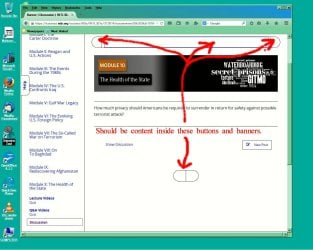
edX screen grab-02.JPG
I contacted the website for this page (an edX course) and they couldn't replicate it; said it was a browser or system problem.
I have experienced this problem on other websites, including the main gmail site.
I think I've screwed up a setting in Windows 7 when I was reinstalling it. Whatever I did or didn't do, is interfering with both browsers (and who knows what else). I've got no clue.
Any advice would be much appreciated.
Thanks.
 

My Computer My Computer

At a glance

Windows 7 Home Premium 64 bitIntel Core2 Quad 2.33Ghz4Gb 1066 MHz DDR3 SDRAM (non-ECC only)PCI Express x16 graphics adapter
Computer type
PC/Desktop
Computer Manufacturer/Model Number
Dell Optiplex 780
OS
Windows 7 Home Premium 64 bit
CPU
Intel Core2 Quad 2.33Ghz
Motherboard
intel Q45 Express chipset w/ICH10DO
Memory
4Gb 1066 MHz DDR3 SDRAM (non-ECC only)
Graphics Card(s)
PCI Express x16 graphics adapter
Hard Drives
SATA hard drive
ST 3250310AS ATA
Antivirus
Microsoft Security essentials
Browser
Mozilla Firefox (primary), Windows IE (use sometimes)
Hi and welcome to SEvenForums,
Use TFC save it to your desktop,
Right click it and Run as administrator
Start the scanner,
After it’s done close and boot or shut down your machine,
http://www.bleepingcomputer.com/download/tfc/
 

My Computer My Computer

At a glance

Win-7-Pro64bit 7-H-Prem-64biti7-5930K 2nd i9-9940x both water blocked VRM'...Trident-z 3200C14 2nd Trident-z 3600C16EVGA 1080ti ftw3 2nd Titan Xp both water blocked
Computer type
PC/Desktop
Computer Manufacturer/Model Number
Custom assembled by me :}
OS
Win-7-Pro64bit 7-H-Prem-64bit
CPU
i7-5930K 2nd i9-9940x both water blocked VRM's too
Motherboard
ASUS SABERTOOTH X99 2nd ASUS x299 Apex
Memory
Trident-z 3200C14 2nd Trident-z 3600C16
Graphics Card(s)
EVGA 1080ti ftw3 2nd Titan Xp both water blocked
Sound Card
Built-in Realtek
Monitor(s) Displays
1-AOC G2460PG 24"G-Sync 144Hz/ 2nd 1-ASUS VG248QE 24" 144Hz
Screen Resolution
1920 x 1080 144Hz
Hard Drives
2-Samsung M.2 Evo & Evo Plus
2-Samsung 850 EVO 500GB SSD's/ 3-2.5 W.D. Black 1tb-&3-1tb/3-3.5 WD Black 1tb hdd's
PSU
EVGA SuperNOVA 1000-P2 2nd 1200-P2
Case
2-Corsair Obsidian Series 450D Black ATX Mid Tower
Cooling
Custom water loops
Keyboard
Logitech G710+/ 2nd Logitech G910
Mouse
2-RedDragon M901 Perdition 16400 dpi Gaming mouse = wired
Internet Speed
Comcast Ping 19ms 89.31mbps download speed 6.12mbps upload
Antivirus
Malwarebytes Pro/ Superantispyware Pro
Browser
FireFox & Pale moon
Other Info
2nd ASUS X299 Apex/Intel i9-9940x with Custom water loop/7H-Prem-x64/Corsair 450D case/Ram Trident-z 3600C16 4x8gb / Samsung970Evo plus 500gb SSD/Dual ssd EZ swap evo/PSU EVGA SuperNova 1200w-P2 80+Platinum/GPU Titan Xp /8-ML-140 on push-pull on 2-280GTX rads
Displays still incomplete on Firefox & Win IE after fixes

I appreciate the suggestions concerning how to fix my display problem(s). I've tried two of them.
I ran TFC from bleepingcomputer and while it located and disposed of 745 Mb of crap, it didn't correct the display problem.
I then purchased (!) RegCleanPro and ran it. It found and removed 50 crappy items in my registry, but the display problem persists.
While I have no actual clue, I wonder if the problem with the incomplete display of websites could in some way be due to some setup option that I chose (or didn't choose) when re-installing Windows 7 Home Premium 65-bit last month?
Any further advice or suggestions would be greatly appreciated.
Many thanks.
 

My Computer My Computer

At a glance

Windows 7 Home Premium 64 bitIntel Core2 Quad 2.33Ghz4Gb 1066 MHz DDR3 SDRAM (non-ECC only)PCI Express x16 graphics adapter
Computer type
PC/Desktop
Computer Manufacturer/Model Number
Dell Optiplex 780
OS
Windows 7 Home Premium 64 bit
CPU
Intel Core2 Quad 2.33Ghz
Motherboard
intel Q45 Express chipset w/ICH10DO
Memory
4Gb 1066 MHz DDR3 SDRAM (non-ECC only)
Graphics Card(s)
PCI Express x16 graphics adapter
Hard Drives
SATA hard drive
ST 3250310AS ATA
Antivirus
Microsoft Security essentials
Browser
Mozilla Firefox (primary), Windows IE (use sometimes)
Do you know what type of content is missing? Images?

Try this:
With that page loaded in IE, press F12, press Ctrl+4. This will show Developer Tools - Network. Press the green Play button. Then reload/refresh the page in the browser.
Wait for the page to load, then check in the Developer Tools windows for any content that has a Result other than 200. For example Pending or Aborted.

Any not successfully loaded content could be the reason of many things, for example browser security settings, add-ons, anti-virus etc.
 

My Computer My Computer

At a glance

Windows 7 Pro 32Intel(R) Core(TM) i5 CPU M 540 @ 2.53GHz4,00 GB (Usable 2,98)NVIDIA NVS 5100M
Computer type
Laptop
Computer Manufacturer/Model Number
HP Elitebook 8540p
OS
Windows 7 Pro 32
CPU
Intel(R) Core(TM) i5 CPU M 540 @ 2.53GHz
Motherboard
Hewlett-Packard 1521
Memory
4,00 GB (Usable 2,98)
Graphics Card(s)
NVIDIA NVS 5100M
Sound Card
NVIDIA High Definition Audio
Screen Resolution
1600x900
Hard Drives
INTEL SSDSA2CW120G3
Antivirus
F-Secure Internet Security
Browser
IE, Firefox, Opera
Other Info
Sandboxie,
SRP (Software Restriction Policy),
EMET (Enhanced Mitigation Experience Toolkit),
WFC (Windows Firewall Control by BiniSoft),
Malwarebytes Premium
Re:Tookeri Analysis for incomplete browser displays

The missing (incompletely displayed) information is the visual content within buttons and banners and sometimes the outlines of boxes, buttons, etc. I cannot see this content but when I hover over the empty button or banner with the cursor a floating menu appears which lists the contents (text only). I know that sometimes the content is symbols like arrows, etc. These never display on my system but I know what the contents should be by looking at the page with another computer. I have never been able to view the symbols on my system.
Thank you for your suggestion about using the Developer Tool in Windows IE. I followed your instructions using the F12 and Ctrl 4 keys to call up the Developer Network Tool.
Two items did not get a result of "200":
URL: file///about%7Cblank Result: (file)
URL: https://assets.annotateit.org/vendor/xpath.min.js?_=1414960482918 Result: 0
I'm not sure what this means.
Should I delete these?
Is there an equivalent analysis for Firefox?
I appreciate your help.
Thanks.
 

My Computer My Computer

At a glance

Windows 7 Home Premium 64 bitIntel Core2 Quad 2.33Ghz4Gb 1066 MHz DDR3 SDRAM (non-ECC only)PCI Express x16 graphics adapter
Computer type
PC/Desktop
Computer Manufacturer/Model Number
Dell Optiplex 780
OS
Windows 7 Home Premium 64 bit
CPU
Intel Core2 Quad 2.33Ghz
Motherboard
intel Q45 Express chipset w/ICH10DO
Memory
4Gb 1066 MHz DDR3 SDRAM (non-ECC only)
Graphics Card(s)
PCI Express x16 graphics adapter
Hard Drives
SATA hard drive
ST 3250310AS ATA
Antivirus
Microsoft Security essentials
Browser
Mozilla Firefox (primary), Windows IE (use sometimes)
The first URL "about:blank" is just an empty page. I'm not sure why you would see that in the list. This could mean something's wrong, but I'm not sure what.
The second URL is a JavaScript file. When a JavaScript file fails to load you'll lose some functionality in the page. This might explain your problem. If I try to load that page in Firefox which I'm using right now I get an error that the connection is untrusted, a HTTPS issue.

Firefox has similar functionality. Press F12 to bring it up.
 

My Computer My Computer

At a glance

Windows 7 Pro 32Intel(R) Core(TM) i5 CPU M 540 @ 2.53GHz4,00 GB (Usable 2,98)NVIDIA NVS 5100M
Computer type
Laptop
Computer Manufacturer/Model Number
HP Elitebook 8540p
OS
Windows 7 Pro 32
CPU
Intel(R) Core(TM) i5 CPU M 540 @ 2.53GHz
Motherboard
Hewlett-Packard 1521
Memory
4,00 GB (Usable 2,98)
Graphics Card(s)
NVIDIA NVS 5100M
Sound Card
NVIDIA High Definition Audio
Screen Resolution
1600x900
Hard Drives
INTEL SSDSA2CW120G3
Antivirus
F-Secure Internet Security
Browser
IE, Firefox, Opera
Other Info
Sandboxie,
SRP (Software Restriction Policy),
EMET (Enhanced Mitigation Experience Toolkit),
WFC (Windows Firewall Control by BiniSoft),
Malwarebytes Premium
Tookeri Analysis for incomplete displays-more info

I just accidentally ran the Developer "Network" Tool again. This time the results were different from the first time. In addition to the two items listed in my previous post, the following three items did not return a result of "200":

https://api.segment.io/v1/p HTTPS OPTIONS (Aborted) 275 B 3.13 s CORS Preflight 5414 530 2605 0 0 63493


https://api.segment.io/v1/i HTTPS OPTIONS (Aborted) 275 B 2.69 s CORS Preflight 5850 188 2511 0 0 63493


https://api.segment.io/v1/t HTTPS OPTIONS (Aborted) 275 B 3.12 s CORS Preflight 5429 577 2543 0 0 63493

I don't know what this means. Should I delete these items? Take some other action?
Thanks.
 

My Computer My Computer

At a glance

Windows 7 Home Premium 64 bitIntel Core2 Quad 2.33Ghz4Gb 1066 MHz DDR3 SDRAM (non-ECC only)PCI Express x16 graphics adapter
Computer type
PC/Desktop
Computer Manufacturer/Model Number
Dell Optiplex 780
OS
Windows 7 Home Premium 64 bit
CPU
Intel Core2 Quad 2.33Ghz
Motherboard
intel Q45 Express chipset w/ICH10DO
Memory
4Gb 1066 MHz DDR3 SDRAM (non-ECC only)
Graphics Card(s)
PCI Express x16 graphics adapter
Hard Drives
SATA hard drive
ST 3250310AS ATA
Antivirus
Microsoft Security essentials
Browser
Mozilla Firefox (primary), Windows IE (use sometimes)
You can't delete them. It's just a log.

The only common thing I can see with these URLs is that they're all HTTPS. Why I don't know. Try both of these, without Developer Tools, to see if you can see the difference, it they load or not. The first is HTTPS and the 2nd HTTP but both with load the same file. It's only the protocol that's different:
HTTPS: https://assets.annotateit.org/vendor/xpath.min.js?_=1414960482918
HTTP: http://assets.annotateit.org/vendor/xpath.min.js?_=1414960482918

Since it only loads a JavaScript file it will only show as a lot of "text".
 

My Computer My Computer

At a glance

Windows 7 Pro 32Intel(R) Core(TM) i5 CPU M 540 @ 2.53GHz4,00 GB (Usable 2,98)NVIDIA NVS 5100M
Computer type
Laptop
Computer Manufacturer/Model Number
HP Elitebook 8540p
OS
Windows 7 Pro 32
CPU
Intel(R) Core(TM) i5 CPU M 540 @ 2.53GHz
Motherboard
Hewlett-Packard 1521
Memory
4,00 GB (Usable 2,98)
Graphics Card(s)
NVIDIA NVS 5100M
Sound Card
NVIDIA High Definition Audio
Screen Resolution
1600x900
Hard Drives
INTEL SSDSA2CW120G3
Antivirus
F-Secure Internet Security
Browser
IE, Firefox, Opera
Other Info
Sandboxie,
SRP (Software Restriction Policy),
EMET (Enhanced Mitigation Experience Toolkit),
WFC (Windows Firewall Control by BiniSoft),
Malwarebytes Premium
Tookeri analysis of Firefox for incomplete display

I ran the F12 key on Firefox. Under the category of "Console" two items were displayed with an orange triangle with an exclamation mark beside each:

mutating the [[Prototype]] of an object will cause your code to run very slowly; instead create the object with the correct initial [[Prototype]] value using Object.create lms-modules.eb701a7990a7.js:5

Use of getPreventDefault() is deprecated. Use defaultPrevented instead. 1743970571.js:92

I haven't a clue about what this may imply.
Is there action I can take?
 

My Computer My Computer

At a glance

Windows 7 Home Premium 64 bitIntel Core2 Quad 2.33Ghz4Gb 1066 MHz DDR3 SDRAM (non-ECC only)PCI Express x16 graphics adapter
Computer type
PC/Desktop
Computer Manufacturer/Model Number
Dell Optiplex 780
OS
Windows 7 Home Premium 64 bit
CPU
Intel Core2 Quad 2.33Ghz
Motherboard
intel Q45 Express chipset w/ICH10DO
Memory
4Gb 1066 MHz DDR3 SDRAM (non-ECC only)
Graphics Card(s)
PCI Express x16 graphics adapter
Hard Drives
SATA hard drive
ST 3250310AS ATA
Antivirus
Microsoft Security essentials
Browser
Mozilla Firefox (primary), Windows IE (use sometimes)
Hi,
Show us your programs list,
Click Start and type in the search box Uninstall a program,
Click on the suggestion at any time you see it,
On the top right next to the question mark
Click on the drop down triangle and switch to List,
Take a screen shot
Cheers.
 

My Computer My Computer

At a glance

Win-7-Pro64bit 7-H-Prem-64biti7-5930K 2nd i9-9940x both water blocked VRM'...Trident-z 3200C14 2nd Trident-z 3600C16EVGA 1080ti ftw3 2nd Titan Xp both water blocked
Computer type
PC/Desktop
Computer Manufacturer/Model Number
Custom assembled by me :}
OS
Win-7-Pro64bit 7-H-Prem-64bit
CPU
i7-5930K 2nd i9-9940x both water blocked VRM's too
Motherboard
ASUS SABERTOOTH X99 2nd ASUS x299 Apex
Memory
Trident-z 3200C14 2nd Trident-z 3600C16
Graphics Card(s)
EVGA 1080ti ftw3 2nd Titan Xp both water blocked
Sound Card
Built-in Realtek
Monitor(s) Displays
1-AOC G2460PG 24"G-Sync 144Hz/ 2nd 1-ASUS VG248QE 24" 144Hz
Screen Resolution
1920 x 1080 144Hz
Hard Drives
2-Samsung M.2 Evo & Evo Plus
2-Samsung 850 EVO 500GB SSD's/ 3-2.5 W.D. Black 1tb-&3-1tb/3-3.5 WD Black 1tb hdd's
PSU
EVGA SuperNOVA 1000-P2 2nd 1200-P2
Case
2-Corsair Obsidian Series 450D Black ATX Mid Tower
Cooling
Custom water loops
Keyboard
Logitech G710+/ 2nd Logitech G910
Mouse
2-RedDragon M901 Perdition 16400 dpi Gaming mouse = wired
Internet Speed
Comcast Ping 19ms 89.31mbps download speed 6.12mbps upload
Antivirus
Malwarebytes Pro/ Superantispyware Pro
Browser
FireFox & Pale moon
Other Info
2nd ASUS X299 Apex/Intel i9-9940x with Custom water loop/7H-Prem-x64/Corsair 450D case/Ram Trident-z 3600C16 4x8gb / Samsung970Evo plus 500gb SSD/Dual ssd EZ swap evo/PSU EVGA SuperNova 1200w-P2 80+Platinum/GPU Titan Xp /8-ML-140 on push-pull on 2-280GTX rads
It's JavaScript related and nothing you can or should do anything about. Developer Tools can be used for many things, but I only meant you should use it to see if any content couldn't be loaded successfully. Stick to the Developer Tools in IE. To analyze JavaScript is only confusing and won't help.
 

My Computer My Computer

At a glance

Windows 7 Pro 32Intel(R) Core(TM) i5 CPU M 540 @ 2.53GHz4,00 GB (Usable 2,98)NVIDIA NVS 5100M
Computer type
Laptop
Computer Manufacturer/Model Number
HP Elitebook 8540p
OS
Windows 7 Pro 32
CPU
Intel(R) Core(TM) i5 CPU M 540 @ 2.53GHz
Motherboard
Hewlett-Packard 1521
Memory
4,00 GB (Usable 2,98)
Graphics Card(s)
NVIDIA NVS 5100M
Sound Card
NVIDIA High Definition Audio
Screen Resolution
1600x900
Hard Drives
INTEL SSDSA2CW120G3
Antivirus
F-Secure Internet Security
Browser
IE, Firefox, Opera
Other Info
Sandboxie,
SRP (Software Restriction Policy),
EMET (Enhanced Mitigation Experience Toolkit),
WFC (Windows Firewall Control by BiniSoft),
Malwarebytes Premium
HTTPS and HTTP Javascript links

The HTTPS link returned the following:
This Connection is Untrusted

You have asked Firefox to connect securely to assets.annotateit.org, but we can't confirm that your connection is secure.

Normally, when you try to connect securely, sites will present trusted identification to prove that you are going to the right place. However, this site's identity can't be verified.
What Should I Do?

If you usually connect to this site without problems, this error could mean that someone is trying to impersonate the site, and you shouldn't continue.

assets.annotateit.org uses an invalid security certificate. The certificate is only valid for s3.amazonaws.com (Error code: ssl_error_bad_cert_domain)


The HTTP link did return a lot of text. Here is the preamble:
/* XPath.js, an JavaScript implementation of XML Path Language (XPath) Version 1.0 Copyright (C) 2008 Henrik Lindqvist <[email protected]> This library is free software: you can redistribute it and/or modify it under the terms of the GNU Lesser General Public License as published by the Free Software Foundation, either version 3 of the License, or (at your option) any later version. This library is distributed in the hope that it will be useful, but WITHOUT ANY WARRANTY; without even the implied warranty of MERCHANTABILITY or FITNESS FOR A PARTICULAR PURPOSE. See the GNU Lesser General Public License for more details. You should have received a copy of the GNU Lesser General Public License along with this program. If not, see <http://www.gnu.org/licenses/>.
Lots of code followed.
 

My Computer My Computer

At a glance

Windows 7 Home Premium 64 bitIntel Core2 Quad 2.33Ghz4Gb 1066 MHz DDR3 SDRAM (non-ECC only)PCI Express x16 graphics adapter
Computer type
PC/Desktop
Computer Manufacturer/Model Number
Dell Optiplex 780
OS
Windows 7 Home Premium 64 bit
CPU
Intel Core2 Quad 2.33Ghz
Motherboard
intel Q45 Express chipset w/ICH10DO
Memory
4Gb 1066 MHz DDR3 SDRAM (non-ECC only)
Graphics Card(s)
PCI Express x16 graphics adapter
Hard Drives
SATA hard drive
ST 3250310AS ATA
Antivirus
Microsoft Security essentials
Browser
Mozilla Firefox (primary), Windows IE (use sometimes)
Programs list -- screen grab

Programs list -- screen grab.JPG
 

My Computer My Computer

At a glance

Windows 7 Home Premium 64 bitIntel Core2 Quad 2.33Ghz4Gb 1066 MHz DDR3 SDRAM (non-ECC only)PCI Express x16 graphics adapter
Computer type
PC/Desktop
Computer Manufacturer/Model Number
Dell Optiplex 780
OS
Windows 7 Home Premium 64 bit
CPU
Intel Core2 Quad 2.33Ghz
Motherboard
intel Q45 Express chipset w/ICH10DO
Memory
4Gb 1066 MHz DDR3 SDRAM (non-ECC only)
Graphics Card(s)
PCI Express x16 graphics adapter
Hard Drives
SATA hard drive
ST 3250310AS ATA
Antivirus
Microsoft Security essentials
Browser
Mozilla Firefox (primary), Windows IE (use sometimes)
Your HTTPS and HTTP results are the same I'm getting, so nothing unusual there. But if the page you're having problems with is dependent on this JavaScript page loaded with HTTPS, the page won't function properly. When you try the HTTPS one and see the message you can click "I understand the risks" and make an exception for it. That way it'll ignore the warning and load it. Not sure if it would fix your problem though. Or to put it this way: if this is the root of the problem then other people would have the same problem with it.

As for the Program List I'll leave that to ThrashZone, but I noticed a tweak software. They sometimes tweak too much and cause problems.
 

My Computer My Computer

At a glance

Windows 7 Pro 32Intel(R) Core(TM) i5 CPU M 540 @ 2.53GHz4,00 GB (Usable 2,98)NVIDIA NVS 5100M
Computer type
Laptop
Computer Manufacturer/Model Number
HP Elitebook 8540p
OS
Windows 7 Pro 32
CPU
Intel(R) Core(TM) i5 CPU M 540 @ 2.53GHz
Motherboard
Hewlett-Packard 1521
Memory
4,00 GB (Usable 2,98)
Graphics Card(s)
NVIDIA NVS 5100M
Sound Card
NVIDIA High Definition Audio
Screen Resolution
1600x900
Hard Drives
INTEL SSDSA2CW120G3
Antivirus
F-Secure Internet Security
Browser
IE, Firefox, Opera
Other Info
Sandboxie,
SRP (Software Restriction Policy),
EMET (Enhanced Mitigation Experience Toolkit),
WFC (Windows Firewall Control by BiniSoft),
Malwarebytes Premium
Personally I would get rid of java both versions and reset both browsers to default and delete any personal settings,
Then reuse tfc and shut down and restart,
If still no joy do a repair install,

Export Favorites to html file before resetting Internet explorer/ just to be safe.
http://www.sevenforums.com/tutorials/86795-internet-explorer-import-export-favorites.html


My Computer My Computer

At a glance

Win-7-Pro64bit 7-H-Prem-64biti7-5930K 2nd i9-9940x both water blocked VRM'...Trident-z 3200C14 2nd Trident-z 3600C16EVGA 1080ti ftw3 2nd Titan Xp both water blocked
Computer type
PC/Desktop
Computer Manufacturer/Model Number
Custom assembled by me :}
OS
Win-7-Pro64bit 7-H-Prem-64bit
CPU
i7-5930K 2nd i9-9940x both water blocked VRM's too
Motherboard
ASUS SABERTOOTH X99 2nd ASUS x299 Apex
Memory
Trident-z 3200C14 2nd Trident-z 3600C16
Graphics Card(s)
EVGA 1080ti ftw3 2nd Titan Xp both water blocked
Sound Card
Built-in Realtek
Monitor(s) Displays
1-AOC G2460PG 24"G-Sync 144Hz/ 2nd 1-ASUS VG248QE 24" 144Hz
Screen Resolution
1920 x 1080 144Hz
Hard Drives
2-Samsung M.2 Evo & Evo Plus
2-Samsung 850 EVO 500GB SSD's/ 3-2.5 W.D. Black 1tb-&3-1tb/3-3.5 WD Black 1tb hdd's
PSU
EVGA SuperNOVA 1000-P2 2nd 1200-P2
Case
2-Corsair Obsidian Series 450D Black ATX Mid Tower
Cooling
Custom water loops
Keyboard
Logitech G710+/ 2nd Logitech G910
Mouse
2-RedDragon M901 Perdition 16400 dpi Gaming mouse = wired
Internet Speed
Comcast Ping 19ms 89.31mbps download speed 6.12mbps upload
Antivirus
Malwarebytes Pro/ Superantispyware Pro
Browser
FireFox & Pale moon
Other Info
2nd ASUS X299 Apex/Intel i9-9940x with Custom water loop/7H-Prem-x64/Corsair 450D case/Ram Trident-z 3600C16 4x8gb / Samsung970Evo plus 500gb SSD/Dual ssd EZ swap evo/PSU EVGA SuperNova 1200w-P2 80+Platinum/GPU Titan Xp /8-ML-140 on push-pull on 2-280GTX rads
Thank you Tookeri and ThrashZone!
The problem has been fixed. Here's what I did:
1. I followed Thrashzone's final recommendation and uninstalled both Java versions, reset both browsers to their original default settings, ran TFC, shut the computer down and restarted it.
Unfortunately, that did not fix the problem -- both browsers still refused to show the contents of the buttons and banners.
2. So I went into control panel -- appearances and changed the system display colors to windows classic from the high contrast setup I had been using. That fixed the problem. Both browsers now display properly.
(The problem was that I had selected a white type color that didn't show against a white page background).
The real problem, of course, was my own clueless stupidity.
I apologize for putting you guys through all that back and forth. I must say that your willingness to pursue this problem with excellent suggestions and prompt followups has completely sold me on Windows 7 Forums. You guys are terrific. I've actually learned a lot just by doing what you told me to do.
So thank you very much! I truly appreciate your help.
Art Murphy
 

My Computer My Computer

At a glance

Windows 7 Home Premium 64 bitIntel Core2 Quad 2.33Ghz4Gb 1066 MHz DDR3 SDRAM (non-ECC only)PCI Express x16 graphics adapter
Computer type
PC/Desktop
Computer Manufacturer/Model Number
Dell Optiplex 780
OS
Windows 7 Home Premium 64 bit
CPU
Intel Core2 Quad 2.33Ghz
Motherboard
intel Q45 Express chipset w/ICH10DO
Memory
4Gb 1066 MHz DDR3 SDRAM (non-ECC only)
Graphics Card(s)
PCI Express x16 graphics adapter
Hard Drives
SATA hard drive
ST 3250310AS ATA
Antivirus
Microsoft Security essentials
Browser
Mozilla Firefox (primary), Windows IE (use sometimes)
Thank you for the update,
I suppose we should of picked that up from the very dark fonts used in the programs list :/
Blistering black wow I thought you just had a very good graphic :D
In any event we appreciate you updating us :thumbsup:
Cheers.
 

My Computer My Computer

At a glance

Win-7-Pro64bit 7-H-Prem-64biti7-5930K 2nd i9-9940x both water blocked VRM'...Trident-z 3200C14 2nd Trident-z 3600C16EVGA 1080ti ftw3 2nd Titan Xp both water blocked
Computer type
PC/Desktop
Computer Manufacturer/Model Number
Custom assembled by me :}
OS
Win-7-Pro64bit 7-H-Prem-64bit
CPU
i7-5930K 2nd i9-9940x both water blocked VRM's too
Motherboard
ASUS SABERTOOTH X99 2nd ASUS x299 Apex
Memory
Trident-z 3200C14 2nd Trident-z 3600C16
Graphics Card(s)
EVGA 1080ti ftw3 2nd Titan Xp both water blocked
Sound Card
Built-in Realtek
Monitor(s) Displays
1-AOC G2460PG 24"G-Sync 144Hz/ 2nd 1-ASUS VG248QE 24" 144Hz
Screen Resolution
1920 x 1080 144Hz
Hard Drives
2-Samsung M.2 Evo & Evo Plus
2-Samsung 850 EVO 500GB SSD's/ 3-2.5 W.D. Black 1tb-&3-1tb/3-3.5 WD Black 1tb hdd's
PSU
EVGA SuperNOVA 1000-P2 2nd 1200-P2
Case
2-Corsair Obsidian Series 450D Black ATX Mid Tower
Cooling
Custom water loops
Keyboard
Logitech G710+/ 2nd Logitech G910
Mouse
2-RedDragon M901 Perdition 16400 dpi Gaming mouse = wired
Internet Speed
Comcast Ping 19ms 89.31mbps download speed 6.12mbps upload
Antivirus
Malwarebytes Pro/ Superantispyware Pro
Browser
FireFox & Pale moon
Other Info
2nd ASUS X299 Apex/Intel i9-9940x with Custom water loop/7H-Prem-x64/Corsair 450D case/Ram Trident-z 3600C16 4x8gb / Samsung970Evo plus 500gb SSD/Dual ssd EZ swap evo/PSU EVGA SuperNova 1200w-P2 80+Platinum/GPU Titan Xp /8-ML-140 on push-pull on 2-280GTX rads
Great, and thanks for reporting back! You're not the only one that learned something here. I would never have been able to figure out it was an appearance thing ;)
 

My Computer My Computer

At a glance

Windows 7 Pro 32Intel(R) Core(TM) i5 CPU M 540 @ 2.53GHz4,00 GB (Usable 2,98)NVIDIA NVS 5100M
Computer type
Laptop
Computer Manufacturer/Model Number
HP Elitebook 8540p
OS
Windows 7 Pro 32
CPU
Intel(R) Core(TM) i5 CPU M 540 @ 2.53GHz
Motherboard
Hewlett-Packard 1521
Memory
4,00 GB (Usable 2,98)
Graphics Card(s)
NVIDIA NVS 5100M
Sound Card
NVIDIA High Definition Audio
Screen Resolution
1600x900
Hard Drives
INTEL SSDSA2CW120G3
Antivirus
F-Secure Internet Security
Browser
IE, Firefox, Opera
Other Info
Sandboxie,
SRP (Software Restriction Policy),
EMET (Enhanced Mitigation Experience Toolkit),
WFC (Windows Firewall Control by BiniSoft),
Malwarebytes Premium
Back
Top