Inconsistent BSOD/Freeze/Restart issues - Fresh OS Install didn't fix

Ashbrooke

New member
Local time
10:45 AM
Messages
11
I've been having some issues with my PC BSODing or restarting randomly. My computer specs are:

CPU: Intel Core 2 Quad Q8400
Motherboard: Asus P5Q SE PLUS
Memory: 2x2GB Kingston HyperX DDR2
Graphics: Nvidia GeForce GTX550 Ti
WiFI: Intel® Centrino® Wireless-N 2200
Hard Drives: WD160GB (OS & Programs)
WD500GB (DATA)
WD4TB (DATA)
Optical Drive: Old Toshiba IDE DVD-RW
PSU: Coolmax M-500B (500W)
Firewire: 4-Port Firewire PCI card
External: PreSonus FIREPOD 24BIT/96K Audio Interface (Connects to the Firewire PCI card)
OS: Windows 7 Ultimate


I've been troubleshooting this for a while now with absolutely no success. I'm running an aftermarket CPU fan and as far as I can tell my temps are OK (SpeedFan + Physically putting my hand around the vents). I'm NOT overclocking. I have done full scans with Bitdefender and MalwareBytes. I've checked my C: drive for errors. I've updated my GPU and Wifi card drivers. I even did a fresh install of Windows 7 Ultimate. I typically run a dual screen setup but BSODs occur even with only one screen and with the IDE optical drives completely disconnected.


Some more specific actions I've taken are:
Updated ASACPI.sys (known to cause BSODS)
Switched over to the 1394ohci.sys Legacy driver (for my firewire device)
I've run the driver verifier which resulted in the PC freezing instead of BSODing.
Run memtest as well as Hot CPU Tester, both without complaint.
The BSODs don't happen when I'm running a specific program, I honestly can't find a correlation between them and my activity. Sometimes they occur when my PC is completely idle and I'm not using it.
WhoCrashed shows me mostly windows system drivers so it's hard to narrow down where the problem is coming from.
Bitdefender recently started to become 'unresponsive' and is marked as 'inactive.'


I will have a second PC this weekend which I can use to swap parts out to see if I have a hardware issue but am posting in these forums with the hopes that someone might have some insight or advice. Maybe I overlooked something stupid I'm getting a little crazy at this point so it's completely possible.


Thanks for taking the time to look at my problems.
Any help, advice, or insight are greatly appreciated.
-Ashbrooke
 

My Computer My Computer

At a glance

Windows 7 Ultimate x64Intel Core 2 Quad Q84002x2GB Kingston HyperX DDR2Nvidia GeForce GTX550 Ti
Computer type
PC/Desktop
Computer Manufacturer/Model Number
Custom Build
OS
Windows 7 Ultimate x64
CPU
Intel Core 2 Quad Q8400
Motherboard
Asus P5Q SE PLUS
Memory
2x2GB Kingston HyperX DDR2
Graphics Card(s)
Nvidia GeForce GTX550 Ti
Hard Drives
160GB (OS & Programs) WD1600JS-22NCB1
500GB (DATA) WD5000AAJS-00A8B2
4TB (DATA) WD40EZRX-00SPEB0
Antivirus
Bitdefender
Browser
Chrome
Hi Ashbrooke.

The BSOD is caused by the display/graphics drivers.
Code:
fffff880`0963f618 fffff800`02f09072 nt!KeBugCheckEx
fffff880`0963f620 fffff800`02e8896e nt! ?? ::FNODOBFM::`string'+0x40440
fffff880`0963f780 fffff800`02e974bb nt!KiPageFault+0x16e
fffff880`0963f910 fffff880`10ab36a6 nt!KiSecondaryClockInterrupt+0x8b
fffff880`0963faa8 fffff880`10ab407f dxgkrnl!DXGFASTMUTEX::Release+0xc2
fffff880`0963fab0 fffff880`10b11766 dxgkrnl!DXGGLOBALSHAREMUTEX::~DXGGLOBALSHAREMUTEX+0xf
fffff880`0963fae0 fffff960`00210f72 [COLOR=Red]dxgkrnl![B]DxgkLock[/B][/COLOR]+0x322
fffff880`0963fbb0 fffff800`02e89ad3 win32k!NtGdiDdDDILock+0x12
fffff880`0963fbe0 00000000`74ea156a nt!KiSystemServiceCopyEnd+0x13
00000000`02f8e108 00000000`00000000 0x74ea156a
Code:
fffff880`0963f680  fffff880`0ff521cb*** [COLOR=Red]WARNING: Unable to verify timestamp for nvlddmkm.sys
*** ERROR: Module load completed but symbols could not be loaded for nvlddmkm.sys[/COLOR]
 nvlddmkm+0xf91cb
Install the NVIDIA DRIVERS 314.22WHQL only. At least as a test.

  • Uninstall All nvidia items in Control Panel > Programs and features
    • 3D Vision Control Driver
    • 3D Vision Driver
    • Graphics Driver
    • HD Audio Driver
    • PhysX
    • nvidia Update
    (Are you using nvidia chipset drivers? If so, dont uninstall anything other than those are listed).
  • Now follow Drivers - Clean Left over Files after Uninstalling
  • Download 314.22 WHQL. While installing, Select Custom (Advanced) install. In the next page, follow this settings:

Let us know the results.

Also, Install Service pack 1 and all other windows updates. Otherwise the system will remain vulnerable to threats.
Code:
[COLOR=Red]Windows 7 Kernel Version 7600 MP[/COLOR] (4 procs) Free x64
Product: WinNt, suite: TerminalServer SingleUserTS
Built by: 7600.17273.amd64fre.win7_gdr.130318-1532
Learn how to install Windows 7 Service Pack 1 (SP1)
Service Pack and Update Center - Microsoft Windows
 

My Computer My Computer

At a glance

Microsoft Windows 10 Pro Insider Preview 64-bitIntel(R) Core(TM) i3-4130 CPU @ 3.40GHzCorsair Vengence 4GB x2 (8.00GB Dual-Channel ...2047MB GeForce GTS 450 (ZOTAC International)
Computer type
PC/Desktop
Computer Manufacturer/Model Number
Self Assembled
OS
Microsoft Windows 10 Pro Insider Preview 64-bit
CPU
Intel(R) Core(TM) i3-4130 CPU @ 3.40GHz
Motherboard
Gigabyte Technology Co., Ltd. B85M-D3H
Memory
Corsair Vengence 4GB x2 (8.00GB Dual-Channel DDR3 @ 798MHz)
Graphics Card(s)
2047MB GeForce GTS 450 (ZOTAC International)
Sound Card
Onboard (Realtek High Definition Audio)
Monitor(s) Displays
LG Flatron E2040T
Screen Resolution
1600x900
Hard Drives
Western Digital 1 TB
Seagate 500 GB
PSU
Corsair VS550
Case
Cooler Master K380
Cooling
Cooler Master Seidon 120V Plus
Keyboard
Logitech MK260r
Mouse
Logitech MK260r
Internet Speed
PMPL Broadband
Antivirus
Windows Defender + MBAM
Browser
Firefox
Other Info
Dell Studio 15" Laptop
Arc,

Thanks for leaving such a detailed reply. I have followed your instructions and will post back in a few days to let you know how it turns out!


-Ashbrooke
 

My Computer My Computer

At a glance

Windows 7 Ultimate x64Intel Core 2 Quad Q84002x2GB Kingston HyperX DDR2Nvidia GeForce GTX550 Ti
Computer type
PC/Desktop
Computer Manufacturer/Model Number
Custom Build
OS
Windows 7 Ultimate x64
CPU
Intel Core 2 Quad Q8400
Motherboard
Asus P5Q SE PLUS
Memory
2x2GB Kingston HyperX DDR2
Graphics Card(s)
Nvidia GeForce GTX550 Ti
Hard Drives
160GB (OS & Programs) WD1600JS-22NCB1
500GB (DATA) WD5000AAJS-00A8B2
4TB (DATA) WD40EZRX-00SPEB0
Antivirus
Bitdefender
Browser
Chrome
Its ok, take your Time. :)
 

My Computer My Computer

At a glance

Microsoft Windows 10 Pro Insider Preview 64-bitIntel(R) Core(TM) i3-4130 CPU @ 3.40GHzCorsair Vengence 4GB x2 (8.00GB Dual-Channel ...2047MB GeForce GTS 450 (ZOTAC International)
Computer type
PC/Desktop
Computer Manufacturer/Model Number
Self Assembled
OS
Microsoft Windows 10 Pro Insider Preview 64-bit
CPU
Intel(R) Core(TM) i3-4130 CPU @ 3.40GHz
Motherboard
Gigabyte Technology Co., Ltd. B85M-D3H
Memory
Corsair Vengence 4GB x2 (8.00GB Dual-Channel DDR3 @ 798MHz)
Graphics Card(s)
2047MB GeForce GTS 450 (ZOTAC International)
Sound Card
Onboard (Realtek High Definition Audio)
Monitor(s) Displays
LG Flatron E2040T
Screen Resolution
1600x900
Hard Drives
Western Digital 1 TB
Seagate 500 GB
PSU
Corsair VS550
Case
Cooler Master K380
Cooling
Cooler Master Seidon 120V Plus
Keyboard
Logitech MK260r
Mouse
Logitech MK260r
Internet Speed
PMPL Broadband
Antivirus
Windows Defender + MBAM
Browser
Firefox
Other Info
Dell Studio 15" Laptop
Looks like I've got some other problems going on. I've attached an updated information.

This time WhoCrashed is actually telling me about a troublesome third party driver: pae_1394_x64.sys
Device manager is telling me that my Firewire drivers are up-to-date. I've looked online for a copy of pae_1394_x64.sys but it looks like I already have the most recent version (5.13.0.0) and I can't find a download site that looks trustworthy either.
 

My Computer My Computer

At a glance

Windows 7 Ultimate x64Intel Core 2 Quad Q84002x2GB Kingston HyperX DDR2Nvidia GeForce GTX550 Ti
Computer type
PC/Desktop
Computer Manufacturer/Model Number
Custom Build
OS
Windows 7 Ultimate x64
CPU
Intel Core 2 Quad Q8400
Motherboard
Asus P5Q SE PLUS
Memory
2x2GB Kingston HyperX DDR2
Graphics Card(s)
Nvidia GeForce GTX550 Ti
Hard Drives
160GB (OS & Programs) WD1600JS-22NCB1
500GB (DATA) WD5000AAJS-00A8B2
4TB (DATA) WD40EZRX-00SPEB0
Antivirus
Bitdefender
Browser
Chrome

My Computer My Computer

At a glance

Microsoft Windows 10 Pro Insider Preview 64-bitIntel(R) Core(TM) i3-4130 CPU @ 3.40GHzCorsair Vengence 4GB x2 (8.00GB Dual-Channel ...2047MB GeForce GTS 450 (ZOTAC International)
Computer type
PC/Desktop
Computer Manufacturer/Model Number
Self Assembled
OS
Microsoft Windows 10 Pro Insider Preview 64-bit
CPU
Intel(R) Core(TM) i3-4130 CPU @ 3.40GHz
Motherboard
Gigabyte Technology Co., Ltd. B85M-D3H
Memory
Corsair Vengence 4GB x2 (8.00GB Dual-Channel DDR3 @ 798MHz)
Graphics Card(s)
2047MB GeForce GTS 450 (ZOTAC International)
Sound Card
Onboard (Realtek High Definition Audio)
Monitor(s) Displays
LG Flatron E2040T
Screen Resolution
1600x900
Hard Drives
Western Digital 1 TB
Seagate 500 GB
PSU
Corsair VS550
Case
Cooler Master K380
Cooling
Cooler Master Seidon 120V Plus
Keyboard
Logitech MK260r
Mouse
Logitech MK260r
Internet Speed
PMPL Broadband
Antivirus
Windows Defender + MBAM
Browser
Firefox
Other Info
Dell Studio 15" Laptop
Switched over to the Legacy driver and my PreSonus is up-to-date. Just had another BSOD this morning browsing the web.
 

My Computer My Computer

At a glance

Windows 7 Ultimate x64Intel Core 2 Quad Q84002x2GB Kingston HyperX DDR2Nvidia GeForce GTX550 Ti
Computer type
PC/Desktop
Computer Manufacturer/Model Number
Custom Build
OS
Windows 7 Ultimate x64
CPU
Intel Core 2 Quad Q8400
Motherboard
Asus P5Q SE PLUS
Memory
2x2GB Kingston HyperX DDR2
Graphics Card(s)
Nvidia GeForce GTX550 Ti
Hard Drives
160GB (OS & Programs) WD1600JS-22NCB1
500GB (DATA) WD5000AAJS-00A8B2
4TB (DATA) WD40EZRX-00SPEB0
Antivirus
Bitdefender
Browser
Chrome
Its a different one. I wonder every time it generates a different issue.
Code:
BugCheck 3B, {c0000005, fffff8800fcf3bf9, fffff8800c3b4940, 0}

Probably caused by : hardware ( dxgkrnl!memset+79 )

Followup: MachineOwner
---------
Stress test the Graphics Card using Furmark.
Video Card - Stress Test with Furmark

Test your RAM modules for possible errors.
How to Test and Diagnose RAM Issues with Memtest86+
Run memtest for at least 8 passes, preferably overnight.

If it start showing errors/red lines, stop testing. A single error is enough to determine that something is going bad there.

Stress test the CPU.
Hardware - Stress Test With Prime95

If no issue is found, enable Driver Verifier to monitor the drivers.
Driver Verifier - Enable and Disable
Run Driver Verifier for 24 hours or the occurrence of the next crash, whichever is earlier.

   Information
Why Driver Verifier:
It puts a stress on the drivers, ans so it makes the unstable drivers crash. Hopefully the driver that crashes is recorded in the memory dump.

How Can we know that DV is enabled:
It will make the system bit of slow, laggy.

   Warning
Before enabling DV, make it sure that you have earlier System restore points made in your computer. You can check it easily by using CCleaner looking at Tools > System Restore.

If there is no points, make a System Restore Point manually before enabling DV.

   Tip


Let us know the results, with the subsequent crash dumps, if any.
 

My Computer My Computer

At a glance

Microsoft Windows 10 Pro Insider Preview 64-bitIntel(R) Core(TM) i3-4130 CPU @ 3.40GHzCorsair Vengence 4GB x2 (8.00GB Dual-Channel ...2047MB GeForce GTS 450 (ZOTAC International)
Computer type
PC/Desktop
Computer Manufacturer/Model Number
Self Assembled
OS
Microsoft Windows 10 Pro Insider Preview 64-bit
CPU
Intel(R) Core(TM) i3-4130 CPU @ 3.40GHz
Motherboard
Gigabyte Technology Co., Ltd. B85M-D3H
Memory
Corsair Vengence 4GB x2 (8.00GB Dual-Channel DDR3 @ 798MHz)
Graphics Card(s)
2047MB GeForce GTS 450 (ZOTAC International)
Sound Card
Onboard (Realtek High Definition Audio)
Monitor(s) Displays
LG Flatron E2040T
Screen Resolution
1600x900
Hard Drives
Western Digital 1 TB
Seagate 500 GB
PSU
Corsair VS550
Case
Cooler Master K380
Cooling
Cooler Master Seidon 120V Plus
Keyboard
Logitech MK260r
Mouse
Logitech MK260r
Internet Speed
PMPL Broadband
Antivirus
Windows Defender + MBAM
Browser
Firefox
Other Info
Dell Studio 15" Laptop
Ran Furmark without any issues. GPU temp leveled out at 89C. Prime95 ran without complaint and a CPU temp of 58C. Memtest86+ ran all night for 9 passes without errors.

Driver Verifier causes a BSOD right after I put in my password in the login screen. Updated info is attached.


Thanks for your continued support,
-Ashbrooke
 

My Computer My Computer

At a glance

Windows 7 Ultimate x64Intel Core 2 Quad Q84002x2GB Kingston HyperX DDR2Nvidia GeForce GTX550 Ti
Computer type
PC/Desktop
Computer Manufacturer/Model Number
Custom Build
OS
Windows 7 Ultimate x64
CPU
Intel Core 2 Quad Q8400
Motherboard
Asus P5Q SE PLUS
Memory
2x2GB Kingston HyperX DDR2
Graphics Card(s)
Nvidia GeForce GTX550 Ti
Hard Drives
160GB (OS & Programs) WD1600JS-22NCB1
500GB (DATA) WD5000AAJS-00A8B2
4TB (DATA) WD40EZRX-00SPEB0
Antivirus
Bitdefender
Browser
Chrome
Hardware is not failing, and so the drivers too.

I this point I can suggest you to get a genuine activation key form windows. Yours a Lenovo OEM key which is not legit for an ASUS retail motherboard.
 

My Computer My Computer

At a glance

Microsoft Windows 10 Pro Insider Preview 64-bitIntel(R) Core(TM) i3-4130 CPU @ 3.40GHzCorsair Vengence 4GB x2 (8.00GB Dual-Channel ...2047MB GeForce GTS 450 (ZOTAC International)
Computer type
PC/Desktop
Computer Manufacturer/Model Number
Self Assembled
OS
Microsoft Windows 10 Pro Insider Preview 64-bit
CPU
Intel(R) Core(TM) i3-4130 CPU @ 3.40GHz
Motherboard
Gigabyte Technology Co., Ltd. B85M-D3H
Memory
Corsair Vengence 4GB x2 (8.00GB Dual-Channel DDR3 @ 798MHz)
Graphics Card(s)
2047MB GeForce GTS 450 (ZOTAC International)
Sound Card
Onboard (Realtek High Definition Audio)
Monitor(s) Displays
LG Flatron E2040T
Screen Resolution
1600x900
Hard Drives
Western Digital 1 TB
Seagate 500 GB
PSU
Corsair VS550
Case
Cooler Master K380
Cooling
Cooler Master Seidon 120V Plus
Keyboard
Logitech MK260r
Mouse
Logitech MK260r
Internet Speed
PMPL Broadband
Antivirus
Windows Defender + MBAM
Browser
Firefox
Other Info
Dell Studio 15" Laptop
OK,

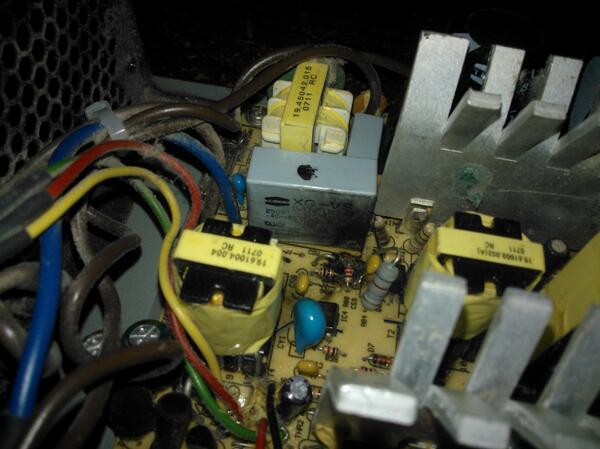
So I have gotten a genuine Windows key and I'm now running Windows 8.1. After a few days my PC would just restart. I pulled out the power supply to clean it and found this inside:

Boh0-CXCIAEF64E.jpg


I have replaced the PSU and everything was running smooth until this afternoon when I had another BSOD. I tried to switch over to the legacy driver, but it wasn't listed when I tried to update it through the device manager.


Thanks for your patience and continued advice!
 

My Computer My Computer

At a glance

Windows 7 Ultimate x64Intel Core 2 Quad Q84002x2GB Kingston HyperX DDR2Nvidia GeForce GTX550 Ti
Computer type
PC/Desktop
Computer Manufacturer/Model Number
Custom Build
OS
Windows 7 Ultimate x64
CPU
Intel Core 2 Quad Q8400
Motherboard
Asus P5Q SE PLUS
Memory
2x2GB Kingston HyperX DDR2
Graphics Card(s)
Nvidia GeForce GTX550 Ti
Hard Drives
160GB (OS & Programs) WD1600JS-22NCB1
500GB (DATA) WD5000AAJS-00A8B2
4TB (DATA) WD40EZRX-00SPEB0
Antivirus
Bitdefender
Browser
Chrome
Forgot the dump.
 

My Computer My Computer

At a glance

Windows 7 Ultimate x64Intel Core 2 Quad Q84002x2GB Kingston HyperX DDR2Nvidia GeForce GTX550 Ti
Computer type
PC/Desktop
Computer Manufacturer/Model Number
Custom Build
OS
Windows 7 Ultimate x64
CPU
Intel Core 2 Quad Q8400
Motherboard
Asus P5Q SE PLUS
Memory
2x2GB Kingston HyperX DDR2
Graphics Card(s)
Nvidia GeForce GTX550 Ti
Hard Drives
160GB (OS & Programs) WD1600JS-22NCB1
500GB (DATA) WD5000AAJS-00A8B2
4TB (DATA) WD40EZRX-00SPEB0
Antivirus
Bitdefender
Browser
Chrome
This time it blamed the driver directly.
Code:
BugCheck D1, {0, 2, 0, fffff80003c551d3}

*** WARNING: Unable to verify timestamp for pae_1394_x64.sys
*** ERROR: Module load completed but symbols could not be loaded for pae_1394_x64.sys
***** Kernel symbols are WRONG. Please fix symbols to do analysis.

[COLOR=Red]Probably caused by : pae_1394_x64.sys[/COLOR] ( pae_1394_x64+231d3 )
And it is old, as it seems.
Code:
fffff800`03c32000 fffff800`03c65000   pae_1394_x64 T (no symbols)           
    Loaded symbol image file: pae_1394_x64.sys
    Image path: \SystemRoot\System32\Drivers\pae_1394_x64.sys
[COLOR=Red]    Image name: pae_1394_x64.sys
    Timestamp:        Fri Jan 08 21:27:51 2010[/COLOR] (4B4755FF)
    CheckSum:         00031856
    ImageSize:        00033000
    Translations:     0000.04b0 0000.04e4 0409.04b0 0409.04e4
You may try to update the product version form PreSonus | Downloads - FP10 .

The driver is developed by ArchWave AG. You may search for updated drivers with them, too.
Archwave Pro-audio Connectivity Solutions
 

My Computer My Computer

At a glance

Microsoft Windows 10 Pro Insider Preview 64-bitIntel(R) Core(TM) i3-4130 CPU @ 3.40GHzCorsair Vengence 4GB x2 (8.00GB Dual-Channel ...2047MB GeForce GTS 450 (ZOTAC International)
Computer type
PC/Desktop
Computer Manufacturer/Model Number
Self Assembled
OS
Microsoft Windows 10 Pro Insider Preview 64-bit
CPU
Intel(R) Core(TM) i3-4130 CPU @ 3.40GHz
Motherboard
Gigabyte Technology Co., Ltd. B85M-D3H
Memory
Corsair Vengence 4GB x2 (8.00GB Dual-Channel DDR3 @ 798MHz)
Graphics Card(s)
2047MB GeForce GTS 450 (ZOTAC International)
Sound Card
Onboard (Realtek High Definition Audio)
Monitor(s) Displays
LG Flatron E2040T
Screen Resolution
1600x900
Hard Drives
Western Digital 1 TB
Seagate 500 GB
PSU
Corsair VS550
Case
Cooler Master K380
Cooling
Cooler Master Seidon 120V Plus
Keyboard
Logitech MK260r
Mouse
Logitech MK260r
Internet Speed
PMPL Broadband
Antivirus
Windows Defender + MBAM
Browser
Firefox
Other Info
Dell Studio 15" Laptop
Looks like my graphics drivers are causing more BSODs. This happens only when I'm playing games. Additionally a game crashed giving me a dialog that had something to do with OpenGL.

After installing Windows 8 I just ran the default installation for the graphics card. Would it be wise to re-install the older versions and follow the instructions from your first post again?
 

My Computer My Computer

At a glance

Windows 7 Ultimate x64Intel Core 2 Quad Q84002x2GB Kingston HyperX DDR2Nvidia GeForce GTX550 Ti
Computer type
PC/Desktop
Computer Manufacturer/Model Number
Custom Build
OS
Windows 7 Ultimate x64
CPU
Intel Core 2 Quad Q8400
Motherboard
Asus P5Q SE PLUS
Memory
2x2GB Kingston HyperX DDR2
Graphics Card(s)
Nvidia GeForce GTX550 Ti
Hard Drives
160GB (OS & Programs) WD1600JS-22NCB1
500GB (DATA) WD5000AAJS-00A8B2
4TB (DATA) WD40EZRX-00SPEB0
Antivirus
Bitdefender
Browser
Chrome

My Computer My Computer

At a glance

Microsoft Windows 10 Pro Insider Preview 64-bitIntel(R) Core(TM) i3-4130 CPU @ 3.40GHzCorsair Vengence 4GB x2 (8.00GB Dual-Channel ...2047MB GeForce GTS 450 (ZOTAC International)
Computer type
PC/Desktop
Computer Manufacturer/Model Number
Self Assembled
OS
Microsoft Windows 10 Pro Insider Preview 64-bit
CPU
Intel(R) Core(TM) i3-4130 CPU @ 3.40GHz
Motherboard
Gigabyte Technology Co., Ltd. B85M-D3H
Memory
Corsair Vengence 4GB x2 (8.00GB Dual-Channel DDR3 @ 798MHz)
Graphics Card(s)
2047MB GeForce GTS 450 (ZOTAC International)
Sound Card
Onboard (Realtek High Definition Audio)
Monitor(s) Displays
LG Flatron E2040T
Screen Resolution
1600x900
Hard Drives
Western Digital 1 TB
Seagate 500 GB
PSU
Corsair VS550
Case
Cooler Master K380
Cooling
Cooler Master Seidon 120V Plus
Keyboard
Logitech MK260r
Mouse
Logitech MK260r
Internet Speed
PMPL Broadband
Antivirus
Windows Defender + MBAM
Browser
Firefox
Other Info
Dell Studio 15" Laptop
I rolled back to 314.22 WHQL but it didn't take long for my PC to BSOD again. Still confused, what can I try next?
 

My Computer My Computer

At a glance

Windows 7 Ultimate x64Intel Core 2 Quad Q84002x2GB Kingston HyperX DDR2Nvidia GeForce GTX550 Ti
Computer type
PC/Desktop
Computer Manufacturer/Model Number
Custom Build
OS
Windows 7 Ultimate x64
CPU
Intel Core 2 Quad Q8400
Motherboard
Asus P5Q SE PLUS
Memory
2x2GB Kingston HyperX DDR2
Graphics Card(s)
Nvidia GeForce GTX550 Ti
Hard Drives
160GB (OS & Programs) WD1600JS-22NCB1
500GB (DATA) WD5000AAJS-00A8B2
4TB (DATA) WD40EZRX-00SPEB0
Antivirus
Bitdefender
Browser
Chrome
When the BSODs are continuous irrespective of the driver version, it may be said that the issue is not with the driver.

Can you manage any other GPU to apply there, on a test basis? From friends or family?
Or even you can see what happens with the onboard graphics.
 

My Computer My Computer

At a glance

Microsoft Windows 10 Pro Insider Preview 64-bitIntel(R) Core(TM) i3-4130 CPU @ 3.40GHzCorsair Vengence 4GB x2 (8.00GB Dual-Channel ...2047MB GeForce GTS 450 (ZOTAC International)
Computer type
PC/Desktop
Computer Manufacturer/Model Number
Self Assembled
OS
Microsoft Windows 10 Pro Insider Preview 64-bit
CPU
Intel(R) Core(TM) i3-4130 CPU @ 3.40GHz
Motherboard
Gigabyte Technology Co., Ltd. B85M-D3H
Memory
Corsair Vengence 4GB x2 (8.00GB Dual-Channel DDR3 @ 798MHz)
Graphics Card(s)
2047MB GeForce GTS 450 (ZOTAC International)
Sound Card
Onboard (Realtek High Definition Audio)
Monitor(s) Displays
LG Flatron E2040T
Screen Resolution
1600x900
Hard Drives
Western Digital 1 TB
Seagate 500 GB
PSU
Corsair VS550
Case
Cooler Master K380
Cooling
Cooler Master Seidon 120V Plus
Keyboard
Logitech MK260r
Mouse
Logitech MK260r
Internet Speed
PMPL Broadband
Antivirus
Windows Defender + MBAM
Browser
Firefox
Other Info
Dell Studio 15" Laptop
So the past few days I have run my computer without my Firepod connected to it. I had to run the installer in Windows 7 compatibility mode because it is no longer supported in Windows 8, so I thought it might be the root of some of my issues. Instead I got a whole batch of new BSOD codes. Not sure if they will help narrow down the issue but they are attached.

I do have an old ATI card laying around somewhere. I'll put that in and let you know how it goes.

Should I uninstall the Nvidia card and the Firepod drivers or is it sufficient to leave the hardware disconnected?
 

My Computer My Computer

At a glance

Windows 7 Ultimate x64Intel Core 2 Quad Q84002x2GB Kingston HyperX DDR2Nvidia GeForce GTX550 Ti
Computer type
PC/Desktop
Computer Manufacturer/Model Number
Custom Build
OS
Windows 7 Ultimate x64
CPU
Intel Core 2 Quad Q8400
Motherboard
Asus P5Q SE PLUS
Memory
2x2GB Kingston HyperX DDR2
Graphics Card(s)
Nvidia GeForce GTX550 Ti
Hard Drives
160GB (OS & Programs) WD1600JS-22NCB1
500GB (DATA) WD5000AAJS-00A8B2
4TB (DATA) WD40EZRX-00SPEB0
Antivirus
Bitdefender
Browser
Chrome
How confident are you the motherboard was not damaged when you had that PSU problem?
 

My Computer My Computer

At a glance

Windows 10 Pro x64 ; Xubuntu x64Intel i7 860 @ 2.80 GHz O/C'ed to 4.0GHz16GB Corsair Vengance DDR3 @ 661 MHz Dual Cha...EVGA NVidia GTX 560 1024MB
Computer type
PC/Desktop
Computer Manufacturer/Model Number
Golden Mk. I.4
OS
Windows 10 Pro x64 ; Xubuntu x64
CPU
Intel i7 860 @ 2.80 GHz O/C'ed to 4.0GHz
Motherboard
Gigabyte P55A-UD3R Rev.1. Award BIOS F13
Memory
16GB Corsair Vengance DDR3 @ 661 MHz Dual Channel (9-9-9-24)
Graphics Card(s)
EVGA NVidia GTX 560 1024MB
Sound Card
Realtek Integrated
Monitor(s) Displays
Dual Samsung SyncMaster 2494HS
Screen Resolution
1920*1080 and 1920*1080
Hard Drives
1*Samsung 840 EVO 120GB SSD;
1*OCZ Vertex 2 60GB SSD;
2*Samsung F3 SpinPoint 1TB in RAID0;
1*Samsung F1 SpinPoint 1TB;
2*Western Digital 1TB External USB 3.0
1*Western Digital 500GB External USB 3.0
1*Seagate 500GB External USB 2.0
PSU
Thermaltake ToughPower QFan 750W
Case
Thermaltake Element S VK60001W2Z
Cooling
Corsair H60 Water Cooling, 2*230mm and 2*80mm case fans
Keyboard
Logitech G110
Mouse
Logitech MX518
Code:
[Jun 11 23:59] Test 1, 84000 Lucas-Lehmer iterations of M1150221 using type-2 FFT length 64K, Pass1=256, Pass2=256.
[Jun 12 00:00] FATAL ERROR: Rounding was 0.4990234375, expected less than 0.4
[Jun 12 00:00] Hardware failure detected, consult stress.txt file.
[Jun 12 00:00] Torture Test completed 138 tests in 2 hours, 41 minutes - 1 errors, 0 warnings.
[Jun 12 00:00] Worker stopped.


Golden, I wasn't feeling very confident about the condition of my hardware. I decided to run Prime95 again just to be sure and this was the result.

Is this sufficient evidence to suggest a hardware failure within my motherboard/CPU? Would it be wise at this point to consider replacing my motherboard/CPU for a new one?
 

My Computer My Computer

At a glance

Windows 7 Ultimate x64Intel Core 2 Quad Q84002x2GB Kingston HyperX DDR2Nvidia GeForce GTX550 Ti
Computer type
PC/Desktop
Computer Manufacturer/Model Number
Custom Build
OS
Windows 7 Ultimate x64
CPU
Intel Core 2 Quad Q8400
Motherboard
Asus P5Q SE PLUS
Memory
2x2GB Kingston HyperX DDR2
Graphics Card(s)
Nvidia GeForce GTX550 Ti
Hard Drives
160GB (OS & Programs) WD1600JS-22NCB1
500GB (DATA) WD5000AAJS-00A8B2
4TB (DATA) WD40EZRX-00SPEB0
Antivirus
Bitdefender
Browser
Chrome
Back
Top