Inconsistent wireless internet connection

fasteddie911

New member
Local time
8:51 PM
Messages
5
Hello,
My wireless internet starting becoming inconsistent a few weeks ago, often times showing the yellow triangle & exclamation over the signal strength indicator. Signal strength has always been strong 4-5 bars, but the connection is either slow or keeps dropping out. This has been affecting all computers in the household more or less(though my windows 7 pc more so than a mac laptop), though direct ethernet connection to both the modem or router is good. I've tried 2 other routers, both with the same issues. I've done router/modem resets and changing channels, but nothing helps. This problem seemed to come on suddenly and there are a few other wireless networks around the area, though i'm only 10ft away from my router. Any thoughts? Thanks!
 

My Computer

OS
Windows 7 Home Premium 32bit
You should first make sure to use WPA2 and AES encryption, these newer security standards are made to work with Windows 7 drivers.

The wireless drop outs are usually caused from channel crossover. Rather than guessing which channel to change to you should use software that allows you to look at the channels in your area then make the best possible channel selection. Xirrus WIFI scanner works well for this. If you can post a screen shot of the results here it might be helpful.
Wi-Fi Inspector | Xirrus
 

My Computer

Computer type
PC/Desktop
Computer Manufacturer/Model Number
Home built
OS
Windows 7 Ult, Windows 8.1 Pro,
CPU
Q9650-4.275GHz, E8600 4.5GHz, E6750-3.8GHz
Motherboard
Evga 780i FTW
Memory
G.Skill PC2 9600 1200Mhz 5 5 5 15 2T
Graphics Card(s)
GTX480
Sound Card
Asus Xonar D2
Monitor(s) Displays
HannsG
Screen Resolution
1680X1050
Hard Drives
GSkill Phoenix Pro 120GB SSD
PSU
ThermalTake Toughpower 1000Watt modular
Case
ThermalTake XaserV
Cooling
Xigmatek S1283
Keyboard
Logitech G15
Mouse
Logitech G9
Internet Speed
T1
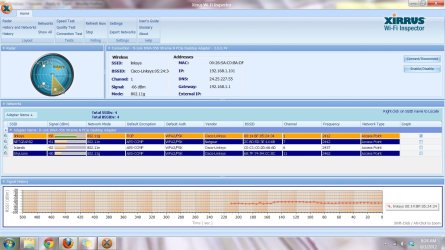
Thanks for the reply. I went ahead and downloaded xirrus and am posting a screenshot of the program. I am currently on channel 1, with no one else on that channel, but still having connection issues.
 

Attachments

  • screenshot.jpg
    screenshot.jpg
    190.7 KB · Views: 27

My Computer

OS
Windows 7 Home Premium 32bit
Thanks for the reply. I went ahead and downloaded xirrus and am posting a screenshot of the program. I am currently on channel 1, with no one else on that channel, but still having connection issues.

The channel looks ok but you will definitely want to change encryption to AES rather that TKIP if possible. TKIP can cause connection problems and does so on a regular basis.

You will need to make the change in your routers set up page for wireless and also change the Wireless Profile in Windows for this connection. Test it out and see if it works any better after that. :)
 

My Computer

Computer type
PC/Desktop
Computer Manufacturer/Model Number
Home built
OS
Windows 7 Ult, Windows 8.1 Pro,
CPU
Q9650-4.275GHz, E8600 4.5GHz, E6750-3.8GHz
Motherboard
Evga 780i FTW
Memory
G.Skill PC2 9600 1200Mhz 5 5 5 15 2T
Graphics Card(s)
GTX480
Sound Card
Asus Xonar D2
Monitor(s) Displays
HannsG
Screen Resolution
1680X1050
Hard Drives
GSkill Phoenix Pro 120GB SSD
PSU
ThermalTake Toughpower 1000Watt modular
Case
ThermalTake XaserV
Cooling
Xigmatek S1283
Keyboard
Logitech G15
Mouse
Logitech G9
Internet Speed
T1
Back
Top