
hello friends
I'm learning some commands and atm i'm stuck on "net" command.
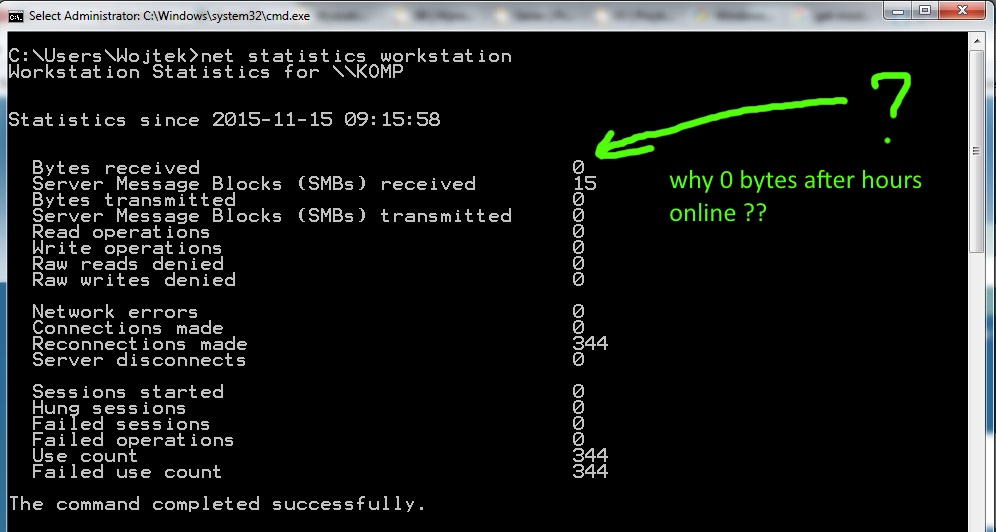
I want check statistics of my network connection, you know - some basic stuff but when I execute this (using workstation as parameter value) then I got 0 bytes received, same about transmitted. Why ?
When I put this into PowerShell same results. I attached screen. When I check wireless connection status (in tray near clock) then there is valid data send/received since todays morning 9:15 am.
Could you please check this net statistics workstation command on your machine and check if it displays other that 0 bytes ?? Whats wrong with this command ? I'm using win 7 ultimate x64 SP1 with USB WiFi card if it matters.
I'm learning some commands and atm i'm stuck on "net" command.
I want check statistics of my network connection, you know - some basic stuff but when I execute this (using workstation as parameter value) then I got 0 bytes received, same about transmitted. Why ?
When I put this into PowerShell same results. I attached screen. When I check wireless connection status (in tray near clock) then there is valid data send/received since todays morning 9:15 am.
Could you please check this net statistics workstation command on your machine and check if it displays other that 0 bytes ?? Whats wrong with this command ? I'm using win 7 ultimate x64 SP1 with USB WiFi card if it matters.
My Computer
- Computer type
- PC/Desktop
- Computer Manufacturer/Model Number
- homemade
- OS
- Windows 7 Ultimate x64
- CPU
- i7 4770
- Motherboard
- AsRock H87M Pro4
- Memory
- 16GB Hynix
- Graphics Card(s)
- R9 280x
- Hard Drives
- EVO 256GB
- Antivirus
- Eset Nod32
