Solved Incorrect Free Disk Space Reported After Partition Resize

webtop

New member
Local time
1:04 AM
Messages
4
Location
In the desert, AZ, USA
Hello Gang,

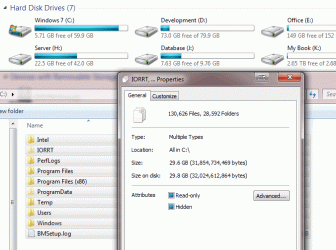
One of my drives was running low on space, so I moved files from another partition to the right, to a different drive and deleted the partition. I then resized the drive low on space to fill the new 20GB that I had just cleared. This was fine and no errrors were reported. However, after a restart a while later I noticed that both disk management and explorer reported I had 5GB free on the drive, even though it should have been roughly 21GB.

If I open explorer and select all folders on that drive and look at the properties, it shows 29.6GB of data. The drive has a capacity of 60GB, and shows only 5.71GB free. This makes no sense at all.

Please see the image attached.

Is there some kind of counter in the registry that maintains these numbers?

Thanks,
Paul
 

Attachments
  • Size_Issue.gif
    Size_Issue.gif
    39.9 KB · Views: 10

My Computer My Computer

Computer type
PC/Desktop
Computer Manufacturer/Model Number
custom build
OS
Windows Ultimate x64
CPU
Intel Core i7-3770K
Motherboard
ASUS P8Z68-V LGA 1155 Intel Z68
Memory
G.SKILL Sniper Gaming Series 16GB 240-Pin DDR3
Graphics Card(s)
ASUS MATRIX GTX580 1536MB 384-bit GDDR5
Sound Card
Creative X-Fi Elite
Monitor(s) Displays
Benq 24 inch, ASUS 23 inch
Screen Resolution
3840 x 1080
Hard Drives
Crucial M4 SSD 60GB
Intel W120 SSD 120GB
WD Caviar 250GB
WD MyBook USB 2TB
PSU
Black Widow 850W
Case
ABS Aplus ABS-CS-Monolith Black SECC Steel ATX Full Tower
Cooling
Dual 250mm Front Fans
Keyboard
Logitech G510
Mouse
Logitech G700
Internet Speed
50Mb
Antivirus
ESET Smart Security
Browser
IE, Chrome and FF - All latest versions
Other Info
System is not O/C
Please post a snip of your maximised disk management
Start>diskmgmt.msc

Some files, for example windows image backups, will not display there size as they are hidden but i suspect your issue may be that space is being used by system restore, recycle bin, pagefile & hiberfile if you use hibernation
There are some settings you can change to alter this depending on your setup
 

My Computer My Computer

Computer type
PC/Desktop
Computer Manufacturer/Model Number
Pauly Special
OS
Win7 Ultimate X64
CPU
Intel i5 3570K
Motherboard
Gigabyte Z77X-DS3H
Memory
8GB DDR3 1600
Graphics Card(s)
Onboard
Sound Card
Onboard
Screen Resolution
1280x1024
Hard Drives
Samsung 840 Evo SSD (OS)
1TB Spinner (Data)
PSU
800W Arctic
Case
Cooler Master
Cooling
3x120mm Fans
Keyboard
MS Wireless
Mouse
MS Wireless
Internet Speed
20M
Thanks for the response.

I've attached an image of the window. The 20GB I removed was between C and H on Disk 1.
 

Attachments

  • Size_Issue.gif
    Size_Issue.gif
    34.8 KB · Views: 5

My Computer My Computer

Computer type
PC/Desktop
Computer Manufacturer/Model Number
custom build
OS
Windows Ultimate x64
CPU
Intel Core i7-3770K
Motherboard
ASUS P8Z68-V LGA 1155 Intel Z68
Memory
G.SKILL Sniper Gaming Series 16GB 240-Pin DDR3
Graphics Card(s)
ASUS MATRIX GTX580 1536MB 384-bit GDDR5
Sound Card
Creative X-Fi Elite
Monitor(s) Displays
Benq 24 inch, ASUS 23 inch
Screen Resolution
3840 x 1080
Hard Drives
Crucial M4 SSD 60GB
Intel W120 SSD 120GB
WD Caviar 250GB
WD MyBook USB 2TB
PSU
Black Widow 850W
Case
ABS Aplus ABS-CS-Monolith Black SECC Steel ATX Full Tower
Cooling
Dual 250mm Front Fans
Keyboard
Logitech G510
Mouse
Logitech G700
Internet Speed
50Mb
Antivirus
ESET Smart Security
Browser
IE, Chrome and FF - All latest versions
Other Info
System is not O/C
I see what you mean, you could try running windirstat which should give you a better idea of where that space is going, i believe it will show you real time page file usage etc

On a seperate note i notice you have 2 partitions marked as active, generally only the partition which holds the boot info should be marked active i would consider making the other inactive
http://www.sevenforums.com/tutorials/197157-partition-mark-inactive.html
 

My Computer My Computer

Computer type
PC/Desktop
Computer Manufacturer/Model Number
Pauly Special
OS
Win7 Ultimate X64
CPU
Intel i5 3570K
Motherboard
Gigabyte Z77X-DS3H
Memory
8GB DDR3 1600
Graphics Card(s)
Onboard
Sound Card
Onboard
Screen Resolution
1280x1024
Hard Drives
Samsung 840 Evo SSD (OS)
1TB Spinner (Data)
PSU
800W Arctic
Case
Cooler Master
Cooling
3x120mm Fans
Keyboard
MS Wireless
Mouse
MS Wireless
Internet Speed
20M
Thank you for pointing me to that awesome little tool.
It seems I somehow have a 16GB pageing file and a 12GB hibernation file.

Very odd how that happened, but at least now I know where all my space went.

Thanks again Pauly.
 

My Computer My Computer

Computer type
PC/Desktop
Computer Manufacturer/Model Number
custom build
OS
Windows Ultimate x64
CPU
Intel Core i7-3770K
Motherboard
ASUS P8Z68-V LGA 1155 Intel Z68
Memory
G.SKILL Sniper Gaming Series 16GB 240-Pin DDR3
Graphics Card(s)
ASUS MATRIX GTX580 1536MB 384-bit GDDR5
Sound Card
Creative X-Fi Elite
Monitor(s) Displays
Benq 24 inch, ASUS 23 inch
Screen Resolution
3840 x 1080
Hard Drives
Crucial M4 SSD 60GB
Intel W120 SSD 120GB
WD Caviar 250GB
WD MyBook USB 2TB
PSU
Black Widow 850W
Case
ABS Aplus ABS-CS-Monolith Black SECC Steel ATX Full Tower
Cooling
Dual 250mm Front Fans
Keyboard
Logitech G510
Mouse
Logitech G700
Internet Speed
50Mb
Antivirus
ESET Smart Security
Browser
IE, Chrome and FF - All latest versions
Other Info
System is not O/C
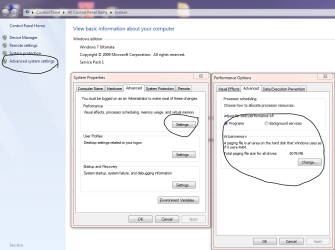
Pagefile is normally auto set to the same size as the amount of ram you have installed, if you need to change it, it can be found here although normally system managed is the best way

Here you can see mine, i have 8GB of RAM installed so im guessing you have 16
Capture.PNG

Hibernation (hiberfile) can be disabled if you dont use/need it
http://www.sevenforums.com/tutorials/819-hibernate-enable-disable.html

Glad you got it sorted :)
 

My Computer My Computer

Computer type
PC/Desktop
Computer Manufacturer/Model Number
Pauly Special
OS
Win7 Ultimate X64
CPU
Intel i5 3570K
Motherboard
Gigabyte Z77X-DS3H
Memory
8GB DDR3 1600
Graphics Card(s)
Onboard
Sound Card
Onboard
Screen Resolution
1280x1024
Hard Drives
Samsung 840 Evo SSD (OS)
1TB Spinner (Data)
PSU
800W Arctic
Case
Cooler Master
Cooling
3x120mm Fans
Keyboard
MS Wireless
Mouse
MS Wireless
Internet Speed
20M
Correct.

I won't bother messing around and moving it to another drive, I've just gotten back 12GB so that's fine.

Paul
 

My Computer My Computer

Computer type
PC/Desktop
Computer Manufacturer/Model Number
custom build
OS
Windows Ultimate x64
CPU
Intel Core i7-3770K
Motherboard
ASUS P8Z68-V LGA 1155 Intel Z68
Memory
G.SKILL Sniper Gaming Series 16GB 240-Pin DDR3
Graphics Card(s)
ASUS MATRIX GTX580 1536MB 384-bit GDDR5
Sound Card
Creative X-Fi Elite
Monitor(s) Displays
Benq 24 inch, ASUS 23 inch
Screen Resolution
3840 x 1080
Hard Drives
Crucial M4 SSD 60GB
Intel W120 SSD 120GB
WD Caviar 250GB
WD MyBook USB 2TB
PSU
Black Widow 850W
Case
ABS Aplus ABS-CS-Monolith Black SECC Steel ATX Full Tower
Cooling
Dual 250mm Front Fans
Keyboard
Logitech G510
Mouse
Logitech G700
Internet Speed
50Mb
Antivirus
ESET Smart Security
Browser
IE, Chrome and FF - All latest versions
Other Info
System is not O/C
Back
Top