
Incorrect Shortcut Display

DelayedStrom

New member
Local time
3:22 PM
Messages
1
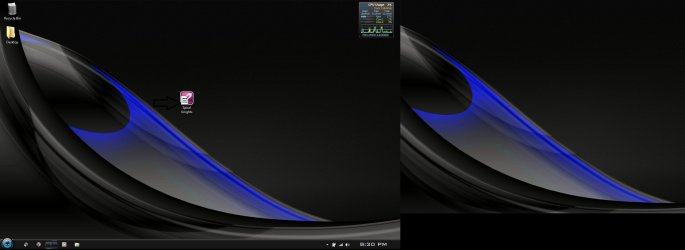
I recently installed Nero 10 and upon completing the installation any desktop shortcut received a white square covering up most of the Icon(I provided an attachment labeled "Desktop" depicting the problem). This problem persists with newly added shortcuts as well. The shortcuts still work like this, but it is unacceptable. I have uninstalled Nero since.
I have tried the following:
Refreshing the desktop
Deleting and creating new short cuts
Going into properties and choosing the correct icon for said shortcuts
Rebuilding the Icon Cache
So far all have failed to fix the problem and any help or ideas would be appreciated.

Thank in Advance,
DelayedStorm
 

Attachments
  • Desktop.jpg
    Desktop.jpg
    198.8 KB · Views: 19

My Computer

Computer Manufacturer/Model Number
Alienware M17
OS
Windows 7 Home Premium 64bit
CPU
Intel Core 2 Duo P8600 @2.40GHz
Motherboard
Alienware
Memory
5GB DDR3
Graphics Card(s)
Ati Mobility Radeon HD 3870 X2
Screen Resolution
1440x900

My Computer

Computer type
PC/Desktop
Computer Manufacturer/Model Number
Custom Build
OS
Windows 7 Home Premium 64 bit
CPU
Intel Core i7-4790
Motherboard
GA-Z87X-D3H
Memory
G.SKILL 8GB (2 x 4GB) DDR3 F3-10666CL9D-8GBNT
Graphics Card(s)
AMD Radeon R7 250
Sound Card
Realtek ALC892
Monitor(s) Displays
Samsung UN32EH5000, Dell 1703FPT
Screen Resolution
1920 x 1080, 1280 x 1024
Hard Drives
WD5003AZEX
WD10EZEX
Samsung HD103SJ
Samsung 128 GB 840 PRO
PSU
SeaSonic M12II SS-500GM
Case
Fractal Design Define R4
Cooling
Zalman CNPS9900ALED
Keyboard
Logitech K800
Mouse
Logitech M705
Internet Speed
16 Mbps
Antivirus
Avast
Browser
Firefox
Other Info
Bose Companion 2 Multimedia Speakers
I recently installed Nero 10 and upon completing the installation any desktop shortcut received a white square covering up most of the Icon(I provided an attachment labeled "Desktop" depicting the problem). This problem persists with newly added shortcuts as well. The shortcuts still work like this, but it is unacceptable. I have uninstalled Nero since.
I have tried the following:
Refreshing the desktop
Deleting and creating new short cuts
Going into properties and choosing the correct icon for said shortcuts
Rebuilding the Icon Cache
So far all have failed to fix the problem and any help or ideas would be appreciated.

Thank in Advance,
DelayedStorm

Use this tutorial :
http://www.sevenforums.com/tutorials/3606-shortcut-arrow-change-remove-restore.html

Use Option One .
 

My Computer

Computer Manufacturer/Model Number
Acer Aspire 7741Z
OS
Windows 7 Home Premium 64-bit, SP1
CPU
Intel Pentium P6200, Cores 2, 2.13 GHz
Memory
4 GB
Graphics Card(s)
Intel HD
Sound Card
unknown
Monitor(s) Displays
17.3 inches
Screen Resolution
1600 x 900
Hard Drives
640 GB, 5400 PRM
Back
Top