
I ran CCleaner and selected the following extra options (DONT ASK ME WHY!  :shock:
 ) in addition to the standard selection:
DNS Cache
Old prefecth data
Window size/location cache
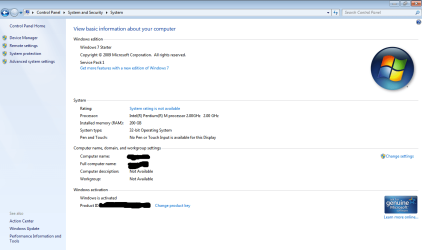
My laptop now seems to be confused where the decimal should be when showing hard drive space and memory. Its an old laptop with 2GB memory, which now shows 200GB RAM. All drives also show incorrect values in explorer as follows:
C: 487GB free of 448GB
D: 154GB free of 453GB
F: 807GB free of 578GB
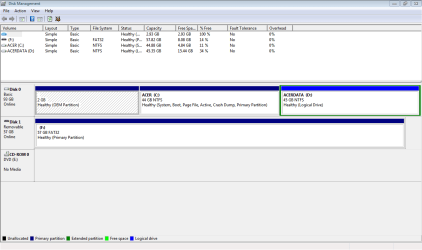
The values do however appear correct in Disk Management as follows:
C: 4.84GB free of 44.88GB
D: 15.44GB free of 45.35GB
F: 8.08GB free of 57.82GB
I've attached screenshots for further reference.
Any suggestions how to fix this please?
:shock:) in addition to the standard selection:DNS Cache
Old prefecth data
Window size/location cache
My laptop now seems to be confused where the decimal should be when showing hard drive space and memory. Its an old laptop with 2GB memory, which now shows 200GB RAM. All drives also show incorrect values in explorer as follows:
C: 487GB free of 448GB
D: 154GB free of 453GB
F: 807GB free of 578GB
The values do however appear correct in Disk Management as follows:
C: 4.84GB free of 44.88GB
D: 15.44GB free of 45.35GB
F: 8.08GB free of 57.82GB
I've attached screenshots for further reference.
Any suggestions how to fix this please?
Attachments

Last edited:
My Computer
At a glance
Windows Starter 32bit
- Computer type
- PC/Desktop
- OS
- Windows Starter 32bit
