Incorrect taskbar icon

Rayman

New member
Local time
10:29 AM
Messages
41
I have an ethernet cable linked from my PC to my XBOX 360. I bridged my PC connection to the XBOX so that it can share my internet connection to access the console's online features. This is what the network area on my PC looks like:

icocgp.png


The problem I'm having is in the taskbar. The internet icon just shows the bars with a red cross through them (as if to signify the internet isn't working), instead of before the bridge where it showed the speed levels of the internet with the coloured bars.

2cfxelz.png


I know this is a minor thing, but is there any way I could get the icon back to its original state while keeping the bridge?

Thanks.
 

My Computer

Computer Manufacturer/Model Number
Dell
OS
Windows 7
Memory
2 GB
Graphics Card(s)
Nvidia 7900 GS
Rayman Welcome to SevenForums. Have you gone to right click start orb/properties/taskbar/notification area costomize/network/ show notifications? Have a play with this may give you a veiw you may prefer.
 

My Computer

Computer Manufacturer/Model Number
Gateway GT5692
OS
Windows 7 Ulti. x64
CPU
AMD Phenom 8450 triple-core 2.10 ghz
Memory
4GB
Graphics Card(s)
ATI Radion HD 3200
Monitor(s) Displays
Gateway FPD1775W
Screen Resolution
1280x720
Hard Drives
465.6613 Gibibytes
Sadly this doesn't affect the icon picture.
 

My Computer

Computer Manufacturer/Model Number
Dell
OS
Windows 7
Memory
2 GB
Graphics Card(s)
Nvidia 7900 GS
Sadly this doesn't affect the icon picture.
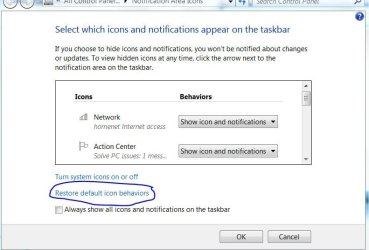
Rayman.. Did you give this a try? Sorry I do not have a bridge or a xbox to test with so just not much help to you.
restore icons.JPG
 

My Computer

Computer Manufacturer/Model Number
Gateway GT5692
OS
Windows 7 Ulti. x64
CPU
AMD Phenom 8450 triple-core 2.10 ghz
Memory
4GB
Graphics Card(s)
ATI Radion HD 3200
Monitor(s) Displays
Gateway FPD1775W
Screen Resolution
1280x720
Hard Drives
465.6613 Gibibytes
I did, but to no result!
 

My Computer

Computer Manufacturer/Model Number
Dell
OS
Windows 7
Memory
2 GB
Graphics Card(s)
Nvidia 7900 GS
Go to the window where you made your screenshot, right click "Local Area Connection", the one with red cross on it, right click, disable. If you want to use wired network, make sure you re-enable it first before plugging.

zzz2496
 

My Computer

Computer Manufacturer/Model Number
Self Built
OS
Windows7 Ultimate 64bit
CPU
Intel Core 2 Quad Q6600
Motherboard
Abit IN9-32X-MMAX
Memory
DDR2 Adata 4GB
Graphics Card(s)
Nvidia GeForce GTX 285 1024 and Nvidia GeForce 8800GT 512
Sound Card
Asus Xonar HDAV 1.3
Monitor(s) Displays
Dell 2407WFP and BenQ 2400v and Philips 150v3
Screen Resolution
3840x1200 and 1024x768
Hard Drives
2 WDC 1TB
1 WDC 1.5TB
1 WDC 640GB
1 WDC 320GB
1 Seagate 200GB
PSU
Corsair TX 850W
Case
Cooler Master HAF932
Cooling
Arctic Cooling Freezer Extreme and plenty of fans...
Keyboard
MicrosoftNaturalKeyboard 4000/Apple Alu keyboard/Dinovo mini
Mouse
Logitech G5/MarbleMouseTrackball/PerformanceMX/SpacePilotPRO
Internet Speed
1.5Mbps down/384Kbps up
Other Info
APC SURT 1000XL
Logitech Z-560
Wiimote
Mikrotik Router
Linksys (now Cisco) SD2008 8 port Gigabit switch
Linksys WRT54G (acting as AP)
Apple wireless Aluminium keyboard
Apple Magic Mouse
Xbox360 wired controller
Go to the window where you made your screenshot, right click "Local Area Connection", the one with red cross on it, right click, disable. If you want to use wired network, make sure you re-enable it first before plugging.

zzz2496

That doesn't seem to do anything. Plus, it's a bit hassly to have to enable it every time I want to use it.
 

My Computer

Computer Manufacturer/Model Number
Dell
OS
Windows 7
Memory
2 GB
Graphics Card(s)
Nvidia 7900 GS
I too have the incorrect icon on ask tray. I have a new laptop running windows 7 with a wireless connection. Until today the icon represented bars of signal strength. Today it is different???

Any ideas why it would change all by itself like that?
 

Attachments

  • Capture.PNG
    Capture.PNG
    650 bytes · Views: 899

My Computer

Computer Manufacturer/Model Number
Gateway
OS
Windows 7
CPU
AMD Athalon(tm)II Dual Core M300 2.00 GHz
Memory
4.00 GB
Graphics Card(s)
AMD M880G with ATI Mobility Radeon HD 4200
Sound Card
ATI High Definition Audio Device
Monitor(s) Displays
Generic PnP Monitor
Hard Drives
WDC WD32 00BEVT-22ZCT0 SATA Disk Device
I too have the incorrect icon on ask tray. I have a new laptop running windows 7 with a wireless connection. Until today the icon represented bars of signal strength. Today it is different???

Any ideas why it would change all by itself like that?
Welcome to SevenForums seawolf
That is the icon for a wired connection. Are you connecting with a wire now? If you are that will change the icon.
 

My Computer

Computer Manufacturer/Model Number
Gateway GT5692
OS
Windows 7 Ulti. x64
CPU
AMD Phenom 8450 triple-core 2.10 ghz
Memory
4GB
Graphics Card(s)
ATI Radion HD 3200
Monitor(s) Displays
Gateway FPD1775W
Screen Resolution
1280x720
Hard Drives
465.6613 Gibibytes
No wired connection. I've tried changing the icon as you descibed above. I tried restoring icon defaults as well.
 

My Computer

Computer Manufacturer/Model Number
Gateway
OS
Windows 7
CPU
AMD Athalon(tm)II Dual Core M300 2.00 GHz
Memory
4.00 GB
Graphics Card(s)
AMD M880G with ATI Mobility Radeon HD 4200
Sound Card
ATI High Definition Audio Device
Monitor(s) Displays
Generic PnP Monitor
Hard Drives
WDC WD32 00BEVT-22ZCT0 SATA Disk Device
Any other ideas? It's a bit annoying!
Thanks.
 

My Computer

Computer Manufacturer/Model Number
Dell
OS
Windows 7
Memory
2 GB
Graphics Card(s)
Nvidia 7900 GS
Any updates on this or will I just have to put up with it?
 

My Computer

Computer Manufacturer/Model Number
Dell
OS
Windows 7
Memory
2 GB
Graphics Card(s)
Nvidia 7900 GS
Back
Top