Increase Shadow Value behind Windows/Boxes similar to OS X?

Ramboy208

New member
Local time
8:54 PM
Messages
3
I don't like Apple, I don't like Macs or any of that nonsense, But I love how deep the shadows are behind the separate windows on the screen. Is there a tweak somewhere, like the registry maybe, where the shadows can be deepened? I found a cool .exe on DeviantArt that added a shadow value to my taskbar, maybe there exists one for regular windows? I never had trouble customizing my PC in regards to themes and other appearances in any other way besides this. Help me out guys!
 

My Computer My Computer

At a glance

Windows 7 Ultimate x64AMD Phenom II 1100TCorsair XMS3 (8GB, 2GB x4)XFX Radeon HD 6970
Computer Manufacturer/Model Number
Custom Built
OS
Windows 7 Ultimate x64
CPU
AMD Phenom II 1100T
Motherboard
MSi 890FXA-GD70
Memory
Corsair XMS3 (8GB, 2GB x4)
Graphics Card(s)
XFX Radeon HD 6970
Monitor(s) Displays
Samsung P2770 (27")
Screen Resolution
1920x1080
Hard Drives
Seagate Barracuda 1TB 7200RPM 64MB Cache
PSU
Ultra X4 750W Full Modular PSU
Case
Thermaltake Element T
Cooling
Ultra Carbon X7 (passively cooled dual red LED fan)
Keyboard
Thermaltake Challenger Pro
Mouse
Thermaltake Black
Other Info
Its got enough black paint and red LEDs to make it the envy of Darth Vader...

My Computer My Computer

At a glance

Windows 7 Ultimate SP1 - 64 BitIntel Core i5 2500k2x4GB DDR3 1333HzAti Radeon 6770
Computer type
PC/Desktop
Computer Manufacturer/Model Number
Novatech iRush Pro
OS
Windows 7 Ultimate SP1 - 64 Bit
CPU
Intel Core i5 2500k
Motherboard
Foxconn H67M-S/H67M-V/H67
Memory
2x4GB DDR3 1333Hz
Graphics Card(s)
Ati Radeon 6770
Sound Card
None
Monitor(s) Displays
Samsung S22B150
Screen Resolution
1920x1080
Hard Drives
2x500GB
PSU
500W
Cooling
Fan
Keyboard
HP KU0316
Mouse
Wireless Logitech M185
Internet Speed
20MB/s
Antivirus
Avast Free
Browser
Google Chrome
Other Info
Logitech M185 Mouse
KU-M316 Keyboard
LOL I already know about this I'm not totally n00b ya know. If you saw my build I have a pretty fancy GPU that can handle all the visual things turned up full in basic Aero, so naturally I have the standard shadow. I want to make it deeper, darker, so it looks more 3D like OS X does. In other words, I'm looking to edit the shadows rather than turn them on or off. Which I would imagine you would do in the registry or run a 3rd party exe
 

My Computer My Computer

At a glance

Windows 7 Ultimate x64AMD Phenom II 1100TCorsair XMS3 (8GB, 2GB x4)XFX Radeon HD 6970
Computer Manufacturer/Model Number
Custom Built
OS
Windows 7 Ultimate x64
CPU
AMD Phenom II 1100T
Motherboard
MSi 890FXA-GD70
Memory
Corsair XMS3 (8GB, 2GB x4)
Graphics Card(s)
XFX Radeon HD 6970
Monitor(s) Displays
Samsung P2770 (27")
Screen Resolution
1920x1080
Hard Drives
Seagate Barracuda 1TB 7200RPM 64MB Cache
PSU
Ultra X4 750W Full Modular PSU
Case
Thermaltake Element T
Cooling
Ultra Carbon X7 (passively cooled dual red LED fan)
Keyboard
Thermaltake Challenger Pro
Mouse
Thermaltake Black
Other Info
Its got enough black paint and red LEDs to make it the envy of Darth Vader...
Welcome to the Seven Forums
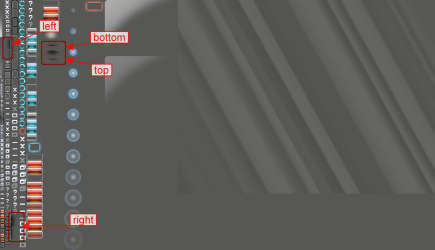
I do not know of any registry or third party app that will do this, but in the aero.msstyles in C:\Windows\Resources\Themes\Aero there is a Steam image #971 is where those shadows are I have posted a screenshot out lining them you'll notice as example the right or left shadow on top it is darker that is active window the lighter second shadow is for inactive windows the top and bottom image the center should be split in half, half for the top half of the bottom same way the darkest part is for the active window the lightest part is for inactive windows. You could use any resource hacker to extract that image and then edit it.
971.png

I have Windows Style Builder which breaks down that Steam image into individual parts making it easier to edit. If you purchase Windows Style Builder (I will make you go to their forum and sign up with the e-mail address and the keycode that comes in a e-mail to you to verify your purchase)I could help you in editing that or
If you are using the default aero theme I can (Try to edit those shadows they are very tricky to edit) change that for you, using Windows Style Builder and post it here in a zip folder.
If you are using a custom theme you will need to ask the theme maker. It's not cool to change someone else work.
&
This will be a custom theme and you will need to do 1 of these 2 ways of Enabling custom themes for it to work.
http://www.sevenforums.com/tutorials/34579-enabling-custom-themes-windows-7-a.html
Or
http://www.sevenforums.com/tutorials/28377-theme-how-apply-custom-themes.html?filter
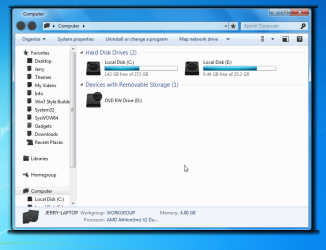
In the screenshot below I quickly edited those shadows to show you what can be done.
Screenshot - 2_17_2012 , 6_32_17 AM.png


If you want me to do it all's I need is a name for the custom theme from you.
Let me know.
Jerry
 

My Computer My Computer

At a glance

Win 7 Pro x64 / Win 10 ProIntel(R) Core(TM) i7-3630QM CPU @ 2.40GHz12 GB(1) Intel(R) HD Graphics 4000 (2) NVIDIA GeFo...
Computer type
Laptop
Computer Manufacturer/Model Number
Sager NP9170
OS
Win 7 Pro x64 / Win 10 Pro
CPU
Intel(R) Core(TM) i7-3630QM CPU @ 2.40GHz
Motherboard
CLEVO P170EM
Memory
12 GB
Graphics Card(s)
(1) Intel(R) HD Graphics 4000 (2) NVIDIA GeForce GTX 675M
Sound Card
(1) Realtek High Definition Audio (2) Intel(R) Display Aud
Monitor(s) Displays
17.3
Screen Resolution
1920x1080
Hard Drives
(1) Samsung 860 EVO 500GB(OS) (1) Samsung 860 EVO 500GB(Data)
Keyboard
Backlite
Antivirus
MSE, Malwarebytes Pro
Browser
Firefox
Other Info
DESKTOP: Custom-built.
OS: Win 10 Pro x64.
CASE: Rosewill R5.
CPU: Intel I5 4670K CPU @ 3.40GHz.
CPU COOLER: Cool Master Hyper 212 EVO.
MOTHERBOARD: Asus Z87-A.
MEMORY: Kingston HyperX 2x4 GB.
GPU: Nvidia Geforce 650 TI.
PSU: Corsair TX750.
DRIVES: (1) Samsung 840 120 GB SSD (2) Western Digital blue 500 GB 7200 RPM.
I will look into it, I have a brother that can help me with all this he's a whiz. I've got a brutal work/school week in front of me so it will be next weekend roundabouts, but I'll let you know.

As for changing someone else's work, I'm not so sure I agree with what you are saying. I've downloaded tons of themes from DeviantArt and I switch them up all the time to whatever my mood is feeling, but not a single one edits the standard shadow value that comes with the normal Windows Aero theme. If I edited how the shadows behind the windows look, it would be like choosing what frame to put a painting in. I'm not messing with their hard work or redistributing it in any way, I was thinking that there was a setting somewhere that would affect the shadow value for all themes at once, like a standard shadow editor that runs regardless of what theme you are using. The themes that they make and put up on DeviantArt are themes that mess with the design of windows and taskbars, start orbs, and the like. Anything outside of that is all me, including shadows.
 

My Computer My Computer

At a glance

Windows 7 Ultimate x64AMD Phenom II 1100TCorsair XMS3 (8GB, 2GB x4)XFX Radeon HD 6970
Computer Manufacturer/Model Number
Custom Built
OS
Windows 7 Ultimate x64
CPU
AMD Phenom II 1100T
Motherboard
MSi 890FXA-GD70
Memory
Corsair XMS3 (8GB, 2GB x4)
Graphics Card(s)
XFX Radeon HD 6970
Monitor(s) Displays
Samsung P2770 (27")
Screen Resolution
1920x1080
Hard Drives
Seagate Barracuda 1TB 7200RPM 64MB Cache
PSU
Ultra X4 750W Full Modular PSU
Case
Thermaltake Element T
Cooling
Ultra Carbon X7 (passively cooled dual red LED fan)
Keyboard
Thermaltake Challenger Pro
Mouse
Thermaltake Black
Other Info
Its got enough black paint and red LEDs to make it the envy of Darth Vader...
You should install the software called Yzshadow ! you can find it in any search engine, and that should serve your purpose
 

My Computer My Computer

At a glance

Windows 8 64Bit8GBIntel 4000
Computer type
PC/Desktop
Computer Manufacturer/Model Number
Sony Vaio
OS
Windows 8 64Bit
Motherboard
Intel i5
Memory
8GB
Graphics Card(s)
Intel 4000
Hard Drives
500GB
Antivirus
Kaspersky
Browser
Chrome
Back
Top