Solved increase sound ?

geordiejohn1950

New member
Local time
2:49 AM
Messages
17
Location
London
hello does any one know how to increase the system sound please ?
i have got an Acer Aspire 5536 laptop and when i use Ubuntu on a dual boot i can go to the volume icon and right click which takes me to system preferences and i can increase the sound,there must be a way i can do this on the Windows 7 Ultimate 64 bit system ?
Thank you.
 

My Computer

OS
Windows 7 Ultimate 64 bit
Hi GeordieJohn, welcome to the forums.

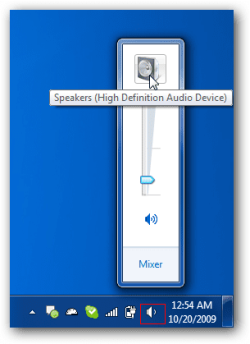
Yeah, if you click on the logo next to the time in the bottom corner that will give you the volume.

image67.png

Or if you go start, in the search box type volume and should be the first option.

Lucky
 

My Computer

Computer Manufacturer/Model Number
The HAFmeister (Custom)
OS
Windows 7 Ultimate x64 RTM + SP1
CPU
Intel Core i7 950 3.06GHZ (OC'd to 3.99Ghz)
Motherboard
Asus Rampage III Extreme x58 SATA 6GB & USB 3.0
Memory
6GB OCZ Reaper HPC Edition PC3-16000 (set 1606Mhz 8-8-8-26)
Graphics Card(s)
EVGA Nvidia Geforce GTX 570
Sound Card
Creative SB X-Fi Titanium Fatal1ty Professional Series
Monitor(s) Displays
Samsung SM2433BW 24" Widescreen Monitor
Screen Resolution
1920x1200
Hard Drives
Western Digital Caviar Black 500GB 32Mb Buffer SATA II
Western Digital Caviar Black 750GB 32Mb Buffer SATA II
Western Digital Caviar Blue 500GB 16Mb Buffer SATA II
Western Digital My Book Essential Edition 750GB USB
Samsung Spinpoint 2TB SATA II
PSU
Thermaltake Toughpower 1200w (Modular)
Case
CoolerMaster HAF-932
Cooling
Zalman Reserator XT and ZM-WB5 Plus - GPU uses Stock coolers
Keyboard
Logitech G510
Mouse
Logitech G9 Gaming Mouse
Internet Speed
3MB Profile - 350-400kbs (Real-Speed)
Other Info
IcyBox Hot-Swap Bay,
Logitech G27 Steering Wheel,
Xbox 360 Wirless Elite Controller with Microsoft Reciever and
Play & Charge Kit,
Belkin USB Wireless Adaptor,
GAME Generic Controller (Playstation Looky-Likey),
Epson SX125 All-in-One.
i have used that to put to 100 % but it must be something about my laptop that even on 100% it is not enough,the sound is ok when i use Ubuntu as i have increased to over 100 %
there must be a program for Windows that will do what Linux does ?
thank you.
 

My Computer

OS
Windows 7 Ultimate 64 bit

My Computer

Computer Manufacturer/Model Number
The HAFmeister (Custom)
OS
Windows 7 Ultimate x64 RTM + SP1
CPU
Intel Core i7 950 3.06GHZ (OC'd to 3.99Ghz)
Motherboard
Asus Rampage III Extreme x58 SATA 6GB & USB 3.0
Memory
6GB OCZ Reaper HPC Edition PC3-16000 (set 1606Mhz 8-8-8-26)
Graphics Card(s)
EVGA Nvidia Geforce GTX 570
Sound Card
Creative SB X-Fi Titanium Fatal1ty Professional Series
Monitor(s) Displays
Samsung SM2433BW 24" Widescreen Monitor
Screen Resolution
1920x1200
Hard Drives
Western Digital Caviar Black 500GB 32Mb Buffer SATA II
Western Digital Caviar Black 750GB 32Mb Buffer SATA II
Western Digital Caviar Blue 500GB 16Mb Buffer SATA II
Western Digital My Book Essential Edition 750GB USB
Samsung Spinpoint 2TB SATA II
PSU
Thermaltake Toughpower 1200w (Modular)
Case
CoolerMaster HAF-932
Cooling
Zalman Reserator XT and ZM-WB5 Plus - GPU uses Stock coolers
Keyboard
Logitech G510
Mouse
Logitech G9 Gaming Mouse
Internet Speed
3MB Profile - 350-400kbs (Real-Speed)
Other Info
IcyBox Hot-Swap Bay,
Logitech G27 Steering Wheel,
Xbox 360 Wirless Elite Controller with Microsoft Reciever and
Play & Charge Kit,
Belkin USB Wireless Adaptor,
GAME Generic Controller (Playstation Looky-Likey),
Epson SX125 All-in-One.
Hi! geordiejohn1950, welcome to 7F :)

As a test have you tried shutting down your machine then log onto the Windows OS, and check if the sound is okay?

There is a possibility that Ubuntu is not properly releasing the resources of the sound card after a restart from Ubuntu.

It would help to know what version of Ubuntu you are running.

You could also try running the 'Playing Audio' troubleshooter while you are in Windows in:
Control Panel\All Control Panel Items\Troubleshooting.
 

My Computer

Computer type
PC/Desktop
Computer Manufacturer/Model Number
Gateway DX4831-01e (Mid-Tower Desktop)
OS
Originally Win 7 Hm Prem x64 Ver 6.1.7600 Build 7601-SP1 | Upgraded to Windows 10 December 14, 2019
CPU
Intel i3 530 2.93GHz, 2933MHz 2 Cores 4 Logical Processors
Motherboard
Gateway H57M01 133 megahertz
Memory
6GB of 1,333MHz DDR3 SDRAM
Graphics Card(s)
32MB Intel Graphics Media Accelerator HD IGChip
Sound Card
Realtek High Definition Audio
Monitor(s) Displays
Gateway HX2000 20inch TFT active matrix TN
Screen Resolution
1600 x 900 x 59 hertz
Hard Drives
WDC WD10EADS-00M2B0 [HDD] (1000.20 GB) -- drive 0,
HL-DT-ST DVDRAM GH41N [CD-ROM dr]
Four card readers, and Four USB 2.0
PSU
300watts.
Case
Mid-Tower Desktop
Cooling
Stock from Gateway
Keyboard
Natural Ergonomic Keyboard 4000, see Other Info
Mouse
Orig. Gateway wore out now using Insignia USB wired optical
Internet Speed
Vz FIOS 10ms png 57.64Mbps down 65.53Mbps up Speedtest.org
Antivirus
Zamana Anti-logger with Anti-malware, MSE, Windows Firewall,
Browser
IE11.0.9600.19399-Upd ver11.0.135, Firefox 68.0.1 x64
Other Info
System Specs by Belarc.

BIOS: American Megatrends Inc. P01-A0 11/17/2009

Replaced the MS 'Natural' Standard PS/2 Enhanced 101-102 Keyboard with a new Natural Ergonomic Keyboard 4000 on August 1st 2014.

Canon Pixma MG3222 Printer.

Updated to IE11 on 12102015 | Fios Quantum Router g1100

Additional AV: SpywareBlaster, manual Mbam, SAS
thank you i am using Ubuntu 11.04 and i have done trouble shooting,i will look into usb sound card or maybe get some external speakers.
thank you once again
 

My Computer

OS
Windows 7 Ultimate 64 bit

My Computer

Computer Manufacturer/Model Number
HP Pavillion dv5t (generation 1)
OS
Vista 64 bit and 32 bit (SP2)
CPU
Intel(R) Core(TM)2 Duo Processor T9400 (2.53 GHz
Memory
4GB DDR2 System Memory (2 Dimm)
Graphics Card(s)
512 MB NVIDIA GeForce 9600M GT
Monitor(s) Displays
15.4" diagonal WSXGA+ High-Definition HP BrightView Widescre
Screen Resolution
1680 x 1050
Hard Drives
320GB 5400RPM SATA Hard Drive with HP ProtectSmart Hard Drive Protection
Keyboard
Built-in HP
Mouse
Built in - Synaptics TouchPad V6.5 on PS/2 Port
Internet Speed
Max
Other Info
~ Intel Next-Gen Wireless-N Mini-card w/Bluetooth ~ Blu-Ray ROM DVD+/-R/RW ~ Integ. HDTV Hybrid Tuner ~ 12 Cell Battery ~ MS Office (Home Premium) 2007 ~
The windows default driver allows for Loudness Eq.
The box must be checked.
Capture 8.JPG
 

My Computer

Computer type
PC/Desktop
Computer Manufacturer/Model Number
Custom Build
OS
Windows 7 Home Premium 64 bit
CPU
Intel Core i7-4790
Motherboard
GA-Z87X-D3H
Memory
G.SKILL 8GB (2 x 4GB) DDR3 F3-10666CL9D-8GBNT
Graphics Card(s)
AMD Radeon R7 250
Sound Card
Realtek ALC892
Monitor(s) Displays
Samsung UN32EH5000, Dell 1703FPT
Screen Resolution
1920 x 1080, 1280 x 1024
Hard Drives
WD5003AZEX
WD10EZEX
Samsung HD103SJ
Samsung 128 GB 840 PRO
PSU
SeaSonic M12II SS-500GM
Case
Fractal Design Define R4
Cooling
Zalman CNPS9900ALED
Keyboard
Logitech K800
Mouse
Logitech M705
Internet Speed
16 Mbps
Antivirus
Avast
Browser
Firefox
Other Info
Bose Companion 2 Multimedia Speakers
For MAXIMUM VOLUME, go to Control Panel, Sound (or Hardware + Sound, then Sound), and select Playback. Double-click “Speaker + Dual Headphones” and select Properties, then Advanced, and set the ‘Default Format’ drop-down menu to: 16 bit, 48,000 Hz (DVD quality). You can Test each of the different choices to make sure that’s the loudest.

Then, if you have RealTek HD Audio Manager (or equivalent), open it and click on Speakers, and follow on-screen directions to increase volume.

Once done, go to Control Panel + open IDT Audio, Playback, Select “Speakers and Dual Headphones.” Follow on-screen directions for Settings, Setup and Equalization.


My Computer

Computer Manufacturer/Model Number
HP Pavillion dv5t (generation 1)
OS
Vista 64 bit and 32 bit (SP2)
CPU
Intel(R) Core(TM)2 Duo Processor T9400 (2.53 GHz
Memory
4GB DDR2 System Memory (2 Dimm)
Graphics Card(s)
512 MB NVIDIA GeForce 9600M GT
Monitor(s) Displays
15.4" diagonal WSXGA+ High-Definition HP BrightView Widescre
Screen Resolution
1680 x 1050
Hard Drives
320GB 5400RPM SATA Hard Drive with HP ProtectSmart Hard Drive Protection
Keyboard
Built-in HP
Mouse
Built in - Synaptics TouchPad V6.5 on PS/2 Port
Internet Speed
Max
Other Info
~ Intel Next-Gen Wireless-N Mini-card w/Bluetooth ~ Blu-Ray ROM DVD+/-R/RW ~ Integ. HDTV Hybrid Tuner ~ 12 Cell Battery ~ MS Office (Home Premium) 2007 ~

My Computer

Computer Manufacturer/Model Number
HP Pavillion dv5t (generation 1)
OS
Vista 64 bit and 32 bit (SP2)
CPU
Intel(R) Core(TM)2 Duo Processor T9400 (2.53 GHz
Memory
4GB DDR2 System Memory (2 Dimm)
Graphics Card(s)
512 MB NVIDIA GeForce 9600M GT
Monitor(s) Displays
15.4" diagonal WSXGA+ High-Definition HP BrightView Widescre
Screen Resolution
1680 x 1050
Hard Drives
320GB 5400RPM SATA Hard Drive with HP ProtectSmart Hard Drive Protection
Keyboard
Built-in HP
Mouse
Built in - Synaptics TouchPad V6.5 on PS/2 Port
Internet Speed
Max
Other Info
~ Intel Next-Gen Wireless-N Mini-card w/Bluetooth ~ Blu-Ray ROM DVD+/-R/RW ~ Integ. HDTV Hybrid Tuner ~ 12 Cell Battery ~ MS Office (Home Premium) 2007 ~
Back
Top