
helldemon80
New member
- Local time
- 5:13 PM
- Messages
- 2
Hello everyone,
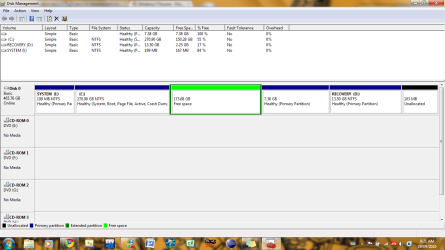
I installed Ubuntu 10.04 on my computer about 3 months ago, so i split my 500gb hard drive into 2 big partitions. But now i didn't feel the need for Ubuntu anymore, and decided to delete the partition. Now i have 173GB of free space on my hard drive that i want to put onto my C: drive where my windows partition is.
The problem is the c: drive will not give me the option to extend the partition, and i have no idea how to get that free space on to my windows C: partition.
If you guys could help, that would be great
Thanks.
Btw i have posted a picture of my disk management so you can see what it looks like currently
I installed Ubuntu 10.04 on my computer about 3 months ago, so i split my 500gb hard drive into 2 big partitions. But now i didn't feel the need for Ubuntu anymore, and decided to delete the partition. Now i have 173GB of free space on my hard drive that i want to put onto my C: drive where my windows partition is.
The problem is the c: drive will not give me the option to extend the partition, and i have no idea how to get that free space on to my windows C: partition.
If you guys could help, that would be great
Thanks.
Btw i have posted a picture of my disk management so you can see what it looks like currently
Attachments
My Computer
At a glance
Windows Home Premium 64bit
- OS
- Windows Home Premium 64bit


