JavaScript is disabled. For a better experience, please enable JavaScript in your browser before proceeding.
You are using an out of date browser. It may not display this or other websites correctly.
You should upgrade or use an
alternative browser .
increasing size of partition
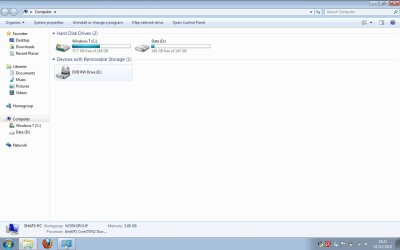
hi - see screen shot of my computer..basically i want to reduce the size of partion D by at least half...and increase the size of C:...because i dont really use all that storage space on D but would rather have it on C...if you know what i mean..?..ta
mylappy.jpg
48.7 KB
· Views: 49
Just call me Nick
Guru
VIP
Have you tried using the "shrink/extend volume" under "computer management"
Just Have a read of the help file before you attempt it though
Computer type PC/Desktop Computer Manufacturer/Model Number Self Built OS Windows 7 Ultimate 64bit CPU AMD Phenom Quad core 9950 black edition Motherboard Gigabyte Memory 16Gb Graphics Card(s) 2x XFX Radeon 5850 Sound Card PCI Express X-Fi Titanium / Logitech G35 Monitor(s) Displays 2x HP 2410i Screen Resolution 1920x1080 Hard Drives 2x 500Gb Seagate PSU Jean Tech Storm 700W Case Cooler Master COSMOS S Cooling Akasa Evo Blue Pro Keyboard Logitech G15 Mouse Mad Catz M.M.O. 7 Internet Speed 12mb
Learning every day
Guru
Gold Member
VIP
Computer Manufacturer/Model Number Keeps changing - (Custom) OS Windows 7 Professional x64 CPU Intel Core i7 860 Motherboard Gigabyte GA-P55-UD4P Memory 4GB DDR3 Mushkin 1600Mhz @ 7-8-7-20 Graphics Card(s) MSI GTS250 1GB DDR3 Twin Frozr Sound Card Onboard realtek Monitor(s) Displays Samsung SyncMaster 24" P2450 + Samsung 20" 2033 Screen Resolution 1920 X 1080 and 1600 X 900 (#2 system 1440 X 900) Hard Drives Patriot Inferno 120GB SSD + 3 WD Blue 640GB drives PSU Corsair 750 HX Modular Case Lancool PC-K62 Cooling Cooler Master TX3 CPU cooler and 4-140mm and 1-120mm case Keyboard Gigabyte USB keyboard Mouse Microsoft wireless laser mouse 5000 Internet Speed 7 Mb down 1.5 up Other Info System #2: AMD Phenom II X6 1055T (Freezer 7 Pro cooler) - Gigabyte 880GMA-UD2H - WD 500GB Black - 9500GT (1GB) 500W OCZ modular PSU - Antec 200 case. System #3 (LapTop) Core 2 Duo T6670 - 320GB 7200RPM HD - 4GB DDR3 RAM.
New member
Thread Starter
can i just delete that D partition as it contained recovery files to restore to windows vista....however im on windows 7 64 bit...so i dont really need it ?....will this make C bigger ?..ta
Learning every day
Guru
Gold Member
VIP
I'm glad you got it sorted out. You can certainly delete the D partition if you don't intend to use it.
Computer Manufacturer/Model Number Keeps changing - (Custom) OS Windows 7 Professional x64 CPU Intel Core i7 860 Motherboard Gigabyte GA-P55-UD4P Memory 4GB DDR3 Mushkin 1600Mhz @ 7-8-7-20 Graphics Card(s) MSI GTS250 1GB DDR3 Twin Frozr Sound Card Onboard realtek Monitor(s) Displays Samsung SyncMaster 24" P2450 + Samsung 20" 2033 Screen Resolution 1920 X 1080 and 1600 X 900 (#2 system 1440 X 900) Hard Drives Patriot Inferno 120GB SSD + 3 WD Blue 640GB drives PSU Corsair 750 HX Modular Case Lancool PC-K62 Cooling Cooler Master TX3 CPU cooler and 4-140mm and 1-120mm case Keyboard Gigabyte USB keyboard Mouse Microsoft wireless laser mouse 5000 Internet Speed 7 Mb down 1.5 up Other Info System #2: AMD Phenom II X6 1055T (Freezer 7 Pro cooler) - Gigabyte 880GMA-UD2H - WD 500GB Black - 9500GT (1GB) 500W OCZ modular PSU - Antec 200 case. System #3 (LapTop) Core 2 Duo T6670 - 320GB 7200RPM HD - 4GB DDR3 RAM.