
Increasing System Restore date range

techgal

New member
Local time
1:54 AM
Messages
1
Hi guys. I am new to Win 7. I notice that when I run system restore the furthest back I can go is about 2 weeks. In XP when I run restore it pops up a calendar and allows me to go back several months.
Is there any way to configure Win 7 to restore back 2 months?
Thanks.
Techgal
 

My Computer

OS
Windows 7 Home Premium 64bit

My Computer

Computer type
PC/Desktop
Computer Manufacturer/Model Number
Alienware Aurora ALX R4
OS
Windows 10 Pro (x64)
CPU
Intel Core i7-3930K (3.2GHz - 4.5GHz)
Motherboard
Alienware Aurora-R4 x79
Memory
4x Samsung 4GB PC3-12800 DDR3 (16GB 1600MHz)
Graphics Card(s)
Nvidia Geforce GTX 690
Sound Card
SteelSeries Siberia Elite
Monitor(s) Displays
Dell UltraSharp U3011
Screen Resolution
2560x1600
Hard Drives
Samsung 850 Pro 256 GB, Seagate 1TB Desktop Hybrid HDD, 2x Western Digital 4TB Green HDD
PSU
875W Some Dell PSU <.<
Case
Alienware Aurora ALX
Cooling
Custom Liquid Cooling (EK CPU & GPU blocks) dual EK 480RAD
Keyboard
Logitech G710+ Mechanical
Mouse
Logitech G700s
Internet Speed
Verizon Fios (50 mbps average)
Other Info
Server: Intel NUC D54250WYK: i5-4250U, 16GB, 256 GB mSATA, Windows Server 2012 R2
It soley depends on the amount of Diskspace you allow system restore to use

Go to start, right click on Computer, go to properties/System protection/configure
and set what you think you can afford :D (IIRC standard setting is depending on partition size 10-15%. I set it to 20% for now)
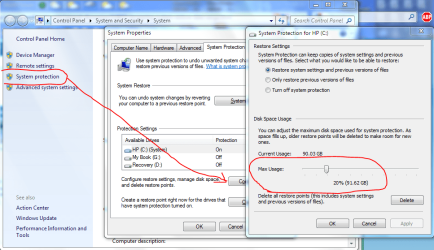
Capture.PNG

-DG
 

My Computer

Computer Manufacturer/Model Number
HP m8000n
OS
Windows 7 Ultimate x86
CPU
DualCore AMD Athlon 64 X2, 2600 MHz 5200+
Motherboard
Asus M2N68-LA (Narra)
Memory
Samsung 2GB DDR2
Graphics Card(s)
Onboard NVIDIA GeForce 6150SE nForce 430
Sound Card
Onboard nVIDIA nForce 6100-430 (MCP61P)
Monitor(s) Displays
Westinghouse 19" LED
Screen Resolution
1280x1024
Hard Drives
SATA II Seagate Barracuda 500GB
USB II WD Elements 500GB
USB II WD My Book 1TB
USB II WD My Book 2TB
PSU
Stock (HP)
Case
Stock (HP)
Cooling
Stock
Keyboard
Logitech Classic KB 200
Mouse
Standard HP opticle USB mouse
Hello techgal, welcome to Seven Forums!


Here's some interesting information in this tutorial at the link below; be sure to post back with any further questions you may have and to keep us informed.


System Restore Point : Create at System Startup
 

My Computer

Computer Manufacturer/Model Number
* BFK Customs *
OS
W 7 64-bit Ultimate
CPU
Intel Q9550 Yorkfield
Motherboard
ASUS P5Q Pro
Memory
8GB Dominator 8500C5D
Graphics Card(s)
ATI : XFX 5870
Sound Card
Realtek HD Audio 7-1
Monitor(s) Displays
1x 47" LCD HDMI & 3x 26" LCD HDMI
Screen Resolution
1920x1080P & 1920x1200
Hard Drives
1x 80GB Intel X25-M G2 SSD : 1x 500GB & 1x 640GB WD Caviar Black(s)
PSU
Corsair 620HX
Case
Cooler Master RC-690
Cooling
Tuniq Tower 120, 2x 140mm and 3x 120mm case fans
Keyboard
Microsoft 500
Mouse
Razer Diamondback 3G
Internet Speed
14 Mb/s
Other Info
1x Koutech 3Gb/s SATA HDD Hot Swap Rack
Wow, This is an interesting find. I have a pentium 4. Wonder what I can do with it?
 

My Computer

OS
Windows 7 Home Premium
CPU
Intel(R) Pentium(R) 4 CPU 3.20GHz
Motherboard
Asus P5VD2-MX-XE
Memory
Physical Memory : 2048 MB (2 x 1024 DDR2-SDRAM )
Graphics Card(s)
Video Card : NVIDIA GeForce 7300 SE/7200 GS
Sound Card
ASUSTeK Computer ALC-660 6-channel CODEC
Monitor(s) Displays
Monitor Type : Acer X183H - 19 inches
Screen Resolution
1366 x 768
Hard Drives
ATA WDC WD1600JS-60NCB1
Keyboard
Logitech
Mouse
Logitech
Internet Speed
DSL 3000
Back
Top