Solved Indexing and Searching broken

grandpavic

New member
Local time
4:08 AM
Messages
55
The indexing and search functions are both broken

When I try to index my files using the index option in the control panel, it looks like its trying to do the indexing, but when I look the next day I still get 0 files indexed.

The search function in the start menu and the control panel don't work. As far as I can determine, when I key my search criteria, nothing happens.

I suspect that these two failures are somehow related, but I don't know what to try next.
 

My Computer My Computer

Computer type
Laptop
Computer Manufacturer/Model Number
Dell 1550
OS
windows 7 home premium 64 bit
I'm not clear on "When I try to index my files using the index option in the control panel..."

Control Panel -> Indexing Options
click the advanced button
then click the rebuild button

Search is different in Win7. Could you provide an example of your search term?
or try typing the word below in the Start menu search box
solitaire

Here are some other things to try:
Open the Search and Indexing troubleshooter
Fix Windows Desktop Search when it crashes or not showing results
You cannot find files when you search a Windows Vista-based computer even though the files exist on the computer

Post an update if the above helped or did not help

I understand that this is a difficult issue to describe, but every little bit of information might help.

Does search work in an explorer window?
Did you perchance fiddle with any settings or services?
 

My Computer My Computer

Computer type
Laptop
Computer Manufacturer/Model Number
HP Pavilion dv6-6c10us
OS
x64 (6.3.9600) Win8.1 Pro & soon dual boot x64 (6.1.7601) Win7_SP1 HomePrem
CPU
AMD A6-3420M APU with Radeon(tm) HD Graphics
Motherboard
Hewlett-Packard 1805
Memory
6.00 GB
Graphics Card(s)
AMD Radeon(TM) HD 6520G
Sound Card
(1) AMD High Definition Audio Device (2) IDT High Definiti
Monitor(s) Displays
HP W2072a 20" LCD (1600 x 900) @ 60 Hz
Screen Resolution
1366 x 768 x 32 bits (4294967296 colors) @ 60 Hz
Hard Drives
ST640LM0 00 HM641JI SATA Disk Device
Keyboard
Logitech k520 wireless KB
Mouse
Logitech m320 wireless mouse (bundled with KB)
Internet Speed
15/5 | 54 MB Wireless 'n'
Antivirus
Realtime: Defender or Avast | On-demand: Malwarebytes, ESET
Browser
IE 11 on Win8, IE 10 on win 7
Other Info
Media: [Gimp, Audacity, VLC] || Comm: [WEmail 2012, Skype] || Productivity: [OpenOffice,| Textpad] || Utils: [Sysinternals, cCleaner, Speccy, Defraggler]
I'm not clear on "When I try to index my files using the index option in the control panel..."

Control Panel -> Indexing Options
click the advanced button
then click the rebuild button

I have tried this several times. I always get
0 items indexed
indexing is complete
 

My Computer My Computer

Computer type
Laptop
Computer Manufacturer/Model Number
Dell 1550
OS
windows 7 home premium 64 bit
I'm not clear on "When I try to index my files using the index option in the control panel..."


Search is different in Win7. Could you provide an example of your search term?
or try typing the word below in the Start menu search box
solitaire

If I key solitaire and hit enter, nothing happens, the key word here is nothing
If I ask for more results to be displayed, I get an error that says some like:

Windows cannot find 'search:query=solitaire'. Make sure you typed the name correctly and try again.

Here are some other things to try:
Open the Search and Indexing troubleshooter
Fix Windows Desktop Search when it crashes or not showing results
You cannot find files when you search a Windows Vista-based computer even though the files exist on the computer

Post an update if the above helped or did not help

I understand that this is a difficult issue to describe, but every little bit of information might help.

Does search work in an explorer window?
Did you perchance fiddle with any settings or services?

Some of my reply is within the quote.
I have tried all of the things that you have suggest and none of them work. Searches do not work in an explorer window.
The operating system is Win 7.
One more thing, the search box when empty has a magnifying glass. When you key the first letter, the magnifying glass disappears and is replaced by an 'x'. When you key the search term, hitting the enter key does nothing.
 

My Computer My Computer

Computer type
Laptop
Computer Manufacturer/Model Number
Dell 1550
OS
windows 7 home premium 64 bit
Thanks, we'll just have to dig a little deeper.

This gives me something -> Windows cannot find 'search:query=solitaire'
The syntax looks good, it works if I copy it into an explorer bar on my machine.
Funny thing - I forgot to remove one of the ' marks and I got the same error msg you did
Windows cannot find ''search:query=solitaire'

Your last sentence is odd behavoir - I take it that you didn't type the letter x
The rest seems normal, except for it not searching.

When I type s
search from start menu returns results immediately - I don't have to hit enter and I don't get an x
That should also be true in the explorer search box


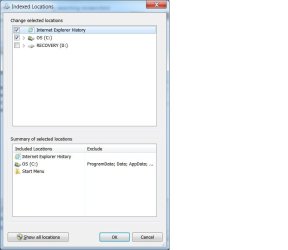
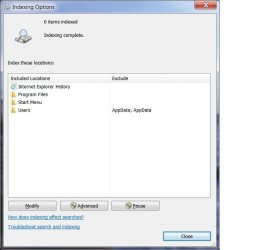
Ok, let's see what you have set for index options. please post a screen shot of
Control Panel (CP) -> Indexing Options
and another one showing Indexed Locations (hit the modify button to get that window)

:ar: Please see http://www.sevenforums.com/tutorials/9733-screenshots-files-upload-post-seven-forums.html for the preferred method of posting files and images on Sevenforums
-
 

My Computer My Computer

Computer type
Laptop
Computer Manufacturer/Model Number
HP Pavilion dv6-6c10us
OS
x64 (6.3.9600) Win8.1 Pro & soon dual boot x64 (6.1.7601) Win7_SP1 HomePrem
CPU
AMD A6-3420M APU with Radeon(tm) HD Graphics
Motherboard
Hewlett-Packard 1805
Memory
6.00 GB
Graphics Card(s)
AMD Radeon(TM) HD 6520G
Sound Card
(1) AMD High Definition Audio Device (2) IDT High Definiti
Monitor(s) Displays
HP W2072a 20" LCD (1600 x 900) @ 60 Hz
Screen Resolution
1366 x 768 x 32 bits (4294967296 colors) @ 60 Hz
Hard Drives
ST640LM0 00 HM641JI SATA Disk Device
Keyboard
Logitech k520 wireless KB
Mouse
Logitech m320 wireless mouse (bundled with KB)
Internet Speed
15/5 | 54 MB Wireless 'n'
Antivirus
Realtime: Defender or Avast | On-demand: Malwarebytes, ESET
Browser
IE 11 on Win8, IE 10 on win 7
Other Info
Media: [Gimp, Audacity, VLC] || Comm: [WEmail 2012, Skype] || Productivity: [OpenOffice,| Textpad] || Utils: [Sysinternals, cCleaner, Speccy, Defraggler]
Thanks, we'll just have to dig a little deeper.


Ok, let's see what you have set for index options. please post a screen shot of
Control Panel (CP) -> Indexing Options
and another one showing Indexed Locations (hit the modify button to get that window)

:ar: Please see http://www.sevenforums.com/tutorials/9733-screenshots-files-upload-post-seven-forums.html for the preferred method of posting files and images on Sevenforums
-

I've not posted screen shots before ... hope these work
 

Attachments

  • Example 2.jpg
    Example 2.jpg
    30.9 KB · Views: 1
  • Example 1.jpg
    Example 1.jpg
    31.6 KB · Views: 1

My Computer My Computer

Computer type
Laptop
Computer Manufacturer/Model Number
Dell 1550
OS
windows 7 home premium 64 bit
Aha!

Remove the tick next to C:

Then rebuild the index in advanced

edit: oh yeah, then try a search
screen shots worked great
 

My Computer My Computer

Computer type
Laptop
Computer Manufacturer/Model Number
HP Pavilion dv6-6c10us
OS
x64 (6.3.9600) Win8.1 Pro & soon dual boot x64 (6.1.7601) Win7_SP1 HomePrem
CPU
AMD A6-3420M APU with Radeon(tm) HD Graphics
Motherboard
Hewlett-Packard 1805
Memory
6.00 GB
Graphics Card(s)
AMD Radeon(TM) HD 6520G
Sound Card
(1) AMD High Definition Audio Device (2) IDT High Definiti
Monitor(s) Displays
HP W2072a 20" LCD (1600 x 900) @ 60 Hz
Screen Resolution
1366 x 768 x 32 bits (4294967296 colors) @ 60 Hz
Hard Drives
ST640LM0 00 HM641JI SATA Disk Device
Keyboard
Logitech k520 wireless KB
Mouse
Logitech m320 wireless mouse (bundled with KB)
Internet Speed
15/5 | 54 MB Wireless 'n'
Antivirus
Realtime: Defender or Avast | On-demand: Malwarebytes, ESET
Browser
IE 11 on Win8, IE 10 on win 7
Other Info
Media: [Gimp, Audacity, VLC] || Comm: [WEmail 2012, Skype] || Productivity: [OpenOffice,| Textpad] || Utils: [Sysinternals, cCleaner, Speccy, Defraggler]
Aha!

Remove the tick next to C:

Then rebuild the index in advanced

edit: oh yeah, then try a search
screen shots worked great

Here is the result .... search still doesn't work
 

Attachments

  • result.jpg
    result.jpg
    29.6 KB · Views: 38

My Computer My Computer

Computer type
Laptop
Computer Manufacturer/Model Number
Dell 1550
OS
windows 7 home premium 64 bit
Aha!

Do the modify one more time and remove the check next to Program Files.

You really don't want the entire contents of C:\ or Program Files indexed.
The idea behind indexing is make it easy to search on attributes or contents of a file.
You want to easily search your data files and some other locations. Indexing Windows and the Programs folders really slow down search (when it's working) and doesn't add much value.

After unticking Progam Files (you might have to expand C:\ to untick Program Files), you should rebuild the index again
and have only the following index locations
Internet Explorer History
Start Menu
Users (whatever is in the exluded column is fine)

try a search and let me know.

edit: posted a picture that might be needed in the next step - removed it to avoid confusion.
 

My Computer My Computer

Computer type
Laptop
Computer Manufacturer/Model Number
HP Pavilion dv6-6c10us
OS
x64 (6.3.9600) Win8.1 Pro & soon dual boot x64 (6.1.7601) Win7_SP1 HomePrem
CPU
AMD A6-3420M APU with Radeon(tm) HD Graphics
Motherboard
Hewlett-Packard 1805
Memory
6.00 GB
Graphics Card(s)
AMD Radeon(TM) HD 6520G
Sound Card
(1) AMD High Definition Audio Device (2) IDT High Definiti
Monitor(s) Displays
HP W2072a 20" LCD (1600 x 900) @ 60 Hz
Screen Resolution
1366 x 768 x 32 bits (4294967296 colors) @ 60 Hz
Hard Drives
ST640LM0 00 HM641JI SATA Disk Device
Keyboard
Logitech k520 wireless KB
Mouse
Logitech m320 wireless mouse (bundled with KB)
Internet Speed
15/5 | 54 MB Wireless 'n'
Antivirus
Realtime: Defender or Avast | On-demand: Malwarebytes, ESET
Browser
IE 11 on Win8, IE 10 on win 7
Other Info
Media: [Gimp, Audacity, VLC] || Comm: [WEmail 2012, Skype] || Productivity: [OpenOffice,| Textpad] || Utils: [Sysinternals, cCleaner, Speccy, Defraggler]
Aha!

Do the modify one more time and remove the check next to Program Files.

You really don't want the entire contents of C:\ or Program Files indexed.
The idea behind indexing is make it easy to search on attributes or contents of a file.
You want to easily search your data files and some other locations. Indexing Windows and the Programs folders really slow down search (when it's working) and doesn't add much value.

After unticking Progam Files (you might have to expand C:\ to untick Program Files), you should rebuild the index again
and have only the following index locations
Internet Explorer History
Start Menu
Users (whatever is in the exluded column is fine)

try a search and let me know.

edit: posted a picture that might be needed in the next step - removed it to avoid confusion.


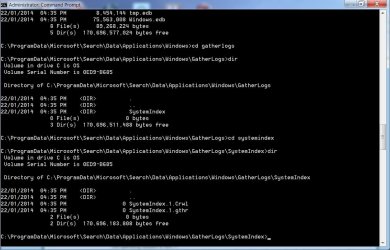
I am rebuilding the index again. But I have a question. In the Advanced Options window, it says that the index file is stored at C:\ProgramData\Microsoft. I can't find it there. Is it stored in a sub folder? What is the name. What happens if I try to store the index file at a new location.
 

My Computer My Computer

Computer type
Laptop
Computer Manufacturer/Model Number
Dell 1550
OS
windows 7 home premium 64 bit
Aha!

Do the modify one more time and remove the check next to Program Files.

You really don't want the entire contents of C:\ or Program Files indexed.
The idea behind indexing is make it easy to search on attributes or contents of a file.
You want to easily search your data files and some other locations. Indexing Windows and the Programs folders really slow down search (when it's working) and doesn't add much value.

After unticking Progam Files (you might have to expand C:\ to untick Program Files), you should rebuild the index again
and have only the following index locations
Internet Explorer History
Start Menu
Users (whatever is in the exluded column is fine)

try a search and let me know.

edit: posted a picture that might be needed in the next step - removed it to avoid confusion.


Does this provide any useful info?
 

Attachments

  • info.jpg
    info.jpg
    98.5 KB · Views: 1

My Computer My Computer

Computer type
Laptop
Computer Manufacturer/Model Number
Dell 1550
OS
windows 7 home premium 64 bit
Aha!

Do the modify one more time and remove the check next to Program Files.

You really don't want the entire contents of C:\ or Program Files indexed.
The idea behind indexing is make it easy to search on attributes or contents of a file.
You want to easily search your data files and some other locations. Indexing Windows and the Programs folders really slow down search (when it's working) and doesn't add much value.

After unticking Progam Files (you might have to expand C:\ to untick Program Files), you should rebuild the index again
and have only the following index locations
Internet Explorer History
Start Menu
Users (whatever is in the exluded column is fine)

try a search and let me know.

edit: posted a picture that might be needed in the next step - removed it to avoid confusion.


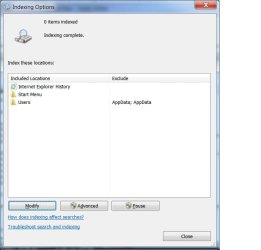
Tried again -- same result -- searches still not working

When I do the reindexing the process appears to be happening. If look at the performance monitor, something is going on.
 

Attachments

  • last.jpg
    last.jpg
    29.2 KB · Views: 22

My Computer My Computer

Computer type
Laptop
Computer Manufacturer/Model Number
Dell 1550
OS
windows 7 home premium 64 bit
I'm a bit embarrased to say that I didn't see the Index complete msg at the top and the pause button not greyed out. That's not right!

This is going a little deeper, how well do you know you're way around the comptuter?

If I said "open services and scroll down to Windows search and tell me the status" is that enough or do you need help getting to services and a descrip[tion of services. You seem fairly sharp, I just never know the experience of people on the other side.
 

My Computer My Computer

Computer type
Laptop
Computer Manufacturer/Model Number
HP Pavilion dv6-6c10us
OS
x64 (6.3.9600) Win8.1 Pro & soon dual boot x64 (6.1.7601) Win7_SP1 HomePrem
CPU
AMD A6-3420M APU with Radeon(tm) HD Graphics
Motherboard
Hewlett-Packard 1805
Memory
6.00 GB
Graphics Card(s)
AMD Radeon(TM) HD 6520G
Sound Card
(1) AMD High Definition Audio Device (2) IDT High Definiti
Monitor(s) Displays
HP W2072a 20" LCD (1600 x 900) @ 60 Hz
Screen Resolution
1366 x 768 x 32 bits (4294967296 colors) @ 60 Hz
Hard Drives
ST640LM0 00 HM641JI SATA Disk Device
Keyboard
Logitech k520 wireless KB
Mouse
Logitech m320 wireless mouse (bundled with KB)
Internet Speed
15/5 | 54 MB Wireless 'n'
Antivirus
Realtime: Defender or Avast | On-demand: Malwarebytes, ESET
Browser
IE 11 on Win8, IE 10 on win 7
Other Info
Media: [Gimp, Audacity, VLC] || Comm: [WEmail 2012, Skype] || Productivity: [OpenOffice,| Textpad] || Utils: [Sysinternals, cCleaner, Speccy, Defraggler]
Let's keep trying

If you need something explained, just ask and I'll go into greater detail.

In a Windows Explorer, are the standard Libraries shown in the left hand navigation pane?
do you use Libraries?


After each step, report back on what you see
test search in on the Start menu and the Explorer search bar
- stop when search works

1) Restart your machine, then
Look at Indexing Options
Is it still 0 - indexing complete?
Is the pause button still active?

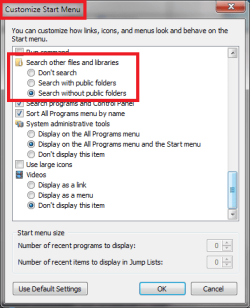
2) Try setting "Search other files and libraries" in Customize Start menu to "Search without public libraries"
If it already was, please tell me that too.

xxx.png

3) See this tutorial to reset search to defaults - use Option One
http://www.sevenforums.com/tutorials/36098-search-options-change-restore.html

I'm searching the forum to hopefully find a post that exists and that already describes the steps to stop and start search related services.
 

My Computer My Computer

Computer type
Laptop
Computer Manufacturer/Model Number
HP Pavilion dv6-6c10us
OS
x64 (6.3.9600) Win8.1 Pro & soon dual boot x64 (6.1.7601) Win7_SP1 HomePrem
CPU
AMD A6-3420M APU with Radeon(tm) HD Graphics
Motherboard
Hewlett-Packard 1805
Memory
6.00 GB
Graphics Card(s)
AMD Radeon(TM) HD 6520G
Sound Card
(1) AMD High Definition Audio Device (2) IDT High Definiti
Monitor(s) Displays
HP W2072a 20" LCD (1600 x 900) @ 60 Hz
Screen Resolution
1366 x 768 x 32 bits (4294967296 colors) @ 60 Hz
Hard Drives
ST640LM0 00 HM641JI SATA Disk Device
Keyboard
Logitech k520 wireless KB
Mouse
Logitech m320 wireless mouse (bundled with KB)
Internet Speed
15/5 | 54 MB Wireless 'n'
Antivirus
Realtime: Defender or Avast | On-demand: Malwarebytes, ESET
Browser
IE 11 on Win8, IE 10 on win 7
Other Info
Media: [Gimp, Audacity, VLC] || Comm: [WEmail 2012, Skype] || Productivity: [OpenOffice,| Textpad] || Utils: [Sysinternals, cCleaner, Speccy, Defraggler]
I'm a bit embarrased to say that I didn't see the Index complete msg at the top and the pause button not greyed out. That's not right!

This is going a little deeper, how well do you know you're way around the comptuter?

If I said "open services and scroll down to Windows search and tell me the status" is that enough or do you need help getting to services and a descrip[tion of services. You seem fairly sharp, I just never know the experience of people on the other side.

Windows Search is started and the startup is set to automatic
 

My Computer My Computer

Computer type
Laptop
Computer Manufacturer/Model Number
Dell 1550
OS
windows 7 home premium 64 bit
Let's keep trying

If you need something explained, just ask and I'll go into greater detail.

In a Windows Explorer, are the standard Libraries shown in the left hand navigation pane?
do you use Libraries?

Yes and Yes

After each step, report back on what you see
test search in on the Start menu and the Explorer search bar
- stop when search works

1) Restart your machine, then
Look at Indexing Options
Is it still 0 - indexing complete?
Is the pause button still active?

Still 0 - Indexing complete
The Pause button is greyed out


2) Try setting "Search other files and libraries" in Customize Start menu to "Search without public libraries"
If it already was, please tell me that too.

View attachment 302816

It already was -- I changed it to this in the last day or so


3) See this tutorial to reset search to defaults - use Option One
http://www.sevenforums.com/tutorials/36098-search-options-change-restore.html

I've tried the first part of this tutorial -- Folders -> Search and restored the defaults

When I become more brave, I will do the registry part of the tutorial


I'm searching the forum to hopefully find a post that exists and that already describes the steps to stop and start search related services.
 

My Computer My Computer

Computer type
Laptop
Computer Manufacturer/Model Number
Dell 1550
OS
windows 7 home premium 64 bit
You did all you have to do in the tutorial, I think.

Many of the tutorials contain alternate ways of accomplishing the same thing (delineated by Option or Method), they also might contain a reverse set of instructions.

As long as you followed Option One "(A) Click/tap on the Restore Defaults button, and click/tap on OK" (if you changed search options, let me know - you can post a screen shot any time) then we're still looking for the answer.

Let's try something I should have offered earlier - the troubleshooter.

Open Control Panel -> Indexing Options
at the bottom of the window, click trouble shooter
You might have to run this once or twice
tick "Files don't appear in results"
then OK or next
Let the troubleshooter run through
if it reports any fixes, hit the more information link (if it gives you that option)
post screen shot

close out the troubleshooter and try a search

there's one more area I think might cause this or contribute to this
Libraries

Have you added many folders to the libraies?
Are any unused?
I'm think about deleting or restoring default libriaries (which might delete what you have already built-I'm not sure)

If you're OK with deleting and restoring default libraries, then great.
Delete and restore is the cleanest way to get a fresh set. Restore defaults only might not get you all the way there.

Think about it.

If not, I'll have to do more research on restore default libraries.
-
 

My Computer My Computer

Computer type
Laptop
Computer Manufacturer/Model Number
HP Pavilion dv6-6c10us
OS
x64 (6.3.9600) Win8.1 Pro & soon dual boot x64 (6.1.7601) Win7_SP1 HomePrem
CPU
AMD A6-3420M APU with Radeon(tm) HD Graphics
Motherboard
Hewlett-Packard 1805
Memory
6.00 GB
Graphics Card(s)
AMD Radeon(TM) HD 6520G
Sound Card
(1) AMD High Definition Audio Device (2) IDT High Definiti
Monitor(s) Displays
HP W2072a 20" LCD (1600 x 900) @ 60 Hz
Screen Resolution
1366 x 768 x 32 bits (4294967296 colors) @ 60 Hz
Hard Drives
ST640LM0 00 HM641JI SATA Disk Device
Keyboard
Logitech k520 wireless KB
Mouse
Logitech m320 wireless mouse (bundled with KB)
Internet Speed
15/5 | 54 MB Wireless 'n'
Antivirus
Realtime: Defender or Avast | On-demand: Malwarebytes, ESET
Browser
IE 11 on Win8, IE 10 on win 7
Other Info
Media: [Gimp, Audacity, VLC] || Comm: [WEmail 2012, Skype] || Productivity: [OpenOffice,| Textpad] || Utils: [Sysinternals, cCleaner, Speccy, Defraggler]
Let's try something I should have offered earlier - the troubleshooter.

Open Control Panel -> Indexing Options
at the bottom of the window, click trouble shooter
You might have to run this once or twice
tick "Files don't appear in results"
then OK or next
Let the troubleshooter run through
if it reports any fixes, hit the more information link (if it gives you that option)
post screen shot

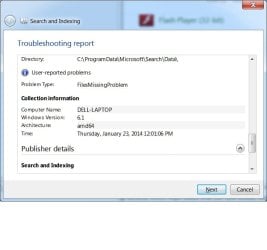
The troubleshooter didn't find any problems. However, I found the following interesting:

The processor is an Intel Core Duo T6400 and Not and amd64
What does Windows 6.1 mean?
 

Attachments

  • interesting.jpg
    interesting.jpg
    36.3 KB · Views: 0

My Computer My Computer

Computer type
Laptop
Computer Manufacturer/Model Number
Dell 1550
OS
windows 7 home premium 64 bit
You did all you have to do in the tutorial, I think.

there's one more area I think might cause this or contribute to this
Libraries

Have you added many folders to the libraies?
Are any unused?
I'm think about deleting or restoring default libriaries (which might delete what you have already built-I'm not sure)

If you're OK with deleting and restoring default libraries, then great.
Delete and restore is the cleanest way to get a fresh set. Restore defaults only might not get you all the way there.

Think about it.

If not, I'll have to do more research on restore default libraries.
-

I have a lot of folders in My Documents. I don't want to play around with those.

However, I think that the problem is fundamental. If I create a new user account, I have all of the same problems with indexing and searching.
 

My Computer My Computer

Computer type
Laptop
Computer Manufacturer/Model Number
Dell 1550
OS
windows 7 home premium 64 bit
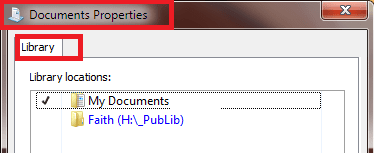
Understood about documents, but just so I'm clear

Please post a screen shot of the Documents Library properties
Right click Documents under Libraries (not the My Documents folder)
and select properties
 

Attachments

  • Libdocs.png
    Libdocs.png
    5.6 KB · Views: 19

My Computer My Computer

Computer type
Laptop
Computer Manufacturer/Model Number
HP Pavilion dv6-6c10us
OS
x64 (6.3.9600) Win8.1 Pro & soon dual boot x64 (6.1.7601) Win7_SP1 HomePrem
CPU
AMD A6-3420M APU with Radeon(tm) HD Graphics
Motherboard
Hewlett-Packard 1805
Memory
6.00 GB
Graphics Card(s)
AMD Radeon(TM) HD 6520G
Sound Card
(1) AMD High Definition Audio Device (2) IDT High Definiti
Monitor(s) Displays
HP W2072a 20" LCD (1600 x 900) @ 60 Hz
Screen Resolution
1366 x 768 x 32 bits (4294967296 colors) @ 60 Hz
Hard Drives
ST640LM0 00 HM641JI SATA Disk Device
Keyboard
Logitech k520 wireless KB
Mouse
Logitech m320 wireless mouse (bundled with KB)
Internet Speed
15/5 | 54 MB Wireless 'n'
Antivirus
Realtime: Defender or Avast | On-demand: Malwarebytes, ESET
Browser
IE 11 on Win8, IE 10 on win 7
Other Info
Media: [Gimp, Audacity, VLC] || Comm: [WEmail 2012, Skype] || Productivity: [OpenOffice,| Textpad] || Utils: [Sysinternals, cCleaner, Speccy, Defraggler]
Back
Top