I
[FONT="]1. [/FONT]I tried to upload the Word file that captures the information you requested, but I can't be sure it uploaded alright. Here's a cut/paste of that document.
Indexing
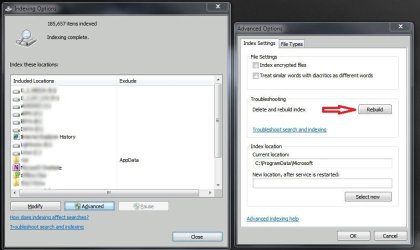
[FONT="]a. [/FONT]I have reset nearly every setting I can see,. e.g. drives, folders, file extensions, index location, properties & contents indexing
[FONT="]b. [/FONT]I have run the troubleshooter a dozen times
[FONT="]c. [/FONT]Here’s the latest screen shot
[FONT="]2. [/FONT]System Information
[FONT="]a. [/FONT]ACPI x86-based PC
[FONT="]b. [/FONT]Intel® Core™2 Duo CPU
[email protected] 2.93
[FONT="]c. [/FONT]RAM 2G
[FONT="]d. [/FONT]32 bit OS
[FONT="]e. [/FONT]MSFT ID 00359-OEM-8702182-44420 --Home Premium
[FONT="]3. [/FONT]Tried resetting the Drive settings
[FONT="]a. [/FONT]Computer\R-Clk-Local Disk (C

\Properties\uncheck “Allow files on this drive to have contents indexed..”\re-boot\retry indexing\=0 files indexed
[FONT="]b. [/FONT]Same as #1, on Disk D
[FONT="]4. [/FONT]In God Mode
[FONT="]a. [/FONT]Review recent messages and resolve problems
[FONT="] i. [/FONT]Problem reporting – checked for solutions of problems reported to MSFT
[FONT="]1. [/FONT]PPT had a problem – it was fixed
[FONT="]2. [/FONT]Windows had a problem * it got fixed
[FONT="]b. [/FONT]Program compatibility troubleshooter\ran for Outlook, because Outlook search is not working
[FONT="] i. [/FONT]No result or change
[FONT="]c. [/FONT]System restore, no recent restore points even though I thought I had set this to restore with every new software install
[FONT="]d. [/FONT]Folder options\search – restored to default
[FONT="]5. [/FONT]Installed “FileSeek,” a search program, to workaround Windows issue
[FONT="]6. [/FONT]Now use Mozilla desk top search program to workaround Windows



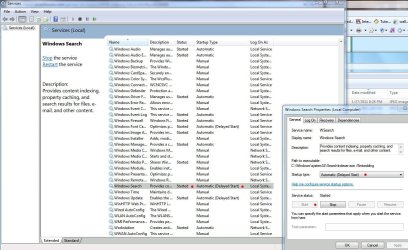


 . Is indexing running properly?