Solved inetcpl issues

despuit

New member
Power User
Local time
11:55 AM
Messages
88
Location
Everywhere
I don't even see this in taskmgr, anyways the manage add-on component of inet keeps resetting itself. Disabling all add-ons but shockwave.

My homepage keeps reverting to default as well, I can even key into the registry manually but something is happening for these to revert back to those settings. I've tried uninstalling the browser all together and it fails, however I'm confident the two are separate. INET would remain without iexplore to my knowledge.


Any ideas on how to keep the add-ons enabled as it effects my explorer.exe as well. Is just very odd. Thanks
 

My Computer

Computer type
Laptop
Computer Manufacturer/Model Number
Lenovo
OS
Windows 7 - Home Edition - Build 7601x8086
Memory
Samsung DDR3 4GB
Graphics Card(s)
Intergrated
Sound Card
Intergrated
Screen Resolution
1400 x 1050
Hard Drives
80GB HDD 2.5
PSU
20V adapter
Case
Piece of plastic
Cooling
Copper heatsink
Keyboard
Intergrated PS2
Mouse
TouchPad
Antivirus
Commodo
Browser
K-Melon
Does Commodo have settings to freeze those things?
 

My Computer

Computer type
Laptop
Computer Manufacturer/Model Number
Employer provided Dell Latitude
OS
W7 Pro SP1 64bit
CPU
i7
Memory
8GB
Graphics Card(s)
Intel HD Graphics
Hard Drives
crappy SSD
Antivirus
Employer mandated Symantec Endpoint Protection
Browser
Pale Moon 64bit, IE11 64bit & Chrome 64bit
Does Commodo have settings to freeze those things?

Good thinking!, I've completely disabled all security features on my device due to a corrupted host file I've yet to fix. However maybe a hidden driver is a foot. Let my go check...

CMDagent
cmdhlp

Disabled both however I cannot disable: cmderd, or cmdguard so I will uninstall the program. Restart, reset Inet settings, restart and see if resolved thank you. :)
 

My Computer

Computer type
Laptop
Computer Manufacturer/Model Number
Lenovo
OS
Windows 7 - Home Edition - Build 7601x8086
Memory
Samsung DDR3 4GB
Graphics Card(s)
Intergrated
Sound Card
Intergrated
Screen Resolution
1400 x 1050
Hard Drives
80GB HDD 2.5
PSU
20V adapter
Case
Piece of plastic
Cooling
Copper heatsink
Keyboard
Intergrated PS2
Mouse
TouchPad
Antivirus
Commodo
Browser
K-Melon
Comodo - settings

Does Commodo have settings to freeze those things?

Well only if Comodo HIPS is enabled and protected objects defined.

COMODO Advanced Settings.jpg

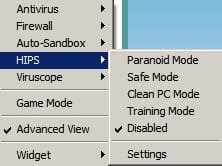
If it's possibly a Comodo issue the simple test would be to right click on the system tray icon and temporarily disable all HIPS protection.

Disable protection.jpg
 

My Computer

Computer type
Laptop
Computer Manufacturer/Model Number
ASUS
OS
Microsoft Windows 7 Home Premium 64-bit 7601 Multiprocessor Free Service Pack 1
CPU
AMD C-60 APU with Radeon(tm) HD Graphics
Motherboard
ASUSTeK COMPUTER INC. X501U
Memory
4.00 GB
Graphics Card(s)
AMD Radeon HD 6290 Graphics
Sound Card
(1) AMD High Definition Audio Device (2) Realtek High Defi
Screen Resolution
1366 x 768 x 32 bits (4294967296 colors) @ 60 Hz
Hard Drives
Hitachi HTS545050A7E380 SATA Disk Device
Antivirus
Comodo CIS & FW, SecureAplus App Whitelisting, Threatfire
Browser
Cyberfox 64bit, Opera 64bit, Airfox
Other Info
Spy-The-Spy, HitmanPro.Alert, Norton Connect Safe, MJRegWatcher, BitDefender TrafficLight, Voodoo Shield, Zemana AntiMalware
Does Commodo have settings to freeze those things?

Well only if Comodo HIPS is enabled and protected objects defined.

If it's possibly a Comodo issue the simple test would be to right click on the system tray icon and temporarily disable all HIPS protection.


Thanks, I don't even have the application running any more. All so my version looks really out of date compared to what you're running. For future reference how is the memory usage? I find it sometimes shows up as 300MB and hurts low ram systems. My problem with it was all ways cpu on this computer, it would randomly run a task in the background and I'd be force to shut it down. Or wouldn't report accurately what was running so things would be blocked and you couldn't figure out why as no parameters were ever set as nothing was ever "detected". Then the firewall was unusable, and it messed up my host files where even now they don't work properly as it wouldn't detect anything so my programs kept being blocked if it wasn't disabled. Something went wrong and that was it for the host files and the whole system locked up until I just said forget about it.

I'd love an application monitor only program though, that was an amazing feature and just use a sonic wall on the network for AV/Firewall/IPS/IDS purposes cost 300 dollars good enough. Sandboxy all so works for virtual testing, revo for capturing installs so don't need all the bells and whistles.

Update

Rebooted all good now, my settings are reset but it works so that's what matters. And magically my taskbar icons are back as well weird but okie dokie. Thanks for the help
 

My Computer

Computer type
Laptop
Computer Manufacturer/Model Number
Lenovo
OS
Windows 7 - Home Edition - Build 7601x8086
Memory
Samsung DDR3 4GB
Graphics Card(s)
Intergrated
Sound Card
Intergrated
Screen Resolution
1400 x 1050
Hard Drives
80GB HDD 2.5
PSU
20V adapter
Case
Piece of plastic
Cooling
Copper heatsink
Keyboard
Intergrated PS2
Mouse
TouchPad
Antivirus
Commodo
Browser
K-Melon
Well configuration is certainly an issue as it's not user friendly. Personally I keep Comodo HIPS and disabled and use something else for HIPS protection. Same goes for Comodo Auto Sandbox. I use mostly the Firewall and on access file scanner. Here's current memory usage:

Comodo.jpg
 

My Computer

Computer type
Laptop
Computer Manufacturer/Model Number
ASUS
OS
Microsoft Windows 7 Home Premium 64-bit 7601 Multiprocessor Free Service Pack 1
CPU
AMD C-60 APU with Radeon(tm) HD Graphics
Motherboard
ASUSTeK COMPUTER INC. X501U
Memory
4.00 GB
Graphics Card(s)
AMD Radeon HD 6290 Graphics
Sound Card
(1) AMD High Definition Audio Device (2) Realtek High Defi
Screen Resolution
1366 x 768 x 32 bits (4294967296 colors) @ 60 Hz
Hard Drives
Hitachi HTS545050A7E380 SATA Disk Device
Antivirus
Comodo CIS & FW, SecureAplus App Whitelisting, Threatfire
Browser
Cyberfox 64bit, Opera 64bit, Airfox
Other Info
Spy-The-Spy, HitmanPro.Alert, Norton Connect Safe, MJRegWatcher, BitDefender TrafficLight, Voodoo Shield, Zemana AntiMalware
Well configuration is certainly an issue as it's not user friendly. Personally I keep Comodo HIPS and disabled and use something else for HIPS protection. Same goes for Comodo Auto Sandbox. I use mostly the Firewall and on access file scanner. Here's current memory usage:

Thanks for the reply. I agree if you have no idea what a computer is then it can be a pain. That's good usage though. What do you use for hips traditionally if you don't mind me asking?
 

My Computer

Computer type
Laptop
Computer Manufacturer/Model Number
Lenovo
OS
Windows 7 - Home Edition - Build 7601x8086
Memory
Samsung DDR3 4GB
Graphics Card(s)
Intergrated
Sound Card
Intergrated
Screen Resolution
1400 x 1050
Hard Drives
80GB HDD 2.5
PSU
20V adapter
Case
Piece of plastic
Cooling
Copper heatsink
Keyboard
Intergrated PS2
Mouse
TouchPad
Antivirus
Commodo
Browser
K-Melon
Well I actually use Threatfire for HIPS but it's not actually available to download these days as it's support has been discontinued. It still works though.

If you want a list of stuff that I use alongside Comdodo here it is. Not a recommendation though!

VoodooShield (Pro)
Threatfire
SecureAPlus Application Whitelisting
MJ RegWatcher (real time registry monitor)
Spy The Spy (watches for newly created or modified executables)
A huge Hosts file and ip blocklist
Several security enhancing browser add ons
Plugins Click to Play per element (browser)
No Java installed
Lots of on demand scanners and file signature checkers
 

My Computer

Computer type
Laptop
Computer Manufacturer/Model Number
ASUS
OS
Microsoft Windows 7 Home Premium 64-bit 7601 Multiprocessor Free Service Pack 1
CPU
AMD C-60 APU with Radeon(tm) HD Graphics
Motherboard
ASUSTeK COMPUTER INC. X501U
Memory
4.00 GB
Graphics Card(s)
AMD Radeon HD 6290 Graphics
Sound Card
(1) AMD High Definition Audio Device (2) Realtek High Defi
Screen Resolution
1366 x 768 x 32 bits (4294967296 colors) @ 60 Hz
Hard Drives
Hitachi HTS545050A7E380 SATA Disk Device
Antivirus
Comodo CIS & FW, SecureAplus App Whitelisting, Threatfire
Browser
Cyberfox 64bit, Opera 64bit, Airfox
Other Info
Spy-The-Spy, HitmanPro.Alert, Norton Connect Safe, MJRegWatcher, BitDefender TrafficLight, Voodoo Shield, Zemana AntiMalware
Back
Top