Information Bar

veegee

New member
Member
Local time
5:53 PM
Messages
69
Quite often I get this yellow information bar across the top of a page and when clicked it says that a security setting needs attention. Then I also get the exclamation mark or error in lower left corner of page.
Could someone please tell me what setting I need to change and where to find it please?
Thanks
 

My Computer

Computer Manufacturer/Model Number
Compaq-Presario
OS
Windows 7 Home Premium 64 bit SP1
CPU
AMD Athlon(tm) II x2 215 Processor
Memory
4.00 GB
Graphics Card(s)
Nividia GeForce 6150SE nForce 430
Monitor(s) Displays
Acer 21.5" - H213H 1920x1080
Hard Drives
466 GB 2 processor cores
Other Info
Avast free|SAS|MBAM pro|Spywareblaster|Spybot|Windows Defender|Windows Firewall
Quite often I get this yellow information bar across the top of a page and when clicked it says that a security setting needs attention. Then I also get the exclamation mark or error in lower left corner of page.
Could someone please tell me what setting I need to change and where to find it please?
Thanks
Please use the snipping tool to take a screenshot, so I can see what you're talking about: http://www.sevenforums.com/tutorials/225278-snipping-tool-use.html
 
Last edited:

My Computer

Computer type
PC/Desktop
Computer Manufacturer/Model Number
HP Pavilion P7-1010
OS
Windows 7 Professional x64 Service Pack 1
CPU
AMD Athlon X4 645
Motherboard
Foxxcon N-Alvorix RS880
Memory
6GB DDR3 1066
Graphics Card(s)
Sapphire Radeon HD 5670 512MB GDDR5
Sound Card
Realtek Integrated Audio
Monitor(s) Displays
HP 2011x
Screen Resolution
1600x900
Hard Drives
1. Crucial M4 128GB SSD
2. 1TB Seagate Barracuda 7200.12 RPM
3. 1TB Western Digital Caviar Green 5400RPM
PSU
Seasonic S12 II Bronze 380 Watt
Case
HP OEM
Cooling
Coolermaster Heatsink, AVC Case Fan
Keyboard
HP OEM- Made by Chicony
Mouse
HP OEM- Made by Logitech
Internet Speed
20MBit Down/4 Up
Antivirus
Microsoft Security Essentials
Browser
Internet Explorer 10
I assume you're talking about a browser webpage? :confused:

The information bar is just that but I've never seen one that complains about my security settings. Most for me are Flash Player notices. (I only allow selected sites to use Flash.) This could be an attempt by the website to bypass security settings. The exclamation or error in the bottom left indicates that part of the website didn't load. This is usually scripts or code on the webpage that were suppressed due to security settings or Protected Mode. More info is needed to be specific.
 

My Computer

Computer type
PC/Desktop
Computer Manufacturer/Model Number
Built 2/11/2011
OS
Windows 7 Pro-x64
CPU
i7-2600 3.4GHz - 3.8GHz Turbo
Motherboard
Intel DH67BL-B3
Memory
8Gb - 2x4GB, Muskin 991770 PC3-1333
Graphics Card(s)
Integrated Intel HD 2000
Sound Card
Integrated Intel 10.1 HD, RealTek ALC892
Monitor(s) Displays
Asus LCD VH222H, Haier HL24XSL2a
Screen Resolution
1920x1080, 1920x1080
Hard Drives
Crucial SSD C300-128Gb,
Western Digital WD5002AALX - 500Gb,
Western Digital WD7501AALS - 750Gb
PSU
Seasonic 650W 80+ Gold Modular
Case
Rosewill Defender
Cooling
Stock CPU, Four 120mm case fans, PCH fan added
Keyboard
Logitech EX100 Y-RBH94 Wireless
Mouse
Logitech EX100 M-RCE95 Wireless
Internet Speed
3.0/1.5 Mbs
Antivirus
Microsoft Security Essentials
Browser
Microsoft Internet Explorer 11
Other Info
Antec Veris Premier-Multimedia IR Station,
Cyber Accoustics-3602 Speakers,
AFT XM-5U Card Reader,
Hauppauge TV-HVR-2250,
Sony LX300 USB Turntable
Definitely post a snip. There are a lot of fake "security alerts" going around right now and they are no fun to clean up if you get caught. It may be nothing, but this is something I'd be sure of before clicking anything.
 

My Computer

Computer Manufacturer/Model Number
Self
OS
Main - Windows 7 Pro SP1 64-Bit; 2nd - Windows Server 2008 R2
CPU
Main - Core i7 2600K; 2nd - Core i7 920
Motherboard
Main - Asus P8Z68-V Pro/Gen3; 2nd - Gigabyte GA-EX58-UDR3
Memory
Main - 16GB Corsair Vengeance; 2nd - 12GB Corsair Vengeance
Graphics Card(s)
Main - XFX Radeon 6870 1GB; 2nd - XFX Radeon 4870 1GB
Sound Card
Both: Onboard Realtek Azalia
Monitor(s) Displays
Main - Hann 25" + I-INC 25" + Acer 23"; 2nd - Upgrading Soon
Screen Resolution
Main - 1920x1080 (All Three Monitors); 2nd - Upgrading Soon
Hard Drives
Main - (1) Crucial M4 128GB (Boot)
Main - (1) Seagate 2TB 64MB Cache (Data)
Main - (1) Seagate 2TB 64MB Cache (Data Backup)
2nd - (1) Intel X25-M SSD 80GB (Boot)
2nd - (3) Seagate 1TB 32MB Cache (Data Backup)
2nd - (1) Seagate 320GB (Because)
PSU
Main - OCZ 600W Modular; 2nd - OCZ 600W
Case
Main - Thermaltake Element G; 2nd - NZXT something or other
Cooling
Main - Corsair H80; 2nd - Prolimatech Megahalems
Keyboard
Main - Razer Reclusa; 2nd - Old MS Keyboard
Mouse
Main - Logitech MX Revolution; 2nd - Old MS Mouse
Internet Speed
20Mbps Time-Warner Cable
I can't snip the info bar as I can't really remember which site I was on when it appeared. It's been on different sites and is a slim yellow bar across the top of the page, just below tool bar etc. Different times it will read:

An add on for this web site failed to run. Check security settings in Int. options for potential conflicts.
An add on for this web site failed to run, check security settings.
I.E. has modified this page to help prevent cross-site scripting.

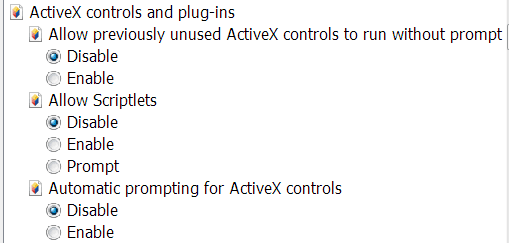
I thought maybe it was an active x setting so snipped this if it helps at all.
Capture.PNG Active-x.PNG

There must be something wrong with my settings because one time I got this:
Internet explorer has stopped running script. A script running on this page is causing your browser to run slowly. If it continues to run, your computer could become unresponsive.

Is there a site where you can get the proper security settings...I know nothing about scripts either. Hope this helps explain the above. Thanks.
 

My Computer

Computer Manufacturer/Model Number
Compaq-Presario
OS
Windows 7 Home Premium 64 bit SP1
CPU
AMD Athlon(tm) II x2 215 Processor
Memory
4.00 GB
Graphics Card(s)
Nividia GeForce 6150SE nForce 430
Monitor(s) Displays
Acer 21.5" - H213H 1920x1080
Hard Drives
466 GB 2 processor cores
Other Info
Avast free|SAS|MBAM pro|Spywareblaster|Spybot|Windows Defender|Windows Firewall
Without seeing the exact screen it is hard to say. I think the things you have investigated so far are good ones to keep an eye on.

I'd advise this for anyone, but I would make sure you have a good antivirus and anti-spyware package and that you keep it up to date. A lot of sites have poorly written code and can give script errors, but that could also be a sign of something rotten going on.

You might also try installing an alternate browser and see if you get the same type of warning with that. :)
 

My Computer

Computer Manufacturer/Model Number
Self
OS
Main - Windows 7 Pro SP1 64-Bit; 2nd - Windows Server 2008 R2
CPU
Main - Core i7 2600K; 2nd - Core i7 920
Motherboard
Main - Asus P8Z68-V Pro/Gen3; 2nd - Gigabyte GA-EX58-UDR3
Memory
Main - 16GB Corsair Vengeance; 2nd - 12GB Corsair Vengeance
Graphics Card(s)
Main - XFX Radeon 6870 1GB; 2nd - XFX Radeon 4870 1GB
Sound Card
Both: Onboard Realtek Azalia
Monitor(s) Displays
Main - Hann 25" + I-INC 25" + Acer 23"; 2nd - Upgrading Soon
Screen Resolution
Main - 1920x1080 (All Three Monitors); 2nd - Upgrading Soon
Hard Drives
Main - (1) Crucial M4 128GB (Boot)
Main - (1) Seagate 2TB 64MB Cache (Data)
Main - (1) Seagate 2TB 64MB Cache (Data Backup)
2nd - (1) Intel X25-M SSD 80GB (Boot)
2nd - (3) Seagate 1TB 32MB Cache (Data Backup)
2nd - (1) Seagate 320GB (Because)
PSU
Main - OCZ 600W Modular; 2nd - OCZ 600W
Case
Main - Thermaltake Element G; 2nd - NZXT something or other
Cooling
Main - Corsair H80; 2nd - Prolimatech Megahalems
Keyboard
Main - Razer Reclusa; 2nd - Old MS Keyboard
Mouse
Main - Logitech MX Revolution; 2nd - Old MS Mouse
Internet Speed
20Mbps Time-Warner Cable
Well now if you can't remember when and where the problem occurred then the problem must not be frequent.

If the problem ever happens again, then here is how you snip:
[FONT=&quot]Make a snapshot (Snip)[/FONT][FONT=&quot]
[/FONT]
[FONT=&quot]WIN |[/FONT][FONT=&quot] type SNIP | ENTER | New
Drag the cursor around the area you want to snip.
File | Save as | select save location and name | Save
[/FONT]

WIN=key with the Microsoft logo on top.
 

My Computer

Computer Manufacturer/Model Number
Toshiba Satellite S875D-S7239 laptop
OS
MS Windows 7 Ultimate SP1 64-bit
CPU
AMD A10-4600M
Motherboard
AMD Pumori (Socket FT1)
Memory
6.00 GB Dual-Channel DDR3 @ 798MHz (11-11-12-28)
Graphics Card(s)
AMD Radeon HD 7660G
Sound Card
High Definition Audio Device
Monitor(s) Displays
Generic PnP Monitor (1600x900@60Hz)
Screen Resolution
1600x900@60Hz
Hard Drives
SSD 119GB Corsair CSSD-V128GB2 ATA Device
Keyboard
Standard PS/2 Keyboard
Mouse
HP Wireless Optical Mobile Mouse Model FHA-3410
Internet Speed
What the local pub, local coffee shop offers.
Other Info
Optical Drive:MATSHITA BD-CMB UJ160B ATA Device


Also have an Asus ha1002xp netbook with Win 7 Ultimate installed.
.......
There must be something wrong with my settings because one time I got this:
Internet explorer has stopped running script. A script running on this page is causing your browser to run slowly. If it continues to run, your computer could become unresponsive..........
There is probably nothing wrong with your settings. There might have have been something wrong with the way that they website you were at the time was written.

.......Is there a site where you can get the proper security settings...
Some (maybe most) web browsers have one or more reset buttons. Each button resets various groups of settings. Let us know which browser and version you are using if you need help resetting stuff.
 

My Computer

Computer type
Laptop
Computer Manufacturer/Model Number
Employer provided Dell Latitude
OS
W7 Pro SP1 64bit
CPU
i7
Memory
8GB
Graphics Card(s)
Intel HD Graphics
Hard Drives
crappy SSD
Antivirus
Employer mandated Symantec Endpoint Protection
Browser
Pale Moon 64bit, IE11 64bit & Chrome 64bit
what anti virus are you using?
 

My Computer

Computer Manufacturer/Model Number
Hewlett packard/p6512uk
OS
Microsoft Windows 7 Home Premium 64-bit 7600
CPU
IIx4 amd athelon 635 processor
Motherboard
FOXCONN 2AA9
Memory
2x2gb
Graphics Card(s)
ati radeon HD 5450
Sound Card
(1) Realtek High Definition Audio (2) AMD High Definition
Monitor(s) Displays
samsung lcd tv 32"
Screen Resolution
1360x 768
Hard Drives
(1) WDC WD10 01FAES-60Z2A0 SATA Disk Device (2) Maxtor OneTouch USB Device (3) ST310003 33AS USB Device (4) WD My Book 1111 USB Device
PSU
?
Cooling
air!
Keyboard
wireless hp
Mouse
wireless Hp,optical
Internet Speed
1.10mb/s
Antivirus
MSE
Browser
Firefox
Inforation Bar

Here is an example of the Info. Bar in question. Guess I was getting so many of them that I began ignoring them as the web sites didn't seem out of the ordinary.

Capture Info. bar.PNG

I am using Avast free, MBAM pro, SAS, spywareblaster, Win. Defender, Win. firewall and I.E. 8.

Will resetting I.E. reset the security settings to the safe & recomended settings or change other settings all over the place?
I have never changed any sec. settings on this PC.

My original question was that I would like to know what I am supposed to change & where?
BUT the weirdest thing is that when I go this particular site again, the blinkin Info. bar is not there....maybe I do have gremlins on this PC!!!
Thanks for your patience & help.

Haven't tried an alternate browser yet...deciding on which one.
 
Last edited:

My Computer

Computer Manufacturer/Model Number
Compaq-Presario
OS
Windows 7 Home Premium 64 bit SP1
CPU
AMD Athlon(tm) II x2 215 Processor
Memory
4.00 GB
Graphics Card(s)
Nividia GeForce 6150SE nForce 430
Monitor(s) Displays
Acer 21.5" - H213H 1920x1080
Hard Drives
466 GB 2 processor cores
Other Info
Avast free|SAS|MBAM pro|Spywareblaster|Spybot|Windows Defender|Windows Firewall
The warning about an addon is likely due to the site having an embedded audio or video file which your browser does not have a plugin for. The most common ones are Flash (.flv), Shockwave (.swf), Quickslime (.qt), etc. The fact that the site you posted the screenshot of says "Radio..." in it could mean an audio file of some sort, especially Realplayer (.ra or .rm) or even a proprietary player that the site itself want to provide. :)
 

My Computer

Computer Manufacturer/Model Number
Self
OS
Main - Windows 7 Pro SP1 64-Bit; 2nd - Windows Server 2008 R2
CPU
Main - Core i7 2600K; 2nd - Core i7 920
Motherboard
Main - Asus P8Z68-V Pro/Gen3; 2nd - Gigabyte GA-EX58-UDR3
Memory
Main - 16GB Corsair Vengeance; 2nd - 12GB Corsair Vengeance
Graphics Card(s)
Main - XFX Radeon 6870 1GB; 2nd - XFX Radeon 4870 1GB
Sound Card
Both: Onboard Realtek Azalia
Monitor(s) Displays
Main - Hann 25" + I-INC 25" + Acer 23"; 2nd - Upgrading Soon
Screen Resolution
Main - 1920x1080 (All Three Monitors); 2nd - Upgrading Soon
Hard Drives
Main - (1) Crucial M4 128GB (Boot)
Main - (1) Seagate 2TB 64MB Cache (Data)
Main - (1) Seagate 2TB 64MB Cache (Data Backup)
2nd - (1) Intel X25-M SSD 80GB (Boot)
2nd - (3) Seagate 1TB 32MB Cache (Data Backup)
2nd - (1) Seagate 320GB (Because)
PSU
Main - OCZ 600W Modular; 2nd - OCZ 600W
Case
Main - Thermaltake Element G; 2nd - NZXT something or other
Cooling
Main - Corsair H80; 2nd - Prolimatech Megahalems
Keyboard
Main - Razer Reclusa; 2nd - Old MS Keyboard
Mouse
Main - Logitech MX Revolution; 2nd - Old MS Mouse
Internet Speed
20Mbps Time-Warner Cable

My Computer

Computer Manufacturer/Model Number
Toshiba Satellite S875D-S7239 laptop
OS
MS Windows 7 Ultimate SP1 64-bit
CPU
AMD A10-4600M
Motherboard
AMD Pumori (Socket FT1)
Memory
6.00 GB Dual-Channel DDR3 @ 798MHz (11-11-12-28)
Graphics Card(s)
AMD Radeon HD 7660G
Sound Card
High Definition Audio Device
Monitor(s) Displays
Generic PnP Monitor (1600x900@60Hz)
Screen Resolution
1600x900@60Hz
Hard Drives
SSD 119GB Corsair CSSD-V128GB2 ATA Device
Keyboard
Standard PS/2 Keyboard
Mouse
HP Wireless Optical Mobile Mouse Model FHA-3410
Internet Speed
What the local pub, local coffee shop offers.
Other Info
Optical Drive:MATSHITA BD-CMB UJ160B ATA Device


Also have an Asus ha1002xp netbook with Win 7 Ultimate installed.
....Will resetting I.E. reset the security settings to the safe & recomended settings or change other settings all over the place?...
I was suggesting that you use this reset button:

IE-reset.JPG

The reset should only impact IE, not the operating system.

But even that reset might not help if it happens to be one or more of your anti-virus-anti-malware programs causing this.
 

My Computer

Computer type
Laptop
Computer Manufacturer/Model Number
Employer provided Dell Latitude
OS
W7 Pro SP1 64bit
CPU
i7
Memory
8GB
Graphics Card(s)
Intel HD Graphics
Hard Drives
crappy SSD
Antivirus
Employer mandated Symantec Endpoint Protection
Browser
Pale Moon 64bit, IE11 64bit & Chrome 64bit
Back
Top