
Hello,
I have recently been browsing the security news section and saw
http://www.sevenforums.com/security...uide-2011-how-get-rid-all-latest-malware.html
In the article that this thread linked the author mentioned
NOTE: I am sorry if A: this is in the wrong place or B: if this has already been posted (did not find it).
NOTE 2: If it is in the wrong place, could someone please point me to the correct place?
Thank you,
Edit: added CKScanner report
Edit 2: added Avast! last full scan report and cmd prompt showing that the flash drive is not appearing to windows
Edit 3: added Malwarebytes' Anti-Malware log
Edit 4: added Spybot – Search & Destroy log
Edit 5: added picture of the folder and permissions that it has versus random EA folder (highlighting courtesy of MSPaint skills)
Edit 6: attached DDS scan info. (I know I have utorrent installed)
Edit 7: CKScanner file updated (was not scanned from on desktop before... new file was from on desktop)
I have recently been browsing the security news section and saw
http://www.sevenforums.com/security...uide-2011-how-get-rid-all-latest-malware.html
Code:
Non hyper-linked for the paranoid:
http://www.sevenforums.com/security-basics/194853-malware-removal-guide-2011-how-get-rid-all-latest-malware.htmlI was wondering if someone could point me in the right direction to install those into my web browser (Chrome for now). The reason I am not using a Google search to find them is because add-ons such as these that are so highly looked at most likely have counterparts doing the opposite, just waiting for that unsuspecting person.Other extensions and add-ons worth wielding to fight the malware fight include Web of Trust, KB SSL Enforcer, Adblock, and HTTPS Everywhere.
NOTE: I am sorry if A: this is in the wrong place or B: if this has already been posted (did not find it).
NOTE 2: If it is in the wrong place, could someone please point me to the correct place?
Thank you,
Edit: added CKScanner report
Edit 2: added Avast! last full scan report and cmd prompt showing that the flash drive is not appearing to windows
Edit 3: added Malwarebytes' Anti-Malware log
Edit 4: added Spybot – Search & Destroy log
Edit 5: added picture of the folder and permissions that it has versus random EA folder (highlighting courtesy of MSPaint skills)
Edit 6: attached DDS scan info. (I know I have utorrent installed)
Edit 7: CKScanner file updated (was not scanned from on desktop before... new file was from on desktop)
Attachments
-
FSS.txt2.4 KB · Views: 3
-
AdwCleaner[R2].txt1.2 KB · Views: 4
-
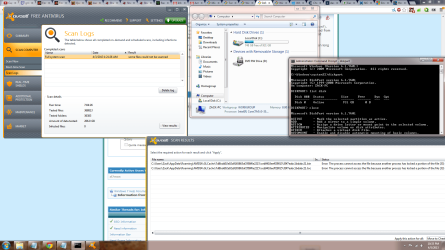 avast report.png134.6 KB · Views: 4
 -
mbam-log-2013-04-03 (18-51-22).txt1.8 KB · Views: 2
-
SDCleaner.log25.9 KB · Views: 2
-
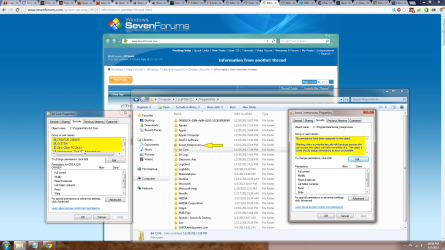 folder of question.png196.7 KB · Views: 7
 -
dds.txt27.6 KB · Views: 3
-
attach.txt7.1 KB · Views: 2
-
ckfiles.txt1.6 KB · Views: 3
Last edited:
My Computer
- Computer type
- PC/Desktop
- Computer Manufacturer/Model Number
- custom build
- OS
- Windows 7 Home Premium 64bit
- CPU
- i5-3570k
- Motherboard
- MSI Z77a-GD65
- Memory
- Corsair Vengnce 8 GB (2x4GB)
- Graphics Card(s)
- MSI N660Ti PE 2GD5/OC
- Sound Card
- N/A
- Monitor(s) Displays
- 1
- Screen Resolution
- 1920:1080
- Hard Drives
- WD Black 1TB 7200 RPM
WD Blue (yet to install)
- PSU
- Thermaltake Black Widow 850W
- Case
- Cooler Master Storm Scout
- Cooling
- Hyper 212+
- Mouse
- Logitech G500
- Antivirus
- Avast!
- Browser
- Chrome


 I have to wait to try and fix this, then again time is of the essence but that time limit seems to have been long past if I only just found that folder. Guess Avast was not allowed to scan it?


