Ink Level Display

RonBin79

New member
Member
VIP
Local time
7:50 PM
Messages
311
Location
West Sussex
I used to get a picture of my ink levels when I did a print out and it would first appear on the screen then in the sys tray. This allowed me to stop printing whatever when ever I wanted. Suddenly this has disapeared and I have no other way of stopping the print out except turning off the printer.

In addition, sometimes I get a percentage of magnification reading in the bottom right hand of my screen. I can increase the magnification or reduce it as required, something that is very handy for someone whose sight is not very good. How can I make sure this percentage figure always appears please?

Cheers for now,

RonBin79
 

My Computer

Computer Manufacturer/Model Number
Dell XP8300
OS
Windows Seven Premium
CPU
Intel Core i5-2300
Motherboard
Unknown
Memory
8GB
Graphics Card(s)
1GB ATI Raedon HD 5450
Sound Card
Integrated 7.1 with THX TrueStudio
Monitor(s) Displays
Dell 17"
Hard Drives
1 Terrabyte Serial ATA
Case
Dell (Metal)
Cooling
None
Keyboard
Dell
Mouse
Dell Laser
Internet Speed
2.8Gb
The printer monitor is usually part of the drivers that are installed with the printer. It sounds like that application isn't running anymore, so you could run msconfig and check your startup items. You could also look in your Start Menu to see if you can manually start it.
 

My Computer

OS
Windows 7 Ultimate x64 SP1
CPU
Intel Core i7-2600
Motherboard
Gigabyte GA-P67A-UD3P-B3
Memory
12 GB Patriot Extreme DDR3-1333
Graphics Card(s)
Nvidia GTX 470
Monitor(s) Displays
Dell UltraSharp 2209WA
Hard Drives
OCZ Agility3 240 GB, WD5001AALS, WD7501AALS
PSU
OCZ ModStream 700W
Case
CoolerMaster HAF 912 Advanced
Cooling
CoolerMaster Hyper 212 Plus
Printer Monitor

Thanks for your reply. What would I be looking for in msconfig to ascertain whether the monitor is running or stopped please?

I am not a computer buff so am wandering around in the dark...
Cheers,

RonBin79
 

My Computer

Computer Manufacturer/Model Number
Dell XP8300
OS
Windows Seven Premium
CPU
Intel Core i5-2300
Motherboard
Unknown
Memory
8GB
Graphics Card(s)
1GB ATI Raedon HD 5450
Sound Card
Integrated 7.1 with THX TrueStudio
Monitor(s) Displays
Dell 17"
Hard Drives
1 Terrabyte Serial ATA
Case
Dell (Metal)
Cooling
None
Keyboard
Dell
Mouse
Dell Laser
Internet Speed
2.8Gb
Yes, msconfig would show you if it was supposed to run at start up or not. If it was unchecked, you could simply check it to set it to run at start up.

I also suggested checking your Start Menu to see if it was listed as a program. You could run it that way as well, to see if the program will run or if there's an error.
 

My Computer

OS
Windows 7 Ultimate x64 SP1
CPU
Intel Core i7-2600
Motherboard
Gigabyte GA-P67A-UD3P-B3
Memory
12 GB Patriot Extreme DDR3-1333
Graphics Card(s)
Nvidia GTX 470
Monitor(s) Displays
Dell UltraSharp 2209WA
Hard Drives
OCZ Agility3 240 GB, WD5001AALS, WD7501AALS
PSU
OCZ ModStream 700W
Case
CoolerMaster HAF 912 Advanced
Cooling
CoolerMaster Hyper 212 Plus
Ink monitor

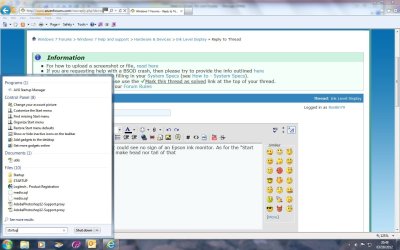
I Looked in msconfig but could see no sign of an Epson ink monitor. As for the "Start Up prgramme" I couldn't make head nor tail of that (please see screen shot). If I only I knew what I was looking for, it would be half the battle.

Is it a programme all on it's own and if so, how do I get into it please so I can check??

Cheers for now,

RonBin79
 

Attachments

  • start up.jpg
    start up.jpg
    124.7 KB · Views: 4

My Computer

Computer Manufacturer/Model Number
Dell XP8300
OS
Windows Seven Premium
CPU
Intel Core i5-2300
Motherboard
Unknown
Memory
8GB
Graphics Card(s)
1GB ATI Raedon HD 5450
Sound Card
Integrated 7.1 with THX TrueStudio
Monitor(s) Displays
Dell 17"
Hard Drives
1 Terrabyte Serial ATA
Case
Dell (Metal)
Cooling
None
Keyboard
Dell
Mouse
Dell Laser
Internet Speed
2.8Gb
For my Epson printer, it uses the Epson Status Monitor 3. This shows up in the Startup Tab of MSCONFIG under that name, with the Manufacturer of SEIKO EPSON CORP and is installed as C:\Windows\system32\spool\DRIVERS\W32X86\3\E_FATIAIA.EXE

This was automatically installed when I recently upgraded the Epson printer drivers.

Before, I had no automatic printer status monitor and had to dig down into the printer properties to see it. Now, like in your case, when I go to print, the window pops up on the screen and there is an icon for it in the System Tray.

So, you should look to see if you can get the printer driver from Epson and reinstall it.
 

My Computer

Computer type
PC/Desktop
Computer Manufacturer/Model Number
Custom
OS
Win7 Pro 32-bit, Win8 Pro 32-bit
CPU
AMD Phenom II X6 1090T
Motherboard
Gigabyte
Memory
4GB ddr3 1300
Graphics Card(s)
AMD HD 4290 onboard
Sound Card
Builtin Realtek HD Audio
Monitor(s) Displays
Samsung 24" widescreen, LG 23" widescreen
Screen Resolution
1920x1200/1920x1080
Hard Drives
Kingston 256GB SSD
Keyboard
Logitech Illuminated Keyboard
Mouse
Logitech M705 wireless mouse
Antivirus
Norton Av 2013
Browser
IE v10
I Looked in msconfig but could see no sign of an Epson ink monitor.
In your screenshot, where you typed STARTUP, type MSCONFIG instead. Post a screenshot of that Windows, showing the list of startup items. That's where you should be able to check or uncheck individual items.
 

My Computer

OS
Windows 7 Ultimate x64 SP1
CPU
Intel Core i7-2600
Motherboard
Gigabyte GA-P67A-UD3P-B3
Memory
12 GB Patriot Extreme DDR3-1333
Graphics Card(s)
Nvidia GTX 470
Monitor(s) Displays
Dell UltraSharp 2209WA
Hard Drives
OCZ Agility3 240 GB, WD5001AALS, WD7501AALS
PSU
OCZ ModStream 700W
Case
CoolerMaster HAF 912 Advanced
Cooling
CoolerMaster Hyper 212 Plus
Back
Top