InPrivate Browsing enables you to surf the web without leaving a trail in Internet Explorer. This helps prevent anyone else who might be using your computer from seeing where you visited and what you have looked at on the web. You can start InPrivate Browsing from the new tab page or the Safety button. Most people don't know that InPrivate will also help block ad content which is widely used to gather personal information about you.
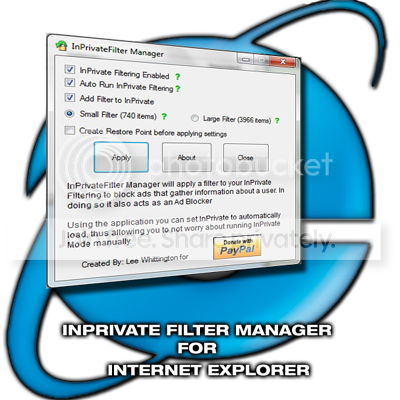
Alot of times InPrivate will not start Automatically so I created this to set its properties to Automatically run when Internet Explorer is loaded
Enabling InPrivate will allow you to use the InPrivate Filtering
Auto Run InPrivate Filtering will enable InPrivate to automatically
turn on when a user opens Internet Explorer.
When the application is run it will create the InPrivate Registry
keys that are needed to activate InPrivate if you have never used
it before.
Unselecting any of the options will remove its corresponding Registry
keys.
Add Filter to InPrivate
Small List: This is a list of 740 items for InPrivate to autoblock
Large List: This is a list of 3966 items for InPrivate to autoblock
Can be downloaded from my Deviantart page:
InPrivate Filter Manager by ~LeeWhittington on deviantART
Alot of times InPrivate will not start Automatically so I created this to set its properties to Automatically run when Internet Explorer is loaded
Enabling InPrivate will allow you to use the InPrivate Filtering
Auto Run InPrivate Filtering will enable InPrivate to automatically
turn on when a user opens Internet Explorer.
When the application is run it will create the InPrivate Registry
keys that are needed to activate InPrivate if you have never used
it before.
Unselecting any of the options will remove its corresponding Registry
keys.
Add Filter to InPrivate
Small List: This is a list of 740 items for InPrivate to autoblock
Large List: This is a list of 3966 items for InPrivate to autoblock
Can be downloaded from my Deviantart page:
InPrivate Filter Manager by ~LeeWhittington on deviantART
My Computer
- Computer Manufacturer/Model Number
- Toshiba Satellite
- OS
- Windows 7 Premium 32Bit\64Bit