Input Spanish Characters

BrasMexo

New member
Local time
5:15 AM
Messages
9
Hi,

I recently got my Samsung Windows 7 laptop and I love it! However, I am writing in Spanish a lot and I require the additional characters and letters for the keyboard. The keyboard shortcuts, like Alt + a number are a little longer. I was wondering if I could set shortcuts or is there a way to do it?

For example, Alt-Gr and then the letter would be perfect! Or shift + ctrl then the letter?

Thank you.
 

My Computer

Computer Manufacturer/Model Number
Samsung Q330
OS
Windows 7 Home Premium 64bit
CPU
Intel Core i3 370m
Memory
3GB
Graphics Card(s)
Intel HD Graphics
Sound Card
Realtek HD Audio
Monitor(s) Displays
13.3" HD LED
Hard Drives
320GB Samsung
Here is a brief table which you might find useful:
.
.

à, è, ì, ò, ù - À, È, Ì, Ò, Ù CTRL+` (ACCENT GRAVE), the letter
.
á, é, í, ó, ú, ý - Á, É, Í, Ó, Ú, Ý CTRL+' (APOSTROPHE), the letter
.
â, ê, î, ô, û Â, Ê, Î, Ô, Û CTRL+^ (CARET), the letter
.
ã, ñ, õ Ã, Ñ, Õ CTRL+~ (TILDE), the letter
.
ä, ë, ï, ö, ü, ÿ Ä, Ë, Ï, Ö, Ü, Ÿ CTRL+: (COLON), the letter
.
å, Å CTRL+@, a or A
.
æ, Æ CTRL+&, a or A
.
œ, Œ CTRL+&, o or O
.
ç, Ç CTRL+, (COMMA), c or C
.
ð, Ð CTRL+' (APOSTROPHE), d or D
.
ø, Ø CTRL+/, o or O
.
¿ ALT+CTRL+?
.
¡ ALT+CTRL+!
.
ß CTRL+&, s
.
.
P.S. I have experienced extreme difficulty in persuading it to display in a legible manner. :rolleyes:

The following link might also be useful: Writing in Spanish Using Microsoft Word - Associated Content from Yahoo! - associatedcontent.com
 

My Computer

Computer type
PC/Desktop
Computer Manufacturer/Model Number
Packard Bell
OS
Windows 7 Home Premium 64bit
CPU
Intel(R) Core(TM) i3-2120 CPU @ 3.30GHz
Motherboard
Packard Bell IPISB-AG
Memory
3.00 GB
Graphics Card(s)
(1) Intel(R) HD Graphics (2) VNC Mirror Driver
Sound Card
Realtek High Definition Audio
Monitor(s) Displays
AIO LCD
Screen Resolution
1920 x 1080
Hard Drives
WDC WD10EADX-22TDHB0 ATA Device
Fixed hard disk media
4 partitions
931.51 GB
Keyboard
Wireless
Mouse
Wireless
Antivirus
Microsoft Security Essentials
Browser
IE; Firefox
Other Info
Also:
Samsung N220 Plus Netbook - Windows 7 Home
HP laptop
iPad 5
Hi,

Thank you for you reply. However, only alt gr + letter seems to activate only a small amount of the accents. Do you know why this is? I also want to be able to write on internet pages, not just Microsoft Word. Please can you help me as to getting all those accents working.

Just tried now and nothing! :(
 

My Computer

Computer Manufacturer/Model Number
Samsung Q330
OS
Windows 7 Home Premium 64bit
CPU
Intel Core i3 370m
Memory
3GB
Graphics Card(s)
Intel HD Graphics
Sound Card
Realtek HD Audio
Monitor(s) Displays
13.3" HD LED
Hard Drives
320GB Samsung
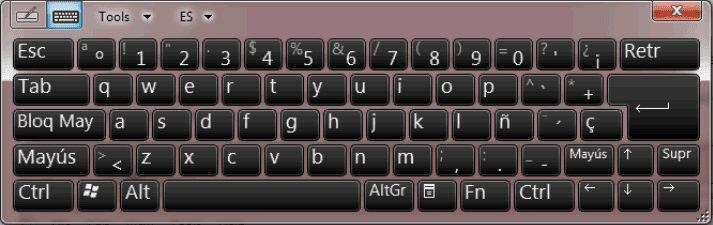
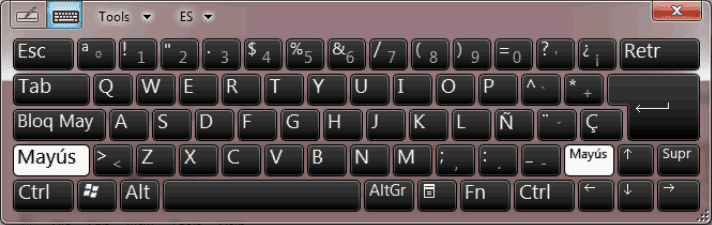
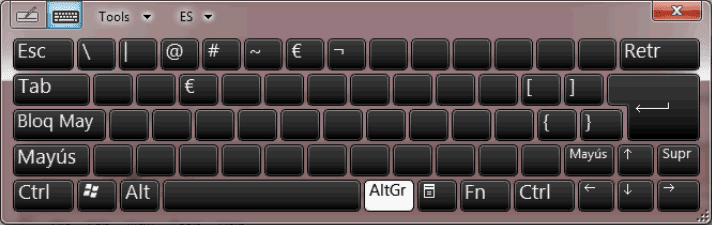
Have you tried to use Spanish keyboard layout? With it you can type both English and Spanish.

Spanish keyboard layout, lower case:

Spanish_lower_case.png

Spanish keyboard layout, upper case:

Spanish_upper_case.png

Spanish keyboard layout, ALT GR:

Spanish_AltGR.png

Kari
 

My Computer

Computer type
Laptop
Computer Manufacturer/Model Number
HP ENVY 17-1150eg
OS
Windows 10 Pro x64 EN-GB
CPU
1.6 GHz Intel Core i7-720QM Processor
Memory
6 GB
Graphics Card(s)
ATI Mobility Radeon HD 5850 Graphics
Sound Card
Beats sound system with integrated subwoofer
Monitor(s) Displays
17" laptop display, 22" LED and 32" Full HD TV through HDMI
Screen Resolution
1600*900 (1), 1920*1080 (2&3)
Hard Drives
Internal: 2 x 500 GB SATA Hard Disk Drive 7200 rpm
External: 2TB for backups, 3TB USB3 network drive for media
Cooling
As Envy runs a bit warm, I have it on a Cooler Master pad
Keyboard
Logitech diNovo Media Desktop Laser (bluetooth)
Mouse
Logitech Performance Mouse MX
Internet Speed
50/10 Mbps VDSL
Antivirus
Windows Defender 4.3.9431.0
Browser
Maxthon 3.5.2., IE11

My Computer

OS
Windows 7 Ultimate x64
CPU
P4 3.2
Motherboard
Intel 815GM
Memory
DDR 400
Graphics Card(s)
ATI HD3850
Sound Card
C-Media 7.1
Monitor(s) Displays
SyncMaster 244T
Screen Resolution
1920*1200
Hard Drives
Several
PSU
500
Case
PowerSpec $24
Cooling
ThermalTake copper
Internet Speed
Blazing
Hi,

Thanks! That works quite well for the ñ and Ñ but for áéíóú the alt-gr doesn't work! And the layout doesn't show which key has these letters? Does anyone know how to use these letters and the others which exist in Spanish.

Thank you!
 

My Computer

Computer Manufacturer/Model Number
Samsung Q330
OS
Windows 7 Home Premium 64bit
CPU
Intel Core i3 370m
Memory
3GB
Graphics Card(s)
Intel HD Graphics
Sound Card
Realtek HD Audio
Monitor(s) Displays
13.3" HD LED
Hard Drives
320GB Samsung
I touch-type in English so I used a keyboard with Spanish keycaps and switch back and forth between English and Spanish keyboard with Windows. For since words, I use the replace feature in Word.
 

My Computer

Computer Manufacturer/Model Number
Home Built
OS
Windows7 beta 7000
CPU
Intel E6550
Motherboard
Intel DP35DP
Memory
8Gb
Graphics Card(s)
Nvidia 8500 GT
Sound Card
Intel onboard sound
Monitor(s) Displays
Two Gateway 22" LCD monitors
Screen Resolution
1680x1050
Hard Drives
Two 500Gb 7200rpm SATA
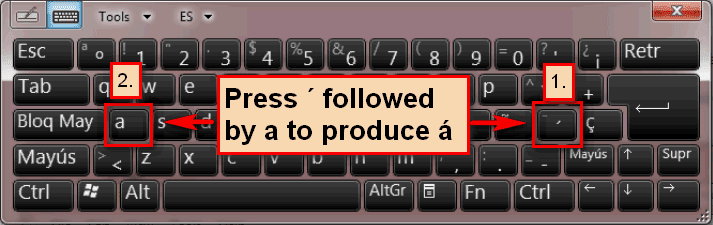
I'm testing the Spanish layout now and for me it works flawless. Apostrophe, Accent Grave, Tilde and Caret work as they should; when you need for instance á, you press the Apostrophe key followed by a, which then produces á.

The idea with these diacritic symbols is when you press the required key, it prints nothing on screen; instead it waits a letter key to be pressed. If the letter pressed is one that can be used together with symbol chosen, like for instance a or e, the symbol is added to the letter, producing á or é. If the letter is one which does not use the symbol chosen, pressing this letter produces two characters: the chosen symbol followed by a letter like for instance ´k or ´w. If you need a single diacritic symbol alone, you press the symbol needed followed by spacebar.

Spanish_lower_case_2.png

Using Spanish keyboard layout it's very easy and fast to type both in Spanish and English.

Kari
 
Last edited:

My Computer

Computer type
Laptop
Computer Manufacturer/Model Number
HP ENVY 17-1150eg
OS
Windows 10 Pro x64 EN-GB
CPU
1.6 GHz Intel Core i7-720QM Processor
Memory
6 GB
Graphics Card(s)
ATI Mobility Radeon HD 5850 Graphics
Sound Card
Beats sound system with integrated subwoofer
Monitor(s) Displays
17" laptop display, 22" LED and 32" Full HD TV through HDMI
Screen Resolution
1600*900 (1), 1920*1080 (2&3)
Hard Drives
Internal: 2 x 500 GB SATA Hard Disk Drive 7200 rpm
External: 2TB for backups, 3TB USB3 network drive for media
Cooling
As Envy runs a bit warm, I have it on a Cooler Master pad
Keyboard
Logitech diNovo Media Desktop Laser (bluetooth)
Mouse
Logitech Performance Mouse MX
Internet Speed
50/10 Mbps VDSL
Antivirus
Windows Defender 4.3.9431.0
Browser
Maxthon 3.5.2., IE11
That works perfectly! Thank you very much! I'll just switch the layout to ES when typing. One thing, the language seems to change randomly? Is that because I am not double-clicking to change?

Thanks!
 

My Computer

Computer Manufacturer/Model Number
Samsung Q330
OS
Windows 7 Home Premium 64bit
CPU
Intel Core i3 370m
Memory
3GB
Graphics Card(s)
Intel HD Graphics
Sound Card
Realtek HD Audio
Monitor(s) Displays
13.3" HD LED
Hard Drives
320GB Samsung
It does not change randomly, there's logic behind it. Every application, be it a browser or word processor or whatever, remembers the chosen layout until the application is closed and relaunched, when it then reverts back to default layout.

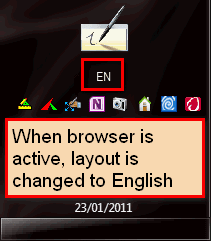
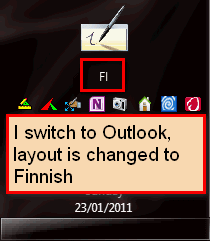
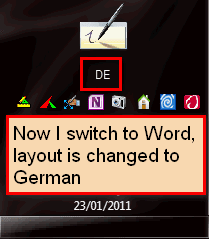
An example. In all my rigs I have three layouts enabled: Finnish (which I also use to type Swedish), German and English. Let's say I have Outlook open, keyboard layout set to Finnish to be able to write an email in Finnish to my mother back home, Word is open to type a letter to my insurance company here in Germany so the layout for Word is set to German, and my browser is open layout set to English to post here on Seven Forums in English. Now every time I switch to Outlook, the Finnish layout is used, when in Word the German, and when I click browser to make it active the layout is changed to English.

Same example as screenshots of my notification area. Please notice the images might look a bit strange to you but it's just because I have my taskbar vertically on the left, not as default horizontally on bottom:

Layout_EN.png

Layout_FI.png

Layout_DE.png

In other words, Windows is intelligent enough to understand and remember that you might want to use different keyboard layouts on different applications.

Kari
 

My Computer

Computer type
Laptop
Computer Manufacturer/Model Number
HP ENVY 17-1150eg
OS
Windows 10 Pro x64 EN-GB
CPU
1.6 GHz Intel Core i7-720QM Processor
Memory
6 GB
Graphics Card(s)
ATI Mobility Radeon HD 5850 Graphics
Sound Card
Beats sound system with integrated subwoofer
Monitor(s) Displays
17" laptop display, 22" LED and 32" Full HD TV through HDMI
Screen Resolution
1600*900 (1), 1920*1080 (2&3)
Hard Drives
Internal: 2 x 500 GB SATA Hard Disk Drive 7200 rpm
External: 2TB for backups, 3TB USB3 network drive for media
Cooling
As Envy runs a bit warm, I have it on a Cooler Master pad
Keyboard
Logitech diNovo Media Desktop Laser (bluetooth)
Mouse
Logitech Performance Mouse MX
Internet Speed
50/10 Mbps VDSL
Antivirus
Windows Defender 4.3.9431.0
Browser
Maxthon 3.5.2., IE11
Hi,

I understand exactly why Windows does that! I also see the logic for it! However, is it possible to change this so that the language is for all programs? Just as I write in both in many programs.

Thanks.
 

My Computer

Computer Manufacturer/Model Number
Samsung Q330
OS
Windows 7 Home Premium 64bit
CPU
Intel Core i3 370m
Memory
3GB
Graphics Card(s)
Intel HD Graphics
Sound Card
Realtek HD Audio
Monitor(s) Displays
13.3" HD LED
Hard Drives
320GB Samsung
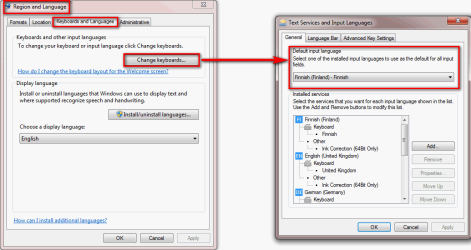
Yes. The easiest way is to disable all other layouts, just leave the Spanish. This forces all applications to use Spanish layout.

If you still occasionally need another layout, for instance English, set Spanish layout as default input language and only change to English layout when needed.

You can set the default input language here:

Default_Input_Language.png
(Click to enlarge)

Kari
 

My Computer

Computer type
Laptop
Computer Manufacturer/Model Number
HP ENVY 17-1150eg
OS
Windows 10 Pro x64 EN-GB
CPU
1.6 GHz Intel Core i7-720QM Processor
Memory
6 GB
Graphics Card(s)
ATI Mobility Radeon HD 5850 Graphics
Sound Card
Beats sound system with integrated subwoofer
Monitor(s) Displays
17" laptop display, 22" LED and 32" Full HD TV through HDMI
Screen Resolution
1600*900 (1), 1920*1080 (2&3)
Hard Drives
Internal: 2 x 500 GB SATA Hard Disk Drive 7200 rpm
External: 2TB for backups, 3TB USB3 network drive for media
Cooling
As Envy runs a bit warm, I have it on a Cooler Master pad
Keyboard
Logitech diNovo Media Desktop Laser (bluetooth)
Mouse
Logitech Performance Mouse MX
Internet Speed
50/10 Mbps VDSL
Antivirus
Windows Defender 4.3.9431.0
Browser
Maxthon 3.5.2., IE11
Back
Top