
Hello all, firstly; apologies for any headaches caused, however, until I buy a capture card I'm recording gameplay through a camera (the quality to my surprise isn't bad either). However picking up the audio requires me to turn up the TV volume quite a lot and also the mic (on my headset) to 100 + 20dB boost in Control Panel > Sound > Recording. As you can imagine, audio is average at best.
So, a cheap solution I thought would be to buy something like this, but I'm not entirely sure it'll work?
3.5mm Male to 2 Dual Female Plug Jack Stereo Audio Headset Mic Y Splitter Cables | eBay
The plan is to basically plug my headsets microphone jack to the red/pink one which will input the audio from that, but for the green, Plug in a male to male audio jack (one of these, which I already have):

From my TV to the green one. But I'm not sure if the green is for inputting or outputting audio?
_______________________________________
So here's where it gets even more complicated:
If the above will work (or you can link me to something that does what I'm wanting), I want to actually listen to the TV audio through my headsets headphones. A simple solution here would be to tick "Listen to this Device" in Control Panel > Sound > Recording, however that also means listening to my voice as well (which I find very offputting).
So, because my headset is like this:
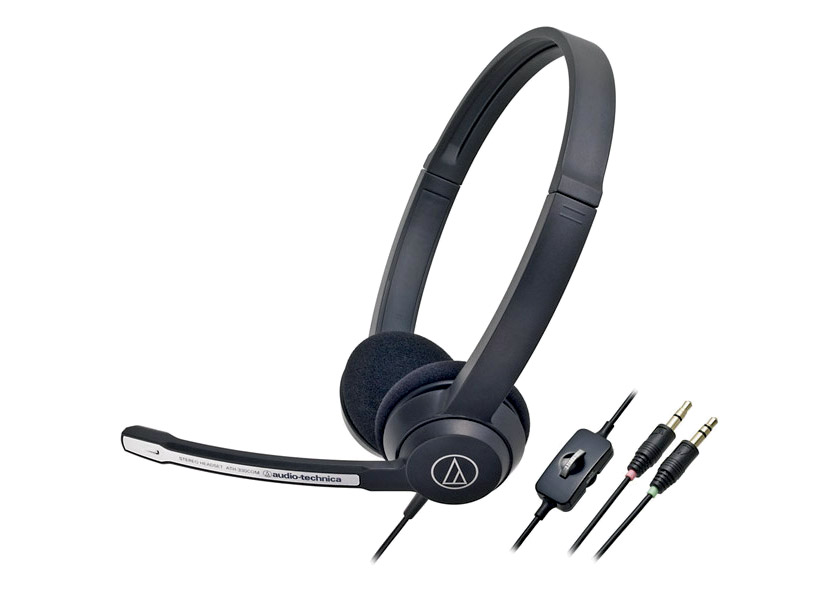
(headphone jack + microphone jack)
I was wondering if this layout would work (excuse the very quickly thrown together illustration):

So what's happening in the image is:
TV headphones port > headphone to 2 headphones splitter
>>Headset' headphone jack in one
>>male to male headphone jack in the other >
headphone port on the splitter < laptops microphone jack in one
headphone port on the splitter < Headset' Microphone jack in the other
Really hope this is possible or someone can think of a similar/simpler way. Also, I realize there may be some degraded quality over all of this equipment. but hopefully not too much.
Thanks in advance.
So, a cheap solution I thought would be to buy something like this, but I'm not entirely sure it'll work?
3.5mm Male to 2 Dual Female Plug Jack Stereo Audio Headset Mic Y Splitter Cables | eBay
The plan is to basically plug my headsets microphone jack to the red/pink one which will input the audio from that, but for the green, Plug in a male to male audio jack (one of these, which I already have):
From my TV to the green one. But I'm not sure if the green is for inputting or outputting audio?
_______________________________________
So here's where it gets even more complicated:
If the above will work (or you can link me to something that does what I'm wanting), I want to actually listen to the TV audio through my headsets headphones. A simple solution here would be to tick "Listen to this Device" in Control Panel > Sound > Recording, however that also means listening to my voice as well (which I find very offputting).
So, because my headset is like this:
(headphone jack + microphone jack)
I was wondering if this layout would work (excuse the very quickly thrown together illustration):
So what's happening in the image is:
TV headphones port > headphone to 2 headphones splitter
>>Headset' headphone jack in one
>>male to male headphone jack in the other >
headphone port on the splitter < laptops microphone jack in one
headphone port on the splitter < Headset' Microphone jack in the other
Really hope this is possible or someone can think of a similar/simpler way. Also, I realize there may be some degraded quality over all of this equipment. but hopefully not too much.
Thanks in advance.
My Computer
At a glance
Windows 7 32bit Home PremiumPentium(R) Dual-Core CPU T4200 @ 2.00GHz2.00 GBMobile Intel(R) 4 Series Express Chipset Family
- Computer type
- Laptop
- Computer Manufacturer/Model Number
- Samsung
- OS
- Windows 7 32bit Home Premium
- CPU
- Pentium(R) Dual-Core CPU T4200 @ 2.00GHz
- Motherboard
- SAMSUNG ELECTRONICS CO., LTD. R519/R719
- Memory
- 2.00 GB
- Graphics Card(s)
- Mobile Intel(R) 4 Series Express Chipset Family
- Sound Card
- Realtek High Definition Audio
- Screen Resolution
- 1366X768
- Hard Drives
- Crucial M4 256GB SSD
- Internet Speed
- Up to 20Mbps Sky Unlimited Broadband
- Antivirus
- Avast Free
- Browser
- Google Chrome


