Insane RAM usage which isn't listed in Task Manager/Resource Monitor

Zyph

New member
Local time
12:30 PM
Messages
3
Hi!

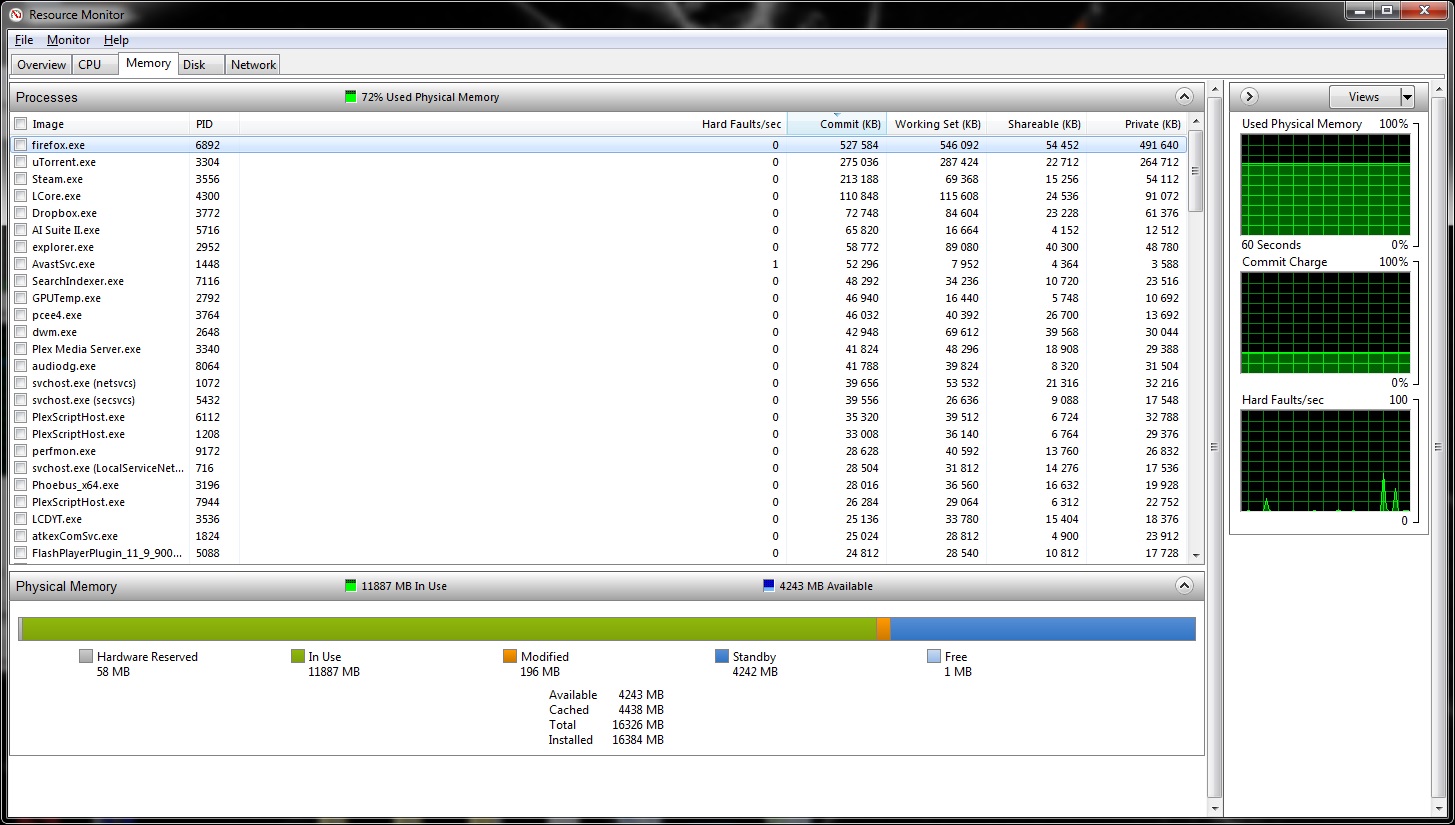
For a few days my now PC has used insane amounts of RAM and I haven't got a clue what's causing at as it's not all listen in Task Manager or Resource Monitor.

As the screenshot below shows: I have 16GB of RAM installed, the processes (when counting "Commit" section values) used up around ~2,5-3GB in total, but yet the RAM usage is at ~11,9GB.

I know ofcourse that the OS in itself generally takes up ~2-3GB, but even then I'm looking at ~6GB of used RAM without any clue what's eating it up.

I have ofcourse rebooted the PC several times. Right after the reboot everything seems fine, but slowly the RAM usage runs up.

As a matter of fact while uploading that screenshot and typing this my total RAM usage has risen to ~12,8GB. :eek:

Any ideas? :confused:


nTZnNZm.jpg
 

My Computer My Computer

At a glance

Windows 7 Ultimate x64Intel Core i7-3930K @4.50GHz (OC)G.Skill RipjawsZ DDR3 1600MHz 16GB (4x4GB)Zotac NVIDIA GeForce GTX680 4GB
Computer type
PC/Desktop
Computer Manufacturer/Model Number
Custom Built
OS
Windows 7 Ultimate x64
CPU
Intel Core i7-3930K @4.50GHz (OC)
Motherboard
Asus Rampage IV Formula Intel X79 LGA2011 ATX
Memory
G.Skill RipjawsZ DDR3 1600MHz 16GB (4x4GB)
Graphics Card(s)
Zotac NVIDIA GeForce GTX680 4GB
Antivirus
Avast
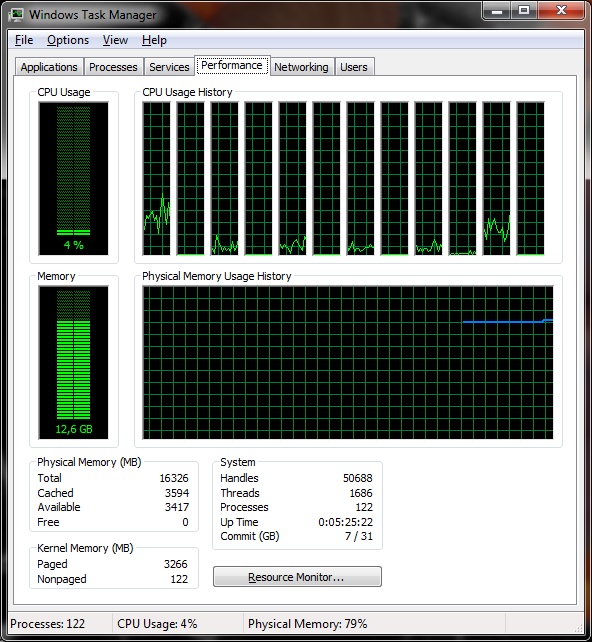
Post a screenshot of Task Manager - Performance tab. This contains important information not found anywhere else.
The "commit" of a process has no relationship to the memory usage of a process.
 

My Computer My Computer

At a glance

Windows 7 Pro 64 bitXeon W35208 GBNvidia Geforce 210
Computer type
PC/Desktop
Computer Manufacturer/Model Number
HP
OS
Windows 7 Pro 64 bit
CPU
Xeon W3520
Memory
8 GB
Graphics Card(s)
Nvidia Geforce 210

My Computer My Computer

At a glance

Windows 7 Ultimate x64Intel Core i7-3930K @4.50GHz (OC)G.Skill RipjawsZ DDR3 1600MHz 16GB (4x4GB)Zotac NVIDIA GeForce GTX680 4GB
Computer type
PC/Desktop
Computer Manufacturer/Model Number
Custom Built
OS
Windows 7 Ultimate x64
CPU
Intel Core i7-3930K @4.50GHz (OC)
Motherboard
Asus Rampage IV Formula Intel X79 LGA2011 ATX
Memory
G.Skill RipjawsZ DDR3 1600MHz 16GB (4x4GB)
Graphics Card(s)
Zotac NVIDIA GeForce GTX680 4GB
Antivirus
Avast
There is nothing in any display that shows a problem except that memory usage is high. The Paged kernel memory seems high but there is no way that could cause the problem. 122 processes is high but in itself will not cause the problem.

You could check the Resource monitor sorted by "Working set" but I doubt that will reveal the problem.

I notice you have uTorrent running. Torrent sites are notorious for spreading malware and that could be the problem, not necessarily detected by ant-malware software.
 

My Computer My Computer

At a glance

Windows 7 Pro 64 bitXeon W35208 GBNvidia Geforce 210
Computer type
PC/Desktop
Computer Manufacturer/Model Number
HP
OS
Windows 7 Pro 64 bit
CPU
Xeon W3520
Memory
8 GB
Graphics Card(s)
Nvidia Geforce 210
There is nothing in any display that shows a problem except that memory usage is high. The Paged kernel memory seems high but there is no way that could cause the problem. 122 processes is high but in itself will not cause the problem.

You could check the Resource monitor sorted by "Working set" but I doubt that will reveal the problem.

I notice you have uTorrent running. Torrent sites are notorious for spreading malware and that could be the problem, not necessarily detected by ant-malware software.

Sorting by "Working set" doesn't really answer this either...
Yes, running uTorrent, but only on private trackers which I trust would not spread malware. Shutting down uTorrent doesn't make the RAM usage dramatically drop either and have ran antivirus program to check for viruses malware. Also ran McAfee Stinger and all...

This is weeeeird I must say, never before had this type of program and I've had this current configuration for nearly a year now and I can't think of any recent actions or whatever which could explain this either :confused:

Up to 13,7GB usage now :/
 

My Computer My Computer

At a glance

Windows 7 Ultimate x64Intel Core i7-3930K @4.50GHz (OC)G.Skill RipjawsZ DDR3 1600MHz 16GB (4x4GB)Zotac NVIDIA GeForce GTX680 4GB
Computer type
PC/Desktop
Computer Manufacturer/Model Number
Custom Built
OS
Windows 7 Ultimate x64
CPU
Intel Core i7-3930K @4.50GHz (OC)
Motherboard
Asus Rampage IV Formula Intel X79 LGA2011 ATX
Memory
G.Skill RipjawsZ DDR3 1600MHz 16GB (4x4GB)
Graphics Card(s)
Zotac NVIDIA GeForce GTX680 4GB
Antivirus
Avast

My Computer My Computer

At a glance

Windows 7 Home Premium 64bitIntel Core i5 3570k OC'd to 4.3Ghz with Hyper...Crucial Ballistix Sport RAM 8GB DDR3 1333mhzSapphire AMD R9 290 Tri-X OC edition
Computer type
PC/Desktop
Computer Manufacturer/Model Number
Custom Build
OS
Windows 7 Home Premium 64bit
CPU
Intel Core i5 3570k OC'd to 4.3Ghz with Hyper 212 evo.
Motherboard
Asus p8z77 V-LX
Memory
Crucial Ballistix Sport RAM 8GB DDR3 1333mhz
Graphics Card(s)
Sapphire AMD R9 290 Tri-X OC edition
Sound Card
Intergrated
Screen Resolution
1920x1080p
Hard Drives
1TB WD Caviar blue
PSU
Coolermaster VS-Series 650W Semi Modular Gold Power Supply
Case
Fractal Define R5
Cooling
4 Arctic Cooling F12 120mm Case Fans, stock intake case fan.
Mouse
Logitech MX518 & Logitech G400
Antivirus
Avast and Malwarebytes
Browser
Chrome

My Computer My Computer

At a glance

Windows 7 Ultimate 32bit SP1Intel(R) Core(TM)2 Quad CPU @ 2.40GHz, 2400 MHz4 GBATI Radeon HD 2600 Pro
Computer type
PC/Desktop
Computer Manufacturer/Model Number
Bruce ... somewhere in his 40's
OS
Windows 7 Ultimate 32bit SP1
CPU
Intel(R) Core(TM)2 Quad CPU @ 2.40GHz, 2400 MHz
Motherboard
INTEL/D975XBX2
Memory
4 GB
Graphics Card(s)
ATI Radeon HD 2600 Pro
Monitor(s) Displays
Samsung SyncMaster 914v
Screen Resolution
1280 x 1024
Hard Drives
2/500GB each ... ST3500630AS ATA Device.
One is not connected
PSU
Rocketfish 700 W
Case
G.Skill Gigabyte Chassis
Keyboard
Standard PS/2 Keyboard
Mouse
Microsoft PS/2 Mouse
Internet Speed
DSL
Antivirus
Avira Internet Security
Browser
IE 11
Other Info
ATI HDMI Audio
Back
Top