inserting an image INTO a theme

currysteph

New member
Local time
7:37 PM
Messages
14
I know this has been asked but before but the answers have not been relevant to the question.

Several people have asked how to add an image to a theme and all the answer are basically leading them to creating a new theme with that image but not ADDING it to an existing theme.

I would like to know if it is possible and what the steps are to INSERT a new image into an existing theme..not creating a new theme.

thanks for any help
 

My Computer

OS
Win 7
Adding Image into a Theme

Hi Currysteph

Yes it can be done you need to ensure that you can view all files then navigate to

C:\Users\"your name"\AppData\Local\Microsoft\Windows\Themes

Find the theme you want and click on it and open desktop background folder and paste the image into that folder, presto the image is now added to the theme

Hope this helps :D
 

My Computer

Computer Manufacturer/Model Number
Own Build
OS
Windows 7 7600 SP1 64 Bit dual boot Windows 8 CP
CPU
i7-2600k currently running @ 4.8 ghz
Motherboard
GA-Z68X-UD5-B3
Memory
8 gig Corsair Dominator 1600 DDR3
Graphics Card(s)
Gigabyte GTX 680
Sound Card
Onboard
Monitor(s) Displays
Dell Ultrasharp U3011
Screen Resolution
2560 x 1600
Hard Drives
1 x 256gb Crucial M4 SSD
2 x 1tb Western Digital Caviar Black
1 x 2tb Western Digital Caviar Green
1 x 2Tb Samsung Story USB 3
1 Ready NAS NV+ with 4x2Tb Drives
PSU
Enermax MAXREVO 1350 Watts
Case
Antec Lanboy Air Case with NZXT Sentry LXE Controller
Cooling
Antec Kuhler 920 with 120 mm Noctua NF-P12 PWM fans
Keyboard
Roccat Isku
Mouse
Roccat Kova Plus
Internet Speed
12000 kbs
Other Info
Brother 6490CW Multifunction Printer
Brother 2170W Laser Printer
Fritz Box 7390 Modem / Router
Logitech Webcam 500
Logitech G25 Racing Wheel
XBox 360 Controller
Logitech Z4 Speakers
WD TV Live
  • Like
Reactions: JMH
Take the default theme 'characters' of Windows 7 for example:
1. Set your theme to be basic, such as Windows Classic;

2. Navigate to C:\Windows\Resources\Themes, then take ownership of the
'characters.theme';

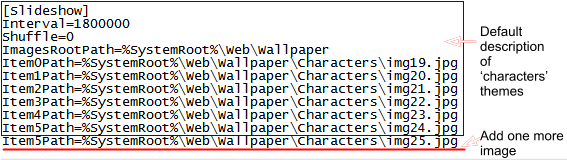
3. Open the 'characters.theme' with notepad, and navigate to the bottom of it.
There are 'img19.jpg' to 'img24.jpg' six images existing there. Now you can add
image's name as the following pic:
Snap1.png

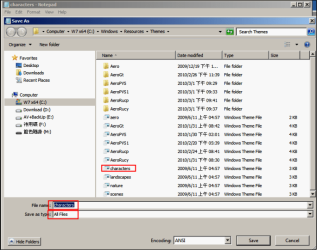
4. Save and replace the 'characters.theme':
Snap2.png

5. Navigate to C:\Windows\Web\Wallpaper\Characters\ , and place the img25.jpg
in that folder, for example.

You've inserted an image in it !!! And, your are free to replace all images in that
folder, too.
 

My Computer

OS
Server 2008 R2 SP1, Win7 x64 Pro SP1
CPU
Intel Core 2 Duo E6700 @3.3GHz
Motherboard
ASUS P5W DH DELUXE
Memory
Transcend DDRII 800 4GB (2 x 2GB )
Graphics Card(s)
GeForce 7950GX2
Sound Card
Realtek ALC882M Integrated on board
Monitor(s) Displays
ACER AL2723 27" LCD
Screen Resolution
1920x1200
Hard Drives
WD 6401 AALS 640G x 1
Seagate 160 GB (Barracuda 7200.7) x 2
PSU
Zippy PSL-6720P(G1)720W
Case
Thermaltake Kandalf VA9000SWA
Cooling
Zalman CNPS9500
Keyboard
Standard
Mouse
Standard
Internet Speed
10M, Cable
Other Info
Above is one of my desktops.
you just want to change the wallpaper? or image in part of the theme. like taskbar or startmenu...?

if it's the wallpaper then open> controlpanel..> personalization > and then bottom left icon.

if you mean any other image then you have to open the theme with restorator and change out your image there. be sure to use the original dimensions and file type eg. PNG or BMP
 

My Computer

OS
windows 7
CPU
AMD Phenom II x3 Black Edition 720
Motherboard
ASUS M3N72-D
Memory
OCZ Gold XTC DDR2 1066 2GB x2
Graphics Card(s)
BFG NVidia GTX 260
Monitor(s) Displays
Samsung 42" Plasma 1920x1080
Hard Drives
WDC 2TB
Segate Free Agent 3TB
PSU
OCZ XTreme 600w
Case
Antec 300
Cooling
Air x4 12" antec fans
Thanks guys...loquacious' post answered my question and works.

as for xile1020 >

I know how to change a wallpaper..but its a different story adding a wallpaper to a theme of wallpapers.

I was mistakenly under the assumption that the [ filename.theme ] contained the images in some sort of compressed format when in actuality its just an index pointing to the location of the collection of wallpapers...so just adding a new image to that collection (folder) is all that is needed....much simplier than I thought it was going to be.
 

My Computer

OS
Win 7
Back
Top