
Solved Inserting pictures into emails

willythecat

New member
Member
Local time
4:04 PM
Messages
54
Location
SW France
Have Windows 7 but not that it matters as this is a general email enquiry.
I have a main ISP email address together with a made up hotmail address that l also use.
Sometimes, when l get a normal email and open it, it may start of with a few sentences, then have a full blown picture inserted, followed by the remaining sentences.
Then of course there is the other kind whereby l get an email with an attachment.
How is this "full blown" picture inserted within the body of the email? I'm a bit clueless on this!
What l tried was to use the snipping tool and took a copy of my desktop screen. I then tried to email myself from my normal address to my hotmail address, but that didn't seem to work as it always comes up as an attachment.
Hope the above makes sense and what am l doing wrong?
 

My Computer

Computer Manufacturer/Model Number
Home Built System
OS
32bit Windows 7 Ultimate
CPU
AMD Athlon II X2 250 dual core
Motherboard
MSI 760GM-E51
Memory
4 x 1GB dual channel DDR3 @587MHz (7-7-7-20) Crucial Ram
Graphics Card(s)
Built in ATI graphics
Sound Card
Sound Maker Value 5.1
Monitor(s) Displays
Acer P224W
Screen Resolution
1680 x 1050
Hard Drives
2 x 500gb Samsung HD502HJ Sata
PSU
Heden 480W ATX V2.2
Case
ATX Tower
Cooling
n/a
Keyboard
Logitech hard wired Qwerty Keyboard
Mouse
Microsoft Basic Optical hard wired
Internet Speed
ADSL Av.download - 2.10Mb/s Av.upload - 0.14Mb/s
Other Info
Matshita DVD-ROM SR-8584A
TSSTcorp CDDVDW SH-S202N
Whoa, glad no one has replied yet as l'm getting there slow but sure.
ISP to hotmail works if l insert the file as an image. The only thing is that when l open hotmail the image is so dammed big that l have to scroll around the screen to view it!
What l need to know is to how to make the image smaller, but viewable to the naked eye. l suppose this is done within the snipping stage, so are there any guidelines as to the size?
 

My Computer

Computer Manufacturer/Model Number
Home Built System
OS
32bit Windows 7 Ultimate
CPU
AMD Athlon II X2 250 dual core
Motherboard
MSI 760GM-E51
Memory
4 x 1GB dual channel DDR3 @587MHz (7-7-7-20) Crucial Ram
Graphics Card(s)
Built in ATI graphics
Sound Card
Sound Maker Value 5.1
Monitor(s) Displays
Acer P224W
Screen Resolution
1680 x 1050
Hard Drives
2 x 500gb Samsung HD502HJ Sata
PSU
Heden 480W ATX V2.2
Case
ATX Tower
Cooling
n/a
Keyboard
Logitech hard wired Qwerty Keyboard
Mouse
Microsoft Basic Optical hard wired
Internet Speed
ADSL Av.download - 2.10Mb/s Av.upload - 0.14Mb/s
Other Info
Matshita DVD-ROM SR-8584A
TSSTcorp CDDVDW SH-S202N
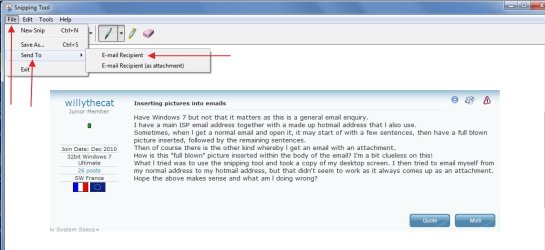
I call it picture e-mail....

One of several ways to send picture e-mail
Use your snipping tool as example > capture the image as you had described > you are now on Snipping Tool wondow > click File > click Send To > click E-mail Recipient

Image 18.jpg
 

My Computer

Computer Manufacturer/Model Number
Acer Aspire 7741Z
OS
Windows 7 Home Premium 64-bit, SP1
CPU
Intel Pentium P6200, Cores 2, 2.13 GHz
Memory
4 GB
Graphics Card(s)
Intel HD
Sound Card
unknown
Monitor(s) Displays
17.3 inches
Screen Resolution
1600 x 900
Hard Drives
640 GB, 5400 PRM
Thanks very much t-4-2, most helpful.
I've never actually done this before (never needed to until now), so l suppose l should have experimented first rather than just whingeing onto this forum. It's lucky that l tried sending emails to myself, (from one account to the other), and whilst you're quite right in what you say, the end result certainly needed adjustment.
When l saved the snipped screen snapshot it was 1680 x 1050 and when l sent it to my hotmail account and opened it, it was blimmin' enormous!
But, if l inserted it as an image file, l could then adjust the size! For a desktop image display, 1200 x 750 is about the maximum, and for general pictures either 700 x 438 or 1000 x 625 tends to suit.
Thanks again for the reply and will close this post as solved.
Regards


BUT


However .........Have been messing around furtherfurther
 

My Computer

Computer Manufacturer/Model Number
Home Built System
OS
32bit Windows 7 Ultimate
CPU
AMD Athlon II X2 250 dual core
Motherboard
MSI 760GM-E51
Memory
4 x 1GB dual channel DDR3 @587MHz (7-7-7-20) Crucial Ram
Graphics Card(s)
Built in ATI graphics
Sound Card
Sound Maker Value 5.1
Monitor(s) Displays
Acer P224W
Screen Resolution
1680 x 1050
Hard Drives
2 x 500gb Samsung HD502HJ Sata
PSU
Heden 480W ATX V2.2
Case
ATX Tower
Cooling
n/a
Keyboard
Logitech hard wired Qwerty Keyboard
Mouse
Microsoft Basic Optical hard wired
Internet Speed
ADSL Av.download - 2.10Mb/s Av.upload - 0.14Mb/s
Other Info
Matshita DVD-ROM SR-8584A
TSSTcorp CDDVDW SH-S202N
You are welcome.

t-4-2
 

My Computer

Computer Manufacturer/Model Number
Acer Aspire 7741Z
OS
Windows 7 Home Premium 64-bit, SP1
CPU
Intel Pentium P6200, Cores 2, 2.13 GHz
Memory
4 GB
Graphics Card(s)
Intel HD
Sound Card
unknown
Monitor(s) Displays
17.3 inches
Screen Resolution
1600 x 900
Hard Drives
640 GB, 5400 PRM
another way to resize pics that are large ,ie photos ,is to open them in photo viewer, adjust the size of the window to get a smaller pic but still viewable , then do a snip .
i often do that when uploading pics to the forum here, it also takes less time to upload them
 

My Computer

Computer Manufacturer/Model Number
Hewlett packard/p6512uk
OS
Microsoft Windows 7 Home Premium 64-bit 7600
CPU
IIx4 amd athelon 635 processor
Motherboard
FOXCONN 2AA9
Memory
2x2gb
Graphics Card(s)
ati radeon HD 5450
Sound Card
(1) Realtek High Definition Audio (2) AMD High Definition
Monitor(s) Displays
samsung lcd tv 32"
Screen Resolution
1360x 768
Hard Drives
(1) WDC WD10 01FAES-60Z2A0 SATA Disk Device (2) Maxtor OneTouch USB Device (3) ST310003 33AS USB Device (4) WD My Book 1111 USB Device
PSU
?
Cooling
air!
Keyboard
wireless hp
Mouse
wireless Hp,optical
Internet Speed
1.10mb/s
Antivirus
MSE
Browser
Firefox
Back
Top