Inspiron 15z

spk02

New member
Local time
2:44 PM
Messages
9
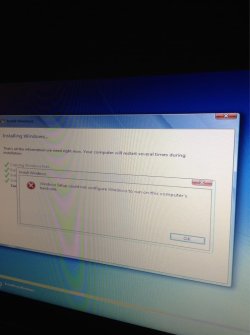
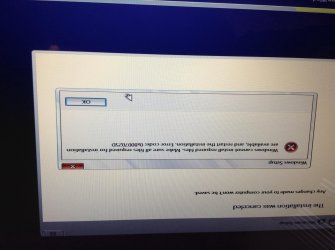
In short laptop froze during updates I left it over night and in the morning it was still stuck at 33% I had to force shut down by holding down power button. After it work but ie11 would freeze when I tried to run it, it would also immediately create an error report which would also freeze laptop. I tried using Windows 8 advanced start up options to do clean PC, but it didn't work. I recovered PC to an earlier image to retry everything again but that didn't work either. I tried resetting to factory settings that didn't work either. So I gave up and I was gonna try a w8 clean install. However when I put the windows 8 key in the windows 8 tool it told me the key couldn't be used.(I obtained key using Belrac) I than gave up with 8 I tried to do a windows 7 clean install but that didn't work either. Additionally there's a 29 GB volume which I cannot delete, expand or shrink. The original hdd size is 500. I'm familiar with the command line and I tried (when windows 8 was running) to check my image with one online to see if it would than fix it self but nothing. I've tried deleting volume through cmd but nothing. The only thing I've managed to run and install successfully on it was Linux Mint Debian Edition 17 (which is not a bad distort at all) Any help is greatly appreciated thank you kindly for your time
 

Attachments
  • image.jpg
    image.jpg
    578 KB · Views: 1

My Computer

OS
windows 7 64 bit
Boot the Win7 installation media for your licensed version to do a perfect Clean Reinstall - Factory OEM Windows 7. Everything needed is in the blue link.

Be sure to read the Special Note for Dell Owners at the end of tutorial for how to determine what partitions are worth keeping, probably only the small tools partition and then only if Diagnostics still boots from F12 key. Otherwise delete them all during install.

If you're unclear on any step or have another failure post back the exact steps or error message.
 
Trying a clean windows 7 install right now will update ASAP. Hopefully with error code.
 

My Computer

OS
windows 7 64 bit
Have you unplugged all peripherals and other drives?

Is there a BIOS update for the PC on the Dell Support Downloads webpage for your tag number?

Did you complete all steps in Overcoming Windows 7 Installation Failures - Windows 7 Help Forums including the BIOS reset, setting SATA controller to AHCI and wiping the Clean command?

Are you using the latest official Installer w/SP1 provided in that tutorial? There is an issue resolved in SP1 which once generated that error here: “Windows Setup could not configure Windows on this computer’s hardware” installation error on a Windows 7-based or a Windows Server 2008 R2-based computer

Try accessing Device Manager - Access During Windows 7 Installation to disable any erroring devices until it completes install.

If this fails test your hardware from Troubleshooting Steps for Windows 7
 
Solved:
I took the windows 8 drivers cd. I didn't or had not noticed it was in there. Additionally I had not noticed in the bios that the laptop can boot legacy and uefi so I changed it to uefi. That worked did a clean install from ground up. However I still couldn't erase the 29. Gb volume that still there nothing in it but it is there. Just doing updates now.
(Went blue screen through one of the updates and it did a memory dump, however system just restarted and reinstalled updates)
ImageUploadedBySeven Forums1404493779.304362.jpg
 

My Computer

OS
windows 7 64 bit
Make sure to enable hardware Updates and install all Important and Optional with reboots until no more are offered.

Don't force any drivers unless missing in DevMgr after all Updates. The exception is Standard VGA Display or chipset if missing element(s).

If updates are Queued on Shutdown button clear those first.

The Dell Diag part files may be hidden. Try booting Diagnostics and Util partition via F12 to see if either boot and run before deleting part
 
They seemed to have installed just fine. Did a big security update w restore point and all devices are installed. Everything's find and running at 100% capacity thanks so much for the help.
 

My Computer

OS
windows 7 64 bit
What about Dell hardware diagnostics via F12. Very valuable to preserve if possible which is why I asked and detailed it in tutorial.
 
Will check tomorrow Ty for the thorough follow up. And will post results.
 

My Computer

OS
windows 7 64 bit
Back
Top