
instailling a SSD

Mitch656

New member
Power User
VIP
Local time
3:57 AM
Messages
722
Location
Australia
Hi,
so I just got a SSD, and it wasn't showing in my computer, so I did some googleing and some sites suggest I need assigned a drive letter to it.

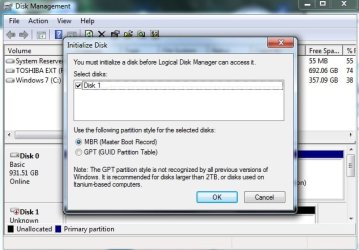
However when I got into the drive management I get a pop up. I don't know which option to select. I don't plan on booting from it. Just installing game files.

Which option show I select?
 

Attachments
  • Untitled.jpg
    Untitled.jpg
    44.7 KB · Views: 39

My Computer

Computer type
PC/Desktop
Computer Manufacturer/Model Number
Custom Build
OS
Windows 7 Professional 64bit
CPU
Intel Core i5 - 2500K @ 3.30GHz
Motherboard
Gigabyte Z77-HD3
Memory
4GB DDR3
Graphics Card(s)
EVGA Nvidia GeForce GT 740 2GB DDR3
Screen Resolution
1680 x 1050
Hard Drives
1T Samaung HD/ 1T toshiba external drive/ 1T western digital external drive/ 2T seagate external drive/ 250gb samaung SSD
PSU
Antec 430W
Keyboard
Microsoft Wireless Keyboard 800
Mouse
Microsoft Wireless Mouse 1000
Antivirus
AVG
Browser
Internet Explorer
For storage it shouldn`t matter, but I would choose MBR.

The note at the bottom of the window should also be a clue as to your decision ;)
 

My Computer

Computer type
PC/Desktop
Computer Manufacturer/Model Number
Skylake Special #666
OS
Windows 10 Pro x64
CPU
Intel Core i7 6700K
Motherboard
Asus Sabertooth Z170 Mark 1
Memory
GSkill TridentZ RGB 16GB 3600 16-16-16-36
Graphics Card(s)
EVGA GTX 980 Ti SC x2
Sound Card
Realtek High Definition
Monitor(s) Displays
AOC G2460PG
Screen Resolution
1920 x 1080 144Hz
Hard Drives
Samsung 860 Pro 256GB, Seagate Barracuda 4TB x2
PSU
EVGA 1000 P2, EVGA White Custom Braided Cables
Case
Corsair Vengeance C70 Gunmetal Black
Cooling
Corsair H100i v2, Corsair ML120 x2, Thermal Grizzly Kryonaut
Keyboard
Logitech G910 Orion Spectrum
Mouse
Logitech G700s
Internet Speed
Verizon Fios Quantum Gateway 75/75
Antivirus
Windows Defender, Malwarebytes Free 3.8.3
Browser
Chrome
Other Info
Corsair SP120 x4, LG Blu-ray Drive, Durabrand HT-395 100 Watt Dolby Digital Amp, Corsair H2100 Wireless 7.1 Headset
If you don't have a SSD for the C: drive, you should use it for the C:. It will make booting much faster (35 seconds) and when you put the programs on the SSD they open in one second. It will speed up your machine a lot.
 

My Computer

Computer type
PC/Desktop
Computer Manufacturer/Model Number
Custom Build
OS
Windows 7 Home Premium 32-Bit - Build 7600 SP1
CPU
Intel Core i3-2120 3.30Ghz
Motherboard
Asus P8Z68-V LX Intel Z68 Socket H2 ATX
Memory
Kingston 4 GB DDR3 1333 mhz
Graphics Card(s)
AMD Radeon HD6670
Sound Card
Sound Blaster Audigy SE 24-Bit
Monitor(s) Displays
Asus VE228
Screen Resolution
1440 X 900
Hard Drives
OCZ Vertex 3 120 GB Sata 3 SSD ==
Kingston SH103/S3 120 G Hyper X 120 GB SSD ==
Western Digital 500 GB Caviar Green 7200 RPM ==
PSU
Corsair CX600M == 600 Watt
Case
NZXT Apollo - Silver with Clear Side Panel
Cooling
Three 120 mm Fans
Keyboard
Microsoft Natural 4000
Mouse
Microsoft Custom Optical 3000
Internet Speed
AT&T Fiber Optic Wireless Network
Antivirus
Microsoft Security Essentials
Browser
Chrome
Other Info
120 mm Blue LED Fan -- Three Blue LED Lazer Light Sticks
We'll originally I brought the SSD to dual boot windows and OSX and have OSX on the SSD. It only a small 250GB
Then my brother was building the computer together and the ram I have currently didn't fit his motherboard.
So I'm ordering this plus an OSX compatible GPU.

So in the mean time i thought I would put my game folder on the SSD and see if it loads faster.


So far, I have yet to do anything. I still haven't chosen the partition style.
 

My Computer

Computer type
PC/Desktop
Computer Manufacturer/Model Number
Custom Build
OS
Windows 7 Professional 64bit
CPU
Intel Core i5 - 2500K @ 3.30GHz
Motherboard
Gigabyte Z77-HD3
Memory
4GB DDR3
Graphics Card(s)
EVGA Nvidia GeForce GT 740 2GB DDR3
Screen Resolution
1680 x 1050
Hard Drives
1T Samaung HD/ 1T toshiba external drive/ 1T western digital external drive/ 2T seagate external drive/ 250gb samaung SSD
PSU
Antec 430W
Keyboard
Microsoft Wireless Keyboard 800
Mouse
Microsoft Wireless Mouse 1000
Antivirus
AVG
Browser
Internet Explorer
If you're happy with your present Win7 then shrink it so it will fit on the SSD and then use Macrium Imaging boot disk to clone or image it over to the SSD. If not, then Clean Reinstall Windows 7 to the SSD.

Clean up and move your User folders (the best way to sort your files and organize them) to their own partition on the HD so the old OS can eventually be deleted). Then in the new Win7 right click on each User folder (Documents, Downloads, Favorites) to choose Properties, from the Location tab move the User folder to the location you have it stored on the data partition. If prompted to copy files within go ahead in case there is anything in the new User folders, since this will delete them on C and make them now live on the data partiton.

User files are the only thing that doesn't benefit from SSD speed. So be sure to install your OS and programs all on it.

Let us know how it goes. You've come a long way since I spent all night once helping you in a thread that got me nominated for MVP. I was just renewed for my fifth year. ;)
 
Back
Top