Install All messed up - with Ubuntu - HELP

Thanks for your kind words. The pleasure is truly all mine.
 

My Computer My Computer

At a glance

Windows Vista Home PremiumAMD Turion(tm)64 X2 Mobile Technology TL-58 1...1.00 GB
Computer Manufacturer/Model Number
Dell Inspiron 1521
OS
Windows Vista Home Premium
CPU
AMD Turion(tm)64 X2 Mobile Technology TL-58 1.90GHz
Memory
1.00 GB
Too soon to squeak....

Sorry, I should have waited to ask....

I did a Disk Cleanup evaluation on System files. After a long while, a list came back showing me the "Previous Windows Installations" that took up 52G.

I am deleting them. I am all set.

Thanks again sincerely...Mimi
 

My Computer My Computer

At a glance

Windows Vista Home PremiumAMD Turion(tm)64 X2 Mobile Technology TL-58 1...1.00 GB
Computer Manufacturer/Model Number
Dell Inspiron 1521
OS
Windows Vista Home Premium
CPU
AMD Turion(tm)64 X2 Mobile Technology TL-58 1.90GHz
Memory
1.00 GB
Sorry, I should have waited to ask....

I did a Disk Cleanup evaluation on System files. After a long while, a list came back showing me the "Previous Windows Installations" that took up 52G.

I am deleting them. I am all set.

Thanks again sincerely...Mimi
Again, you are most welcome!

Cheers!
Robert
 

My Computer My Computer

At a glance

...
OS
...
You do NOT need to reinstall GRUB. Before reinstalling windows, shut down and disconnect the hard drive with ubuntu on it. Then boot your windows disc and install. After the install is complete, reconnect the ubuntu drive. Then boot into your BIOS settings. Change the settings to boot from your ubuntu drive and reboot. When ubuntu is loaded open the terminal and type:

sudo grub-update

The process will take 5-10 seconds. Afterwards, reboot and you're good to go. Reinstalling GRUB ontop of an existing installation fails more often than not.
 

My Computer My Computer

At a glance

Windows 7 Ultimate x64, Ubuntu 10.10 x64, Fed...AMD Thuban Black Edition 3.2Ghz16GB Patriot Viper Extreme DDR3-16002XEVGA GTX 460 Superclocked Edition
OS
Windows 7 Ultimate x64, Ubuntu 10.10 x64, Fedora 13 x64
CPU
AMD Thuban Black Edition 3.2Ghz
Motherboard
MSI NF750-G55 SLI
Memory
16GB Patriot Viper Extreme DDR3-1600
Graphics Card(s)
2XEVGA GTX 460 Superclocked Edition
Sound Card
Sound Blaster X-Fi Extreme
Monitor(s) Displays
47" LG LCD HDTV
Screen Resolution
1080p
Hard Drives
2X Kingston 64GB SSD RAID 1 (Ubuntu)
WD BLACK 500 GB HDD (Windows)
2X WD BLACK 1TB RAID 1 (Fedora)
PSU
Antec 1000W ATX
Cooling
Water cooled
There isn't any reason to boot via GRUB if you have separate HD's. You can use the BIOS itself: set preferred HD as first to boot, then boot other HD using one-time BIOS Boot Menu key.

This method keeps the HD's independent to come and go as you please.
 
Yes you can do it that way. However, not all motherboards have that option.
 

My Computer My Computer

At a glance

Windows 7 Ultimate x64, Ubuntu 10.10 x64, Fed...AMD Thuban Black Edition 3.2Ghz16GB Patriot Viper Extreme DDR3-16002XEVGA GTX 460 Superclocked Edition
OS
Windows 7 Ultimate x64, Ubuntu 10.10 x64, Fedora 13 x64
CPU
AMD Thuban Black Edition 3.2Ghz
Motherboard
MSI NF750-G55 SLI
Memory
16GB Patriot Viper Extreme DDR3-1600
Graphics Card(s)
2XEVGA GTX 460 Superclocked Edition
Sound Card
Sound Blaster X-Fi Extreme
Monitor(s) Displays
47" LG LCD HDTV
Screen Resolution
1080p
Hard Drives
2X Kingston 64GB SSD RAID 1 (Ubuntu)
WD BLACK 500 GB HDD (Windows)
2X WD BLACK 1TB RAID 1 (Fedora)
PSU
Antec 1000W ATX
Cooling
Water cooled
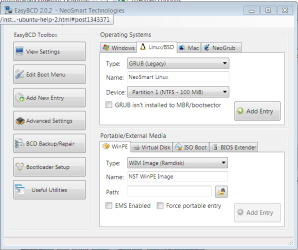
We also have good reports on using EasyBCD 2.02 from Win7 to add Linux to a windows-managed Dual Boot.

Capture.PNG click to enlarge
 
Back
Top