Install disk not working

Loco Metal Head

New member
Local time
11:51 PM
Messages
15
Hey everyone, I'm new here and I want to download the Windows 7 RC (I have beta 7000 as of now) and I can't figure out what I'm doing wrong exactly. I download the file and burn it on a dvd-r with active iso while the file is still compressed. What am I doing wrong exactly because when I place it in my desktop cd drive it automatically boots to the windows 7 beta and I tried changing the boot drive but I don't even see the disc their. Some help please? Thanks.

Note: Sorry bout the title mess up, meant to type something else but I hit enter by accident.
 
Last edited:

My Computer

OS
Windows 7
Hello Don, and welcome to Seven Forums.

Do you have the CD/DVD drive listed first, then the hard drive in the boot priority order list in the BIOS?

After you restart the computer with the DVD in the drive, you will only have 8 seconds to press a key to boot from the DVD when prompted.

Hope this helps,
Shawn
 

My Computer

Computer type
PC/Desktop
Computer Manufacturer/Model Number
Self built custom
OS
64-bit Windows 11 Pro for Workstations
CPU
Intel i7-8700K OC'd to 5 GHz
Motherboard
ASUS ROG Maximus XI Formula Z390
Memory
64 GB (4x16GB) G.SKILL TridentZ RGB DDR4 3600 MHz
Graphics Card(s)
ASUS ROG-STRIX-GTX1080TI-O11G-GAMING
Sound Card
Integrated
Monitor(s) Displays
2 x Samsung Odyssey G7 27"
Screen Resolution
2560x1440
Hard Drives
1TB Samsung 990 PRO M.2,
4TB Samsung 990 PRO PRO M.2,
TerraMaster F8 SSD Plus NAS
PSU
Seasonic Prime Titanium 850W
Case
Thermaltake Core P3
Cooling
Corsair Hydro H115i
Keyboard
Logitech wireless K800
Mouse
Logitech MX Master 4
Internet Speed
2 Gb/s Download and 100 Mb/s Upload
Antivirus
Malwarebyte Anti-Malware Premium
Browser
Google Chrome
Other Info
Logitech Z625 speaker system,
Logitech BRIO 4K Pro webcam,
HP Color LaserJet Pro MFP M477fdn,
APC SMART-UPS RT 1000 XL - SURT1000XLI,
Galaxy S23 Plus phone
Well the option to boot the cd beforehand is not there so that is why I'm actually posting here. Is it because I didn't create the cd correctly?
 

My Computer

OS
Windows 7
I know this sounds like a daft question but did you burn the image to the cd or did you just burn the file that you downloaded?
 

My Computer

Computer Manufacturer/Model Number
Self Build
OS
Win 7 RC
CPU
C2D E6700 2.6Ghz
Motherboard
Asus P5N32-Sli Premium
Memory
4GB
Graphics Card(s)
ATI Radeon X1950 Pro
Monitor(s) Displays
Dell S2309W
Screen Resolution
1920 x 1080
Hard Drives
Maxtor 6V250F0
WDC WD2500JD-00HBB0
WDC WD2500KS-00MJB0
PSU
Xclio 700W Modular
Case
Akasa Mirage
Keyboard
Logitech LX-300
Mouse
Logitech MX Revolution
Loco Metal Head,

Following Hammerhead's post, did you use a program like ImgBurn to burn the ISO image file with to the DVD? Copying the ISO as is to the DVD will not work.

Hope this helps,
Shawn
 

My Computer

Computer type
PC/Desktop
Computer Manufacturer/Model Number
Self built custom
OS
64-bit Windows 11 Pro for Workstations
CPU
Intel i7-8700K OC'd to 5 GHz
Motherboard
ASUS ROG Maximus XI Formula Z390
Memory
64 GB (4x16GB) G.SKILL TridentZ RGB DDR4 3600 MHz
Graphics Card(s)
ASUS ROG-STRIX-GTX1080TI-O11G-GAMING
Sound Card
Integrated
Monitor(s) Displays
2 x Samsung Odyssey G7 27"
Screen Resolution
2560x1440
Hard Drives
1TB Samsung 990 PRO M.2,
4TB Samsung 990 PRO PRO M.2,
TerraMaster F8 SSD Plus NAS
PSU
Seasonic Prime Titanium 850W
Case
Thermaltake Core P3
Cooling
Corsair Hydro H115i
Keyboard
Logitech wireless K800
Mouse
Logitech MX Master 4
Internet Speed
2 Gb/s Download and 100 Mb/s Upload
Antivirus
Malwarebyte Anti-Malware Premium
Browser
Google Chrome
Other Info
Logitech Z625 speaker system,
Logitech BRIO 4K Pro webcam,
HP Color LaserJet Pro MFP M477fdn,
APC SMART-UPS RT 1000 XL - SURT1000XLI,
Galaxy S23 Plus phone
I know this isn't exactly burning, per se'. But DAEMON Tools Lite gets the job done of mounting the .Iso and giving you a direct path to the installation.
 

My Computer

OS
Windows Se7en
I'm a little confused also, shouldn't it be burned to a dvd and not a cd and like was said above you need a burning prog to make the dvd.

Smitty
 

My Computer

Computer Manufacturer/Model Number
Dell XPS 730
OS
Windows 7 Home Premium 64 bit
CPU
Intel Core 2 quad Extreme Q9770 @ 3.2 GHz
Memory
4x2 GB Muskin 1600 MHz ram
Graphics Card(s)
NVidia GTX 250
Sound Card
Soundblaster X-Fi Fatality Champion
Monitor(s) Displays
2 Dell 2007WFP Ultrascans
Screen Resolution
3360 x 1050
Hard Drives
WD Black 1TB sata, 2-WD Black 500 sata, 2-Seagate 500 Go external
PSU
1000 Watt
Cooling
air
Keyboard
MS Natrual Keyboard Pro
Mouse
Logitech Wireless Trackball
Internet Speed
DSL Elite
I'm a little confused also, shouldn't it be burned to a dvd and not a cd and like was said above you need a burning prog to make the dvd.

Smitty

Yep your're right. Should be dvd and not cd..doh!.....Runs off to hide.:o
 

My Computer

Computer Manufacturer/Model Number
Self Build
OS
Win 7 RC
CPU
C2D E6700 2.6Ghz
Motherboard
Asus P5N32-Sli Premium
Memory
4GB
Graphics Card(s)
ATI Radeon X1950 Pro
Monitor(s) Displays
Dell S2309W
Screen Resolution
1920 x 1080
Hard Drives
Maxtor 6V250F0
WDC WD2500JD-00HBB0
WDC WD2500KS-00MJB0
PSU
Xclio 700W Modular
Case
Akasa Mirage
Keyboard
Logitech LX-300
Mouse
Logitech MX Revolution
Lol, ;)

Nope.gif
 

My Computer

Computer type
PC/Desktop
Computer Manufacturer/Model Number
Self built custom
OS
64-bit Windows 11 Pro for Workstations
CPU
Intel i7-8700K OC'd to 5 GHz
Motherboard
ASUS ROG Maximus XI Formula Z390
Memory
64 GB (4x16GB) G.SKILL TridentZ RGB DDR4 3600 MHz
Graphics Card(s)
ASUS ROG-STRIX-GTX1080TI-O11G-GAMING
Sound Card
Integrated
Monitor(s) Displays
2 x Samsung Odyssey G7 27"
Screen Resolution
2560x1440
Hard Drives
1TB Samsung 990 PRO M.2,
4TB Samsung 990 PRO PRO M.2,
TerraMaster F8 SSD Plus NAS
PSU
Seasonic Prime Titanium 850W
Case
Thermaltake Core P3
Cooling
Corsair Hydro H115i
Keyboard
Logitech wireless K800
Mouse
Logitech MX Master 4
Internet Speed
2 Gb/s Download and 100 Mb/s Upload
Antivirus
Malwarebyte Anti-Malware Premium
Browser
Google Chrome
Other Info
Logitech Z625 speaker system,
Logitech BRIO 4K Pro webcam,
HP Color LaserJet Pro MFP M477fdn,
APC SMART-UPS RT 1000 XL - SURT1000XLI,
Galaxy S23 Plus phone
All I am doing is taking the Windows 7 RC file I just downloaded which is in iso form and opening Active Iso along with the file and pressing burn. Should I be doing something different?
 

My Computer

OS
Windows 7
Loco Metal Head,

That sounds right to me. I have not used Active ISO though, so you might try ImgBurn to burn the ISO image file with as a test to see if that may the problem. Be sure to burn it with a slow burn speed.
 

My Computer

Computer type
PC/Desktop
Computer Manufacturer/Model Number
Self built custom
OS
64-bit Windows 11 Pro for Workstations
CPU
Intel i7-8700K OC'd to 5 GHz
Motherboard
ASUS ROG Maximus XI Formula Z390
Memory
64 GB (4x16GB) G.SKILL TridentZ RGB DDR4 3600 MHz
Graphics Card(s)
ASUS ROG-STRIX-GTX1080TI-O11G-GAMING
Sound Card
Integrated
Monitor(s) Displays
2 x Samsung Odyssey G7 27"
Screen Resolution
2560x1440
Hard Drives
1TB Samsung 990 PRO M.2,
4TB Samsung 990 PRO PRO M.2,
TerraMaster F8 SSD Plus NAS
PSU
Seasonic Prime Titanium 850W
Case
Thermaltake Core P3
Cooling
Corsair Hydro H115i
Keyboard
Logitech wireless K800
Mouse
Logitech MX Master 4
Internet Speed
2 Gb/s Download and 100 Mb/s Upload
Antivirus
Malwarebyte Anti-Malware Premium
Browser
Google Chrome
Other Info
Logitech Z625 speaker system,
Logitech BRIO 4K Pro webcam,
HP Color LaserJet Pro MFP M477fdn,
APC SMART-UPS RT 1000 XL - SURT1000XLI,
Galaxy S23 Plus phone
Even easier is to use Alex Feinman's ISO Recorder v3 - which he has updated for Windows 7. It adds a context menu item that let's you find the .ISO and right click it and burn it to DVD - no fuss.

The app also has the ability to copy from one disc to another *and* to make those wonderful ISOs on your own of any other discs you might want to....
 

My Computers

System One System Two

  • Computer type
    PC/Desktop
    Computer Manufacturer/Model Number
    The Beast Model A (homebrew)
    OS
    Windows 11 21H2 Current build
    CPU
    AMD Ryzen 9 3950X
    Motherboard
    MSI MEG X570 GODLIKE
    Memory
    4 * 32 GB - Corsair Vengeance 3600 MHz
    Graphics Card(s)
    EVGA GeForce RTX 3080 Ti XC3 ULTRA GAMING (12G-P5-3955-KR)
    Sound Card
    Realtek® ALC1220 Codec
    Monitor(s) Displays
    2x Eve Spectrum ES07D03 4K Gaming Monitor (Matte) | Eve Spec
    Screen Resolution
    3x 3840 x 2160
    Hard Drives
    3x Samsung 980 Pro NVMe PCIe 4 M.2 2 TB SSD (MZ-V8P2T0B/AM) } 3x Sabrent Rocket NVMe 4.0 1 TB SSD
    PSU
    PC Power & Cooling’s Silencer Series 1050 Watt, 80 Plus Plat
    Case
    Fractal Design Define 7 XL Dark ATX Full Tower Case
    Cooling
    SteelSeries Apex Pro Wired Gaming Keyboard
    Keyboard
    SteelSeries Apex Pro
    Mouse
    Logitech MX Master 3S | MX Master 3 for business
    Internet Speed
    AT&T LightSpeed Gigabit Duplex Ftth
    Antivirus
    Windows Defender + MB 3
    Browser
    Nightly (default) + Firefox (stable),Chrome, Edge
  • Computer type
    PC/Desktop
    System Manufacturer/Model Number
    Dell Latitude E5470
    OS
    ChromeOS Flex Dev Channel (current)
    CPU
    Intel(R) Core(TM) i5-6300U CPU @ 2.40GHz, 2501 Mhz, 2 Core(s), 4 Logical Processor(s)
    Motherboard
    Dell
    Memory
    16 GB
    Graphics Card(s)
    Intel(R) HD Graphics 520
    Sound Card
    Intel(R) HD Graphics 520 + RealTek Audio
    Monitor(s) Displays
    Dell laptop display 15"
    Screen Resolution
    1920 * 1080
    Hard Drives
    Toshiba 128GB M.2 22300 drive
    INTEL Cherryville 520 Series SSDSC2CW180A 180 GB SATA III SSD
    PSU
    Dell
    Case
    Dell
    Cooling
    Dell
    Keyboard
    Dell
    Mouse
    Logitech MX Master 3S (shared w. Sys 1) | Dell TouchPad
    Internet Speed
    AT&T LightSpeed Gigabit Duplex Ftth
Even easier is to use Alex Feinman's ISO Recorder v3 - which he has updated for Windows 7. It adds a context menu item that let's you find the .ISO and right click it and burn it to DVD - no fuss.

The app also has the ability to copy from one disc to another *and* to make those wonderful ISOs on your own of any other discs you might want to....


Of course though, Windows 7 already has a built-in ISO burner that you can use to. ;)

http://www.sevenforums.com/tutorials/548-burn-disc-image-iso-img-file.html
 

My Computer

Computer type
PC/Desktop
Computer Manufacturer/Model Number
Self built custom
OS
64-bit Windows 11 Pro for Workstations
CPU
Intel i7-8700K OC'd to 5 GHz
Motherboard
ASUS ROG Maximus XI Formula Z390
Memory
64 GB (4x16GB) G.SKILL TridentZ RGB DDR4 3600 MHz
Graphics Card(s)
ASUS ROG-STRIX-GTX1080TI-O11G-GAMING
Sound Card
Integrated
Monitor(s) Displays
2 x Samsung Odyssey G7 27"
Screen Resolution
2560x1440
Hard Drives
1TB Samsung 990 PRO M.2,
4TB Samsung 990 PRO PRO M.2,
TerraMaster F8 SSD Plus NAS
PSU
Seasonic Prime Titanium 850W
Case
Thermaltake Core P3
Cooling
Corsair Hydro H115i
Keyboard
Logitech wireless K800
Mouse
Logitech MX Master 4
Internet Speed
2 Gb/s Download and 100 Mb/s Upload
Antivirus
Malwarebyte Anti-Malware Premium
Browser
Google Chrome
Other Info
Logitech Z625 speaker system,
Logitech BRIO 4K Pro webcam,
HP Color LaserJet Pro MFP M477fdn,
APC SMART-UPS RT 1000 XL - SURT1000XLI,
Galaxy S23 Plus phone

My Computer

OS
Windows 7
You know you don't have to boot to the disc in order to install it, unless you want to change the partition etc... You can install a clean installation from inside of windows and still have it work correctly...
 

My Computer

Computer Manufacturer/Model Number
fakeasdf (c)
OS
Win 7 Pro x64 x 3, Win 7 Pro x86, Ubuntu 9.04
CPU
2 x C2D [email protected] Ghz, C2D [email protected] ghz, P4 @ 3.0 ghz,
Motherboard
GIGABYTE GA-EP35-DS3P LGA 775 Intel P35 ATX Dynamic Energy S
Memory
2x8 GB Corsair, 4GB Kingston, 2GB GSkill
Graphics Card(s)
ATI Radeon 4670 1 GB DDR3, 2600 Pro, 2400 Pro, Intel 965
Sound Card
I don't care... Connected using Optical on Media Center
Monitor(s) Displays
Panasonic Viera 50" Plasma, 2x 19"
Screen Resolution
1080P, 1280x1024's
Hard Drives
4 Terabytes
Case
Antec P182 Gun Metal Black
Internet Speed
20 Mbit U/D
Yea, I would use the one that is already there but I can't use my desktop to burn the cd cause it doesn't have a dvd burner. But for Imgburn do I have to write the img over and then write the files on the cd seperately? That is what is kind of confusing me.

This may help some more: :)

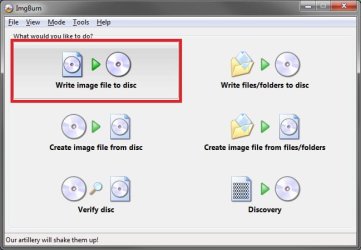
When you run ImgBurn, you would select the Write image file to disc option.
1.jpg
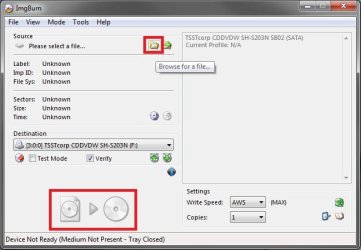
After that, click on the folder and navigate to where you have the ISO file saved to, and select it. Put a blank (unformated) DVD in the DVD drive, then click on the file/disc icon boxed in red on the bottom of the image below when it is no longer grayed out to start burning the ISO file to the DVD.

3.jpg
 

My Computer

Computer type
PC/Desktop
Computer Manufacturer/Model Number
Self built custom
OS
64-bit Windows 11 Pro for Workstations
CPU
Intel i7-8700K OC'd to 5 GHz
Motherboard
ASUS ROG Maximus XI Formula Z390
Memory
64 GB (4x16GB) G.SKILL TridentZ RGB DDR4 3600 MHz
Graphics Card(s)
ASUS ROG-STRIX-GTX1080TI-O11G-GAMING
Sound Card
Integrated
Monitor(s) Displays
2 x Samsung Odyssey G7 27"
Screen Resolution
2560x1440
Hard Drives
1TB Samsung 990 PRO M.2,
4TB Samsung 990 PRO PRO M.2,
TerraMaster F8 SSD Plus NAS
PSU
Seasonic Prime Titanium 850W
Case
Thermaltake Core P3
Cooling
Corsair Hydro H115i
Keyboard
Logitech wireless K800
Mouse
Logitech MX Master 4
Internet Speed
2 Gb/s Download and 100 Mb/s Upload
Antivirus
Malwarebyte Anti-Malware Premium
Browser
Google Chrome
Other Info
Logitech Z625 speaker system,
Logitech BRIO 4K Pro webcam,
HP Color LaserJet Pro MFP M477fdn,
APC SMART-UPS RT 1000 XL - SURT1000XLI,
Galaxy S23 Plus phone
LOL, you're welcome Loco Metal Head. :)
 

My Computer

Computer type
PC/Desktop
Computer Manufacturer/Model Number
Self built custom
OS
64-bit Windows 11 Pro for Workstations
CPU
Intel i7-8700K OC'd to 5 GHz
Motherboard
ASUS ROG Maximus XI Formula Z390
Memory
64 GB (4x16GB) G.SKILL TridentZ RGB DDR4 3600 MHz
Graphics Card(s)
ASUS ROG-STRIX-GTX1080TI-O11G-GAMING
Sound Card
Integrated
Monitor(s) Displays
2 x Samsung Odyssey G7 27"
Screen Resolution
2560x1440
Hard Drives
1TB Samsung 990 PRO M.2,
4TB Samsung 990 PRO PRO M.2,
TerraMaster F8 SSD Plus NAS
PSU
Seasonic Prime Titanium 850W
Case
Thermaltake Core P3
Cooling
Corsair Hydro H115i
Keyboard
Logitech wireless K800
Mouse
Logitech MX Master 4
Internet Speed
2 Gb/s Download and 100 Mb/s Upload
Antivirus
Malwarebyte Anti-Malware Premium
Browser
Google Chrome
Other Info
Logitech Z625 speaker system,
Logitech BRIO 4K Pro webcam,
HP Color LaserJet Pro MFP M477fdn,
APC SMART-UPS RT 1000 XL - SURT1000XLI,
Galaxy S23 Plus phone
Back
Top