
IDEngineer
New member
- Local time
- 6:59 AM
- Messages
- 6
I've spent all day on this and still cannot get it to work.
I'm building a second Win7 machine as insurance against my primary Win7 machine having a problem. Given the efforts to make Win7 unusable on later generations, I specifically chose the most recent generation of components that have native Win7 support. I ended up with a brand new Asus Prime Z270-A, Intel i7-6700K, 32GB of DDR4-3200 with the lowest latency I could find that was on the Asus QVL for that board, etc.
I specifically chose this motherboard because it supports two M.2 sticks in NVMe (not just SATA) mode. Might as well get the most performance possible.I have a 500GB Samsung 980 Pro installed in the M2_1 slot to hold the OS and applications, and I'll add a 2GB M.2 later for data.
The problem is I cannot get Win7's installer to see the M.2. I've read countless articles that dance around this topic Here's the sequence I followed:
* The BIOS sees the M.2 drive and properly identifies its size and details, so we're communicating with the M.2 at least at the hardware level. There are no other drives of any kind in the machine, on purpose, other than the USB stick with the Win7 ISO image.
* I initially created a USB stick with the bootable install image of Win7 Ultimate. It booted, but since this motherboard only natively exposes a single sub-USB3 connection (and Win7 doesn't natively handle USB3+) I had to grab the USB3 drivers from the Asus CD and incorporate them into the bootable image using DISM. That worked, and now I'm able to have the USB stick, and a keyboard, and a mouse all operational at the same time.
* The Win7 installer boots just fine and gets all the way to the point where it realizes it cannot see any drives on which to install the OS, so it prompts for drivers. No problem, I'm prepared, I have the "bare" drivers from Samsung on the USB stick. Except that it claims the Samsung drivers aren't signed and refuses to install them.
* No problem, I reimaged install.wim and boot.wim again and incorporated the Samsung drivers, using the "force" option to override the lack of signature. This was successful, so I tried again but the installer still cannot see the M.2 drive.
* Then I ran across a discussion of two Win7 hotfixes, KB2990941 and KB3087873, which (though vaguely described) seem to add NVMe support to Win7. I incorporated those into the ISO image using DISM and tried again. No luck.
* I created brand new versions of install.wim and boot.wim, this time with just the USB3 and hotfixes, leaving out the Samsung drivers. Make a tiny bit of progress... now the Samsung .inf file is visible (actually, the installer lists it THREE times) but when I select and try to load it the installer claims "No new devices could be found".
* I thought perhaps going back to versions of the Samsung drivers closer to the formal end of Win7 might prove helpful since 1) Samsung claims their later M.2's are backwards compatible, but I can't find drivers on any official Samsung site anywhere. Every reference to M.2 drivers says "No drivers are necessary, your M.2 will be automatically supported". Yeah, right.
* There's been some suggestion that the hotfixes could eliminate the need for separate, manufacturer-specific drivers and that the M.2 drive would become accessible solely with the hotfixes. That has not happened. I've tried .wim files both with, and without, the Samsung drivers but nothing makes the drive accessible within the installer.
I'm sort of stuck now. The Samsung drivers I have either "aren't signed" (if I try to load them manually) or I have to force past the lack of signature (if I incorporate them into the ISO image). The hotfixes magically ignore the lack of signature but don't "see" the physical device, yet I know the hardware is accessible because the BIOS accurately reports everything about the drive. Thus this is a Win7 installer problem, not a hardware problem. I'm confident my .wim file handling is OK because the USB3 and hotfix issues are solved, but incorporating the Samsung drivers the same way yields nothing.
Any advice would be GREATLY appreciated. Absolute worst case I can go back to regular SSD's but it would be major bummer if I have two nice M.2 slots sitting here that I cannot use.
Thanks!
I'm building a second Win7 machine as insurance against my primary Win7 machine having a problem. Given the efforts to make Win7 unusable on later generations, I specifically chose the most recent generation of components that have native Win7 support. I ended up with a brand new Asus Prime Z270-A, Intel i7-6700K, 32GB of DDR4-3200 with the lowest latency I could find that was on the Asus QVL for that board, etc.
I specifically chose this motherboard because it supports two M.2 sticks in NVMe (not just SATA) mode. Might as well get the most performance possible.I have a 500GB Samsung 980 Pro installed in the M2_1 slot to hold the OS and applications, and I'll add a 2GB M.2 later for data.
The problem is I cannot get Win7's installer to see the M.2. I've read countless articles that dance around this topic Here's the sequence I followed:
* The BIOS sees the M.2 drive and properly identifies its size and details, so we're communicating with the M.2 at least at the hardware level. There are no other drives of any kind in the machine, on purpose, other than the USB stick with the Win7 ISO image.
* I initially created a USB stick with the bootable install image of Win7 Ultimate. It booted, but since this motherboard only natively exposes a single sub-USB3 connection (and Win7 doesn't natively handle USB3+) I had to grab the USB3 drivers from the Asus CD and incorporate them into the bootable image using DISM. That worked, and now I'm able to have the USB stick, and a keyboard, and a mouse all operational at the same time.
* The Win7 installer boots just fine and gets all the way to the point where it realizes it cannot see any drives on which to install the OS, so it prompts for drivers. No problem, I'm prepared, I have the "bare" drivers from Samsung on the USB stick. Except that it claims the Samsung drivers aren't signed and refuses to install them.
* No problem, I reimaged install.wim and boot.wim again and incorporated the Samsung drivers, using the "force" option to override the lack of signature. This was successful, so I tried again but the installer still cannot see the M.2 drive.
* Then I ran across a discussion of two Win7 hotfixes, KB2990941 and KB3087873, which (though vaguely described) seem to add NVMe support to Win7. I incorporated those into the ISO image using DISM and tried again. No luck.
* I created brand new versions of install.wim and boot.wim, this time with just the USB3 and hotfixes, leaving out the Samsung drivers. Make a tiny bit of progress... now the Samsung .inf file is visible (actually, the installer lists it THREE times) but when I select and try to load it the installer claims "No new devices could be found".
* I thought perhaps going back to versions of the Samsung drivers closer to the formal end of Win7 might prove helpful since 1) Samsung claims their later M.2's are backwards compatible, but I can't find drivers on any official Samsung site anywhere. Every reference to M.2 drivers says "No drivers are necessary, your M.2 will be automatically supported". Yeah, right.
* There's been some suggestion that the hotfixes could eliminate the need for separate, manufacturer-specific drivers and that the M.2 drive would become accessible solely with the hotfixes. That has not happened. I've tried .wim files both with, and without, the Samsung drivers but nothing makes the drive accessible within the installer.
I'm sort of stuck now. The Samsung drivers I have either "aren't signed" (if I try to load them manually) or I have to force past the lack of signature (if I incorporate them into the ISO image). The hotfixes magically ignore the lack of signature but don't "see" the physical device, yet I know the hardware is accessible because the BIOS accurately reports everything about the drive. Thus this is a Win7 installer problem, not a hardware problem. I'm confident my .wim file handling is OK because the USB3 and hotfix issues are solved, but incorporating the Samsung drivers the same way yields nothing.
Any advice would be GREATLY appreciated. Absolute worst case I can go back to regular SSD's but it would be major bummer if I have two nice M.2 slots sitting here that I cannot use.
Thanks!
My Computer
At a glance
Win7 Ultimate x64 SP1Various I7-####K'sDDR4-3200, etc.Modest 750Ti
- Computer type
- PC/Desktop
- Computer Manufacturer/Model Number
- Custom based on various Asus motherboards
- OS
- Win7 Ultimate x64 SP1
- CPU
- Various I7-####K's
- Motherboard
- Various Asus
- Memory
- DDR4-3200, etc.
- Graphics Card(s)
- Modest 750Ti
- Hard Drives
- Various NVMe, SATA SSD, and spinning media
- Antivirus
- None!
- Browser
- Firefox

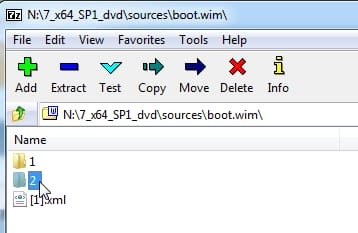
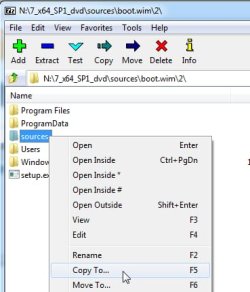
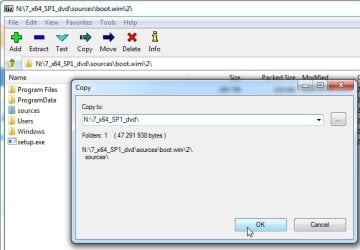
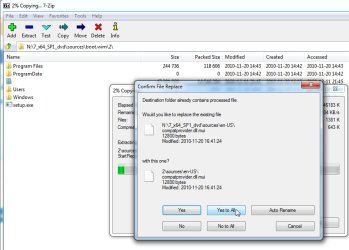

 Looking forward to reporting back once the install is finished and successful.