Install issues: kernel missing or corrupt

My Computer

Computer Manufacturer/Model Number
* BFK Customs *
OS
W 7 64-bit Ultimate
CPU
Intel Q9550 Yorkfield
Motherboard
ASUS P5Q Pro
Memory
8GB Dominator 8500C5D
Graphics Card(s)
ATI : XFX 5870
Sound Card
Realtek HD Audio 7-1
Monitor(s) Displays
1x 47" LCD HDMI & 3x 26" LCD HDMI
Screen Resolution
1920x1080P & 1920x1200
Hard Drives
1x 80GB Intel X25-M G2 SSD : 1x 500GB & 1x 640GB WD Caviar Black(s)
PSU
Corsair 620HX
Case
Cooler Master RC-690
Cooling
Tuniq Tower 120, 2x 140mm and 3x 120mm case fans
Keyboard
Microsoft 500
Mouse
Razer Diamondback 3G
Internet Speed
14 Mb/s
Other Info
1x Koutech 3Gb/s SATA HDD Hot Swap Rack
Not pointing fingers, just wondered when you say "I tried all that" how much you'd actually done and it turns out you haven't wiped your HD which is the most important step.

Formatting is not the same as wiping your HD as formatting erases nothing, while wiping overwrites all remaining code (including infected, corrupt and boot sector) with zeroes.

Now how many of the other suggested steps have actually been completed, including the dozen steps in the final link I posted:

Unplug all periperhals and other HD's during install.

Make sure you have the latest BIOS version update. If so, reset the CMOS: Clear CMOS - 3 Ways to Clear the CMOS - Reset BIOS

If you have SATA HD, set controller to AHCI first, then IDE if necessary. Next test the HD using maker's diag/repair CD scan: HD Diagnostic followed by http://www.sevenforums.com/tutorials/433-disk-check.html

Now wipe the HD of all corruption, infection or bad boot sector code: http://www.sevenforums.com/tutorials/91339-ssd-hdd-optimize-windows-reinstallation.html

Other tips for getting a purrfect install: http://www.sevenforums.com/installation-setup/125874-re-install-windows-7-a.html#post1086729
 
Hi again,

I did the BIOS reset.

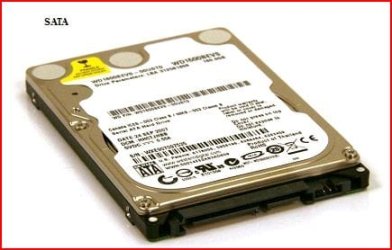
How do I know I have a SATA-drive? (sorry for my lack of pc-knowledge)

I tried "wiping" the HD and tried to reinstall Windows again but I still get the same error..
 

My Computer

OS
Windows 7 Ultimate 32
Go through the BIOS setup screens carefully until you find where the HD is registered. Look for SATA controller setting which should have choices like IDE, ATA, AHCI, etc. Set it to AHCI to try install. If this fails try IDE mode.
 
hi again,

i did the bios reset.

How do i know i have a sata-drive? (sorry for my lack of pc-knowledge)

i tried "wiping" the hd and tried to reinstall windows again but i still get the same error..

Capture1.JPG

Capture2.JPG
 

My Computer

OS
ME/XP/Vista/Win7
Back
Top