Install on a new HDD - not formatted yet

kwack

New member
Local time
8:55 PM
Messages
76
Probably an easy question but one I have never done before as I have always installed to an existing partition.

Been having problems with Win 7 64bit and with a few BSOD and with no driver support for my Canon scanner I have decided to go and install 32bit version.

I have purchased a new HDD which I want to partition into 2 to create an O/S partition and the other for data etc.

During a custom install will it give me the option to format and create a partition from my new HDD and seelctteh size that I want?

Easy question but worth asking before I kick this off tonight

Thanks

Kwack
 

My Computer My Computer

At a glance

Win 7 64 bitE6320 O/C to 3.1 ghzocz 6400XFX Nvidia GTX260
Computer Manufacturer/Model Number
Home Built
OS
Win 7 64 bit
CPU
E6320 O/C to 3.1 ghz
Motherboard
Gigabyte GA-DSP4
Memory
ocz 6400
Graphics Card(s)
XFX Nvidia GTX260
Sound Card
Onboard
Hard Drives
2 x various
PSU
Corsair tx750
Case
Antec 900
Cooling
xigmatek
For a new hard drive out of the box(often called "raw") you have the option of using the drive tools included on the Windows install disk or a 3rd party partitioning program to create the two partitions and format them for use. I see we both have the same case too! :D

The program often used here and about to be used once more is the free Linux tool GParted you download and burn to cd or write to a usb flash drive in order to boot from that first. Others often use the Diskpart tool while booted in one Windows install to partition another drive.

Once the new drive is in you can also boot up from the present 64bit 7 and use the Disk Management tool there for creating the new partitions and formatting them from there as well. You simply have to decide which one you will use for the basic task there.
 

My Computers My Computers

  • At a glance

    W7 Ultimate x64/W10 Pro x64/W11 Pro Triple Bo...AMD Phenom II X4 975 Deneb 3.6ghz - 965 2nd r...Kingston Hyper X DDR3 1600 1.5v 16gb - Hyper ...MSI HD Radeon 5750 1gb - MSI HD Radeon 6450 o...
    Computer type
    PC/Desktop
    Computer Manufacturer/Model Number
    Custom builds = 2
    OS
    W7 Ultimate x64/W10 Pro x64/W11 Pro Triple Boot - Main PC W7 Remote PC Micro ATX W7 Pro x64/W11 Pro
    CPU
    AMD Phenom II X4 975 Deneb 3.6ghz - 965 2nd remote pc
    Motherboard
    Gigabyte GA-790XTA-UD4-Gigabyte GA-880GM-D2H remote pc
    Memory
    Kingston Hyper X DDR3 1600 1.5v 16gb - Hyper X Fury 8gb 2nd
    Graphics Card(s)
    MSI HD Radeon 5750 1gb - MSI HD Radeon 6450 on mini tower
    Sound Card
    Creative Labs X-Fi Xtreme Audio P - Realtek onooard 2nd case
    Monitor(s) Displays
    ASUS VW199T-P 19" HP 2082a Main-HP 2082a 20" remote pc
    Screen Resolution
    Asus 1440x900 - HP 1600x900
    Hard Drives
    WD Black 1TB HD per OS W7, W10, and pending W11 presently on 500gb OS Drive - Pending Triple 1TB HDs for Spanned Storage/backup volume
    Single 2TB external USB enclosure, single 1TB System 7 Host/Boot drive, Pending 8TB external HD for system image b
    PSU
    Corsair 750TX - primary / Corsair CX600 - second
    Case
    Antec 900-2 - SSD compatible / NZXT Vulcan mini tower
    Cooling
    Zalman CNPS9900A
    Keyboard
    AZIO L70 Backlit Letters Gaming - ONN Cordless/USB
    Mouse
    MSI DS200 Programmable, Logitech Cordless
    Internet Speed
    30mbps upgrade - primary hard wired - mini tower usb WiFi
    Antivirus
    GFI VIPRE Internet Security 2014 on W7 2016 beta on W10,
    Browser
    Cyberfox, WaterFox 64bit FF variants, FireFox x64, Pale Moon
    Other Info
    Accomdata fan cooled usb 2.0 PIDE/Sata II, III external enclosure.
    Sambient usb/eSata PATA/Sata II, III external enclosure.
  • At a glance

    W7 Pro x64/W11 ProAMD Deneb 3.6ghz - 965Kingston Hyper X Fury 8gbMSI HD Radeon 6450 DVI Output
    Computer type
    PC/Desktop
    System Manufacturer/Model Number
    CUSTOM ASSEMBLY
    OS
    W7 Pro x64/W11 Pro
    CPU
    AMD Deneb 3.6ghz - 965
    Motherboard
    Gigabyte GA-880GM-D2H remote pc
    Memory
    Kingston Hyper X Fury 8gb
    Graphics Card(s)
    MSI HD Radeon 6450 DVI Output
    Sound Card
    Realtek onooard Creative or Other separate PENDING
    Monitor(s) Displays
    VIZIO 32" LCD TV Separate LCD Pending
    Screen Resolution
    1600x1080
    Hard Drives
    WD 500GB OS Host/Boot WD Green 1TB Storage/Backup
    PSU
    Corsair 600W - THERMALTAKE 600W spare case
    Case
    NZXT Vulcan mini tower
    Cooling
    Twin 120mm Top Fans - 240mm Side Cover
    Keyboard
    ONN Cordless/USB Logitech Cordless
    Mouse
    ONN USB/Cordless - Logitech Cordless
    Internet Speed
    DSL 5G
    Browser
    MS Edge, FireFox, WaterFox x64, FireFox Nightly
    Other Info
    OS Testing-Remote Access to Main TeamViewer
Ok got it. I was going to disconnet my existing HDD, install my new one and then boot from DVD and run through the install procedures from there.

If I went with that option woudl Win 7 find teh unallocated HDD and ask to create and format the partition?

If I went with loading win7 64 bit and did my formatting on teh new HDD etc and then did an install of 32 bit, wouldnt this cause a dual boot environment which I am not after as I want to eventually remove 64bit?

Thanks for the response

Kwack
 

My Computer My Computer

At a glance

Win 7 64 bitE6320 O/C to 3.1 ghzocz 6400XFX Nvidia GTX260
Computer Manufacturer/Model Number
Home Built
OS
Win 7 64 bit
CPU
E6320 O/C to 3.1 ghz
Motherboard
Gigabyte GA-DSP4
Memory
ocz 6400
Graphics Card(s)
XFX Nvidia GTX260
Sound Card
Onboard
Hard Drives
2 x various
PSU
Corsair tx750
Case
Antec 900
Cooling
xigmatek
If you plug the new drive into the first sata port and providing no ide hard drvies are present and set that as the new default boot device the 32bit install will become the default OS automatically! You would still have the option to boot into the 64bit Windows and can easily reformat and remove the 64bit's drive unless used for additional storage.

Once you remove the 64bit 7 you can easily remove the entry for it from the 32bit's boot options as well using a free BCD tool called BellaVista which needs no installation! System Tools - BellaVista

The one thing to note is that the rar file downloaded will contain two versions of the same tool in folders marked x86 and x64. The BellaVista exe file will still see the same name however inside each folder when you extract them. You would want the 32bit version unless you simply unplug the drive the 64bit installation is presently on until the 32bit is up and running on the new HD.

Which model Cannon scanner do you there by the way? If that sees Vista 64bit updates you can those for the 64bit 7 usually without any problem since the compatibility between the two versions is strong! I use Vista updates on the 64bit main drive here.
 

My Computers My Computers

  • At a glance

    W7 Ultimate x64/W10 Pro x64/W11 Pro Triple Bo...AMD Phenom II X4 975 Deneb 3.6ghz - 965 2nd r...Kingston Hyper X DDR3 1600 1.5v 16gb - Hyper ...MSI HD Radeon 5750 1gb - MSI HD Radeon 6450 o...
    Computer type
    PC/Desktop
    Computer Manufacturer/Model Number
    Custom builds = 2
    OS
    W7 Ultimate x64/W10 Pro x64/W11 Pro Triple Boot - Main PC W7 Remote PC Micro ATX W7 Pro x64/W11 Pro
    CPU
    AMD Phenom II X4 975 Deneb 3.6ghz - 965 2nd remote pc
    Motherboard
    Gigabyte GA-790XTA-UD4-Gigabyte GA-880GM-D2H remote pc
    Memory
    Kingston Hyper X DDR3 1600 1.5v 16gb - Hyper X Fury 8gb 2nd
    Graphics Card(s)
    MSI HD Radeon 5750 1gb - MSI HD Radeon 6450 on mini tower
    Sound Card
    Creative Labs X-Fi Xtreme Audio P - Realtek onooard 2nd case
    Monitor(s) Displays
    ASUS VW199T-P 19" HP 2082a Main-HP 2082a 20" remote pc
    Screen Resolution
    Asus 1440x900 - HP 1600x900
    Hard Drives
    WD Black 1TB HD per OS W7, W10, and pending W11 presently on 500gb OS Drive - Pending Triple 1TB HDs for Spanned Storage/backup volume
    Single 2TB external USB enclosure, single 1TB System 7 Host/Boot drive, Pending 8TB external HD for system image b
    PSU
    Corsair 750TX - primary / Corsair CX600 - second
    Case
    Antec 900-2 - SSD compatible / NZXT Vulcan mini tower
    Cooling
    Zalman CNPS9900A
    Keyboard
    AZIO L70 Backlit Letters Gaming - ONN Cordless/USB
    Mouse
    MSI DS200 Programmable, Logitech Cordless
    Internet Speed
    30mbps upgrade - primary hard wired - mini tower usb WiFi
    Antivirus
    GFI VIPRE Internet Security 2014 on W7 2016 beta on W10,
    Browser
    Cyberfox, WaterFox 64bit FF variants, FireFox x64, Pale Moon
    Other Info
    Accomdata fan cooled usb 2.0 PIDE/Sata II, III external enclosure.
    Sambient usb/eSata PATA/Sata II, III external enclosure.
  • At a glance

    W7 Pro x64/W11 ProAMD Deneb 3.6ghz - 965Kingston Hyper X Fury 8gbMSI HD Radeon 6450 DVI Output
    Computer type
    PC/Desktop
    System Manufacturer/Model Number
    CUSTOM ASSEMBLY
    OS
    W7 Pro x64/W11 Pro
    CPU
    AMD Deneb 3.6ghz - 965
    Motherboard
    Gigabyte GA-880GM-D2H remote pc
    Memory
    Kingston Hyper X Fury 8gb
    Graphics Card(s)
    MSI HD Radeon 6450 DVI Output
    Sound Card
    Realtek onooard Creative or Other separate PENDING
    Monitor(s) Displays
    VIZIO 32" LCD TV Separate LCD Pending
    Screen Resolution
    1600x1080
    Hard Drives
    WD 500GB OS Host/Boot WD Green 1TB Storage/Backup
    PSU
    Corsair 600W - THERMALTAKE 600W spare case
    Case
    NZXT Vulcan mini tower
    Cooling
    Twin 120mm Top Fans - 240mm Side Cover
    Keyboard
    ONN Cordless/USB Logitech Cordless
    Mouse
    ONN USB/Cordless - Logitech Cordless
    Internet Speed
    DSL 5G
    Browser
    MS Edge, FireFox, WaterFox x64, FireFox Nightly
    Other Info
    OS Testing-Remote Access to Main TeamViewer
So can I just plug in the new HDD and install 32 bit to it rather than unplug my existing HDD with 64 bit on it.

I have the upgrade version of Win 7 so not sure whether if I did just a clean install with teh new HDD only if it would bomb out as it couldnt find any windows versions anywhere

Alos my Canon scanner is Lide20 which I have found no 64bit drivers for and numerous google posts complainign about it

Kwack
 

My Computer My Computer

At a glance

Win 7 64 bitE6320 O/C to 3.1 ghzocz 6400XFX Nvidia GTX260
Computer Manufacturer/Model Number
Home Built
OS
Win 7 64 bit
CPU
E6320 O/C to 3.1 ghz
Motherboard
Gigabyte GA-DSP4
Memory
ocz 6400
Graphics Card(s)
XFX Nvidia GTX260
Sound Card
Onboard
Hard Drives
2 x various
PSU
Corsair tx750
Case
Antec 900
Cooling
xigmatek
Ouch! You may want to review the following on upgrade media. Microsoft SMB Community Blog : Regardless of what any hack says, a Windows 7 Upgrade is an Upgrade. What you need to know.

The first I advise to anyone planning an upgrade of version on a fresh drive is to get a full version disk. As you will see there an upgrade means just that to upgrade a previous full version install such as seen on premade systems.

As far as Windows 7/Vista there are 32bit updates available. But when clicking on the OS seletor for the older model scanner you have there for Vista 64bit the following was seen.

No drivers are available for this selection. This operating system may not require a driver or, in the case of older operating systems, may no longer be supported.
Photo Scanners - USB Flatbed Scanner - CanoScan LiDE 20 - Canon USA Consumer Products
 

My Computers My Computers

  • At a glance

    W7 Ultimate x64/W10 Pro x64/W11 Pro Triple Bo...AMD Phenom II X4 975 Deneb 3.6ghz - 965 2nd r...Kingston Hyper X DDR3 1600 1.5v 16gb - Hyper ...MSI HD Radeon 5750 1gb - MSI HD Radeon 6450 o...
    Computer type
    PC/Desktop
    Computer Manufacturer/Model Number
    Custom builds = 2
    OS
    W7 Ultimate x64/W10 Pro x64/W11 Pro Triple Boot - Main PC W7 Remote PC Micro ATX W7 Pro x64/W11 Pro
    CPU
    AMD Phenom II X4 975 Deneb 3.6ghz - 965 2nd remote pc
    Motherboard
    Gigabyte GA-790XTA-UD4-Gigabyte GA-880GM-D2H remote pc
    Memory
    Kingston Hyper X DDR3 1600 1.5v 16gb - Hyper X Fury 8gb 2nd
    Graphics Card(s)
    MSI HD Radeon 5750 1gb - MSI HD Radeon 6450 on mini tower
    Sound Card
    Creative Labs X-Fi Xtreme Audio P - Realtek onooard 2nd case
    Monitor(s) Displays
    ASUS VW199T-P 19" HP 2082a Main-HP 2082a 20" remote pc
    Screen Resolution
    Asus 1440x900 - HP 1600x900
    Hard Drives
    WD Black 1TB HD per OS W7, W10, and pending W11 presently on 500gb OS Drive - Pending Triple 1TB HDs for Spanned Storage/backup volume
    Single 2TB external USB enclosure, single 1TB System 7 Host/Boot drive, Pending 8TB external HD for system image b
    PSU
    Corsair 750TX - primary / Corsair CX600 - second
    Case
    Antec 900-2 - SSD compatible / NZXT Vulcan mini tower
    Cooling
    Zalman CNPS9900A
    Keyboard
    AZIO L70 Backlit Letters Gaming - ONN Cordless/USB
    Mouse
    MSI DS200 Programmable, Logitech Cordless
    Internet Speed
    30mbps upgrade - primary hard wired - mini tower usb WiFi
    Antivirus
    GFI VIPRE Internet Security 2014 on W7 2016 beta on W10,
    Browser
    Cyberfox, WaterFox 64bit FF variants, FireFox x64, Pale Moon
    Other Info
    Accomdata fan cooled usb 2.0 PIDE/Sata II, III external enclosure.
    Sambient usb/eSata PATA/Sata II, III external enclosure.
  • At a glance

    W7 Pro x64/W11 ProAMD Deneb 3.6ghz - 965Kingston Hyper X Fury 8gbMSI HD Radeon 6450 DVI Output
    Computer type
    PC/Desktop
    System Manufacturer/Model Number
    CUSTOM ASSEMBLY
    OS
    W7 Pro x64/W11 Pro
    CPU
    AMD Deneb 3.6ghz - 965
    Motherboard
    Gigabyte GA-880GM-D2H remote pc
    Memory
    Kingston Hyper X Fury 8gb
    Graphics Card(s)
    MSI HD Radeon 6450 DVI Output
    Sound Card
    Realtek onooard Creative or Other separate PENDING
    Monitor(s) Displays
    VIZIO 32" LCD TV Separate LCD Pending
    Screen Resolution
    1600x1080
    Hard Drives
    WD 500GB OS Host/Boot WD Green 1TB Storage/Backup
    PSU
    Corsair 600W - THERMALTAKE 600W spare case
    Case
    NZXT Vulcan mini tower
    Cooling
    Twin 120mm Top Fans - 240mm Side Cover
    Keyboard
    ONN Cordless/USB Logitech Cordless
    Mouse
    ONN USB/Cordless - Logitech Cordless
    Internet Speed
    DSL 5G
    Browser
    MS Edge, FireFox, WaterFox x64, FireFox Nightly
    Other Info
    OS Testing-Remote Access to Main TeamViewer
Thanks for the advice. I have seen walkthoughs on installing to fresh drives using an upgrade disc.

My PC touch wood seems to be behaving itself and not getting BSOD at the moment which I think was related to the canon scanner. So may just stay with 64 bit for time being and ensure I have a backup procedure in place for future.

In terms of using my new 1.5 tb drive which is likely to be faster than my current one with the OS on. Is it possible to clone the Win 7 partition onto it and then boot from then and decommission the 500gb drive?

Thanks for all the assistance

Kwack
 

My Computer My Computer

At a glance

Win 7 64 bitE6320 O/C to 3.1 ghzocz 6400XFX Nvidia GTX260
Computer Manufacturer/Model Number
Home Built
OS
Win 7 64 bit
CPU
E6320 O/C to 3.1 ghz
Motherboard
Gigabyte GA-DSP4
Memory
ocz 6400
Graphics Card(s)
XFX Nvidia GTX260
Sound Card
Onboard
Hard Drives
2 x various
PSU
Corsair tx750
Case
Antec 900
Cooling
xigmatek
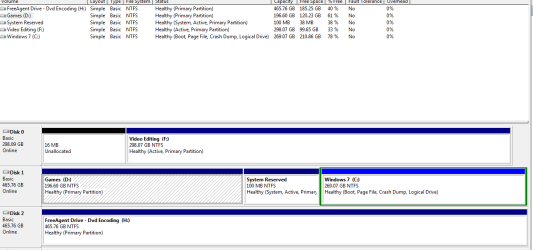
I will wait for the new HD to torun up in the post. THe problem I think I have with my current HD is that teh windows partition is not the 1st sector that it reads but is over to the right which is not ideal I am led to believe.

Can I remove the other partition and move the Win one over to it? This is on disk 1

Ignore Disk 0 as this is an old IDE drive and will decomission once new HD turns up

Thanks

Kwack
 

Attachments

  • Capture.PNG
    Capture.PNG
    16.4 KB · Views: 15

My Computer My Computer

At a glance

Win 7 64 bitE6320 O/C to 3.1 ghzocz 6400XFX Nvidia GTX260
Computer Manufacturer/Model Number
Home Built
OS
Win 7 64 bit
CPU
E6320 O/C to 3.1 ghz
Motherboard
Gigabyte GA-DSP4
Memory
ocz 6400
Graphics Card(s)
XFX Nvidia GTX260
Sound Card
Onboard
Hard Drives
2 x various
PSU
Corsair tx750
Case
Antec 900
Cooling
xigmatek
Kwack, yes it can be done.

Move the data off of the first partition. Make a Win7 backup image of the System and Win7 drives which you save externally in case you need to start over, as moving operations can fail. Or at least back up the data.

Download free Partition Wizard bootable and burn to CD: http://www.partitionwizard.com/download.html

Boot into PW right click D:Games and Delete. Now right click 100mb System Reserved and Delete or Resize/move, if moving drag the partition over snugly against the left border.

Now right click C: Win7 and Resize/Move, dragging its left border over against the System Reserved or left border, resize C: as desired.

Next, if you deleted Sys Reserved partition, rightclick C: and Modify: Set Active., Apply all steps.

Now boot into the Win7 DVD Repair console and run Startup Repair 3 separate times as it will need to repair or rewrite the MBR to System Reserved or Win7 Partition.
 
Last edited:
If the first partition ahead of the 7 primary is removed entirely you would need to boot from a live GParted cd and proceed to move the entire primary to beginning of the drive. That will take some time but preserve the installation already on it.

The time saving method however is simply back everything you want up to another drive or removable media and simply nuke the drive in preparation of a clean install of Windows. Once you have 7 on a new drive there you will likely end up nuking the present drive for use as a storage device if you don't have any plans for dual booting the two flavors(32bit, 64bit) of 7 there.
 

My Computers My Computers

  • At a glance

    W7 Ultimate x64/W10 Pro x64/W11 Pro Triple Bo...AMD Phenom II X4 975 Deneb 3.6ghz - 965 2nd r...Kingston Hyper X DDR3 1600 1.5v 16gb - Hyper ...MSI HD Radeon 5750 1gb - MSI HD Radeon 6450 o...
    Computer type
    PC/Desktop
    Computer Manufacturer/Model Number
    Custom builds = 2
    OS
    W7 Ultimate x64/W10 Pro x64/W11 Pro Triple Boot - Main PC W7 Remote PC Micro ATX W7 Pro x64/W11 Pro
    CPU
    AMD Phenom II X4 975 Deneb 3.6ghz - 965 2nd remote pc
    Motherboard
    Gigabyte GA-790XTA-UD4-Gigabyte GA-880GM-D2H remote pc
    Memory
    Kingston Hyper X DDR3 1600 1.5v 16gb - Hyper X Fury 8gb 2nd
    Graphics Card(s)
    MSI HD Radeon 5750 1gb - MSI HD Radeon 6450 on mini tower
    Sound Card
    Creative Labs X-Fi Xtreme Audio P - Realtek onooard 2nd case
    Monitor(s) Displays
    ASUS VW199T-P 19" HP 2082a Main-HP 2082a 20" remote pc
    Screen Resolution
    Asus 1440x900 - HP 1600x900
    Hard Drives
    WD Black 1TB HD per OS W7, W10, and pending W11 presently on 500gb OS Drive - Pending Triple 1TB HDs for Spanned Storage/backup volume
    Single 2TB external USB enclosure, single 1TB System 7 Host/Boot drive, Pending 8TB external HD for system image b
    PSU
    Corsair 750TX - primary / Corsair CX600 - second
    Case
    Antec 900-2 - SSD compatible / NZXT Vulcan mini tower
    Cooling
    Zalman CNPS9900A
    Keyboard
    AZIO L70 Backlit Letters Gaming - ONN Cordless/USB
    Mouse
    MSI DS200 Programmable, Logitech Cordless
    Internet Speed
    30mbps upgrade - primary hard wired - mini tower usb WiFi
    Antivirus
    GFI VIPRE Internet Security 2014 on W7 2016 beta on W10,
    Browser
    Cyberfox, WaterFox 64bit FF variants, FireFox x64, Pale Moon
    Other Info
    Accomdata fan cooled usb 2.0 PIDE/Sata II, III external enclosure.
    Sambient usb/eSata PATA/Sata II, III external enclosure.
  • At a glance

    W7 Pro x64/W11 ProAMD Deneb 3.6ghz - 965Kingston Hyper X Fury 8gbMSI HD Radeon 6450 DVI Output
    Computer type
    PC/Desktop
    System Manufacturer/Model Number
    CUSTOM ASSEMBLY
    OS
    W7 Pro x64/W11 Pro
    CPU
    AMD Deneb 3.6ghz - 965
    Motherboard
    Gigabyte GA-880GM-D2H remote pc
    Memory
    Kingston Hyper X Fury 8gb
    Graphics Card(s)
    MSI HD Radeon 6450 DVI Output
    Sound Card
    Realtek onooard Creative or Other separate PENDING
    Monitor(s) Displays
    VIZIO 32" LCD TV Separate LCD Pending
    Screen Resolution
    1600x1080
    Hard Drives
    WD 500GB OS Host/Boot WD Green 1TB Storage/Backup
    PSU
    Corsair 600W - THERMALTAKE 600W spare case
    Case
    NZXT Vulcan mini tower
    Cooling
    Twin 120mm Top Fans - 240mm Side Cover
    Keyboard
    ONN Cordless/USB Logitech Cordless
    Mouse
    ONN USB/Cordless - Logitech Cordless
    Internet Speed
    DSL 5G
    Browser
    MS Edge, FireFox, WaterFox x64, FireFox Nightly
    Other Info
    OS Testing-Remote Access to Main TeamViewer
Thanks for the advice - I am trying to look for the easiest way and if I can preserve the current install then all the better.

Would it make sense to add in the new HDD under existing build, partition into two drives. Do a image backup and restore to the new HDD and then boot from there?

Does that make sense - I am trying to make sure it runs as optimally as possible I guess so using the new 1.5tb drive has got to be faster surely considering it is a newer drive??

Cheers
Kwack
 

My Computer My Computer

At a glance

Win 7 64 bitE6320 O/C to 3.1 ghzocz 6400XFX Nvidia GTX260
Computer Manufacturer/Model Number
Home Built
OS
Win 7 64 bit
CPU
E6320 O/C to 3.1 ghz
Motherboard
Gigabyte GA-DSP4
Memory
ocz 6400
Graphics Card(s)
XFX Nvidia GTX260
Sound Card
Onboard
Hard Drives
2 x various
PSU
Corsair tx750
Case
Antec 900
Cooling
xigmatek
Try it. Use Win7 backup imaging to image your system and Win7 drives, then unplug that HD, boot from Win7 DCD or repair CD and reimage to the new HD.

If it fails for some reason, try either Macrium Reflect which uses a Linux disk it will make to reimage from boot, or free Partition Wizard CD and copy the Win7 drive over into the lower unallocated space.

You'll have to run Startup Repair 3 times to rewrite the MBR into the Win7 partition if you use a Copy method rather than reimaging, however you're most likely going to have to do that anyway when you move Win7 to the lower address of the new HD, or the existing HD.

Note that you have the option to drop the 100mb Win7 system reserved drive here since you need to repair or rewrite the MBR anyway. The only reason you might want to keep the 100mb partition is is you plan to use Bitlocker or want your Recovery tools available by tapping F8 at bootup.
 
If you are planning a dual boot on the new drive seeing that split up you are better off planning a clean install of each and using the Windows Easy Transfer wizard to transfer settings over to the fresh 64bit install. I ran that here to duplicate an RC install and that works like a champ for transferring seting and even setting wallpapers up!
 

My Computers My Computers

  • At a glance

    W7 Ultimate x64/W10 Pro x64/W11 Pro Triple Bo...AMD Phenom II X4 975 Deneb 3.6ghz - 965 2nd r...Kingston Hyper X DDR3 1600 1.5v 16gb - Hyper ...MSI HD Radeon 5750 1gb - MSI HD Radeon 6450 o...
    Computer type
    PC/Desktop
    Computer Manufacturer/Model Number
    Custom builds = 2
    OS
    W7 Ultimate x64/W10 Pro x64/W11 Pro Triple Boot - Main PC W7 Remote PC Micro ATX W7 Pro x64/W11 Pro
    CPU
    AMD Phenom II X4 975 Deneb 3.6ghz - 965 2nd remote pc
    Motherboard
    Gigabyte GA-790XTA-UD4-Gigabyte GA-880GM-D2H remote pc
    Memory
    Kingston Hyper X DDR3 1600 1.5v 16gb - Hyper X Fury 8gb 2nd
    Graphics Card(s)
    MSI HD Radeon 5750 1gb - MSI HD Radeon 6450 on mini tower
    Sound Card
    Creative Labs X-Fi Xtreme Audio P - Realtek onooard 2nd case
    Monitor(s) Displays
    ASUS VW199T-P 19" HP 2082a Main-HP 2082a 20" remote pc
    Screen Resolution
    Asus 1440x900 - HP 1600x900
    Hard Drives
    WD Black 1TB HD per OS W7, W10, and pending W11 presently on 500gb OS Drive - Pending Triple 1TB HDs for Spanned Storage/backup volume
    Single 2TB external USB enclosure, single 1TB System 7 Host/Boot drive, Pending 8TB external HD for system image b
    PSU
    Corsair 750TX - primary / Corsair CX600 - second
    Case
    Antec 900-2 - SSD compatible / NZXT Vulcan mini tower
    Cooling
    Zalman CNPS9900A
    Keyboard
    AZIO L70 Backlit Letters Gaming - ONN Cordless/USB
    Mouse
    MSI DS200 Programmable, Logitech Cordless
    Internet Speed
    30mbps upgrade - primary hard wired - mini tower usb WiFi
    Antivirus
    GFI VIPRE Internet Security 2014 on W7 2016 beta on W10,
    Browser
    Cyberfox, WaterFox 64bit FF variants, FireFox x64, Pale Moon
    Other Info
    Accomdata fan cooled usb 2.0 PIDE/Sata II, III external enclosure.
    Sambient usb/eSata PATA/Sata II, III external enclosure.
  • At a glance

    W7 Pro x64/W11 ProAMD Deneb 3.6ghz - 965Kingston Hyper X Fury 8gbMSI HD Radeon 6450 DVI Output
    Computer type
    PC/Desktop
    System Manufacturer/Model Number
    CUSTOM ASSEMBLY
    OS
    W7 Pro x64/W11 Pro
    CPU
    AMD Deneb 3.6ghz - 965
    Motherboard
    Gigabyte GA-880GM-D2H remote pc
    Memory
    Kingston Hyper X Fury 8gb
    Graphics Card(s)
    MSI HD Radeon 6450 DVI Output
    Sound Card
    Realtek onooard Creative or Other separate PENDING
    Monitor(s) Displays
    VIZIO 32" LCD TV Separate LCD Pending
    Screen Resolution
    1600x1080
    Hard Drives
    WD 500GB OS Host/Boot WD Green 1TB Storage/Backup
    PSU
    Corsair 600W - THERMALTAKE 600W spare case
    Case
    NZXT Vulcan mini tower
    Cooling
    Twin 120mm Top Fans - 240mm Side Cover
    Keyboard
    ONN Cordless/USB Logitech Cordless
    Mouse
    ONN USB/Cordless - Logitech Cordless
    Internet Speed
    DSL 5G
    Browser
    MS Edge, FireFox, WaterFox x64, FireFox Nightly
    Other Info
    OS Testing-Remote Access to Main TeamViewer
Ok will take a look. At the moment I cant get system image to work as it says that there isnt enough disk space even though I am using the 1.5tb drive to image to.
 

My Computer My Computer

At a glance

Win 7 64 bitE6320 O/C to 3.1 ghzocz 6400XFX Nvidia GTX260
Computer Manufacturer/Model Number
Home Built
OS
Win 7 64 bit
CPU
E6320 O/C to 3.1 ghz
Motherboard
Gigabyte GA-DSP4
Memory
ocz 6400
Graphics Card(s)
XFX Nvidia GTX260
Sound Card
Onboard
Hard Drives
2 x various
PSU
Corsair tx750
Case
Antec 900
Cooling
xigmatek
Don't feel bad with that! When first installing the 64bit 7 on a 500gb drive the system image wanted 1.2tb! Apparently it adds more then you see on that drive alone into the mix. With several drives here it likely tallied the folders from one of the other drives.

This is one reason why I suggested the Windows Easy Transfer tool there for creating a backup you can restore on a fresh install. Your programs would still need to installed fresh all over while the user account info and files are restored.
 

My Computers My Computers

  • At a glance

    W7 Ultimate x64/W10 Pro x64/W11 Pro Triple Bo...AMD Phenom II X4 975 Deneb 3.6ghz - 965 2nd r...Kingston Hyper X DDR3 1600 1.5v 16gb - Hyper ...MSI HD Radeon 5750 1gb - MSI HD Radeon 6450 o...
    Computer type
    PC/Desktop
    Computer Manufacturer/Model Number
    Custom builds = 2
    OS
    W7 Ultimate x64/W10 Pro x64/W11 Pro Triple Boot - Main PC W7 Remote PC Micro ATX W7 Pro x64/W11 Pro
    CPU
    AMD Phenom II X4 975 Deneb 3.6ghz - 965 2nd remote pc
    Motherboard
    Gigabyte GA-790XTA-UD4-Gigabyte GA-880GM-D2H remote pc
    Memory
    Kingston Hyper X DDR3 1600 1.5v 16gb - Hyper X Fury 8gb 2nd
    Graphics Card(s)
    MSI HD Radeon 5750 1gb - MSI HD Radeon 6450 on mini tower
    Sound Card
    Creative Labs X-Fi Xtreme Audio P - Realtek onooard 2nd case
    Monitor(s) Displays
    ASUS VW199T-P 19" HP 2082a Main-HP 2082a 20" remote pc
    Screen Resolution
    Asus 1440x900 - HP 1600x900
    Hard Drives
    WD Black 1TB HD per OS W7, W10, and pending W11 presently on 500gb OS Drive - Pending Triple 1TB HDs for Spanned Storage/backup volume
    Single 2TB external USB enclosure, single 1TB System 7 Host/Boot drive, Pending 8TB external HD for system image b
    PSU
    Corsair 750TX - primary / Corsair CX600 - second
    Case
    Antec 900-2 - SSD compatible / NZXT Vulcan mini tower
    Cooling
    Zalman CNPS9900A
    Keyboard
    AZIO L70 Backlit Letters Gaming - ONN Cordless/USB
    Mouse
    MSI DS200 Programmable, Logitech Cordless
    Internet Speed
    30mbps upgrade - primary hard wired - mini tower usb WiFi
    Antivirus
    GFI VIPRE Internet Security 2014 on W7 2016 beta on W10,
    Browser
    Cyberfox, WaterFox 64bit FF variants, FireFox x64, Pale Moon
    Other Info
    Accomdata fan cooled usb 2.0 PIDE/Sata II, III external enclosure.
    Sambient usb/eSata PATA/Sata II, III external enclosure.
  • At a glance

    W7 Pro x64/W11 ProAMD Deneb 3.6ghz - 965Kingston Hyper X Fury 8gbMSI HD Radeon 6450 DVI Output
    Computer type
    PC/Desktop
    System Manufacturer/Model Number
    CUSTOM ASSEMBLY
    OS
    W7 Pro x64/W11 Pro
    CPU
    AMD Deneb 3.6ghz - 965
    Motherboard
    Gigabyte GA-880GM-D2H remote pc
    Memory
    Kingston Hyper X Fury 8gb
    Graphics Card(s)
    MSI HD Radeon 6450 DVI Output
    Sound Card
    Realtek onooard Creative or Other separate PENDING
    Monitor(s) Displays
    VIZIO 32" LCD TV Separate LCD Pending
    Screen Resolution
    1600x1080
    Hard Drives
    WD 500GB OS Host/Boot WD Green 1TB Storage/Backup
    PSU
    Corsair 600W - THERMALTAKE 600W spare case
    Case
    NZXT Vulcan mini tower
    Cooling
    Twin 120mm Top Fans - 240mm Side Cover
    Keyboard
    ONN Cordless/USB Logitech Cordless
    Mouse
    ONN USB/Cordless - Logitech Cordless
    Internet Speed
    DSL 5G
    Browser
    MS Edge, FireFox, WaterFox x64, FireFox Nightly
    Other Info
    OS Testing-Remote Access to Main TeamViewer
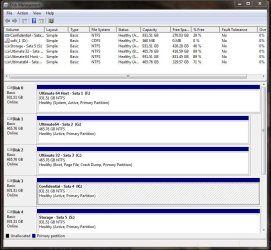
I gave you the easy way to do this here: http://www.sevenforums.com/installa...all-new-hdd-not-formatted-yet.html#post445448

You have the option to move your System Reserved 100mb partition or delete it.

Either way you'll have to boot into the Win7 DVD to recover the MBR afterwards by running Startup Repair 3 times.

Cloning or imaging is just the long way around. We help people get out of dual boots here all the time, and Partition Wizard bootable is all they need to delete the first partition to move Win7 over. Then the commands to repair or rewrite the MBR are all automated now in Win7 DVD Startup Repair by running it at least 3 separate times.
 
The dual boots most often seen are generally with previous versions or Linux. First you have to decide just how you will want to keep the drives set up there and whether you want to split up the new drive.

As far as seeing the 64bit added into the 32bit's boot options you can either unplug the 64bit's drive through the installation or edit the BCD store later to see the entry removed. Having added in a new drive here plus finding the 32bit was still in need I installed 7 fresh twice in the last couple of days one install on the new drive and the 32bit replaced the last RC installation after wiping that drive.
 

Attachments

  • Present Partitions.jpg
    Present Partitions.jpg
    88.8 KB · Views: 6
  • Present Partitions Updated.jpg
    Present Partitions Updated.jpg
    109.8 KB · Views: 6

My Computers My Computers

  • At a glance

    W7 Ultimate x64/W10 Pro x64/W11 Pro Triple Bo...AMD Phenom II X4 975 Deneb 3.6ghz - 965 2nd r...Kingston Hyper X DDR3 1600 1.5v 16gb - Hyper ...MSI HD Radeon 5750 1gb - MSI HD Radeon 6450 o...
    Computer type
    PC/Desktop
    Computer Manufacturer/Model Number
    Custom builds = 2
    OS
    W7 Ultimate x64/W10 Pro x64/W11 Pro Triple Boot - Main PC W7 Remote PC Micro ATX W7 Pro x64/W11 Pro
    CPU
    AMD Phenom II X4 975 Deneb 3.6ghz - 965 2nd remote pc
    Motherboard
    Gigabyte GA-790XTA-UD4-Gigabyte GA-880GM-D2H remote pc
    Memory
    Kingston Hyper X DDR3 1600 1.5v 16gb - Hyper X Fury 8gb 2nd
    Graphics Card(s)
    MSI HD Radeon 5750 1gb - MSI HD Radeon 6450 on mini tower
    Sound Card
    Creative Labs X-Fi Xtreme Audio P - Realtek onooard 2nd case
    Monitor(s) Displays
    ASUS VW199T-P 19" HP 2082a Main-HP 2082a 20" remote pc
    Screen Resolution
    Asus 1440x900 - HP 1600x900
    Hard Drives
    WD Black 1TB HD per OS W7, W10, and pending W11 presently on 500gb OS Drive - Pending Triple 1TB HDs for Spanned Storage/backup volume
    Single 2TB external USB enclosure, single 1TB System 7 Host/Boot drive, Pending 8TB external HD for system image b
    PSU
    Corsair 750TX - primary / Corsair CX600 - second
    Case
    Antec 900-2 - SSD compatible / NZXT Vulcan mini tower
    Cooling
    Zalman CNPS9900A
    Keyboard
    AZIO L70 Backlit Letters Gaming - ONN Cordless/USB
    Mouse
    MSI DS200 Programmable, Logitech Cordless
    Internet Speed
    30mbps upgrade - primary hard wired - mini tower usb WiFi
    Antivirus
    GFI VIPRE Internet Security 2014 on W7 2016 beta on W10,
    Browser
    Cyberfox, WaterFox 64bit FF variants, FireFox x64, Pale Moon
    Other Info
    Accomdata fan cooled usb 2.0 PIDE/Sata II, III external enclosure.
    Sambient usb/eSata PATA/Sata II, III external enclosure.
  • At a glance

    W7 Pro x64/W11 ProAMD Deneb 3.6ghz - 965Kingston Hyper X Fury 8gbMSI HD Radeon 6450 DVI Output
    Computer type
    PC/Desktop
    System Manufacturer/Model Number
    CUSTOM ASSEMBLY
    OS
    W7 Pro x64/W11 Pro
    CPU
    AMD Deneb 3.6ghz - 965
    Motherboard
    Gigabyte GA-880GM-D2H remote pc
    Memory
    Kingston Hyper X Fury 8gb
    Graphics Card(s)
    MSI HD Radeon 6450 DVI Output
    Sound Card
    Realtek onooard Creative or Other separate PENDING
    Monitor(s) Displays
    VIZIO 32" LCD TV Separate LCD Pending
    Screen Resolution
    1600x1080
    Hard Drives
    WD 500GB OS Host/Boot WD Green 1TB Storage/Backup
    PSU
    Corsair 600W - THERMALTAKE 600W spare case
    Case
    NZXT Vulcan mini tower
    Cooling
    Twin 120mm Top Fans - 240mm Side Cover
    Keyboard
    ONN Cordless/USB Logitech Cordless
    Mouse
    ONN USB/Cordless - Logitech Cordless
    Internet Speed
    DSL 5G
    Browser
    MS Edge, FireFox, WaterFox x64, FireFox Nightly
    Other Info
    OS Testing-Remote Access to Main TeamViewer
Back
Top