Install / Reinstall Windows on Laptop - Options?

rcanino

New member
Member
VIP
Local time
8:35 AM
Messages
123
Location
Wash Heights, NYC
Hi guys -

I have a one-year old laptop and the HDD died yesterday (click of death). I shut it down immediately, tried rebooting but no luck. It's in the freezer now but...ya, I don't think so either. :(

My question is - what are my options to get this laptop running Windows7 again? Originally it had Home Premium 64-bit on it.

I know I need another HDD of course. No problem there. But Windows...that's where I'm confused. Here's what I have:

1) A DVD I made soon after I bought the laptop, following Windows' instructions - I labeled it "Win7 Home Prem Recovery."

2) A retail copy of Win7 Pro I installed on my desktop. (I realize I can't use the same product key)

3) A copy of Win7 sp1, downloaded from this site: **REMOVED**

I hope I don't have to buy another copy of Windows...that doesn't seem fair. Is it as simple as using the Product Key on the bottom of the laptop?

If I *can* use that Product Key on the laptop to activate Windows, which DVD should I use? I don't care about any of the files that were on the laptop originally.

Thank you all so much - I appreciate any thoughts you can share.
 
Last edited by a moderator:

My Computer My Computer

Computer type
PC/Desktop
OS
Win7 Pro 64-bit sp1
CPU
core i7 980X
Motherboard
MSI Big-Bang XPower X58
Memory
G.Skill 4Gx3 F3-10666CL9T-12GBRL (x2)
Graphics Card(s)
EVGA 06G-P4-3787-KR
Monitor(s) Displays
HP LP2475w (x2)
Screen Resolution
3840x1200
Hard Drives
Crucial RealSSD CTFDDAC128MAG-1G1 (boot drive);
Crucial m4 128GB;
Samsung 1TB HD103SJ 32M 7200rpm (x2);
WD Black WD2002FAEX 2TB (x2)
PSU
Corsair CMPSU-850HX
Case
HAF X
Cooling
Intel DBX-B (stock)
#1 should work
#2 is no good - different product key
#3 might work if that is a clean copy. You will have to apply the product key that you find on the bottom of your laptop

Best is to first create a primary, active Partition on your new HDD into which to install. You can use the bootable CD of Partition Wizard for that.
 

My Computer My Computer

Computer Manufacturer/Model Number
HP, Dell, Gateway, Toshiba - 4 laptops and 2 desktops
OS
Vista, Windows7, Mint Mate, Zorin, Windows 8
CPU
from 1.6GHz Duo to i7
Monitor(s) Displays
2x HP w2207
Hard Drives
5x HDD, 7x SSD, 12x Externals
Keyboard
with trackball - no mices
Mouse
Trackball mice
Internet Speed
DSL 6000
thank you for moving this thread btw...sorry about that.

Thanks! I don't know whether the Digital River is a "clean copy" because I don't really know what you mean by that, but according to the website it's an "official" copy...whatever that means exactly :rolleyes:

One little wrinkle, according to Toshiba "tech support" anyway - supposedly the Recovery Disk I made should actually be 4 or 5 disks.

I think the 2 support people I talked to were confusing Recovery Disk(s) with System Image. I know I ran the Recovery Disk utility, right after I got the laptop and it fit onto 1 DVD.

unless they're right and I *did* goof...but I don't think I did.

[btw - I thought all Win 7 retail disks included all the versions of Win 7 in both 32 and 64-bit versions: Home Premium, Pro and Ultimate - and the product key unlocks the version you actually bought. Isn't that how it works? So I thought I could use the retail Win7 disk but enter the Laptop's Product Key...No good? I guess because the laptop's is an OEM key they won't play nice with each other - the retail disk and the OEM key?] Shoot. I hope Toshiba "tech support" was wrong about needing 4 or 5 recovery disks...
 
Last edited:

My Computer My Computer

Computer type
PC/Desktop
OS
Win7 Pro 64-bit sp1
CPU
core i7 980X
Motherboard
MSI Big-Bang XPower X58
Memory
G.Skill 4Gx3 F3-10666CL9T-12GBRL (x2)
Graphics Card(s)
EVGA 06G-P4-3787-KR
Monitor(s) Displays
HP LP2475w (x2)
Screen Resolution
3840x1200
Hard Drives
Crucial RealSSD CTFDDAC128MAG-1G1 (boot drive);
Crucial m4 128GB;
Samsung 1TB HD103SJ 32M 7200rpm (x2);
WD Black WD2002FAEX 2TB (x2)
PSU
Corsair CMPSU-850HX
Case
HAF X
Cooling
Intel DBX-B (stock)
1. By "clean copy" I meant a copy that does not come from some questionable torrent. But Digital River should be OK.

2. I think the Toshiba people are wrong. The recovery disks I burnt fit on 1 DVD.

3. Regarding the retail disk you can try. I am not sure whether that will work. What can you loose.
 

My Computer My Computer

Computer Manufacturer/Model Number
HP, Dell, Gateway, Toshiba - 4 laptops and 2 desktops
OS
Vista, Windows7, Mint Mate, Zorin, Windows 8
CPU
from 1.6GHz Duo to i7
Monitor(s) Displays
2x HP w2207
Hard Drives
5x HDD, 7x SSD, 12x Externals
Keyboard
with trackball - no mices
Mouse
Trackball mice
Internet Speed
DSL 6000
@rcanino - Pardon for being off subject, but any idea on why your HDD died so soon (1 year) ?

Although it may not be under warranty, would calling Toshiba for an installation disc be worthwhile ?
 

My Computer My Computer

OS
Win 7, 32bit, Premium
Thanks you guys! I appreciate the screen shots and the links, as well as your thoughts.

pretty unusual, a HDD dying in a year + 9 days. But apparently it happens...the dreaded Click of Death - ugh.

So I got my problem "escalated" to a case manager at Toshiba and finally, after 15 minutes he finally agreed to talk to his supervisor about the problem.

Turns out they'll let me ship it to them for a free repair - since it's only 9 days past the 1-year warranty period. Technically of course they didn't have to do anything and I'm glad they are. I always liked Toshiba laptops...

Now I just have to decide whether I really want to ship the thing to them - wherever that will be - and wait the "7 to 10 business days" for them to send it back.

They won't be able to see my personal stuff :o unless they get the HDD working again - but they won't even try to do that will they? They'll stick in a refurb Hitachi HDD and button it up - I'm guessing anyway.
What would you guys do?

Thanks again for your help Everyone!
 

My Computer My Computer

Computer type
PC/Desktop
OS
Win7 Pro 64-bit sp1
CPU
core i7 980X
Motherboard
MSI Big-Bang XPower X58
Memory
G.Skill 4Gx3 F3-10666CL9T-12GBRL (x2)
Graphics Card(s)
EVGA 06G-P4-3787-KR
Monitor(s) Displays
HP LP2475w (x2)
Screen Resolution
3840x1200
Hard Drives
Crucial RealSSD CTFDDAC128MAG-1G1 (boot drive);
Crucial m4 128GB;
Samsung 1TB HD103SJ 32M 7200rpm (x2);
WD Black WD2002FAEX 2TB (x2)
PSU
Corsair CMPSU-850HX
Case
HAF X
Cooling
Intel DBX-B (stock)
I would take the offer of the RMA, perhaps after asking them if you can just ship the HD.

This is a generous offer by Toshiba which I haven't heard of anyone else making out of warranty.

If you have anything on the HD you don't want others to see for reasons other than embarassment then I would reconsider.

You should know if the HD is reparable, however, by booting the maker's diagnostics/repair CD extended scan: HD Diagnostic. If not and it's detected by the scan then you can zero the HD to make data unreadable on it, if necessary after copying out the data: Copy & Paste - in Windows Recovery Console
 
Thanks for your reply greg.

No there's nothing illegal or dangerous on the HDD, just personal, diary-type writing, some passwords I've used over the years, some financial stuff...etc.

But I can't believe they would even attempt to fix such an inexpensive part. I can replace it from newegg for less than $50; I imagine Toshiba's cost is closer to $10.

+++++++++++++++++++++++++++++++++++

So I followed the link to the HD Diagnostics page. It's talking about running the diagnostic tool on the bad HDD, right? Sorry if I misunderstood but I don't see how a HDD tool can help a head that keeps bumping against the stop. I've always understood that particular problem to be inoperable basically. (again my apologies if I misunderstood the directions)

I was pretty impressed by Toshiba's offer too. It took 4 separate phone calls and 5 different people but in the end Toshiba came through. It's the right thing to do. After all the HDD did fail in just over a year; a week's grace doesn't seem like it's asking too much.

It's a nice offer and I hate to refuse it, but I'd also like to be sure no random stranger is accessing my data. If only I could be sure they'd just chuck that HDD into the garbage...

Thanks again for your reply greg.

(I asked them about simply sending me a replacement HDD - they wouldn't go for that. I can understand they want to protect themselves from scam artists who'd make up a story like mine)
 

My Computer My Computer

Computer type
PC/Desktop
OS
Win7 Pro 64-bit sp1
CPU
core i7 980X
Motherboard
MSI Big-Bang XPower X58
Memory
G.Skill 4Gx3 F3-10666CL9T-12GBRL (x2)
Graphics Card(s)
EVGA 06G-P4-3787-KR
Monitor(s) Displays
HP LP2475w (x2)
Screen Resolution
3840x1200
Hard Drives
Crucial RealSSD CTFDDAC128MAG-1G1 (boot drive);
Crucial m4 128GB;
Samsung 1TB HD103SJ 32M 7200rpm (x2);
WD Black WD2002FAEX 2TB (x2)
PSU
Corsair CMPSU-850HX
Case
HAF X
Cooling
Intel DBX-B (stock)
177433-install-reinstall-windows-laptop-options-start_menu04.jpg

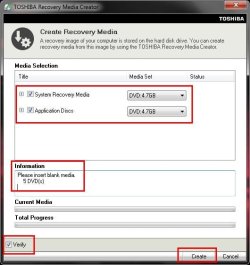
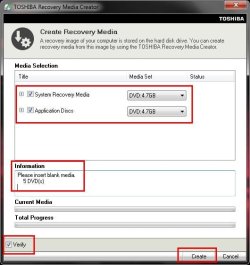
It says "Please insert blank media: 5 DVD(s)" But you've got both options checked - System Recovery Media + Application Discs.

When I made my Recovery DVD I only checked "System Recovery Media." I guess that's why mine all fit onto 1 DVD...and why the other poster fit his onto 1 as well. Sound right?
 
Last edited:

My Computer My Computer

Computer type
PC/Desktop
OS
Win7 Pro 64-bit sp1
CPU
core i7 980X
Motherboard
MSI Big-Bang XPower X58
Memory
G.Skill 4Gx3 F3-10666CL9T-12GBRL (x2)
Graphics Card(s)
EVGA 06G-P4-3787-KR
Monitor(s) Displays
HP LP2475w (x2)
Screen Resolution
3840x1200
Hard Drives
Crucial RealSSD CTFDDAC128MAG-1G1 (boot drive);
Crucial m4 128GB;
Samsung 1TB HD103SJ 32M 7200rpm (x2);
WD Black WD2002FAEX 2TB (x2)
PSU
Corsair CMPSU-850HX
Case
HAF X
Cooling
Intel DBX-B (stock)
Good chance. Go ahead and try the Recovery Disk you made to see if it works, providing you want the preinstalled factory bloatware to be restored along with the OS.

If not or it doesn't seem as snappy as you'd like do the clean reinstall using the retail disk.
 
Thanks G - I think that's exactly how I'll proceed.

Avoiding the bloat - that's really why I hoped I could use the retail disk. Or the Digital River .iso - anything but the factory default (though the bloat factor wasn't too bad this time).

because there's a funny story about bloat and this laptop purchase -

Apparently BBuy had done a "special, custom setup" to it and the buyer had backed out so the laptop was back on the shelf. There was no hint of anything special or "custom" about it. The price was marked $349.

There were 2 BBuy guys nearby so I figured I'd ask them what they knew about the machine. What they knew was that the price was $80 more - over and above the marked price - because they'd done this special setup to it (which I guess included deleting most of the bloatware).

I laughed and said I'd pass, "thanks anyway" - at which point the boys in yellow had a quick discussion, then decided it was probably okay after all to sell it to me for the advertised price.

They sure were disappointed I wouldn't spring for the extra $80...
 

My Computer My Computer

Computer type
PC/Desktop
OS
Win7 Pro 64-bit sp1
CPU
core i7 980X
Motherboard
MSI Big-Bang XPower X58
Memory
G.Skill 4Gx3 F3-10666CL9T-12GBRL (x2)
Graphics Card(s)
EVGA 06G-P4-3787-KR
Monitor(s) Displays
HP LP2475w (x2)
Screen Resolution
3840x1200
Hard Drives
Crucial RealSSD CTFDDAC128MAG-1G1 (boot drive);
Crucial m4 128GB;
Samsung 1TB HD103SJ 32M 7200rpm (x2);
WD Black WD2002FAEX 2TB (x2)
PSU
Corsair CMPSU-850HX
Case
HAF X
Cooling
Intel DBX-B (stock)
I myself would not send it to Toshiba. I have seen too many stories about PCs returned after "repair" that were worse off than before. And you never know what they will do with your old HDD and the data on it. I would ask them for a replacement HDD and an installation disk. And I never worry too much about the bloatware - I just uninstall it.

And if Toshiba does not pay for the shipping, it will probably cost you more than a new HDD.
 

My Computer My Computer

Computer Manufacturer/Model Number
HP, Dell, Gateway, Toshiba - 4 laptops and 2 desktops
OS
Vista, Windows7, Mint Mate, Zorin, Windows 8
CPU
from 1.6GHz Duo to i7
Monitor(s) Displays
2x HP w2207
Hard Drives
5x HDD, 7x SSD, 12x Externals
Keyboard
with trackball - no mices
Mouse
Trackball mice
Internet Speed
DSL 6000
Thanks for your input W -

They're sending me a prepaid shipping box so the repair will be free. They wouldn't agree to sending me a replacement HDD.

The more I think about what's on that drive - financial records, passwords - the less I want to send it to them. But I have to believe once they power it up and hear the "Click of Death" they'll scrap the HDD and pop in a new (refurb probably) one. I just wish I could be sure.
 

My Computer My Computer

Computer type
PC/Desktop
OS
Win7 Pro 64-bit sp1
CPU
core i7 980X
Motherboard
MSI Big-Bang XPower X58
Memory
G.Skill 4Gx3 F3-10666CL9T-12GBRL (x2)
Graphics Card(s)
EVGA 06G-P4-3787-KR
Monitor(s) Displays
HP LP2475w (x2)
Screen Resolution
3840x1200
Hard Drives
Crucial RealSSD CTFDDAC128MAG-1G1 (boot drive);
Crucial m4 128GB;
Samsung 1TB HD103SJ 32M 7200rpm (x2);
WD Black WD2002FAEX 2TB (x2)
PSU
Corsair CMPSU-850HX
Case
HAF X
Cooling
Intel DBX-B (stock)
Same thing happened at Best Buy when I went with my roommate to shop for an HP laptop. We ran the new minimized Factory Recovery which leaves out most of the bloatware and manually uninstalled the HP wireless mangler.

Did you boot the maker's HD diagnostics/repair CD to run the extended scan. The reason for doing this is not that it might repair your HD (tho "it could happen" :huh:) so much as to see if it's data is even accessible which I doubt. But if it is you can wipe zeros to it to protect your privacy before shipping.

I would probably go for the free HD, in spite of the limited risks. But it's your call here.
 
Back
Top