
Install Scenario and "strange" partition

Boras

New member
Local time
10:21 AM
Messages
23
Location
Zagreb,Croatia
Hello, everyone!
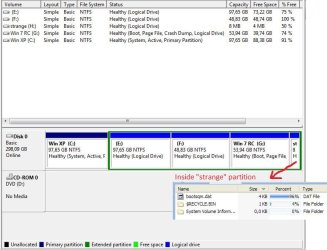
I'm new to this great Forum and my ignorance and inexperience already drops thanks to you guys, specially Tutorial writers. My insecurity is related to the clean install of Windows 7 Professional 32 bit(OEM version). When I get it I want the new one on C partition instead the present Dual-boot of XP Pro (installed first) and 7100 RC (logical drive) on the same and only physical drive.
Now, should I just delete RC partition from XP and than clean install 7 over XP or delete/format RC partition during installation.
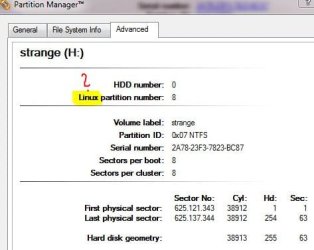
I'm concerned about the boot files (bootmgr) on RC partition and the "strange" partition at the end. About the probable reason for the mystery(for me) partition:
My wife told me she tried to install Ubuntu(on a blank new drive) but than withdraw after 20 seconds and just ejected the DVD??:confused: Can I delete it?
Here are the screenshots from Disk Manager and Paragon PM(for "strange" partition properties)

32795[/ATTACH]Paragon PM-strange H.JPG
Any suggestions and help are greatly appreciated but the most important thing is that I found a great place to learn.
Grettings!
 

Attachments
  • RC disk manager.JPG
    RC disk manager.JPG
    65.5 KB · Views: 29

My Computer My Computer

Computer Manufacturer/Model Number
Build in store
OS
Windows 7 Professional 32bit
CPU
AMD Athlon 64x2 6000+
Motherboard
BIOSTAR Group/N61PC-M25
Memory
Kingston 2GB DDR2 800MHz
Graphics Card(s)
NVIDIA Geforce 9600 GSO 384MB
Sound Card
5.1
Monitor(s) Displays
Samsung SyncMaster T220HD
Screen Resolution
1680x1050
Hard Drives
Hitachi 320GB,SATA,7200 RPM
PSU
400W
Case
MIDI Tower CX-8159
Cooling
build in
Keyboard
Logitech standard
Mouse
NEON
Internet Speed
4MB/256kbps
Hello Boras, welcome to the forums.

Now, if i read correctly, you would like to get rid of W7 RC and install W7 over your current XP install?
 

My Computer My Computer

Computer Manufacturer/Model Number
Custom Build
OS
W7 RTM Ultimate x64
CPU
Intel Q8400 @ 2.66GHZ
Motherboard
Gigabyte GA-EG45M-UD2H
Memory
4GB DDR2-800
Graphics Card(s)
Gainward GTS 450 GLH 1GB Edition
Sound Card
Integrated 8 Channel
Monitor(s) Displays
AOC 23.6 Inch Widescreen LCD
Screen Resolution
1920x1080
Hard Drives
Seagate 500GB Internal
Western Digital 1TB Internal

Hitachi 1TB External
PSU
Apevia Java Power 500W
Case
Cooler Master HAF 922 Black
Cooling
Stock Intel CPU Fan
Keyboard
HP SK-2960 Multimedia Keyboard
Mouse
Logitech M350 Wireless Gaming Mouse
Internet Speed
1.5MB
Thanks for quick replay. Yes, I'd like the new 7 Pro over XP and without RC. 7 Pro should "go" to C partition
 

My Computer My Computer

Computer Manufacturer/Model Number
Build in store
OS
Windows 7 Professional 32bit
CPU
AMD Athlon 64x2 6000+
Motherboard
BIOSTAR Group/N61PC-M25
Memory
Kingston 2GB DDR2 800MHz
Graphics Card(s)
NVIDIA Geforce 9600 GSO 384MB
Sound Card
5.1
Monitor(s) Displays
Samsung SyncMaster T220HD
Screen Resolution
1680x1050
Hard Drives
Hitachi 320GB,SATA,7200 RPM
PSU
400W
Case
MIDI Tower CX-8159
Cooling
build in
Keyboard
Logitech standard
Mouse
NEON
Internet Speed
4MB/256kbps
Boras, welcome to the forums and thanks for filling in your system specs completely
What version of Win7 do you have (Upgrade or Full)?
 

My Computer My Computer

Computer Manufacturer/Model Number
Wally, Innc.
OS
Windows 7 x64 finally!
CPU
AMD Athlon II X2 240
Motherboard
Biostar TA790GX XE
Memory
OCZ Platinum 4GB DDR2 1066 (will not work past 800MHz)
Graphics Card(s)
MSI R4670-MD1G Radeon HD 4670 1GB 128-bit GDDR3
Sound Card
ATI High Definition Audio Device Realtek ALC888
Monitor(s) Displays
HP w19e
Screen Resolution
1440x900
Hard Drives
Western Digital Caviar Green WD5000AADS 500GB SATA
Western Digital Caviar Blue WD5000AAKS 500GB SATA
PSU
Athena Power Micro ATX 400W
Case
HEC 6T 6T10BB Black MicroATX Mini Tower
Cooling
stock
Keyboard
wired, many keys
Mouse
HP wireless, 2 buttons, 1 wheel
Internet Speed
DSL 2Mb (recently getting 1.65M!)
OEM version of Windows 7 Professional 32 bit(full)
Thanks for relpay
 

My Computer My Computer

Computer Manufacturer/Model Number
Build in store
OS
Windows 7 Professional 32bit
CPU
AMD Athlon 64x2 6000+
Motherboard
BIOSTAR Group/N61PC-M25
Memory
Kingston 2GB DDR2 800MHz
Graphics Card(s)
NVIDIA Geforce 9600 GSO 384MB
Sound Card
5.1
Monitor(s) Displays
Samsung SyncMaster T220HD
Screen Resolution
1680x1050
Hard Drives
Hitachi 320GB,SATA,7200 RPM
PSU
400W
Case
MIDI Tower CX-8159
Cooling
build in
Keyboard
Logitech standard
Mouse
NEON
Internet Speed
4MB/256kbps
Hmm, well before you go ahead with this, you should back all your important files up, to an external harddrive, or a flash drive, DVD etc. Also make sure your computer has the first boot device as the DVD drive.

This process should be as simple as sticking the DVD into your computer, and once you get to the install drive selection, click advanced, and delete the W7 RC Partition, and also delete the Xp partition.

You should now be left with one long rectangle in black with 'unallocated space' inside, select that for your install partition, and let it work its magic.

If you need any help, don't hesitate to ask.

Good luck!
 

My Computer My Computer

Computer Manufacturer/Model Number
Custom Build
OS
W7 RTM Ultimate x64
CPU
Intel Q8400 @ 2.66GHZ
Motherboard
Gigabyte GA-EG45M-UD2H
Memory
4GB DDR2-800
Graphics Card(s)
Gainward GTS 450 GLH 1GB Edition
Sound Card
Integrated 8 Channel
Monitor(s) Displays
AOC 23.6 Inch Widescreen LCD
Screen Resolution
1920x1080
Hard Drives
Seagate 500GB Internal
Western Digital 1TB Internal

Hitachi 1TB External
PSU
Apevia Java Power 500W
Case
Cooler Master HAF 922 Black
Cooling
Stock Intel CPU Fan
Keyboard
HP SK-2960 Multimedia Keyboard
Mouse
Logitech M350 Wireless Gaming Mouse
Internet Speed
1.5MB
Than, no fear about boot files and "strange" partition. I did a backup already.
If so, I love windows 7 and thanks again +rep
 

My Computer My Computer

Computer Manufacturer/Model Number
Build in store
OS
Windows 7 Professional 32bit
CPU
AMD Athlon 64x2 6000+
Motherboard
BIOSTAR Group/N61PC-M25
Memory
Kingston 2GB DDR2 800MHz
Graphics Card(s)
NVIDIA Geforce 9600 GSO 384MB
Sound Card
5.1
Monitor(s) Displays
Samsung SyncMaster T220HD
Screen Resolution
1680x1050
Hard Drives
Hitachi 320GB,SATA,7200 RPM
PSU
400W
Case
MIDI Tower CX-8159
Cooling
build in
Keyboard
Logitech standard
Mouse
NEON
Internet Speed
4MB/256kbps
Once its finished you will get a 100mb system partition, then your windows partition. you should be sweet to go :)
 

My Computer My Computer

Computer Manufacturer/Model Number
Custom Build
OS
W7 RTM Ultimate x64
CPU
Intel Q8400 @ 2.66GHZ
Motherboard
Gigabyte GA-EG45M-UD2H
Memory
4GB DDR2-800
Graphics Card(s)
Gainward GTS 450 GLH 1GB Edition
Sound Card
Integrated 8 Channel
Monitor(s) Displays
AOC 23.6 Inch Widescreen LCD
Screen Resolution
1920x1080
Hard Drives
Seagate 500GB Internal
Western Digital 1TB Internal

Hitachi 1TB External
PSU
Apevia Java Power 500W
Case
Cooler Master HAF 922 Black
Cooling
Stock Intel CPU Fan
Keyboard
HP SK-2960 Multimedia Keyboard
Mouse
Logitech M350 Wireless Gaming Mouse
Internet Speed
1.5MB

My Computer My Computer

Computer Manufacturer/Model Number
Build in store
OS
Windows 7 Professional 32bit
CPU
AMD Athlon 64x2 6000+
Motherboard
BIOSTAR Group/N61PC-M25
Memory
Kingston 2GB DDR2 800MHz
Graphics Card(s)
NVIDIA Geforce 9600 GSO 384MB
Sound Card
5.1
Monitor(s) Displays
Samsung SyncMaster T220HD
Screen Resolution
1680x1050
Hard Drives
Hitachi 320GB,SATA,7200 RPM
PSU
400W
Case
MIDI Tower CX-8159
Cooling
build in
Keyboard
Logitech standard
Mouse
NEON
Internet Speed
4MB/256kbps
There will be NO windows.old folder, right?

No, it will be a clean install, and your System Reserved (100 MB) partition will allow you to perform startup repair (if needed), system restore point restores, and full backup restores right from your disk, with no need to go & get the Windows 7 installation DVD. :D
 

My Computer My Computer

Computer Manufacturer/Model Number
Asus N73SV
OS
Windows 7 x64 Ultimate SP1
CPU
Core i7-2630QM
Motherboard
Intel HM 65
Memory
6 GB DDR3
Graphics Card(s)
Nvidia GT 540M / Intel HD 3000 - Optimus switching
Sound Card
HD Audio (Intel Azalia/Realtek) ALC269
Monitor(s) Displays
LED flat panel
Screen Resolution
1920 x 1080
Hard Drives
2x Seagate Momentus 640 GB - 1,28 TB in total
Internet Speed
4 MB/256 kbps
Other Info
External HDs

WD Elements 1,5 TB
WD MyBook 500 GB
OK, I will keep it than, anyway it's a small amount for a useful purpose. Thanks!
 

My Computer My Computer

Computer Manufacturer/Model Number
Build in store
OS
Windows 7 Professional 32bit
CPU
AMD Athlon 64x2 6000+
Motherboard
BIOSTAR Group/N61PC-M25
Memory
Kingston 2GB DDR2 800MHz
Graphics Card(s)
NVIDIA Geforce 9600 GSO 384MB
Sound Card
5.1
Monitor(s) Displays
Samsung SyncMaster T220HD
Screen Resolution
1680x1050
Hard Drives
Hitachi 320GB,SATA,7200 RPM
PSU
400W
Case
MIDI Tower CX-8159
Cooling
build in
Keyboard
Logitech standard
Mouse
NEON
Internet Speed
4MB/256kbps
Back
Top