Install W7 on Modern Machine ? - I want to play with some old toys

FredM8

New member
Member
Local time
4:12 PM
Messages
89
Location
London - UK
Can I install W7 Pro on this machine ?
Or W98 SE ?


This is my PC
ASUS Z97 WS
i7 4790K CPU
32 GB RAM
AMD RX 6600 GPU
W10 Pro 22H2 Build 19045.5247
 

My Computer My Computer

At a glance

Windows 7 Pro 64 Biti7 4790K32 GB DDR3 2400 mhzEVGA GeForce GTX 960 SuperSC ACX 2.0+ 4 GB, G...
Computer type
PC/Desktop
Computer Manufacturer/Model Number
Home Build
OS
Windows 7 Pro 64 Bit
CPU
i7 4790K
Motherboard
ASUS Z97 WS
Memory
32 GB DDR3 2400 mhz
Graphics Card(s)
EVGA GeForce GTX 960 SuperSC ACX 2.0+ 4 GB, GDDR5
Monitor(s) Displays
iiyama ProLite E2607WSD 26in wide, ProLite E1906s 19in 5.4
Screen Resolution
Main 1920 X 1200, Other 1280 X 1024
Hard Drives
Main : 256 GB Samsung 850 PRO SSD | Other HDD's are normal SATA III- Seagate Barracuda
PSU
EVGA G2 850 W
Case
Microtower uATX
Cooling
Noctua NH-U9S Dual Fan + 2 X 120 mm NF-12 Fans
Keyboard
Windows
Mouse
Windows
Internet Speed
Dreadful, but getting better when 4g Dongles arrive
Antivirus
Windows Security Essentials
Browser
Chrome, Firefox, IE11, AVANT
Other Info
Speakers: M-AUDIO AV40 | WebCam: Logitech C920 |
External storage via eSATA X 2 | One port dedicated to file storage, and the other one dedicated to "Acronis Clone" as backup
Can I install W7 Pro on this machine ?
Or W98 SE ?


This is my PC
ASUS Z97 WS
i7 4790K CPU
32 GB RAM
AMD RX 6600 GPU
W10 Pro 22H2 Build 19045.5247
With W10 Pro you could run Window 7 Pro as a Hyper-V VM. You wouldn't have sound though, Hyper-V's 'enhanced mode' is only available for a W8.1 or higher guest OS. Hyper-V does not support a W98 guest. XP is the oldest OS you can get to run in Hyper-V.

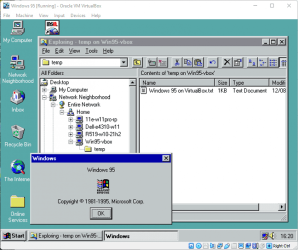
A VirtualBox VM could run W7 with sound though, and VirtualBox supports earlier version of Windows too, with networking even....

Windows 95 in VirtualBox.png
 

My Computers My Computers

  • At a glance

    Windows 7 Home Premium x64AMD V1204GB
    Computer type
    Laptop
    Computer Manufacturer/Model Number
    Toshiba satellite C650D
    OS
    Windows 7 Home Premium x64
    CPU
    AMD V120
    Memory
    4GB
    Internet Speed
    150 Mbps
    Antivirus
    MSE
    Browser
    IE11, Edge, Firefox
    Other Info
    I also have W7 Pro on my System Two, and several W7 Hyper-V VMs. My other machines run Windows 10/11. Their specs are in my Ten Forums & Eleven Forum profiles.
  • At a glance

    Windows 7 Pro x64Intel i5-3320M8 GB
    Computer type
    Laptop
    System Manufacturer/Model Number
    Lenovo Thinkpad T430
    OS
    Windows 7 Pro x64
    CPU
    Intel i5-3320M
    Memory
    8 GB
    Hard Drives
    250GB Samsung SSD 860 EVO
    Antivirus
    MSE
You could also install W7 as a dual-boot (that is, not as a virtual system). W98, probably not. I have an i7 also, a bit earlier (3770 or something), and am running W7 quite well.
 

My Computer My Computer

At a glance

Windows 7 x64 SP1AMD Athlon 64 X2 6000+ / 3.0 GHz6 GB
Computer type
PC/Desktop
Computer Manufacturer/Model Number
Gateway GT5656
OS
Windows 7 x64 SP1
CPU
AMD Athlon 64 X2 6000+ / 3.0 GHz
Motherboard
NVIDIA GeForce 6150 SE
Memory
6 GB
Monitor(s) Displays
Lenovo LED
Screen Resolution
1920 X 1080
Hard Drives
Windows on 500 GB spinner; Ubuntu 16 on Sandisk 250GB SSD; Bodhi5 on Samsung 250GB SSD; another old spinner for fooling around.
PSU
Original that came with computer
Keyboard
Logitech wireless
Mouse
Logitech wireless
Antivirus
Microsoft Sec Essentials
Browser
Vivaldi
The key point is are there win 7 drivers for everything most thing should run on 10 you may need to set it properties as win 7
 

My Computer My Computer

At a glance

win 8 32 bit
Computer type
PC/Desktop
OS
win 8 32 bit
Windows 7 divers are mainly up to 6th gen skylake. 4790K is 4th gen system so there will be windows 7 support for that computer. its either way you can make a windows 10 or windows 7 computer with that system.
 

My Computers My Computers

  • At a glance

    10
    OS
    10
  • Computer type
    PC/Desktop
The only gotcha for Windows 7 is that it doesn't natively support USB 3.0. That means when you install Windows 7 you will only be able to use the USB 2.0 ports. I see that there are 2 x USB 2.0 ports on the ASUS Z97-WS back panel. After Windows 7 is installed you can install the USB 3.0 driver so that the USB 3.0 are working.

BTW, I just replaced the motherboard for my computer with a dual-boot of Windows 10 Pro and Windows 7 Home. It now has an ASUS Prime X370-Pro motherboard with an AMD Ryzen 7 1700X CPU. When I went to boot Windows 7 neither the keyboard or mouse worked. I finally realized that all of the front and rear panel ports were USB 3.0 or USB 3.1. I ordered a back panel bracket for the USB 2.0 headers on the motherboard. I could have waited for that but then realized that the motherboard had a PS/2 connector. I plugged in a keyboard with a PS/2
connector. I was able to boot into Windows 7. I managed to navigate everything without a mouse. After I installed the USB 3.0 driver the USB 3.0 ports started working. I was then able to use a USB keyboard and mouse again.
 

My Computers My Computers

  • At a glance

    Windows 7 Professional 64bit / Windows 10 Hom...AMD FX-8350GSKILL Ripjaw-X PC3 12800 12GB (2x4GB, 2x2GB)ASUS ENGTX560 DCII OC/2DI/1GD5 1GB
    Computer type
    PC/Desktop
    Computer Manufacturer/Model Number
    Custom build
    OS
    Windows 7 Professional 64bit / Windows 10 Home 64bit
    CPU
    AMD FX-8350
    Motherboard
    Gigabyte GA-990FXA-UD3 (AM3+) Rev. 4.0
    Memory
    GSKILL Ripjaw-X PC3 12800 12GB (2x4GB, 2x2GB)
    Graphics Card(s)
    ASUS ENGTX560 DCII OC/2DI/1GD5 1GB
    Sound Card
    Integrated
    Monitor(s) Displays
    Asus VE228H (21.5-in)
    Screen Resolution
    1920x1080 60Hz
    Hard Drives
    SAMSUNG 870 EVO 1TB (2.5" SATA SSD)
    SAMSUNG 870 EVO 500GB (2.5" SATA SSD)
    PSU
    Antec TruePower (new) TP-650 (650 watts)
    Case
    Antec Three Hundred
    Cooling
    AMD stock (plan to upgrade to Cooler Master Hyper 212 EVO)
    Keyboard
    Logitech K540 (wireless)
    Mouse
    Logitech M310 (wireless)
    Internet Speed
    Comcast Gigabit X2 Internet (2100Mbps down / 300Mbps up)
    Browser
    Firefox, Edge, Chrome
    Other Info
    Optical drive: ASUS DRW-24B3ST/BLK/G (Black) (24X)
    External hard drives: 2TB & 6TB
    Internet Gateway: Comcast XB8
  • Computer type
    PC/Desktop
Back
Top