
Install win 7 clean upgrade

BILL1909

New member
Local time
8:07 AM
Messages
14
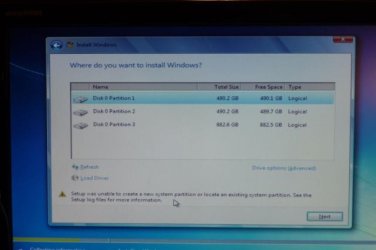
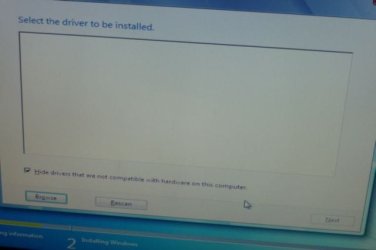
I picked custom,clean,upgrade and tried to load into new h/d,that was formatted and partitioned.The window comes up asking--where do you want to install win.It would not let me pick a partition unless I formatted it again.But still looking for device drivers after that.I had backup up drivers from xp pro and installed on another partition . Can not run program to let win 7 install disk see drivers.Not sure how to get drivers installed.So the question is what to do
P1110909-S-J.jpg

10J.jpg
 

My Computer

Computer type
PC/Desktop
Computer Manufacturer/Model Number
custom
OS
32bit now xp pro-want to install MS7 pro
CPU
3.15 gigahertz intel pentium III
Motherboard
Gigabyte EP45-UD3P
Memory
2-2048 mb,
Graphics Card(s)
ATI Radeon HD 4800 series
Hard Drives
Seagate-St31000340As (loss a few files,might be failing,so might as well install ms7 on new h/D
Hitachi HDS721010KLA330
Antivirus
NIS
Browser
Fire Fox
Hello Bill,

Is this an upgrade or full copy of Windows?

If full, see if using the method in the tutorial below to do a clean install may work better for you. At step 8 (top link below), delete all partitions until the disk is unallocated, then select the unallocated disk to install Windows 7 on.

http://www.sevenforums.com/tutorials/1649-clean-install-windows-7-a.html

OR

http://www.sevenforums.com/tutorials/31402-clean-install-upgrade-windows-7-version.html

After Windows has finished installing, you could then setup the partitions how you like.
 

My Computer

Computer type
PC/Desktop
Computer Manufacturer/Model Number
Self built custom
OS
64-bit Windows 11 Pro for Workstations
CPU
Intel i7-8700K OC'd to 5 GHz
Motherboard
ASUS ROG Maximus XI Formula Z390
Memory
64 GB (4x16GB) G.SKILL TridentZ RGB DDR4 3600 MHz
Graphics Card(s)
ASUS ROG-STRIX-GTX1080TI-O11G-GAMING
Sound Card
Integrated
Monitor(s) Displays
2 x Samsung Odyssey G7 27"
Screen Resolution
2560x1440
Hard Drives
1TB Samsung 990 PRO M.2,
4TB Samsung 990 PRO PRO M.2,
TerraMaster F8 SSD Plus NAS
PSU
Seasonic Prime Titanium 850W
Case
Thermaltake Core P3
Cooling
Corsair Hydro H115i
Keyboard
Logitech wireless K800
Mouse
Logitech MX Master 4
Internet Speed
2 Gb/s Download and 100 Mb/s Upload
Antivirus
Malwarebyte Anti-Malware Premium
Browser
Google Chrome
Other Info
Logitech Z625 speaker system,
Logitech BRIO 4K Pro webcam,
HP Color LaserJet Pro MFP M477fdn,
APC SMART-UPS RT 1000 XL - SURT1000XLI,
Galaxy S23 Plus phone
This is retail upgrade 32/64.Just trying to install win 7,32bit.Was just trying to -- tutorials/31402-clean-install-upgrade-windows-7-version.html . Trying to do 4th option,can not get pass this part.Will try and allocate partitions and do just one partition until win installed. Are they asking for the mother board drivers, and how to install them if they are asking.I have d/l drivers for mother board but how do you install on a dvd or usb.Only wants to install to computer
 

My Computer

Computer type
PC/Desktop
Computer Manufacturer/Model Number
custom
OS
32bit now xp pro-want to install MS7 pro
CPU
3.15 gigahertz intel pentium III
Motherboard
Gigabyte EP45-UD3P
Memory
2-2048 mb,
Graphics Card(s)
ATI Radeon HD 4800 series
Hard Drives
Seagate-St31000340As (loss a few files,might be failing,so might as well install ms7 on new h/D
Hitachi HDS721010KLA330
Antivirus
NIS
Browser
Fire Fox
No need for Sata controller drivers as HDD is showing, but Windows can not boot from a Logical partition, partition needs to be Primary.
 

My Computer

OS
ME/XP/Vista/Win7
I deleted all partitions. When I finally got to the window asking--Where to install win 7,can not go any farther.I can only choose new,refresh,load drivers. When I pick new and chose 1907718mb (whole drive) I get error message ---failed to create a new partition on the selected unused space (error -0X8004240F). No matter what size I wanted to make the partition the same error message came up.
Does it make any difference if the type of partition is extended.
Wouldn't the windows cd make the partition and make it primary.Or should I make it primary and then try and install win cd.
 

My Computer

Computer type
PC/Desktop
Computer Manufacturer/Model Number
custom
OS
32bit now xp pro-want to install MS7 pro
CPU
3.15 gigahertz intel pentium III
Motherboard
Gigabyte EP45-UD3P
Memory
2-2048 mb,
Graphics Card(s)
ATI Radeon HD 4800 series
Hard Drives
Seagate-St31000340As (loss a few files,might be failing,so might as well install ms7 on new h/D
Hitachi HDS721010KLA330
Antivirus
NIS
Browser
Fire Fox
Bill,

Please go ahead and post a screenshot showing what you have now to see what the issue may be.
 

My Computer

Computer type
PC/Desktop
Computer Manufacturer/Model Number
Self built custom
OS
64-bit Windows 11 Pro for Workstations
CPU
Intel i7-8700K OC'd to 5 GHz
Motherboard
ASUS ROG Maximus XI Formula Z390
Memory
64 GB (4x16GB) G.SKILL TridentZ RGB DDR4 3600 MHz
Graphics Card(s)
ASUS ROG-STRIX-GTX1080TI-O11G-GAMING
Sound Card
Integrated
Monitor(s) Displays
2 x Samsung Odyssey G7 27"
Screen Resolution
2560x1440
Hard Drives
1TB Samsung 990 PRO M.2,
4TB Samsung 990 PRO PRO M.2,
TerraMaster F8 SSD Plus NAS
PSU
Seasonic Prime Titanium 850W
Case
Thermaltake Core P3
Cooling
Corsair Hydro H115i
Keyboard
Logitech wireless K800
Mouse
Logitech MX Master 4
Internet Speed
2 Gb/s Download and 100 Mb/s Upload
Antivirus
Malwarebyte Anti-Malware Premium
Browser
Google Chrome
Other Info
Logitech Z625 speaker system,
Logitech BRIO 4K Pro webcam,
HP Color LaserJet Pro MFP M477fdn,
APC SMART-UPS RT 1000 XL - SURT1000XLI,
Galaxy S23 Plus phone
I have win 7 up and running,now it updating.Tomorrow I will try and register.My problem was that I had read that I should partition the new h/d,which I did.From other reading I guess I got confused and throught that win 7 cd would then make the partition that was picked to install win, the primary. Once I made the partition primary the install went OK. I did the two install and will find out if the registration works tomorrow.
Tomorrow I try and get the win7 drive and xp pro drive to dual boot.
MY problem is I know just enough to get my self into trouble. Thanks for your tutorials and all the help.
 

My Computer

Computer type
PC/Desktop
Computer Manufacturer/Model Number
custom
OS
32bit now xp pro-want to install MS7 pro
CPU
3.15 gigahertz intel pentium III
Motherboard
Gigabyte EP45-UD3P
Memory
2-2048 mb,
Graphics Card(s)
ATI Radeon HD 4800 series
Hard Drives
Seagate-St31000340As (loss a few files,might be failing,so might as well install ms7 on new h/D
Hitachi HDS721010KLA330
Antivirus
NIS
Browser
Fire Fox
You're welcome Bill. I'm glad we were able to help.

Hopefully it will all go smoothly for you. :)
 

My Computer

Computer type
PC/Desktop
Computer Manufacturer/Model Number
Self built custom
OS
64-bit Windows 11 Pro for Workstations
CPU
Intel i7-8700K OC'd to 5 GHz
Motherboard
ASUS ROG Maximus XI Formula Z390
Memory
64 GB (4x16GB) G.SKILL TridentZ RGB DDR4 3600 MHz
Graphics Card(s)
ASUS ROG-STRIX-GTX1080TI-O11G-GAMING
Sound Card
Integrated
Monitor(s) Displays
2 x Samsung Odyssey G7 27"
Screen Resolution
2560x1440
Hard Drives
1TB Samsung 990 PRO M.2,
4TB Samsung 990 PRO PRO M.2,
TerraMaster F8 SSD Plus NAS
PSU
Seasonic Prime Titanium 850W
Case
Thermaltake Core P3
Cooling
Corsair Hydro H115i
Keyboard
Logitech wireless K800
Mouse
Logitech MX Master 4
Internet Speed
2 Gb/s Download and 100 Mb/s Upload
Antivirus
Malwarebyte Anti-Malware Premium
Browser
Google Chrome
Other Info
Logitech Z625 speaker system,
Logitech BRIO 4K Pro webcam,
HP Color LaserJet Pro MFP M477fdn,
APC SMART-UPS RT 1000 XL - SURT1000XLI,
Galaxy S23 Plus phone
Back
Top