Solved Install Win7 to Logical partition?

gregrocker

New member
Guru
Local time
9:52 AM
Messages
50,634
After clean installing Win7 to second partition dual booting with XP, I notice that the Win7 paritition is marked "logical drive" in Disk Management. XP is marked primary active.

Are there any reasons why an OS should not be installed to a logical drive?
 
A logical drive can function perfectly well as a Boot partition.

However, as it can not be marked Active, it cannot be the System partition.

If, for any reason , you wish to convert it to a Primary partition - rt click it in Paragon Partition Manager an you can convert it in a matter of seconds without data loss.

( You will only be offered the option to convert if doing so adheres to the max no. of partitions allowed under mbr partitioning rules, of course)
 

My Computers My Computers

System One System Two

  • Computer type
    PC/Desktop
    OS
    7 X64
    CPU
    i5 8400
    Motherboard
    gigabyte b365m ds3h
    Memory
    2x8gb 3200mhz
    Hard Drives
    various
    PSU
    pure power 11 400w cm
    Case
    Coolermaster
    Cooling
    cryorig m9i
  • Computer type
    PC/Desktop
    OS
    7x64
    CPU
    g5400
    Motherboard
    ga b365m ds3h
    Memory
    8gb ddr4 2400
    PSU
    xfx pro 450w
A logical drive can function perfectly well as a Boot partition.

However, as it can not be marked Active, it cannot be the System partition.

If, for any reason , you wish to convert it to a Primary partition - rt click it in Paragon Partition Manager an you can convert it in a matter of seconds without data loss.

( You will only be offered the option to convert if doing so adheres to the max no. of partitions allowed under mbr partitioning rules, of course)

Thanks!

Is there any reason to do this if I don't need the boot files now to be contained on the Win7 partition?

Would some programs/utilities not recognize a logical partition as containing an OS?

It is running fine, booting up correctly from XP/Win 7 menu.
 
Last edited:
You would probably only need if to you wanted to make 7 the System partition . Otherwise, it should be fine as it is. I am not aware of any programs that would complain.
 

My Computers My Computers

System One System Two

  • Computer type
    PC/Desktop
    OS
    7 X64
    CPU
    i5 8400
    Motherboard
    gigabyte b365m ds3h
    Memory
    2x8gb 3200mhz
    Hard Drives
    various
    PSU
    pure power 11 400w cm
    Case
    Coolermaster
    Cooling
    cryorig m9i
  • Computer type
    PC/Desktop
    OS
    7x64
    CPU
    g5400
    Motherboard
    ga b365m ds3h
    Memory
    8gb ddr4 2400
    PSU
    xfx pro 450w
Strange happenings. I converted logical to primary using Paragon Pro bootable. Seemed to affect the responsiveness of the Win7 installed there, so I used an image backup I had made before conversion to reimage my HDD. All good now. Today I look in Disk Management and both partitions are now Primary. WTF?
 
Maybe because there's no point in making a logical partition because there are only 2 partitions on the drive. Logical is only needed when there are more than 4 partitions (the Master Boot Record contains enough space for 4 partition records).
 

My Computer My Computer

Computer Manufacturer/Model Number
Too many to list.
OS
XP, Seven, 2008R2
CPU
AMD, Intel, VIA
Motherboard
Various
Memory
Corsair, Kingston, etc.
Graphics Card(s)
ATI, NVIDIA
Monitor(s) Displays
Samsung
Hard Drives
Maxtor, Western Digital
Keyboard
qwerty
Internet Speed
22 Mb/s @ home, 1 Gb/s @ server
Other Info
All of my systems still run fastest on XP 32-bit for the most part. Win7 is fun to play with, but I still prefer XP for raw speed, security, and functionality.
RE
After clean installing Win7 to second partition dual booting with XP, I notice that the Win7 paritition is marked "logical drive" in Disk Management. XP is marked primary active.

Are there any reasons why an OS should not be installed to a logical drive?


RE: With XP on 1st primary, Win7 on a logical OR the 2nd primary..

(Win7 and XP boot files are on the XP partition- XP partition is "active".)

Q: With this set-up while in XP.... XP OS is on "C:" .... is the Win7 partition "C" while in Win7?

Have a thread asking about it here, plus the Pros and Cons of installing to a logical vs a primary...

Currently have the boot files on a 200mb "System Reserved" partition- which while in XP is seen as "C:" and cannot be hidden causing XP to be seen as "D:".

http://www.sevenforums.com/installa...nstall-oss-logical-primary-partition-pro.html

Any info you have on this subject would be appreciated.


.
 

My Computer My Computer

OS
XP Pro 32, Win7 Pro 64, Windows 7 Ultimate 32/64
You can install Win7 to Logical if there is a Primary Active partition for it to write its boot files to.

If you want to remove XP you'll need to convert Win7's Logical partition To Primary using free Partition Wizard bootable CD, then Modify>Set to Active, boot the Win7 DVD to run Startup Repair up to 3 separate times to write the boot files to Win7 partition.

Or you can create a Primary boot partition in some of the space where you delete XP using free Partition Wizard CD(resizing Win7 into the rest of the space if desired), mark it Active then run the Repairs which will write the System MBR and boot files to the newly constructed boot partition.

An added benefit of constructing the boot partition is that the Repairs will also install the Repair Console onto the Advanced Boot Tools menu accessed by tapping F8 at bootup. Normally you need the DVD or Repair CD for this Repair console.
 
Dear greckrocker!
I just registered just to thank you! It took me some hours to understand why windows will not fix the bootmanager. Although it accepted the logical partition for windows 7 in partnership with xp it was not able to restore the win7 when it was on its own.

I copied the system-files bootmanager/autoexec.bat/ from a fresh win7-install. After that the repair-function was able to find my win-install.

After adding a small primary partition and giving it the boot-flag bootrec /fixboot and /fixmbr (under windows repair console) suceeded. Before that the error message was Element not found OR on german Element nicht gefunden.

After that my kubuntu update-grub will also find the win7 ... full sucess!

Thank you so much. I really was desperate after killing a windows of a customer with installing kubuntu (which I did many times)

Have a nice day/evening -- whereever you live!
Matthias - Austria
 

My Computer My Computer

OS
windows 7 pro 32 bit
Glad it helped, Matthias.

Greets from the beach in Calif (where I live), Boston (where I'm traveling) bound for London, Berlin, Paris, Madrid and Barcelona in the next few months.

All the best to you there and I hope to get to Austria again soon.
 
This is very nearly what my problem is.

I installed a fresh Windows 7, but not wanting to touch the rest of my drive, I made a nice 160 GB partition (of a 1TB drive) in it and went ahead with the install. But it was the 2nd hard drive used by this computer. An older version of Windows was still installed in the first (160 GB) drive. But that's cool with me, I would prefer to just keep all these partitions around and not think about it.

Problem was, somehow the Windows boot manager on drive #1 was configured to boot into Windows 7 on drive #2. Again, that shouldn't be a problem. But then I try to go directly from the BIOS to drive #2, it says that it's not bootable. Okay, so check the information... the 160 GB Windows partition is marked as logical, while the other (data only) partition is marked as the primary.

So... my BIOS is telling the truth, at least somewhat. It looked at the drive, found the primary partition, and correctly concluded that it was not bootable. As far as I can figure out, the only instructions that allow me to boot into the Windows 7 partition lie on drive #1, which is a terrible terrible policy and I'm running around trying to figure out a solution to fix it.

EaseUS partition manager has several utilities that seem like they could fix it, but none actually work. Editing the MBR seems hopeful to point the BIOS to the right partition, but this can't be used with the free version, and I have no confidence that buying it would actually solve my problem. Now, I would like to use EaseUS to just set the Windows 7 drive to primary, but it says that this property can't be changed for a bootable sector. Now I'm stuck in a big infinite loop of errors!

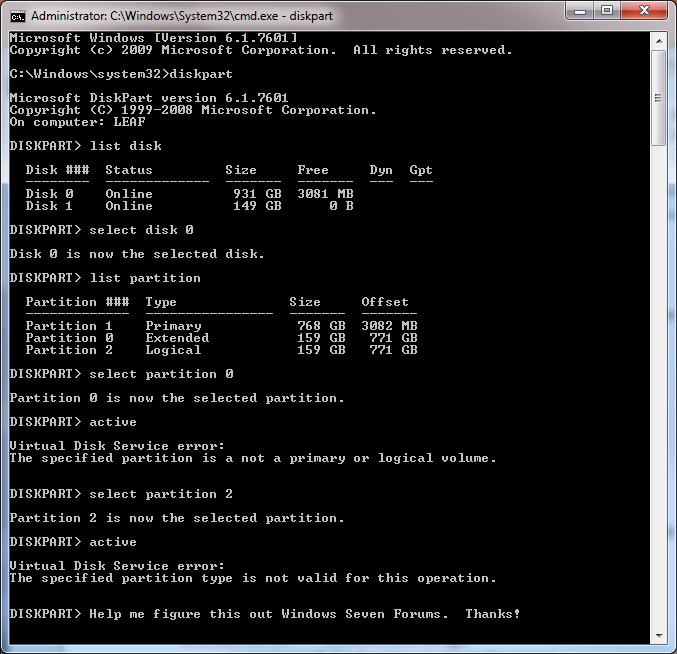
Now I'm trying to do this same operation with diskpart (which is likely to give the same error anyway), and I notice that it has an "Extended" sector, which seems a duplicate of the "Logical" Windows 7 partition. I guess I'll ignore that and try to make the logical sector primary. If that doesn't work, I'll give the Paragon partition manger a shot. I'm fairly sure neither of these approaches will work, and I'll post here again to continue the saga.

UPDATE: problem was solved. See my final post for this specific saga first if you are working on a similar problem. Everything between these two posts are intermediary troubleshooting steps.

 
Last edited:

My Computer My Computer

Computer type
PC/Desktop
Computer Manufacturer/Model Number
Dell
OS
Windows 7 Enterprise x64
CPU
Intel Core 2 Due CPU
Motherboard
0GM819
Memory
6 GB
Antivirus
AVG
Browser
Firefox
Post back a Disk Mgmt screenshot for the steps to do what you want.
 
Here is a screenshot. This is probably obvious, but disk 1 is the old drive with the old OS. Disk 1 is the 1 TB drive. Clearly, 768+159+159 does not equal 931, which evidences the fact that the two small partitions either refer to the same thing or one is junk.

UOWjzQ8.png


Now I'm looking into XOSL for a potential boot manager, but there's a lot to read before I try anything.
 

My Computer My Computer

Computer type
PC/Desktop
Computer Manufacturer/Model Number
Dell
OS
Windows 7 Enterprise x64
CPU
Intel Core 2 Due CPU
Motherboard
0GM819
Memory
6 GB
Antivirus
AVG
Browser
Firefox
It would help to see it better with a screenshot of Disk Management - Post a Screen Capture Image.

Neither the Logical or Extended holds the Boot files for either Win7 installation, as they can only be placed on a Primary partition.

You can always convert a Logical to Primary using How to set partition as Primary or Logical with Partition Wizard.

Then you can Mark Partition Active the Win7 you want to keep and run Startup Repair - Run 3 Separate Times to write the boot files there until it starts and holds the System Active flags.


Having an OS in third partition is also not as desirable as having it in the left hand side closer to where the disk reader parks for faster reads.
 
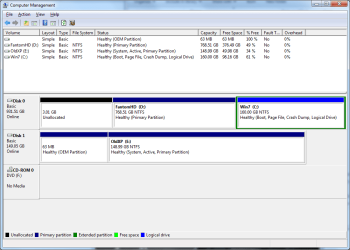
Thanks, sorry I didn't follow the FAQ right the first time. Attached is the Disk Management screenshot, as per those instructions.

Next, I will try setting the Win7 partition to primary via the Partition Wizard. Other software gave errors for this operation, so I'll post the error message if I get one.

Then, I'll have to put my Windows7 iso on portable media in order to run the Startup Repair. That will take me a day or so since I don't have it with me.

It sounds like it might make sense to copy the entire Windows7 partition to another partition on the "left" as you say. Space isn't a problem, and I think this is within the capabilities of what software I've already used. Perhaps it can be set to primary as it is created.
 

Attachments

  • Screenshot 2014-05-06 16.48.48.png
    Screenshot 2014-05-06 16.48.48.png
    25 KB · Views: 1

My Computer My Computer

Computer type
PC/Desktop
Computer Manufacturer/Model Number
Dell
OS
Windows 7 Enterprise x64
CPU
Intel Core 2 Due CPU
Motherboard
0GM819
Memory
6 GB
Antivirus
AVG
Browser
Firefox
Neither the Logical or Extended holds the Boot files for either Win7 installation, as they can only be placed on a Primary partition.

You can always convert a Logical to Primary using How to set partition as Primary or Logical with Partition Wizard.

Then you can Mark Partition Active the Win7 you want to keep and run Startup Repair - Run 3 Separate Times to write the boot files there until it starts and holds the System Active flags.

I've been trying with the two steps referred to here. That is, unplug the old install and start up into my valid Win7 install CD/flash drive. Then, the two steps from there are to follow the diskpart instructions and then use Windows repair. I can certainly attempt both of these, but it still doesn't accomplish the objective of correctly configuring the MBR on this drive.

diskpart:

I still can't use diskpart to set the logical partition as active. I see how it makes sense that you can't do this when Windows is running, and that we need to use the installation files. I did this, and it throws the same error:

Virtual Disk Service error:
The specified partition type is not valid for this operation.
Now, I can set the other partition to nonactive. I thought maybe I needed to do this before setting the Win7 partition to active, but it doesn't help.

Windows repair:

I have gone through the Windows repair too. The first time (again, without the other drive plugged in), it detected the Windows 7 partition, so I committed those changes. But that still won't allow me to boot from that disk. Same general:

Alert! Failed to detect one or more drives during POST.
Strike the F1 key to continue, F2 to run the setup utility
Press F5 to run onboard diagnostics
I can select the drive to look for boot files in with the BIOS options, I'm confident that it's looking at the desired drive, and this is after the Windows repair, and it won't boot. When I try again after the above error, I can get yet another error, which I think is "NTLDR missing". I don't have solid documentation, because it only flashes the message, not long enough to take a picture of the screen.

Next up:

Some options still remain from what we've discussed here, although I'm marking them out one-by-one slowly. I'm going to try creating a new primary partition from scratch and copying the Windows 7 partition there. If the error is due to baggage from being a logical partition, this would seem to remedy it. I'll try to keep posting updates, because I'm fairly sure I will get it figured out eventually.
 

My Computer My Computer

Computer type
PC/Desktop
Computer Manufacturer/Model Number
Dell
OS
Windows 7 Enterprise x64
CPU
Intel Core 2 Due CPU
Motherboard
0GM819
Memory
6 GB
Antivirus
AVG
Browser
Firefox
Did you read what I wrote and you just quoted? You must convert C from Logical to Primary before it will mark Active, and it must be Active before repairs will work.

You can use the Partition Wizard boot disk or install it to XP. Remember to apply both steps:

Convert C to Primary first using Partition Wizard to set partition as Primary. It cannot be marked Active until it is Primary.

You can then also use Partition Wizard to Set C Active partition - Video Help. It will not repair until C is marked Active.

Then after C is confirmed to be Primary Active, power down to unplug XP drive, boot into Win7 disk to run Startup Repair - Run 3 Separate Times.

You can then use Partition Wizard to Resize D Partition from the left to make space to copy C into the Unallocated Space created at the front of the drive using How to copy partition with the partition manager MiniTool Partition Wizard. Once it is copied into the space, use PW to mark old C Inactive, confirm new C is marked Active, then run Startup Repair if necessary. Save the old C partition until you are sure the new one functions correctly.
 
I still can't use diskpart to set the logical partition as active

You need to convert it to a PRIMARY partition before it can be marked Active. You need a 3rd party partitioning tool for that.

Couple of very good free ones :

Standard edition is free

Free Partition Manager - AOMEI Partition Assistant Standard


Home edition is free

Best Free Partition Manager Freeware and free partition magic for Windows 7, Windows 8, Windows Vista and Windows XP 32 bit & 64 bit. MiniTool Free Partition Manager Software Home Edition.

Edit: Greg beat me to it.:)
 

My Computers My Computers

System One System Two

  • Computer type
    PC/Desktop
    OS
    7 X64
    CPU
    i5 8400
    Motherboard
    gigabyte b365m ds3h
    Memory
    2x8gb 3200mhz
    Hard Drives
    various
    PSU
    pure power 11 400w cm
    Case
    Coolermaster
    Cooling
    cryorig m9i
  • Computer type
    PC/Desktop
    OS
    7x64
    CPU
    g5400
    Motherboard
    ga b365m ds3h
    Memory
    8gb ddr4 2400
    PSU
    xfx pro 450w
But I learned it from you Simon (years ago) in this very thread! :geek:

This is the first time however that I'm recommending copying System partition using PW which has worked for me in the past. Do you think it is as sound of a copy as imaging?
 
Back
Top