Hi All,
Greets,
Sir(s),
It seems the things are all done But I have something to say!
1) The Correct Understanding : Installing & maintaining windows on a pen drive AND preparing a pen drive Installation media to install windows on a HDD/SSD, are two different things.
Both utilities support both the things.
As it is clear that the objective, here, is to prepare a USB installation media, we should talk only about that.
2) Here is a small guide to use Rufus :
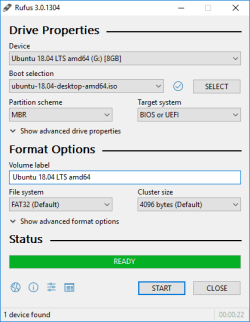 This image is just for reference. Need not follow it or get confused! Follow instructions as below only :
To avoid any confusions/problems :
Close all the Programs/Apps/Windows.
Eject & unplug/take out all the external devices & external media like CD/DVD, Pen Drives, external hard disks & other USB Devices except the one pen drive
Place the Rufus portable in a folder, launch Rufus & follow the instructions :
(a) When you launch Rufus , It may ask to check for updates, opt 'NO'.
(b) Select the pen drive in the Device menu
(c)click 'SELECT', browse to the windows iso and double click it (somethings change & iso name will appear in the 'Boot selection' window)
(d) Choose partition scheme as GPT/MBR & Target system as UEFI/BIOS as applicable to your system ( These options may be chosen automatically but make sure you make the ones required )
(e) need not change any thing else
(f) press 'START' ( copying iso files, finally READY! )
(g) close the rufus window, it's done.
3) Rufus :
(a) Rufus is the best!
(b) It can be used to check Bad Blocks on the USB drive. It can be used to quick format the drive.
(c) While creating installation media, It automatically selects proper file system. Then it quick formats the drive, erasing all the other things present on it.
(d) While using Rufus, it will be good to go with the default selections & settings, except for the two things 'Partition Scheme' & 'Target System' i.e. 'MBR/GPT' & 'BIOS/UEFI'. They should be chosen according to the system on which the installation is planned. Leave rest to Rufus.
(e) Another great feature is : It can be used to prepare UEFI USB installation media with ISOs greater in size than 4GB. It uses UEFI+GPT+NTFS for that!
( In the near future, a fully updated win7 ISO may be larger in size than 4GB )
4) The File System : The proper file system is automatically chosen by Rufus & stick to its selection. The chosen file system is only for the installation media & has no bearing on the HDD/SSD file system. The file system present on the HDD/SSD would be taken care of itself.
( So, just make sure that your HDD/SDD is having NTFS on it which is default now a days)
5) In some cases HDD/SDD may be needed to convert from GPT to MBR or from MBR to GPT depending on the system it has to used on.
6) Critical Storage Drivers :
(a) USB drivers : To recognize & boot well into a Windows 7 USB Installation media, better go with USB 2.0 port as windows 7 does not support USB 3.0 port out of the box. Otherwise integrate the USB 3.0 drivers in the ISO before making an installation media.
(b) AHCI : With basic drivers already integrated into the windows 7 ISO, AHCI is only a problem on very new/latest machines. I also noticed problem with RAID drivers on new machines. But one need not think about it in advance.
If the driver is not there, It will still boot well into USB media but would not be able to access/recognize the hard drive & its partitions thereafter, just like XP days.
Your machine is not quite new & so it would not be an issue for you with win 7.
(c) AHCI/RAID ? If a computer has RAID configuration, It definitely should have something in BIOS to switch backward to AHCI interface which seems vital for SSDs.
7) To avoid any problems, just use ''One Time Boot Menu'' to boot into the USB/CD/DVD installation media. Always keep Hard drive on priority over USB & CD/DVD in the default boot order. ( One may get into a loop if it is not so)
So,
'Partition Scheme' & 'Target System' should be known before preparing USB installation media with Rufus. It will also tell you whether you need to convert Partition Scheme on the HDD/SSD.
Besides, If SSD is to be used, first switch from RAID to AHCI in BIOS Settings.
It is quite easy to decide/know about the things in BIOS Setup.
If one has a running OS on the same system, it is helpful to know what actually is working for the system.
Besides one should also look into the BIOS/Firmware capabilities. The exact make & model can help with that.
Just to mention :
(a) If planning to install win7 x64 , make sure that the system has 4GB or more RAM to support.
(b) Detach all other hard disks & pen drives except the two & then proceed with the installation.
(c) Consider to update the installation media :
Update your Win 7 installation media. by Sir
SIW2.
OR
Create An Integrated Up To Date Windows 7 Install Disc • Raymond.CC
After updating the installation media, one may need to use a pen drive of 8gb or more capacity.
Thanks & Regards. ...