Solved Install windows problem

terry1996

New member
Local time
3:04 PM
Messages
30
hello friends, as the title says , i have a problem with windows installing ,let me tell you exaclty.my old computer have windows xp with dual core to 3Ghz and 2GB ram , i try to install windows 7 but when i am trying to boot from USB the computer restars from the start. I try to format the hard drive from another computer and i did it successfully .After that i plug the hard drive back , i open computer booted from hard drive and restarts at the "Starting Windows" page. I check ram , video card , anything but they are all absolutelly fine! Please give me an answer , Thank you in advance,

P.S : sorry if my english are bad :D
 

My Computer

Computer type
Laptop
Computer Manufacturer/Model Number
Acer
OS
Windows 7 Ultimate x64
CPU
Intel(R) Core(TM) i5-4200U CPU @ 1.60GHz 2.30GHz
Motherboard
Acer Aspire E1-572G
Memory
4,00GB RAM
Graphics Card(s)
AMD RADEON GRAPHICS HD 8750m
Hard Drives
TOSHIBA MQ01ABD075 (698 GB)
Antivirus
Avast
Browser
Google Chrome
Unless you plan to upgrade the RAM to at least 4gb, I'd use 32 bit for only 2 gb RAM to get better performance: Win7 Home Premium x86 SP1 English Official ISO download written to stick with Windows 7 USB-DVD Download Tool.

Work through the steps to Troubleshoot Windows 7 Installation Failures - Windows 7 Help Forums.

Be sure to set hard drive as first to boot in BIOS setup, then trigger the stick using one-time BIOS Boot menu key, so it won't start the install over at reboot. If so, unplug it.
 
You did not change the boot order in the bios did you ?

When booting from a usb stick you use the 1 time boot key to bring up the boot menu and only choose the usb stick the first time, after it re boots the hard drive will then take over and finish the install.
 

My Computer

Computer type
PC/Desktop
Computer Manufacturer/Model Number
Skylake Special #666
OS
Windows 10 Pro x64
CPU
Intel Core i7 6700K
Motherboard
Asus Sabertooth Z170 Mark 1
Memory
GSkill TridentZ RGB 16GB 3600 16-16-16-36
Graphics Card(s)
EVGA GTX 980 Ti SC x2
Sound Card
Realtek High Definition
Monitor(s) Displays
AOC G2460PG
Screen Resolution
1920 x 1080 144Hz
Hard Drives
Samsung 860 Pro 256GB, Seagate Barracuda 4TB x2
PSU
EVGA 1000 P2, EVGA White Custom Braided Cables
Case
Corsair Vengeance C70 Gunmetal Black
Cooling
Corsair H100i v2, Corsair ML120 x2, Thermal Grizzly Kryonaut
Keyboard
Logitech G910 Orion Spectrum
Mouse
Logitech G700s
Internet Speed
Verizon Fios Quantum Gateway 75/75
Antivirus
Windows Defender, Malwarebytes Free 3.8.3
Browser
Chrome
Other Info
Corsair SP120 x4, LG Blu-ray Drive, Durabrand HT-395 100 Watt Dolby Digital Amp, Corsair H2100 Wireless 7.1 Headset
Sorry i forgot to mention some stuff. I try to install windows 7 x32 bit and i had the hard drive in 1st boot option but the problem is still there...
 

My Computer

Computer type
Laptop
Computer Manufacturer/Model Number
Acer
OS
Windows 7 Ultimate x64
CPU
Intel(R) Core(TM) i5-4200U CPU @ 1.60GHz 2.30GHz
Motherboard
Acer Aspire E1-572G
Memory
4,00GB RAM
Graphics Card(s)
AMD RADEON GRAPHICS HD 8750m
Hard Drives
TOSHIBA MQ01ABD075 (698 GB)
Antivirus
Avast
Browser
Google Chrome
sandravlado, if you put the usb stick as the 1st option in the bios, it will just keep restarting the install over and over again.

There is no need to change it in the bios.

Terry, tell us exactly how you prepared the usb stick. That could be your issue.
 

My Computer

Computer type
PC/Desktop
Computer Manufacturer/Model Number
Skylake Special #666
OS
Windows 10 Pro x64
CPU
Intel Core i7 6700K
Motherboard
Asus Sabertooth Z170 Mark 1
Memory
GSkill TridentZ RGB 16GB 3600 16-16-16-36
Graphics Card(s)
EVGA GTX 980 Ti SC x2
Sound Card
Realtek High Definition
Monitor(s) Displays
AOC G2460PG
Screen Resolution
1920 x 1080 144Hz
Hard Drives
Samsung 860 Pro 256GB, Seagate Barracuda 4TB x2
PSU
EVGA 1000 P2, EVGA White Custom Braided Cables
Case
Corsair Vengeance C70 Gunmetal Black
Cooling
Corsair H100i v2, Corsair ML120 x2, Thermal Grizzly Kryonaut
Keyboard
Logitech G910 Orion Spectrum
Mouse
Logitech G700s
Internet Speed
Verizon Fios Quantum Gateway 75/75
Antivirus
Windows Defender, Malwarebytes Free 3.8.3
Browser
Chrome
Other Info
Corsair SP120 x4, LG Blu-ray Drive, Durabrand HT-395 100 Watt Dolby Digital Amp, Corsair H2100 Wireless 7.1 Headset
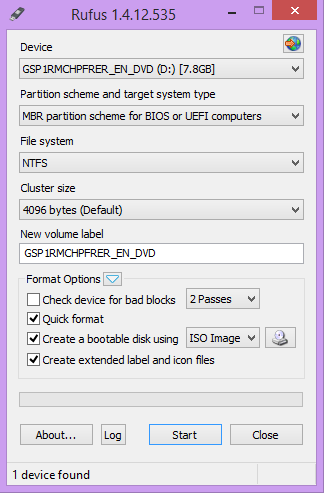
eh, i found some windows with all versions of windows inside (x64 and x32). After that i use Rufus to prepare the usb stick . Rufus finished i plug to computer and voila ! NOTHING >:C\


and right now i am writing the windows 7 from the guy who post before with the tool and blah blah blah!

O0FDcea.png


This is the program what i use , i add the iso and i press start
 
Last edited:

My Computer

Computer type
Laptop
Computer Manufacturer/Model Number
Acer
OS
Windows 7 Ultimate x64
CPU
Intel(R) Core(TM) i5-4200U CPU @ 1.60GHz 2.30GHz
Motherboard
Acer Aspire E1-572G
Memory
4,00GB RAM
Graphics Card(s)
AMD RADEON GRAPHICS HD 8750m
Hard Drives
TOSHIBA MQ01ABD075 (698 GB)
Antivirus
Avast
Browser
Google Chrome
Results : Windows failed to start. A recent hardware or software change might be the cause. To fix the problem .. [blah blah blah] ..

file : \boot\BCD
status : 0xc000000e
Info : An error occurred while attempting to read the boot configuration data.

what is that error and what the hell i am gonna do now ?
 

My Computer

Computer type
Laptop
Computer Manufacturer/Model Number
Acer
OS
Windows 7 Ultimate x64
CPU
Intel(R) Core(TM) i5-4200U CPU @ 1.60GHz 2.30GHz
Motherboard
Acer Aspire E1-572G
Memory
4,00GB RAM
Graphics Card(s)
AMD RADEON GRAPHICS HD 8750m
Hard Drives
TOSHIBA MQ01ABD075 (698 GB)
Antivirus
Avast
Browser
Google Chrome
Well, Why i can't see nothing for my problem in your threat ? I will test it , allright but if it fails ? What shoold i do next?
 

My Computer

Computer type
Laptop
Computer Manufacturer/Model Number
Acer
OS
Windows 7 Ultimate x64
CPU
Intel(R) Core(TM) i5-4200U CPU @ 1.60GHz 2.30GHz
Motherboard
Acer Aspire E1-572G
Memory
4,00GB RAM
Graphics Card(s)
AMD RADEON GRAPHICS HD 8750m
Hard Drives
TOSHIBA MQ01ABD075 (698 GB)
Antivirus
Avast
Browser
Google Chrome
Greg, i wondered about this thread ...
When i re-read
and right now i am writing the windows 7 from the guy who post before with the tool and blah blah blah!
I think the OP might be referring to your post #2 ???
Maybe he is now using the official ISO ... ???
I don't know, I'm just guessing ... the OP should explain clearly ...

:zip:
 

My Computer

Computer type
PC/Desktop
Computer Manufacturer/Model Number
home built
OS
Multi-Boot W7_Pro_x64 W8.1_Pro_x64 W10_Pro_x64 +Linux_VMs +Chromium_VM
CPU
AMD Athlon II x4 620
Motherboard
Gigabyte GA-MA785G-UD3H
Memory
6GB GSkill DDR2 800
Graphics Card(s)
AMD 4670 GPU + AMD 4200 IGP
Sound Card
on board Realtek ALC889A
Monitor(s) Displays
RCA 40" LCD TV, Insignia 32" LCD TV, HP 15" LCD monitor
Screen Resolution
1680 x 1050
Hard Drives
OCZ Vertex 3 120GB,
Samsung F3 1TB (3),
Several others - WD, Seagate, Hitachi, ...
PSU
Corsair 500 W
Case
Rosewill mid tower
Cooling
CM 90mm rifle
Keyboard
Gyration wireless, Logitech wireless, Dell USB wired
Mouse
Gyration wireless, Logitech wireless, V7 USB wired
Internet Speed
Spectrum - 100Mbps D / 10Mbps U
Antivirus
Avast, MBAM3, EMET, WinPatrol
Browser
Pale Moon, Firefox, IE
Other Info
2 multi-boot PC's
Mainly HTPC/Office/Gen purpose (no gaming).
Trendnet USB KVM.
LG DVD burner/Blue Ray Player.
Tray system for removable SATA backup drives.

Not currently OCd, under-volted.
I use Hybrid sleep, rarely re-boot or shutdown.

Hauppauge HD-PVR, Avermedia PCIe TV Tuner, Hauppauge PCI TV Tuner.
Thanks, David. I'm so swamped I don't have time to parse slang.

Terry I see now that it looks like you've downloaded the 32 bit ISO I provided you and written it to stick with the Download tool. Yet you still got the same error, correct?

In that case what works to resolve most all other failures are the steps to Troubleshoot Windows 7 Installation Failures - Windows 7 Help Forums

Let us know the results of the steps as you go as we may have other suggestions.
 
May I ask, does the laptop have a dvd burner drive ?
 

My Computer

Computer type
PC/Desktop
Computer Manufacturer/Model Number
Skylake Special #666
OS
Windows 10 Pro x64
CPU
Intel Core i7 6700K
Motherboard
Asus Sabertooth Z170 Mark 1
Memory
GSkill TridentZ RGB 16GB 3600 16-16-16-36
Graphics Card(s)
EVGA GTX 980 Ti SC x2
Sound Card
Realtek High Definition
Monitor(s) Displays
AOC G2460PG
Screen Resolution
1920 x 1080 144Hz
Hard Drives
Samsung 860 Pro 256GB, Seagate Barracuda 4TB x2
PSU
EVGA 1000 P2, EVGA White Custom Braided Cables
Case
Corsair Vengeance C70 Gunmetal Black
Cooling
Corsair H100i v2, Corsair ML120 x2, Thermal Grizzly Kryonaut
Keyboard
Logitech G910 Orion Spectrum
Mouse
Logitech G700s
Internet Speed
Verizon Fios Quantum Gateway 75/75
Antivirus
Windows Defender, Malwarebytes Free 3.8.3
Browser
Chrome
Other Info
Corsair SP120 x4, LG Blu-ray Drive, Durabrand HT-395 100 Watt Dolby Digital Amp, Corsair H2100 Wireless 7.1 Headset
I am "burning" the iso from greg to a usb stick for second time , the first time i wrote the results like 4 posts ago. I will start reading the troubleshooting guide and take the steps 1 by 1. My laptop that i talking to you right now have , the other is a desktop.Results may come in a few hours . Thanks for everyone here to helping me sorry i am a little newbie or my words are terrible :p
 

My Computer

Computer type
Laptop
Computer Manufacturer/Model Number
Acer
OS
Windows 7 Ultimate x64
CPU
Intel(R) Core(TM) i5-4200U CPU @ 1.60GHz 2.30GHz
Motherboard
Acer Aspire E1-572G
Memory
4,00GB RAM
Graphics Card(s)
AMD RADEON GRAPHICS HD 8750m
Hard Drives
TOSHIBA MQ01ABD075 (698 GB)
Antivirus
Avast
Browser
Google Chrome
I try to boot again with f11 to boot menu , i select usb and i took that error again . I see something at bios in the boot sector "VIA SATA Raid Utility , shoold i have it enabled or disabled?
 

My Computer

Computer type
Laptop
Computer Manufacturer/Model Number
Acer
OS
Windows 7 Ultimate x64
CPU
Intel(R) Core(TM) i5-4200U CPU @ 1.60GHz 2.30GHz
Motherboard
Acer Aspire E1-572G
Memory
4,00GB RAM
Graphics Card(s)
AMD RADEON GRAPHICS HD 8750m
Hard Drives
TOSHIBA MQ01ABD075 (698 GB)
Antivirus
Avast
Browser
Google Chrome
I disable it and i boot into recovery mode and writing the commands!
 

My Computer

Computer type
Laptop
Computer Manufacturer/Model Number
Acer
OS
Windows 7 Ultimate x64
CPU
Intel(R) Core(TM) i5-4200U CPU @ 1.60GHz 2.30GHz
Motherboard
Acer Aspire E1-572G
Memory
4,00GB RAM
Graphics Card(s)
AMD RADEON GRAPHICS HD 8750m
Hard Drives
TOSHIBA MQ01ABD075 (698 GB)
Antivirus
Avast
Browser
Google Chrome
So you are trying to Recover windows and not do a clean re install of windows.

You are confusing, please explain.
 

My Computer

Computer type
PC/Desktop
Computer Manufacturer/Model Number
Skylake Special #666
OS
Windows 10 Pro x64
CPU
Intel Core i7 6700K
Motherboard
Asus Sabertooth Z170 Mark 1
Memory
GSkill TridentZ RGB 16GB 3600 16-16-16-36
Graphics Card(s)
EVGA GTX 980 Ti SC x2
Sound Card
Realtek High Definition
Monitor(s) Displays
AOC G2460PG
Screen Resolution
1920 x 1080 144Hz
Hard Drives
Samsung 860 Pro 256GB, Seagate Barracuda 4TB x2
PSU
EVGA 1000 P2, EVGA White Custom Braided Cables
Case
Corsair Vengeance C70 Gunmetal Black
Cooling
Corsair H100i v2, Corsair ML120 x2, Thermal Grizzly Kryonaut
Keyboard
Logitech G910 Orion Spectrum
Mouse
Logitech G700s
Internet Speed
Verizon Fios Quantum Gateway 75/75
Antivirus
Windows Defender, Malwarebytes Free 3.8.3
Browser
Chrome
Other Info
Corsair SP120 x4, LG Blu-ray Drive, Durabrand HT-395 100 Watt Dolby Digital Amp, Corsair H2100 Wireless 7.1 Headset
I am writing the commands bro, from the troubleshooting guide. Commands seems to cleaning disk not to recover.
 

My Computer

Computer type
Laptop
Computer Manufacturer/Model Number
Acer
OS
Windows 7 Ultimate x64
CPU
Intel(R) Core(TM) i5-4200U CPU @ 1.60GHz 2.30GHz
Motherboard
Acer Aspire E1-572G
Memory
4,00GB RAM
Graphics Card(s)
AMD RADEON GRAPHICS HD 8750m
Hard Drives
TOSHIBA MQ01ABD075 (698 GB)
Antivirus
Avast
Browser
Google Chrome
I stuck at Step 7 . I did all fine , i didn't search for uefi or something else because i didn't saw something like that in my computer. I get the error again tell me what to do >.<
 

My Computer

Computer type
Laptop
Computer Manufacturer/Model Number
Acer
OS
Windows 7 Ultimate x64
CPU
Intel(R) Core(TM) i5-4200U CPU @ 1.60GHz 2.30GHz
Motherboard
Acer Aspire E1-572G
Memory
4,00GB RAM
Graphics Card(s)
AMD RADEON GRAPHICS HD 8750m
Hard Drives
TOSHIBA MQ01ABD075 (698 GB)
Antivirus
Avast
Browser
Google Chrome
Results : Windows failed to start. A recent hardware or software change might be the cause. To fix the problem .. [blah blah blah] ..

file : \boot\BCD
status : 0xc000000e
Info : An error occurred while attempting to read the boot configuration data.

what is that error and what the hell i am gonna do now ?

Is this the error you are still getting? If so it means an attempt is being made to boot the now-empty hard drive, not the flash stick. You'll need to get the flash stick booted. Does it load files when you select it from the BIOS Boot Menu key? Does it then show the screens in Clean Install Windows 7 ? Tell us what happens at each of the steps in that tutorial. If there is an error what is the exact wording of the error?

If you don't see any of the screens in Clean Install Windows 7 then the stick is not booting. Will it boot in another PC? Do yo have a DVD drive to burn the ISO to DVD using Windows 7 USB-DVD Download Tool ?
 
Back
Top