Install windows to a separate partition

joncy92

New member
Local time
6:29 AM
Messages
10
Install users to a separate partition

Hiya guys,

I've been searching around for a way to install a copy of windows ultimate and keep the Users and programs on a separate drive.

To expand a little better; I have a Toshiba satellite which keeps breaking and I've had to re-install 3 times in the last month. Unfortunately I'm a student and I can't really afford a decent replacement or a new drive.

What I'd like to do is install windows on one partition, and have the Users and (if need be) the Program Files folder's located on another disc. This way the next time I have to re-install - in about a week - I won't have to boot a linux disc and back everything up before wiping the thing clean.

Thank you.
 
Last edited:

My Computer

OS
Windows 7 Ultimate x64
You have separate HD's, or just want a separate data partition on the same HD?

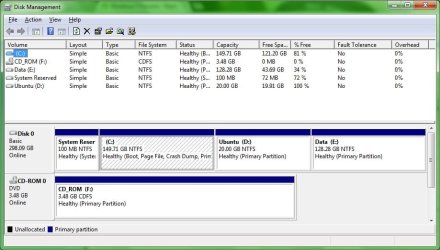
Post back a screenshot showing your maximized Disk Mgmt drive map and listings using the Snipping Tool in Start menu so we can advise you better: Screen Shots

Why do you need to reimage so often? How about getting a superior Clean Reinstall - Factory OEM Windows 7 using only the tools and methods to install and maintain your install given in the blue link. Then save your backup image to use in place of reinstall.

Easiest method to link your files from another partition is to copy your User folders there and then rightclick on each to link to related Library - Include a Folder - Windows 7 Forums. Then you can delete the content of those folders on the OS drive so it becomes only OS and Programs.
 
Well, depending whether you have a problem with Windows or a problem with the hardware, different strategies would apply.

I have a Toshiba satellite which keeps breaking

What does 'keeps breaking' mean. Do you get messages and which, does the system freeze, etc.

Have you done a chkdsk /f on your disk. And also, do you have an external disk.
 

My Computer

Computer Manufacturer/Model Number
HP, Dell, Gateway, Toshiba - 4 laptops and 2 desktops
OS
Vista, Windows7, Mint Mate, Zorin, Windows 8
CPU
from 1.6GHz Duo to i7
Monitor(s) Displays
2x HP w2207
Hard Drives
5x HDD, 7x SSD, 12x Externals
Keyboard
with trackball - no mices
Mouse
Trackball mice
Internet Speed
DSL 6000
You have separate HD's, or just want a separate data partition on the same HD?

Post back a screenshot showing your maximized Disk Mgmt drive map and listings using the Snipping Tool in Start menu so we can advise you better: Screen Shots

Why do you need to reimage so often? How about getting a superior Clean Reinstall - Factory OEM Windows 7 using only the tools and methods to install and maintain your install given in the blue link. Then save your backup image to use in place of reinstall.

Easiest method to link your files from another partition is to copy your User folders there and then rightclick on each to link to related Library - Include a Folder - Windows 7 Forums. Then you can delete the content of those folders on the OS drive so it becomes only OS and Programs.

Same HDD with separate partitions [drive screenshot attached].

The problem I'm having is with the hard drive. It's pretty messed up but chkdisk doesn't find anything. When it decides to go tits up, the system will freeze completely forcing a forced shut down, on reboot the system gets a BSOD (in safe mode also). When booting the disc the system hangs and the only possible way to boot is using a linux distro. The only fix (and please believe this is the last thing I did) was boot GParted and delete the windows boot and windows partition and completely start again.

The include options won't suffice as various applications need to recognise the link (like "documents and settings" and "Users").

Thanks for your reply


Well, depending whether you have a problem with Windows or a problem with the hardware, different strategies would apply.

I have a Toshiba satellite which keeps breaking

What does 'keeps breaking' mean. Do you get messages and which, does the system freeze, etc.

Have you done a chkdsk /f on your disk. And also, do you have an external disk.

As I said above, the system freezes, force shut down, restart, BSOD, must delete partitions. I've run a chkdisk even from boot and other ways nothing get's found.

Thanks for your reply
 

Attachments

  • disk.jpg
    disk.jpg
    69.9 KB · Views: 43

My Computer

OS
Windows 7 Ultimate x64
It looks like you have a Windows problem and not a disk problem. Your plan will not make that go away.

I suggest you post a seperate BSOD thread with the BSOD dump attached. There are some excellent experts on this forum who will be able to decypher that and can tell you how to fix it.
 

My Computer

Computer Manufacturer/Model Number
HP, Dell, Gateway, Toshiba - 4 laptops and 2 desktops
OS
Vista, Windows7, Mint Mate, Zorin, Windows 8
CPU
from 1.6GHz Duo to i7
Monitor(s) Displays
2x HP w2207
Hard Drives
5x HDD, 7x SSD, 12x Externals
Keyboard
with trackball - no mices
Mouse
Trackball mice
Internet Speed
DSL 6000
It looks like you have a Windows problem and not a disk problem. Your plan will not make that go away.

I suggest you post a seperate BSOD thread with the BSOD dump attached. There are some excellent experts on this forum who will be able to decypher that and can tell you how to fix it.

How can this be if I've re-installed several times with different discs?
 

My Computer

OS
Windows 7 Ultimate x64
Only the dump will tell. It is very possible that there are conflicts from programs that you installed.
 

My Computer

Computer Manufacturer/Model Number
HP, Dell, Gateway, Toshiba - 4 laptops and 2 desktops
OS
Vista, Windows7, Mint Mate, Zorin, Windows 8
CPU
from 1.6GHz Duo to i7
Monitor(s) Displays
2x HP w2207
Hard Drives
5x HDD, 7x SSD, 12x Externals
Keyboard
with trackball - no mices
Mouse
Trackball mice
Internet Speed
DSL 6000
Only the dump will tell. It is very possible that there are conflicts from programs that you installed.

Okay, guess the dump will have to wait till next system failure D:

Edit: Just realised that the BSOD wouldn't come up from safe mode if it was a program/software conflict because the program causing the issue wouldn't be loaded.
 
Last edited:

My Computer

OS
Windows 7 Ultimate x64
GRUB on the HD can corrupt Win7 beyond repair.

I would wipe the HD with Diskpart Clean Command from the latest Win7 official DVD available in tutorial below, using DISKPART At PC Startup.

Then follow these steps to Clean Reinstall - Factory OEM Windows 7 which are the same for retail. Use only the tools and methods in the tutorial to get and maintain a perfect install.

If problems persist work through these Troubleshooting Steps for Windows 7 - Windows 7 Forums.

If you cannot boot use these steps for Troubleshooting Windows 7 Failure to Boot - Windows 7 Forums
http://www.sevenforums.com/tutorials/220165-troubleshooting-steps-windows-7-a.html
 
GRUB on the HD can corrupt Win7 beyond repair.

I would wipe the HD with Diskpart Clean Command from the latest Win7 official DVD available in tutorial below, using DISKPART At PC Startup.

Then follow these steps to Clean Reinstall - Factory OEM Windows 7 which are the same for retail. Use only the tools and methods in the tutorial to get and maintain a perfect install.

If problems persist work through these Troubleshooting Steps for Windows 7 - Windows 7 Forums.

If you cannot boot use these steps for Troubleshooting Windows 7 Failure to Boot - Windows 7 Forums
http://www.sevenforums.com/tutorials/220165-troubleshooting-steps-windows-7-a.html

The laptop has failed several times when grub or anything other than windows on the system.
 

My Computer

OS
Windows 7 Ultimate x64
Then wipe the HD and Clean Reinstall as given.

If problems persist work through the Troubleshooting steps.
 
If you had GRUB on the HD then it needs wiping with Diskpart Clean Command as advised earlier. Use the Command Line in System Recovery Options .

You reply that you've already wiped the HD so I wanted to know how you wiped it.

This is an interactive process whereby we give you steps which you complete and report back, then we give you more steps if necessary. But no steps can be skipped.
 
the last time grub was on the system I booted gparted and formatted all partition then deleted them and made a new partition table. since then i've booted linux off a usb drive
 

My Computer

OS
Windows 7 Ultimate x64
That's why I've given you the Diskpart Clean Command (twice now) since formatting does nothing useful to overcome GRUB or other corruption. You need to overwrite the boot sector code with zeroes.

Are you not able to back up data externally first? You can get 25gb free storage right now on Skydrive with each Windows Live ID.
 
That's why I've given you the Diskpart Clean Command (twice now) since formatting does nothing useful to overcome GRUB or other corruption. You need to overwrite the boot sector code with zeroes.

Until this is tried we really can't start troubleshooting since it is the first step.

Are you not able to back up data externally first? You can get 25gb free storage right now on Skydrive with each Windows Live ID.


Apologies for the misunderstanding. However I don't need troubleshooting... The problem I came here with was a way I can install users and windows to separate partition, and on re-install automatically install the old users from the users partition.

Thanks.
 

My Computer

OS
Windows 7 Ultimate x64
Joncy, if you had GRUB on the HD you should wipe it with Diskpart first.

Then boot the Win7 installer, use Custom install Drive Options to make the Win7 and your data partitions the size and position you want.

After install copy your User folders from external back up into the data partition, rightclick on each to link them to the related Library - Include a Folder - Windows 7 Forums.

This is by far the easiest method to do this and avoid potential issues with linking the actual shell User folders to another partition. Just remember to place files in the library listing for the data partition and occasionally drag any files that have fallen into the OS partition User folders over into the data partition from within the related library.

For Downloads you'll need to create the Library during the rightlick linking process.

If you want to move the actual shell User folders to data partition then use this method: User Folders - Change Default Location. However you may find unfixable permissioning and other issues as have I and others.
 
Back
Top