Installation crashes/restarts after...

tmas3

New member
Local time
2:42 PM
Messages
9
..."windows is loading files..." screen finishes loading.
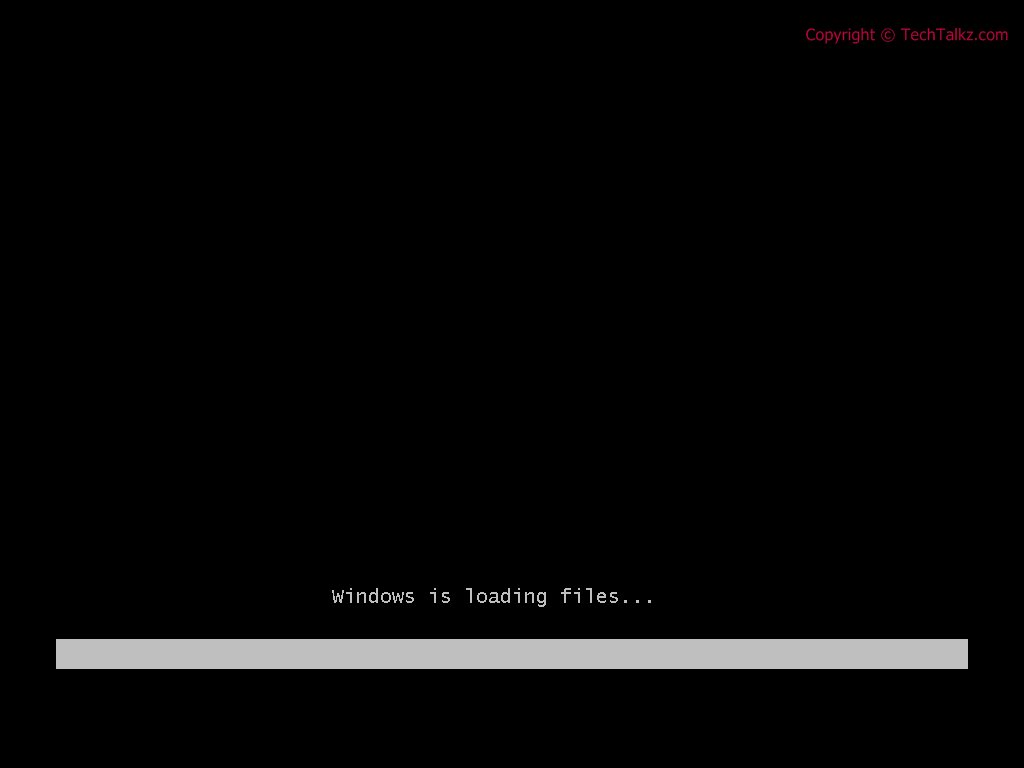


Sometimes it will get to a green loading bar for a few seconds then reboot. Other times it crashes immediately after it finishes loading. (see screenshot above)


Im trying to do a clean install of W7 x64 ultimate over my x86 XP install but the installation keeps crashing and I have no idea why. My bios and drivers are up to date and my xp install works perfectly so I doubt its hardware related. Please help I want windows 7!!

XP x86 SP3
PhenomII X3 720
4GB DDR3 1600 gskill
GIGABYTE GA-MA790GPT-UD3H
 

My Computer

OS
Windows XP
You cannot run a 64 bit installer from the 32 bit environment.

Boot from the DVD and do a Custom clean install, using Advanced drive tools to format full HD as XP formatting is incompatible.
 
I am booting from the dvd...

I get the installation disc isnt compatible error if I launch the dvd in xp.
 

My Computer

OS
Windows XP
Do you have the latest BIOS updates? Check mobo Support DOwnloads page. GIGABYTE - Support&Download - Motherboard - BIOS - GA-MA790GPT-UD3H (rev. 1.0)

Suggest you zero out the HD with DBAN which will start the DVD to load files and install.

Plug ethernet. Select "Connect to internet during install" to get latest drivers/updates during install,

Choose Custom install>Advanced drive tools to Format drive first.

So you want me to "nuke" the hdd with dban then try booting the W7 again?

yes I have the latest bios
 

My Computer

OS
Windows XP
How sure are you wiping the hdd first will fix the problem. Ill be annoyed if I format and W7 install continues to restart at the same spot.
 

My Computer

OS
Windows XP
Thought you said you want to get rid of XP.

If you're not sure, back up an image externally.

Get some second opinions.
 
Ill try it because Im desperate but it will take some time to backup so keep the suggestions coming if you guys can think of any.
 

My Computer

OS
Windows XP
Take out some ram. You got 4g try to install with just 1g or 2g depending on your stick capacity. I know you think its not hardware, however this ram thing has been a known problem for awhile. Hope it helps you. And welcome to SevenForums tmas3
 

My Computer

Computer Manufacturer/Model Number
Gateway GT5692
OS
Windows 7 Ulti. x64
CPU
AMD Phenom 8450 triple-core 2.10 ghz
Memory
4GB
Graphics Card(s)
ATI Radion HD 3200
Monitor(s) Displays
Gateway FPD1775W
Screen Resolution
1280x720
Hard Drives
465.6613 Gibibytes
Take out some ram. You got 4g try to install with just 1g or 2g depending on your stick capacity. I know you think its not hardware, however this ram thing has been a known problem for awhile. Hope it helps you. And welcome to SevenForums tmas3

already tried that. I have 2x2gig sticks I tried each separately in slot 1 and it has the same result.
 

My Computer

OS
Windows XP
Where did you get the DVD?

Will it boot and run on another computer?
 
Its not the DVD. The way it restarts makes me think its something to do with the hard drive.
 

My Computer

OS
Windows XP
Try some of the things mentioned in this thread. Maybe you already have done this,as you seem to be knowledgeable about the ram trick. Good luck to you.
Other
• Any Over Clocking of the RAM, CPU or GPU?
Suggestions
• Remove everything not essential to loading Windows 7, from the system. No printers, gamepads, second monitors, scanners, external devices, flash drives etc., keep only the monitor, keyboard and mouse.
• A standard VGA cable connection between Video card & Monitor is sometimes required for a Windows 7 installation.
http://www.sevenforums.com/installation-setup/28129-questions-use-help-installation-issues.html
 

My Computer

Computer Manufacturer/Model Number
Gateway GT5692
OS
Windows 7 Ulti. x64
CPU
AMD Phenom 8450 triple-core 2.10 ghz
Memory
4GB
Graphics Card(s)
ATI Radion HD 3200
Monitor(s) Displays
Gateway FPD1775W
Screen Resolution
1280x720
Hard Drives
465.6613 Gibibytes
ITS A DVD PROBLEM..i had this problem 4 days ago..im burn a iso win7(a x64 retail) on DVD when im boot with DVD its stuck at the windows is loading file im try to install with flashdisk and its still like that and then at the last im buy new DVD disc ,burn it and its working...try out!(but the last im burn a oem win 7)..
 

My Computer

Computer Manufacturer/Model Number
AMD-ATI
OS
Windows 7 Build 7600 64 bit
CPU
AMD Phenom II X4 920
Motherboard
TA 790GX 128M
Memory
Kingston HyperX 8GB-With Cooling Fan!
Graphics Card(s)
Nvidia 280
Sound Card
Realtek® HD
Monitor(s) Displays
SyncMaster Samsung 24 Inc and 19 Inc
Hard Drives
Sata 1TB ,Maxtor 250GB x1
PSU
1000W
Case
Cooler Master
Cooling
XpressCool
Keyboard
Logitech
Mouse
Logitech
Internet Speed
Connection 1GBPS but slow
I dont think its a DVD problem (burned twice @ 4x with 2 brands) and the same thing happens. Also the loading files screen dosent freeze for me it loads completely then restarts trying to load the next screen(when it trys to access the hdd or other hardware for the first time).
 

My Computer

OS
Windows XP
Set BIOS back to defaults. Make sure DVD drive is then set to boot first.

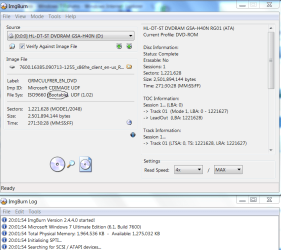
I know you "don't think" it's DVD, but let's check the ISO and DVD both to be sure. Install ImgBurn, select Verify Disk, then load ISO using file tab icon. Make sure it says "Bootable" as shown in screenshot below. Now insert DVD and run the Verify Button. View attachment 41258

Bootable flash stick alternative: format flash stick Primary in Disk Management and load the files into root. Tap F-key given on first bootup screen for Boot Menu and select flash under Hard Drives.

Or load ISO into UltraISO trial version and Write to flash stick using Bootable tab. Boot as above.

If you don't want to risk your XP, then use free Macrium Reflect to save a backup image, zero out your HD which will force the verified DVD to work without interferene by XP. Be sure to choose Custom install, then use Advanced drive tools to create New Partition(s) and Format before installing.

Capture.PNG
 
Back
Top