Installation Drive

dfs4

New member
Member
VIP
Local time
8:51 PM
Messages
199
I have vista installed on C drive, which is the primary drive, and windows 7 on X drive, which is a logical drive. On startup I am given two options of whether to login to the C or X drives. Now I have windows 7 installation files on X drive and I want to install windows 7 on C drive -- I am doing this because cd-rom on this laptop doesn't work. Would it be able to install or would it face problems? I have tried launching the installation file and it seems to accept C drive as the installation drive, but would it go through with it to the end or not? Any ideas?
 

My Computer

Computer type
Laptop
Computer Manufacturer/Model Number
Dell Inspiron
OS
Microsoft Windows 7 Home Premium 32-bit 7600 Multiprocessor Free
CPU
Intel(R) Core(TM) i3-4030U CPU @ 1.90GHz
Motherboard
Dell Inc. 0CG89M
Memory
4.00 GB
Graphics Card(s)
Intel(R) HD Graphics Family
Sound Card
High Definition Audio Device
If you have a USB Thumb Drive you don't need the DVD using this method.....

How to Install Windows 7 from USB Flash Drive

Requirement:
USB Pen Drive (Min 4 GB)
Windows 7 ISO (32 bit or 64 bit)
MBRwiz Download and Extract it on your hard drive (Diskpart utility for Windows XP doesn’t detect USB drive as Disk hence we need to use this free utility to make bootable USB drive).
1. Connect your USB Flash Drive to your computer Format USB drive
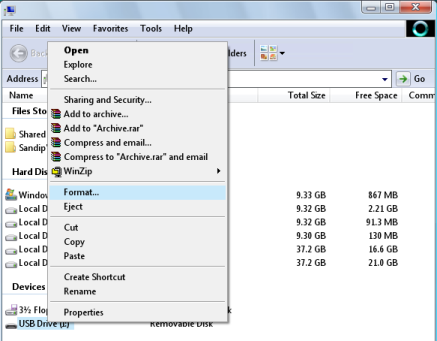
2. To Format [COLOR=blue ! important][COLOR=blue ! important]USB [COLOR=blue ! important]Flash [/COLOR][COLOR=blue ! important]Drive[/COLOR][/COLOR][/COLOR] Go to My Computer -> Right click on USB drive and select Format from context menu.
format-usb-drive.png

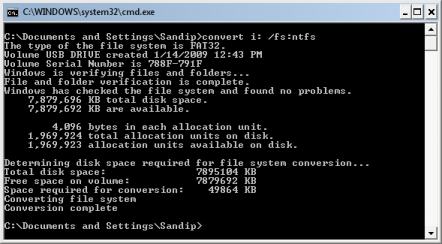
3. Now go to Start Menu->run->cmd (Open [COLOR=blue ! important][COLOR=blue ! important]Command [COLOR=blue ! important]Prompt[/COLOR][/COLOR][/COLOR]) and Type following command
convert i: /fs:ntfs (Where “I” is your USB drive latter)
convert-usb-flash-drive-fat32-to-ntfs.png

4. Mount Windows 7 iso as drive (You can use Freeware MagicDisc download from here).
5. Type Start->run->cmd
Now dir to directory where you have extracted MBRWiz and run following commands
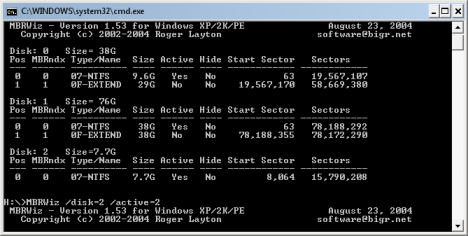
mbrwiz /list (note down disk number of your USB Pen drive)
mbrwiz /disk=X /active=X (X is Disk Number of your USB Drive)
exit
mbrwiz.png

6. Now open another command window and type following command
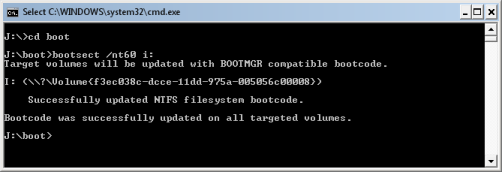
J: (Drive letter of Windows 7 iso mounted with demon tool)
CD boot
bootsect /nt60 Y: (Y is drive latter of your USB drive )
update-bootmgr-for-usb-pen-drive.png

7. Now copy all files from drive where you have mount Windows 7 iso
8. Now reboot your computer and press F9 to get your BIOS screen and select USB drive as your boot drive.
9. If every thing goes fine, Your Windows 7 Installation should start from your USB drive.
 

My Computer

Computer Manufacturer/Model Number
DELL XPS Studio 435T
OS
Vista 64 Ultimate, Windows 7 64 Ultimate, Ubuntu 9.10
CPU
i7 975 3.3 GHz Extreme (Factory OC'd to 3.6 GHz)
Motherboard
DELL provided
Memory
18 Gb Tri-Channel 1066
Graphics Card(s)
ATI 5970 2048 Mb
Sound Card
X-Fi Extreme Gamer
Monitor(s) Displays
Vizio 37" HD-TV
Screen Resolution
1920 x 1080
Hard Drives
1.5 Tb HDD
1.5 Tb HDD
2.0 Tb Network Drive
512 Gb Crucial SSD
PSU
DELL Provided 475 watts
Case
DELL
Cooling
3 fans
Keyboard
Logitech Performance K350 Wireless
Mouse
Logitech Performance MX Wireless
Internet Speed
3 Mb up 750 Kb down
Other Info
Bamboo Fun Tablet, Belkin N+ Wireless router, Pioneer Dolby System Wireless Headphones, Bose 5.1 Dolby Surround Sound System, LifeCam VX 3000 Webcam, Blu-Ray/Hi Def DVD +RW combo and Blu-ray +RW,l 15 in 1 media card reader, Logitech Rumblepad 2, Hauppauge 2250 DTV Tuner with MS Media Center Remote

Laptop:Alienware M17x, Q9100 CPU, 8Gb RAM, 1920x1200 WUXGA LCD driven by 4870's in CrossFireX, Bl
I actually had the installation file on X drive partition and ran it from there.. it apparently copied the files to some mysterious place and installed on C drive just fine. It apparently deleted the vista and installed windows 7 on it. Works fine.. :D you can add this method to the list,, only if the installation file is on the drive I suppose or maybe not.
 

My Computer

Computer type
Laptop
Computer Manufacturer/Model Number
Dell Inspiron
OS
Microsoft Windows 7 Home Premium 32-bit 7600 Multiprocessor Free
CPU
Intel(R) Core(TM) i3-4030U CPU @ 1.90GHz
Motherboard
Dell Inc. 0CG89M
Memory
4.00 GB
Graphics Card(s)
Intel(R) HD Graphics Family
Sound Card
High Definition Audio Device
Back
Top