Installation Error

sunilsangwal

New member
Local time
8:55 AM
Messages
1
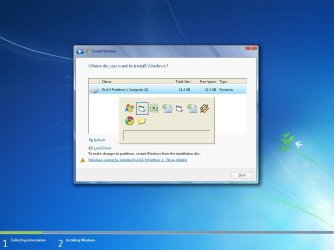
I am Using windows XP and I am trying Dual Boot System
I am running Win Seven setup error shown
Plsease send suggestion.
 

Attachments

  • error.jpg
    error.jpg
    52.2 KB · Views: 8

My Computer

OS
Windows 7

My Computer

Computer Manufacturer/Model Number
Dell and Custom
OS
Systems 1 and 2: Windows 7 Enterprise x64, Win 8 Developer
CPU
System 1: i7 [email protected], System 2: AMD FX-4100 Zambezi 3.6G
Motherboard
System 1:Dell 06NWYK System 2: ASUS M5A97 AM3+
Memory
System 1: 8GB System 2: 8GB
Graphics Card(s)
System 1: ATI FirePro V4800 System 2: Radeon HD 6850
Sound Card
System 1: onboard System 2: onboard
Monitor(s) Displays
System1: Viewsonic HDMI 24"
Screen Resolution
System 1: 1920x1080 System 2: 1920x1080
Hard Drives
System 1: Mirrored .5B drives System 2: Seagate Barracuda ST1000DM003 1TB 7200 RPM 64MB Cache SATA 6.0Gb/s
Case
System 1: Dell System 2: Cooler Master
Internet Speed
10 MBPS
The problem is that your HD is Dynamic as shown.

You need to convert the HD from Dynamic to Basic from the Win7 DVD Command Line using the steps given here: Change a dynamic disk back to a basic disk: Storage Services; Local File Systems

This is a destructive process so back up your files. Afterward you'll need to reinstall XP if you're not ready to migrate fully to Win7. Try first installing your older XP programs in Win7
http://www.sevenforums.com/tutorials/316-compatibility-mode.html or if necessary run them in XP Mode in Ultimate, or in a lesser version use free Virtual Box or Virtual Player.

You could also install Win7 to another HD to Dual Boot via BIOS.

To access the Win7 DVD Command Line, boot the DVD, press Shift +F10 at first screen, a Command Box should open. If not, select Repair My Computer on second screen, click through to Recovery Tools list to choose Command Line.
 
Hello sunilsangwal, welcome to Seven Forums!


Have a look at Method One in this tutorial at the link below for an outline on how to get to DISKPART so you can use the "Change a Dynamic ... " tutorial listed above and be sure to post back with any further questions you may have and to keep us informed.

DISKPART : At PC Startup
 

My Computer

Computer Manufacturer/Model Number
* BFK Customs *
OS
W 7 64-bit Ultimate
CPU
Intel Q9550 Yorkfield
Motherboard
ASUS P5Q Pro
Memory
8GB Dominator 8500C5D
Graphics Card(s)
ATI : XFX 5870
Sound Card
Realtek HD Audio 7-1
Monitor(s) Displays
1x 47" LCD HDMI & 3x 26" LCD HDMI
Screen Resolution
1920x1080P & 1920x1200
Hard Drives
1x 80GB Intel X25-M G2 SSD : 1x 500GB & 1x 640GB WD Caviar Black(s)
PSU
Corsair 620HX
Case
Cooler Master RC-690
Cooling
Tuniq Tower 120, 2x 140mm and 3x 120mm case fans
Keyboard
Microsoft 500
Mouse
Razer Diamondback 3G
Internet Speed
14 Mb/s
Other Info
1x Koutech 3Gb/s SATA HDD Hot Swap Rack
Back
Top