Installation help

Tamash

New member
Local time
6:45 PM
Messages
9
hi guys I need ur help!
I have an Advent 4211-B notebook for a brand new win7!!!
Its not going to be the first one what i repair but im fu..ed...
I'm NOT able to intall to any particion that win7!
I formated the Hdd as usual!
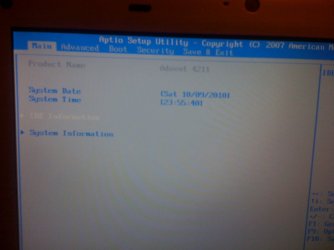
There is almost nothing to set up in its bios but AHCP is ENABLE!!!!!
I also tried to find and install the Intel AHCP Sata driver....nothing happend!
ANY idea how to install win7 to advent 4211-b?
Of course I used external dvd(usb) and external HDD(usb)
PLEASE HELP ME!
Thanks a lot guys.
 

My Computer

OS
win7
Your post was moved as a favor by the moderators since having it in another thread will bury it and not get the help you need.

Run the Win7 Upgrade advisor: Free Download PC Upgrade Advisor Windows 7 Hardware Programs Issues
This will tell you if you can run Win7 on your laptop, and whether its suitable for 32- or 64-bit.

Where did you get WIn7? Did you burn the DVD yourself?

Exactly what happens and what error message appears when install fails?
 
I dont need any program to tell me coz i know is possible.
Its an original win7 ultimate.
Error msg is cant install on this particion(check in bios sata) but its enable!!!!
anyway there is no windows on it to check or intall anything.
I saw win7 on this kind of notebook on youtube,
 

My Computer

OS
win7
Post back the exact wording of the error message,

or enter BIOS setup and change SATA controller to IDE mode.
 
there is no offer to change,this is a primitive bios lol!
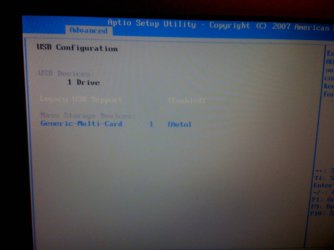
all i can change is time,usb,where to boot from, and the sata on,off thats it...
 

My Computer

OS
win7
u see how easy this bios is
 

Attachments

  • IMG_0039.JPG
    IMG_0039.JPG
    96.1 KB · Views: 19
  • IMG_0040.JPG
    IMG_0040.JPG
    101.2 KB · Views: 18
  • IMG_0041.JPG
    IMG_0041.JPG
    116.2 KB · Views: 19

My Computer

OS
win7
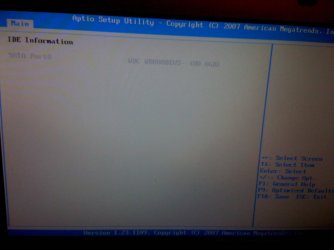
no option on IDE page
 

Attachments

  • IMG_0042.JPG
    IMG_0042.JPG
    103.1 KB · Views: 9
  • IMG_0043.JPG
    IMG_0043.JPG
    99.3 KB · Views: 10
  • IMG_0044.JPG
    IMG_0044.JPG
    112.2 KB · Views: 8

My Computer

OS
win7
On the config page you have boot option DVD enabled the rest disabled. Ide may be in one of the disabled check it.

SYSTEM SPECS


INTEL ATOM 1.6

AMI BIOS

2 GIGS RAM
 

My Computer

Computer Manufacturer/Model Number
HP Pavillion dv-7 1005 Tx
OS
Win 8 Release candidate 8400
CPU
[email protected]
Memory
4 gigs
Graphics Card(s)
Nvidia 9600M
Sound Card
HD built-in
Monitor(s) Displays
17" Wxga
Screen Resolution
1440x900
Cooling
none
Internet Speed
45Mb down 5Mb up
Set your target HD as second to boot in Boot Priority.

If it is a SATA HD try AHCI setting first, then IDE mode if necessary.

I do not see SATA controller setting you said is set to AHCI. Or is that what you meant by this:
There is almost nothing to set up in its bios but AHCP is ENABLE!!!!!
I also tried to find and install the Intel AHCP Sata driver....nothing happend!
 
I dont need any program to tell me coz i know is possible.
Its an original win7 ultimate.
Error msg is cant install on this particion(check in bios sata) but its enable!!!!
anyway there is no windows on it to check or intall anything.
I saw win7 on this kind of notebook on youtube,

If you are asking for help, you need to do what is suggested. Windows 7 Upgrade Advisor - Download - Microsoft Windows This can help identify problems.
 

My Computer

Computer type
PC/Desktop
Computer Manufacturer/Model Number
Custom Build
OS
Windows 7 Home Premium 32-Bit - Build 7600 SP1
CPU
Intel Core i3-2120 3.30Ghz
Motherboard
Asus P8Z68-V LX Intel Z68 Socket H2 ATX
Memory
Kingston 4 GB DDR3 1333 mhz
Graphics Card(s)
AMD Radeon HD6670
Sound Card
Sound Blaster Audigy SE 24-Bit
Monitor(s) Displays
Asus VE228
Screen Resolution
1440 X 900
Hard Drives
OCZ Vertex 3 120 GB Sata 3 SSD ==
Kingston SH103/S3 120 G Hyper X 120 GB SSD ==
Western Digital 500 GB Caviar Green 7200 RPM ==
PSU
Corsair CX600M == 600 Watt
Case
NZXT Apollo - Silver with Clear Side Panel
Cooling
Three 120 mm Fans
Keyboard
Microsoft Natural 4000
Mouse
Microsoft Custom Optical 3000
Internet Speed
AT&T Fiber Optic Wireless Network
Antivirus
Microsoft Security Essentials
Browser
Chrome
Other Info
120 mm Blue LED Fan -- Three Blue LED Lazer Light Sticks
Instalation

The problem lies in where you are trying to install Windows.
"ANY idea how to install Windows 7 to advent 4211-b?
Of course I used external dvd(usb) and external HDD (usb) You cant install Windows to an external drive.
 

My Computer

OS
Vista Home Premium & Windows 7
Good catch, Jon.

Why do you have an USB external HD plugged in?

Unplug the external HD, set internal HD as second to boot after DVD drive, then boot and install.
 
BIGMCK!!!!
THERE IS NO WINDOWS ON IT!GOT IT???
How can i install any program mate????
Let me know.
Gregock i meant AHCI yes is enabled.
And there is no option to change anything under ide page :(
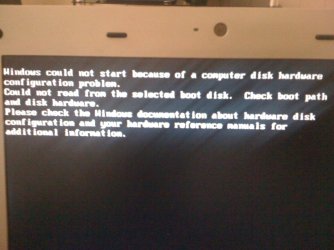
OMG this morning i have this msg (see on pic)
WTF is going on???I even cant see the win7 Install menu omg...

PS:I just have and external HD thats it its not connected as u can see on the picture in bios.I just wanted to try to install the sata driver from it but wasnt success so I unpluged it!

I have this error msg because of the 2nd boot:INternal hd.
After remove it from the list the win7 started to install.....but the problem is still there.
my win7 is Hungarian and I cant tell you what it says but something like Win7 can NOT intall on this particion and check hd setting in bios.(pic above)
 

Attachments

  • IMG_0047.JPG
    IMG_0047.JPG
    176.5 KB · Views: 2
Last edited:

My Computer

OS
win7
Have you tried install with all USB devices except DVD drive unplugged?

Clear the CMOS: Clear CMOS - 3 Ways to Clear the CMOS - Reset BIOS

Look at the AHCI setting and see if you can change it to IDE mode. You should be looking at the SATA settings unless you have an IDE HD.

Next try wiping the HD before install using DISKPART from booted DVD Command Line: http://www.sevenforums.com/tutorials/91339-ssd-hdd-optimize-windows-reinstallation.html

Next try install from USB flash stick with DVD drive unplugged: extract ISO from DVD using ImgBurn, download and install UltraISO trial version, Open ISO on File tab, Write Image on Bootable tab, Format first, then Write. Boot stick under USB or HD's in BIOS boot menu.
 
The problem lies in where you are trying to install Windows.
"ANY idea how to install Windows 7 to advent 4211-b?
Of course I used external dvd(usb) and external HDD (usb) You cant install Windows to an external drive.

FORGET ABOUT EXTERNAL HD!!!!
ITS NOT CONNECTED!!!!!!!!
It was only an idea to intall something from it before win7!!
Right?
 

My Computer

OS
win7
Please stop yelling if you want to get help here. We have no way to know what you have tried or are doing since you don't reply to the suggestions or questions as they're given.

Make sure you've followed all of the steps given in previous threads, then report back so we can continue with troubleshooting process.
 
Back
Top