
Installation prob

barrz90

New member
Local time
3:03 PM
Messages
12
Heey guys I have an Hp pavllion dv6227cl and I'm trying to install windows seven on it..how every when I pop in the dvd and select install it gets stuck at the "expanding files" place and I can't seem to get past it.it satys at zero percent for like five minutes and gives me an error I try and the same thing happen.

Ok..now here's another thing.since windows 7 didn't work I tried installing xp sp3 and that copies the files boots up for installation and than the pc shuts off for some reason.

I don't know wether the pcs operating system is 64 or 32 bit because its my friends and he wiped it out and I can't retrive any info.MY CDS HOWEVER ARE BOTH FOR 32bit.but before I can go and buy a 64bit windows 7 dvd can my cd be the problem or the pc.any help world be greatly appreciated.

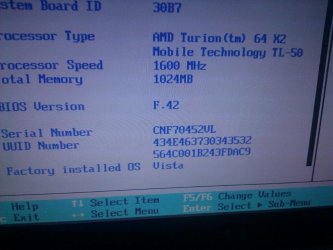
Here are the pcs specs:
 

Attachments
  • uploadfromtaptalk1333242562685.jpg
    uploadfromtaptalk1333242562685.jpg
    78 KB · Views: 20
Last edited by a moderator:

My Computer

OS
windows xp ans seven
Yes, your Windows CD (DVD actually) could be the problem. Where did you get it?

How do you intend to activate a Windows 7 installation? The Product Key showing in your picture isn't likely to work.
 

My Computer

Computer type
PC/Desktop
Computer Manufacturer/Model Number
Ignatz Special; 4 speed manual gearbox; factory air conditioning; one of one
OS
Windows 7 Home Premium SP1, 64-bit
CPU
Intel Skylake i5-6600K, not overclocked
Motherboard
AsRock Z170M Extreme 4, micro ATX
Memory
8 GB HyperX DDR4-2666 (2 x 4 GB)
Graphics Card(s)
none; graphics are integrated on CPU
Sound Card
onboard: Realtek ALC1150; external: USB Behringer UF0-202
Monitor(s) Displays
Dell S2340M 23 inch IPS
Screen Resolution
1600 x 900
Hard Drives
System: Crucial MX100 series SSD, 128 GB;
Data: Samsung Spinpoint 103SJ, 1 TB;
Backup: WD Caviar Green WD30EZRX-00D8PB0, 3 TB
PSU
Rosewill SilentNight 500 watt fanless, semi-modular
Case
Antec Solo II
Cooling
Noctua NH-U12S; Noctua F12 intake, Noctua S12A exhaust
Keyboard
Microsoft 200 6JH-00001 USB
Mouse
Dell or Microsoft optical wired; USB
Antivirus
Microsoft Security Essentials and Malwarebytes Premium
Browser
Pale Moon
Other Info
All fans PWM; speeds at idle: CPU circa 500 rpm; intake circa 600 rpm; exhaust circa 600 rpm; CPU temps 27 idle and 47 C load in a warm room (27 C/81 F) when running Intel Extreme Tuning Utility stress test.
Yes, your Windows CD (DVD actually) could be the problem. Where did you get it?

How do you intend to activate a Windows 7 installation? The Product Key showing in your picture isn't likely to work.

I have the product key from microsoft and I got the cd from my brother...I intend activating it after the installation..however I do know that the installation can go without the product key..
The cds have worked perfectly before on another dell pc..
*also on the xp installlation the pc gets really hot before powering down

Btw: is this a 32 or 64 bit operating system computer
 
Last edited by a moderator:

My Computer

OS
windows xp ans seven
If your brother's CD is burned, rather than purchased in a store, that could be the problem.

You can download an ISO that matches your Product Key from mydigitallife.info. Then burn it to a DVD and install from it. Activate with the Product Key you got from Microsoft.

Yes, you can install without a Product Key. But you still need to activate within 30 days.

You should go to Windows Upgrade Advisor to find out if your PC can run a 64-bit OS.
 

My Computer

Computer type
PC/Desktop
Computer Manufacturer/Model Number
Ignatz Special; 4 speed manual gearbox; factory air conditioning; one of one
OS
Windows 7 Home Premium SP1, 64-bit
CPU
Intel Skylake i5-6600K, not overclocked
Motherboard
AsRock Z170M Extreme 4, micro ATX
Memory
8 GB HyperX DDR4-2666 (2 x 4 GB)
Graphics Card(s)
none; graphics are integrated on CPU
Sound Card
onboard: Realtek ALC1150; external: USB Behringer UF0-202
Monitor(s) Displays
Dell S2340M 23 inch IPS
Screen Resolution
1600 x 900
Hard Drives
System: Crucial MX100 series SSD, 128 GB;
Data: Samsung Spinpoint 103SJ, 1 TB;
Backup: WD Caviar Green WD30EZRX-00D8PB0, 3 TB
PSU
Rosewill SilentNight 500 watt fanless, semi-modular
Case
Antec Solo II
Cooling
Noctua NH-U12S; Noctua F12 intake, Noctua S12A exhaust
Keyboard
Microsoft 200 6JH-00001 USB
Mouse
Dell or Microsoft optical wired; USB
Antivirus
Microsoft Security Essentials and Malwarebytes Premium
Browser
Pale Moon
Other Info
All fans PWM; speeds at idle: CPU circa 500 rpm; intake circa 600 rpm; exhaust circa 600 rpm; CPU temps 27 idle and 47 C load in a warm room (27 C/81 F) when running Intel Extreme Tuning Utility stress test.
So is this a 32 or 64 bit pc..and any idea as to why the files aren't exapnding and why the pc on the windows xp installation turns off in th middle(ps: the pc gets hot during the xp installation but not the windows 7
 

My Computer

OS
windows xp ans seven
So is this a 32 or 64 bit pc..and any idea as to why the files aren't exapnding and why the pc on the windows xp installation turns off in th middle(ps: the pc gets hot during the xp installation but not the windows 7

If it is no more than 2 or 3 years old, it probably will support 64-bit. But without more details of what you have, we can't be sure.

If you can get on the Internet with it, go to Windows Upgrade Advisor at Microsoft.com and that will tell you.

Your Windows 7 installation problems may be due to a bad disc from your brother.
 

My Computer

Computer type
PC/Desktop
Computer Manufacturer/Model Number
Ignatz Special; 4 speed manual gearbox; factory air conditioning; one of one
OS
Windows 7 Home Premium SP1, 64-bit
CPU
Intel Skylake i5-6600K, not overclocked
Motherboard
AsRock Z170M Extreme 4, micro ATX
Memory
8 GB HyperX DDR4-2666 (2 x 4 GB)
Graphics Card(s)
none; graphics are integrated on CPU
Sound Card
onboard: Realtek ALC1150; external: USB Behringer UF0-202
Monitor(s) Displays
Dell S2340M 23 inch IPS
Screen Resolution
1600 x 900
Hard Drives
System: Crucial MX100 series SSD, 128 GB;
Data: Samsung Spinpoint 103SJ, 1 TB;
Backup: WD Caviar Green WD30EZRX-00D8PB0, 3 TB
PSU
Rosewill SilentNight 500 watt fanless, semi-modular
Case
Antec Solo II
Cooling
Noctua NH-U12S; Noctua F12 intake, Noctua S12A exhaust
Keyboard
Microsoft 200 6JH-00001 USB
Mouse
Dell or Microsoft optical wired; USB
Antivirus
Microsoft Security Essentials and Malwarebytes Premium
Browser
Pale Moon
Other Info
All fans PWM; speeds at idle: CPU circa 500 rpm; intake circa 600 rpm; exhaust circa 600 rpm; CPU temps 27 idle and 47 C load in a warm room (27 C/81 F) when running Intel Extreme Tuning Utility stress test.
So is this a 32 or 64 bit pc..and any idea as to why the files aren't exapnding and why the pc on the windows xp installation turns off in th middle(ps: the pc gets hot during the xp installation but not the windows 7

If it is no more than 2 or 3 years old, it probably will support 64-bit. But without more details of what you have, we can't be sure.

If you can get on the Internet with it, go to Windows Upgrade Advisor at Microsoft.com and that will tell you.

Your Windows 7 installation problems may be due to a bad disc from your brother.

What's the specific site.for the Microsoft site
 

My Computer

OS
windows xp ans seven

My Computer

Computer type
PC/Desktop
Computer Manufacturer/Model Number
Ignatz Special; 4 speed manual gearbox; factory air conditioning; one of one
OS
Windows 7 Home Premium SP1, 64-bit
CPU
Intel Skylake i5-6600K, not overclocked
Motherboard
AsRock Z170M Extreme 4, micro ATX
Memory
8 GB HyperX DDR4-2666 (2 x 4 GB)
Graphics Card(s)
none; graphics are integrated on CPU
Sound Card
onboard: Realtek ALC1150; external: USB Behringer UF0-202
Monitor(s) Displays
Dell S2340M 23 inch IPS
Screen Resolution
1600 x 900
Hard Drives
System: Crucial MX100 series SSD, 128 GB;
Data: Samsung Spinpoint 103SJ, 1 TB;
Backup: WD Caviar Green WD30EZRX-00D8PB0, 3 TB
PSU
Rosewill SilentNight 500 watt fanless, semi-modular
Case
Antec Solo II
Cooling
Noctua NH-U12S; Noctua F12 intake, Noctua S12A exhaust
Keyboard
Microsoft 200 6JH-00001 USB
Mouse
Dell or Microsoft optical wired; USB
Antivirus
Microsoft Security Essentials and Malwarebytes Premium
Browser
Pale Moon
Other Info
All fans PWM; speeds at idle: CPU circa 500 rpm; intake circa 600 rpm; exhaust circa 600 rpm; CPU temps 27 idle and 47 C load in a warm room (27 C/81 F) when running Intel Extreme Tuning Utility stress test.
No I mean when I can't get the advisor in the pc with internet where do I go to see its specs and compatibility
 

My Computer

OS
windows xp ans seven
Go to HP and look up the specifications for your exact model number.

Or download a program such as Speccy or HWInfo that will inventory your hardware.

That might not be definitive.

If you have a known good Windows 64-bit install disc and your hardware supports it, it should install.

As far as I know, you don't know if you have a good install disc. That's why I suggested you download an ISO and burn one.
 

My Computer

Computer type
PC/Desktop
Computer Manufacturer/Model Number
Ignatz Special; 4 speed manual gearbox; factory air conditioning; one of one
OS
Windows 7 Home Premium SP1, 64-bit
CPU
Intel Skylake i5-6600K, not overclocked
Motherboard
AsRock Z170M Extreme 4, micro ATX
Memory
8 GB HyperX DDR4-2666 (2 x 4 GB)
Graphics Card(s)
none; graphics are integrated on CPU
Sound Card
onboard: Realtek ALC1150; external: USB Behringer UF0-202
Monitor(s) Displays
Dell S2340M 23 inch IPS
Screen Resolution
1600 x 900
Hard Drives
System: Crucial MX100 series SSD, 128 GB;
Data: Samsung Spinpoint 103SJ, 1 TB;
Backup: WD Caviar Green WD30EZRX-00D8PB0, 3 TB
PSU
Rosewill SilentNight 500 watt fanless, semi-modular
Case
Antec Solo II
Cooling
Noctua NH-U12S; Noctua F12 intake, Noctua S12A exhaust
Keyboard
Microsoft 200 6JH-00001 USB
Mouse
Dell or Microsoft optical wired; USB
Antivirus
Microsoft Security Essentials and Malwarebytes Premium
Browser
Pale Moon
Other Info
All fans PWM; speeds at idle: CPU circa 500 rpm; intake circa 600 rpm; exhaust circa 600 rpm; CPU temps 27 idle and 47 C load in a warm room (27 C/81 F) when running Intel Extreme Tuning Utility stress test.
Go to HP and look up the specifications for your exact model number.

Or download a program such as Speccy or HWInfo that will inventory your hardware.

That might not be definitive.

If you have a known good Windows 64-bit install disc and your hardware supports it, it should install.

As far as I know, you don't know if you have a good install disc. That's why I suggested you download an ISO and burn one.

Where do I get the ios
 

My Computer

OS
windows xp ans seven
The BIOS output in the screenshot says it's 64 bit as are all modern processors.

Try wiping the HD first with Diskpart Clean command: SSD - HDD Optimize for Windows Reinstallation

Reset the BIOS to defaults: Clear CMOS - 3 Ways to Clear the CMOS - Reset BIOS
While in BIOS setup set SATA controller to AHCI if available. Set DVD drive to boot first, then HDD.

Then follow these same steps to Clean Reinstall - Factory OEM Windows 7.

If it still fails, try testing the HD with maker's HD Diagnostic extended CD scan, followed by testing RAM - Test with Memtest86+ for 5-6 passes or overnight.

If laptop is overheating try to clean out the dust as best as is possible:
http://h10025.www1.hp.com/ewfrf/wc/...cname=c01657439&lang=en&lc=en&product=3340166
http://h10025.www1.hp.com/ewfrf/wc/document?docname=c00292159&lc=en&cc=us&dlc=en&product=3340166
 
The BIOS output in the screenshot says it's 64 bit as are all modern processors.

Try wiping the HD first with Diskpart Clean command: SSD - HDD Optimize for Windows Reinstallation

Reset the BIOS to defaults: Clear CMOS - 3 Ways to Clear the CMOS - Reset BIOS
While in BIOS setup set SATA controller to AHCI if available. Set DVD drive to boot first, then HDD.

Then follow these same steps to Clean Reinstall - Factory OEM Windows 7.

If it still fails, try testing the HD with maker's HD Diagnostic extended CD scan, followed by testing RAM - Test with Memtest86+ for 5-6 passes or overnight.

If laptop is overheating try to clean out the dust as best as is possible:
http://h10025.www1.hp.com/ewfrf/wc/...cname=c01657439&lang=en&lc=en&product=3340166
http://h10025.www1.hp.com/ewfrf/wc/document?docname=c00292159&lc=en&cc=us&dlc=en&product=3340166

Thanks bro really helped
 

My Computer

OS
windows xp ans seven
It didn't work it displays this message
 

Attachments

  • uploadfromtaptalk1333569365277.jpg
    uploadfromtaptalk1333569365277.jpg
    89.3 KB · Views: 13

My Computer

OS
windows xp ans seven
When does the error show exactly? Is this during an attempted Clean Install where you've booted the DVD to install on a wiped HD as suggested?

If so the issue is likely a bad installer. Confirm the ISO or download the latest to burn to DVD or write to stick using the methods given here: Clean Reinstall - Factory OEM Windows 7
 
During the installing update part it showed this message..I did wipe..and everything else
 

My Computer

OS
windows xp ans seven
Ok guys it worked and I am up and running windows 7..activated and everything
HOWEVER I am expiriencing a problem
The charging is so slow that idk what to do.I left the pavllion off and to charhe for 3 hours and it only charged 8%
Can it be a driver I'm mssiing or anything else because its charging like its a desktop if I take out the AC cord it atoumatically goes to sleep mode.also the charging bar goes up and down as if its charging than stops and says plugged in charging.ANY help plz
 
Last edited:

My Computer

OS
windows xp ans seven
Back
Top