Installation Problems

My Computer

Computer Manufacturer/Model Number
* BFK Customs *
OS
W 7 64-bit Ultimate
CPU
Intel Q9550 Yorkfield
Motherboard
ASUS P5Q Pro
Memory
8GB Dominator 8500C5D
Graphics Card(s)
ATI : XFX 5870
Sound Card
Realtek HD Audio 7-1
Monitor(s) Displays
1x 47" LCD HDMI & 3x 26" LCD HDMI
Screen Resolution
1920x1080P & 1920x1200
Hard Drives
1x 80GB Intel X25-M G2 SSD : 1x 500GB & 1x 640GB WD Caviar Black(s)
PSU
Corsair 620HX
Case
Cooler Master RC-690
Cooling
Tuniq Tower 120, 2x 140mm and 3x 120mm case fans
Keyboard
Microsoft 500
Mouse
Razer Diamondback 3G
Internet Speed
14 Mb/s
Other Info
1x Koutech 3Gb/s SATA HDD Hot Swap Rack
Just format that drive and start over - don't install over it as you may not get rid of the problem.
 

My Computers

System One System Two

  • Computer type
    PC/Desktop
    Computer Manufacturer/Model Number
    The Beast Model A (homebrew)
    OS
    Windows 11 21H2 Current build
    CPU
    AMD Ryzen 9 3950X
    Motherboard
    MSI MEG X570 GODLIKE
    Memory
    4 * 32 GB - Corsair Vengeance 3600 MHz
    Graphics Card(s)
    EVGA GeForce RTX 3080 Ti XC3 ULTRA GAMING (12G-P5-3955-KR)
    Sound Card
    Realtek® ALC1220 Codec
    Monitor(s) Displays
    2x Eve Spectrum ES07D03 4K Gaming Monitor (Matte) | Eve Spec
    Screen Resolution
    3x 3840 x 2160
    Hard Drives
    3x Samsung 980 Pro NVMe PCIe 4 M.2 2 TB SSD (MZ-V8P2T0B/AM) } 3x Sabrent Rocket NVMe 4.0 1 TB SSD
    PSU
    PC Power & Cooling’s Silencer Series 1050 Watt, 80 Plus Plat
    Case
    Fractal Design Define 7 XL Dark ATX Full Tower Case
    Cooling
    SteelSeries Apex Pro Wired Gaming Keyboard
    Keyboard
    SteelSeries Apex Pro
    Mouse
    Logitech MX Master 3S | MX Master 3 for business
    Internet Speed
    AT&T LightSpeed Gigabit Duplex Ftth
    Antivirus
    Windows Defender + MB 3
    Browser
    Nightly (default) + Firefox (stable),Chrome, Edge
  • Computer type
    PC/Desktop
    System Manufacturer/Model Number
    Dell Latitude E5470
    OS
    ChromeOS Flex Dev Channel (current)
    CPU
    Intel(R) Core(TM) i5-6300U CPU @ 2.40GHz, 2501 Mhz, 2 Core(s), 4 Logical Processor(s)
    Motherboard
    Dell
    Memory
    16 GB
    Graphics Card(s)
    Intel(R) HD Graphics 520
    Sound Card
    Intel(R) HD Graphics 520 + RealTek Audio
    Monitor(s) Displays
    Dell laptop display 15"
    Screen Resolution
    1920 * 1080
    Hard Drives
    Toshiba 128GB M.2 22300 drive
    INTEL Cherryville 520 Series SSDSC2CW180A 180 GB SATA III SSD
    PSU
    Dell
    Case
    Dell
    Cooling
    Dell
    Keyboard
    Dell
    Mouse
    Logitech MX Master 3S (shared w. Sys 1) | Dell TouchPad
    Internet Speed
    AT&T LightSpeed Gigabit Duplex Ftth
I really wish I paid more attention during the W7 setup now.... I was just keen to discover if my new build actually worked :rolleyes:
 

My Computer

Computer type
PC/Desktop
Computer Manufacturer/Model Number
Systems by SmartEyeball
OS
8 Pro x64
CPU
i7 3770K 4.6GHz
Motherboard
ASUS P8Z77 WS
Memory
16GB G.Skill Trident X 2666mhz
Graphics Card(s)
x2 EVGA 780 Ti Superclocked SLI
Sound Card
SB X-FI Surround 5.1 PRO USB / ATH-AD900 Headphones
Monitor(s) Displays
x3 Dell U2410 / 58" Samsung
Screen Resolution
5760*1200/ 1920*1200
Hard Drives
2x Intel 520 240GB (RAID 0) * 2x WD Caviar Blacks 2TB (RAID 0) * 2TB WD Caviar Black * Sony Optirac DVD
PSU
Silverstone Strider Evolution 1200W
Case
Thermaltake Level 10 GT Snow Edition
Cooling
Noctua NH-D14
Keyboard
Topre Realforce // Ducky Shine MX Black // Filco Ninja TKL
Mouse
Thermaltake Theron (Highly Recommended) + Razer Imperator
Antivirus
MSE
Browser
IE, FF, WaterFox
Other Info
GT Extreme V2 Sim Racing Cockpit + 40" LCD and K/B Mouse stand ▼
Fanatec CSR Elite Wheel + Clubsport V1 Pedals + CSR shifter/7G-H ▼Saitek X52 Pro ▼ TrackIR 5 Pro
Buttkicker v2 Seat Rumbler with Dedicated 5.1 and Sub Woofer attached to frame ▼
=
Bloody Big Grin
Hello Jack.

You didn't have a go at these?
Ted, I can't actually boot into 7, and since it's not a partition with Vista there's no way of me getting in there.

Just format that drive and start over - don't install over it as you may not get rid of the problem.
How would you recommend doing this?

Oh and I'm still waiting for Windows 7 to download...
 

My Computer

Computer Manufacturer/Model Number
Custom
OS
Windows 7 Ultimate 64-bit
CPU
Intel Core 2 Quad 3.00GHz
Motherboard
ASUSTeK P5Q SE2
Memory
4.00GB DDR2
Graphics Card(s)
ATI Radeon HD 4670
Monitor(s) Displays
24"
Screen Resolution
1920x1080
Hard Drives
500GB internal
1TB external
1TB external
320GB external
Hello Jack.

If it's on the same HDD as Vista; use Vista's partition manager....;)

jackdelamare said:
Ted, I can't actually boot into 7, and since it's not a partition with Vista there's no way of me getting in there.
jackdelamare said:
How would you recommend doing this?


Later :shock: Ted
 

My Computer

Computer Manufacturer/Model Number
* BFK Customs *
OS
W 7 64-bit Ultimate
CPU
Intel Q9550 Yorkfield
Motherboard
ASUS P5Q Pro
Memory
8GB Dominator 8500C5D
Graphics Card(s)
ATI : XFX 5870
Sound Card
Realtek HD Audio 7-1
Monitor(s) Displays
1x 47" LCD HDMI & 3x 26" LCD HDMI
Screen Resolution
1920x1080P & 1920x1200
Hard Drives
1x 80GB Intel X25-M G2 SSD : 1x 500GB & 1x 640GB WD Caviar Black(s)
PSU
Corsair 620HX
Case
Cooler Master RC-690
Cooling
Tuniq Tower 120, 2x 140mm and 3x 120mm case fans
Keyboard
Microsoft 500
Mouse
Razer Diamondback 3G
Internet Speed
14 Mb/s
Other Info
1x Koutech 3Gb/s SATA HDD Hot Swap Rack
Well, as for the Wing Dings I had those same things show up for me. I thought it was weird but what happened is in Windows 7 when I installed it it made my secondary hard disk c: and my primary disk something like J:. When I deleted everything on J: I guess it uses the Vista bootloader from that drive to load the menu. Which would explain why I was missing the bootloader but don't understand the Wing Dings either.

Either way I just reformatted the HD and then installed Win7 64bit and it did ask me for a 200MB partition for some reason. I tried to delete the partition and do it again and it said some message saying to ensure that Windows runs effectively we require to place a 200MB partition at the beginning of your drive.

I have heard of this on a Linux machine when you put like 50MB before the boot partition just to ensure that it boots without any errors or something. I never really did that but I have heard of some developers and other more savy Linux users doing this. Perhaps is Windows learning from Open Source and doing the same thing??

I am sure there is a reason for all of that. I just wanted to let you guys know it's not just happening with you.
 

My Computer

Computer Manufacturer/Model Number
Dell M1330 XPS - Laptop
OS
Windows 7 Build 7100
CPU
Core 2 Duo T7250
Motherboard
Dell Inc. 0U8042
Memory
2GB PC2-5300
Graphics Card(s)
NVIDIA 8400M GS
Sound Card
Standard HD Audio
Monitor(s) Displays
13" LCD Widescreen
Screen Resolution
1280x800
Hard Drives
160GB
Internet Speed
25 Mbit

My Computer

Computer Manufacturer/Model Number
* BFK Customs *
OS
W 7 64-bit Ultimate
CPU
Intel Q9550 Yorkfield
Motherboard
ASUS P5Q Pro
Memory
8GB Dominator 8500C5D
Graphics Card(s)
ATI : XFX 5870
Sound Card
Realtek HD Audio 7-1
Monitor(s) Displays
1x 47" LCD HDMI & 3x 26" LCD HDMI
Screen Resolution
1920x1080P & 1920x1200
Hard Drives
1x 80GB Intel X25-M G2 SSD : 1x 500GB & 1x 640GB WD Caviar Black(s)
PSU
Corsair 620HX
Case
Cooler Master RC-690
Cooling
Tuniq Tower 120, 2x 140mm and 3x 120mm case fans
Keyboard
Microsoft 500
Mouse
Razer Diamondback 3G
Internet Speed
14 Mb/s
Other Info
1x Koutech 3Gb/s SATA HDD Hot Swap Rack
Hello Jack.

If it's on the same HDD as Vista; use Vista's partition manager....;)

It's not though, it's on a completely different hard drive. How would I wipe this?
 

My Computer

Computer Manufacturer/Model Number
Custom
OS
Windows 7 Ultimate 64-bit
CPU
Intel Core 2 Quad 3.00GHz
Motherboard
ASUSTeK P5Q SE2
Memory
4.00GB DDR2
Graphics Card(s)
ATI Radeon HD 4670
Monitor(s) Displays
24"
Screen Resolution
1920x1080
Hard Drives
500GB internal
1TB external
1TB external
320GB external
Hello Jack.

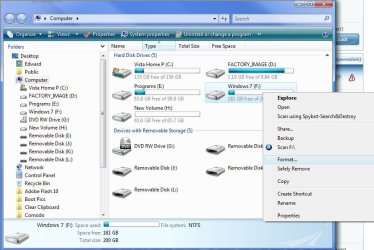
Have a look at this, r click on the partition you want to re-format.

Format2.JPG

Keep us informed!


Later ;) Ted
 

My Computer

Computer Manufacturer/Model Number
* BFK Customs *
OS
W 7 64-bit Ultimate
CPU
Intel Q9550 Yorkfield
Motherboard
ASUS P5Q Pro
Memory
8GB Dominator 8500C5D
Graphics Card(s)
ATI : XFX 5870
Sound Card
Realtek HD Audio 7-1
Monitor(s) Displays
1x 47" LCD HDMI & 3x 26" LCD HDMI
Screen Resolution
1920x1080P & 1920x1200
Hard Drives
1x 80GB Intel X25-M G2 SSD : 1x 500GB & 1x 640GB WD Caviar Black(s)
PSU
Corsair 620HX
Case
Cooler Master RC-690
Cooling
Tuniq Tower 120, 2x 140mm and 3x 120mm case fans
Keyboard
Microsoft 500
Mouse
Razer Diamondback 3G
Internet Speed
14 Mb/s
Other Info
1x Koutech 3Gb/s SATA HDD Hot Swap Rack
But the hard drive isn't in, I have to switch it with my Vista hard drive as I don't have spare cabled. What I'm going to do is just run the XP setup DVD and delete the partition in there, then exit the XP setup.

Right, Windows 7 downloaded and I have a huge load of RAR files, name like ".r01" and such. The NFO file says to "unpack"... how do I do this with all of them? I'm confused, do they all make an ISO or something?

Please help, thanks.

EDIT: I found an actual .rar file and inside it contains an ISO, so I'm extracting it now. Please could someone confirm that the .r01 etc files are just part of the .rar files to help make up the .iso?
 

My Computer

Computer Manufacturer/Model Number
Custom
OS
Windows 7 Ultimate 64-bit
CPU
Intel Core 2 Quad 3.00GHz
Motherboard
ASUSTeK P5Q SE2
Memory
4.00GB DDR2
Graphics Card(s)
ATI Radeon HD 4670
Monitor(s) Displays
24"
Screen Resolution
1920x1080
Hard Drives
500GB internal
1TB external
1TB external
320GB external
They are Jack. The only file you will need it the ISO file. It should be something like 3 GB for the 32-bit version, and around 4 GB for the 64-bit version.
 

My Computer

Computer type
PC/Desktop
Computer Manufacturer/Model Number
Self built custom
OS
64-bit Windows 11 Pro for Workstations
CPU
Intel i7-8700K OC'd to 5 GHz
Motherboard
ASUS ROG Maximus XI Formula Z390
Memory
64 GB (4x16GB) G.SKILL TridentZ RGB DDR4 3600 MHz
Graphics Card(s)
ASUS ROG-STRIX-GTX1080TI-O11G-GAMING
Sound Card
Integrated
Monitor(s) Displays
2 x Samsung Odyssey G7 27"
Screen Resolution
2560x1440
Hard Drives
1TB Samsung 990 PRO M.2,
4TB Samsung 990 PRO PRO M.2,
TerraMaster F8 SSD Plus NAS
PSU
Seasonic Prime Titanium 850W
Case
Thermaltake Core P3
Cooling
Corsair Hydro H115i
Keyboard
Logitech wireless K800
Mouse
Logitech MX Master 4
Internet Speed
2 Gb/s Download and 100 Mb/s Upload
Antivirus
Malwarebyte Anti-Malware Premium
Browser
Google Chrome
Other Info
Logitech Z625 speaker system,
Logitech BRIO 4K Pro webcam,
HP Color LaserJet Pro MFP M477fdn,
APC SMART-UPS RT 1000 XL - SURT1000XLI,
Galaxy S23 Plus phone
The ISO is 2.7GB. I guess this is a problem?
 

My Computer

Computer Manufacturer/Model Number
Custom
OS
Windows 7 Ultimate 64-bit
CPU
Intel Core 2 Quad 3.00GHz
Motherboard
ASUSTeK P5Q SE2
Memory
4.00GB DDR2
Graphics Card(s)
ATI Radeon HD 4670
Monitor(s) Displays
24"
Screen Resolution
1920x1080
Hard Drives
500GB internal
1TB external
1TB external
320GB external
Sorry, I just doubled checked the actual size. That is the correct size.
 

My Computer

Computer type
PC/Desktop
Computer Manufacturer/Model Number
Self built custom
OS
64-bit Windows 11 Pro for Workstations
CPU
Intel i7-8700K OC'd to 5 GHz
Motherboard
ASUS ROG Maximus XI Formula Z390
Memory
64 GB (4x16GB) G.SKILL TridentZ RGB DDR4 3600 MHz
Graphics Card(s)
ASUS ROG-STRIX-GTX1080TI-O11G-GAMING
Sound Card
Integrated
Monitor(s) Displays
2 x Samsung Odyssey G7 27"
Screen Resolution
2560x1440
Hard Drives
1TB Samsung 990 PRO M.2,
4TB Samsung 990 PRO PRO M.2,
TerraMaster F8 SSD Plus NAS
PSU
Seasonic Prime Titanium 850W
Case
Thermaltake Core P3
Cooling
Corsair Hydro H115i
Keyboard
Logitech wireless K800
Mouse
Logitech MX Master 4
Internet Speed
2 Gb/s Download and 100 Mb/s Upload
Antivirus
Malwarebyte Anti-Malware Premium
Browser
Google Chrome
Other Info
Logitech Z625 speaker system,
Logitech BRIO 4K Pro webcam,
HP Color LaserJet Pro MFP M477fdn,
APC SMART-UPS RT 1000 XL - SURT1000XLI,
Galaxy S23 Plus phone
Oh thank goodness. I'm going to burn it onto disk then and hopefully get to installing.
 

My Computer

Computer Manufacturer/Model Number
Custom
OS
Windows 7 Ultimate 64-bit
CPU
Intel Core 2 Quad 3.00GHz
Motherboard
ASUSTeK P5Q SE2
Memory
4.00GB DDR2
Graphics Card(s)
ATI Radeon HD 4670
Monitor(s) Displays
24"
Screen Resolution
1920x1080
Hard Drives
500GB internal
1TB external
1TB external
320GB external
yes they are broke up pieces of the rar file so you should be fine l mean as long as you got all the files. .. lol
 

My Computer

Computer Manufacturer/Model Number
Tx2500z Tablet Pc/Homemade Server
OS
Windows 7 Ult x64(x2), HomePrem x32(x4), Server 08 (+VM), 08 R2 (VM) , SuSe 11.2 (VM), XP 32 (VM)
CPU
Turion X2 ultra (oh well came with laptop)/P4 @3.2 (yes P4)
Motherboard
IDK HP Motherboard / Intel DG965SS
Memory
OCZ Dual Channel 4GB kit/ 1gb Dual Channel
Graphics Card(s)
HD 3200 graphics /GMA x3100 (yay for intergrated!!)
Sound Card
Realtek HD Audio(mic working, well sort of)/Siig IC-70012
Monitor(s) Displays
built-in Hp 12" laptop screen/ Acer 19"
Screen Resolution
1280x800 /1440x900
Cooling
All Air Cooled
Mouse
Logi MX Rev. /MS Wheel Optical 1.1A /Logitech Optical Mouse
Internet Speed
College baby but its still routed through vpn to 1536k...
Other Info
love my wacom pen and pressure sensitivity...
wished it worked in 7, SUSE for that matter though
Ok problem. I am trying to wipe the Windows 7 hard drive I have. I booted into the XP setup DVD, and on the second attempt, it said there were no other previous versions of Windows installed.

So I found a spare L shape cable (for connecting the hard drive aswell as the Vista one) but nothing, in Vista it wasn't shown... so what can I do now?
 

My Computer

Computer Manufacturer/Model Number
Custom
OS
Windows 7 Ultimate 64-bit
CPU
Intel Core 2 Quad 3.00GHz
Motherboard
ASUSTeK P5Q SE2
Memory
4.00GB DDR2
Graphics Card(s)
ATI Radeon HD 4670
Monitor(s) Displays
24"
Screen Resolution
1920x1080
Hard Drives
500GB internal
1TB external
1TB external
320GB external
i think that you are better off using a live cd to delete your partitions
you can actually also do it from 7 too...
go to all the steps of installing until it says where to install it then choose advanced options then choose your disk then click on delete partition (should have an eraser icon)...
 

My Computer

Computer Manufacturer/Model Number
Tx2500z Tablet Pc/Homemade Server
OS
Windows 7 Ult x64(x2), HomePrem x32(x4), Server 08 (+VM), 08 R2 (VM) , SuSe 11.2 (VM), XP 32 (VM)
CPU
Turion X2 ultra (oh well came with laptop)/P4 @3.2 (yes P4)
Motherboard
IDK HP Motherboard / Intel DG965SS
Memory
OCZ Dual Channel 4GB kit/ 1gb Dual Channel
Graphics Card(s)
HD 3200 graphics /GMA x3100 (yay for intergrated!!)
Sound Card
Realtek HD Audio(mic working, well sort of)/Siig IC-70012
Monitor(s) Displays
built-in Hp 12" laptop screen/ Acer 19"
Screen Resolution
1280x800 /1440x900
Cooling
All Air Cooled
Mouse
Logi MX Rev. /MS Wheel Optical 1.1A /Logitech Optical Mouse
Internet Speed
College baby but its still routed through vpn to 1536k...
Other Info
love my wacom pen and pressure sensitivity...
wished it worked in 7, SUSE for that matter though
i think that you are better off using a live cd to delete your partitions
you can actually also do it from 7 too...
go to all the steps of installing until it says where to install it then choose advanced options then choose your disk then click on delete partition (should have an eraser icon)...

Ok I'll try that in due time. Thanks for the help guys, I'll let you know how it goes.
 

My Computer

Computer Manufacturer/Model Number
Custom
OS
Windows 7 Ultimate 64-bit
CPU
Intel Core 2 Quad 3.00GHz
Motherboard
ASUSTeK P5Q SE2
Memory
4.00GB DDR2
Graphics Card(s)
ATI Radeon HD 4670
Monitor(s) Displays
24"
Screen Resolution
1920x1080
Hard Drives
500GB internal
1TB external
1TB external
320GB external
Well I got the new disk and have tried to install Windows 7. Got to the copying files, and then went to restart as normal, but didn't boot. I tried again, with formatting where it installed to and then trying again and it did the same thing. I gave it a rest and then just booted into the hard drive... it said "Starting Windows" and had the copyright Microsoft at the bottom... then just came up with that "Windows Bootloader Error" and told me to repair.

Any ideas, this is pretty much what happened last time, minus the smily face icon things. This really is bugging me. I have no time now but tomorrow i'll "repair" using the install disk and then try, but is there anything else I could be doing wrong?
 

My Computer

Computer Manufacturer/Model Number
Custom
OS
Windows 7 Ultimate 64-bit
CPU
Intel Core 2 Quad 3.00GHz
Motherboard
ASUSTeK P5Q SE2
Memory
4.00GB DDR2
Graphics Card(s)
ATI Radeon HD 4670
Monitor(s) Displays
24"
Screen Resolution
1920x1080
Hard Drives
500GB internal
1TB external
1TB external
320GB external
My ISO is 2.3GB, I wonder where the 400MB difference comes from...

Anyway, jackdelamare, you could try Windows Recovery Environment (boot from DVD). It lets you do a Startup Repair. If that doesn't work out then you could try FixBoot or FixMbr in the command console.
 

My Computer

Computer Manufacturer/Model Number
Dell Vostro 1510
OS
Windows 7 Build 7100 32-bit, Windows Vista 32-bit
CPU
Intel Core Duo T8100 2,1GHz
Memory
3GB
Graphics Card(s)
NVIDIA GeForce 8400M GS
Screen Resolution
1440x900
Hard Drives
250GB
Back
Top