installation software

salvo

New member
Local time
9:12 AM
Messages
16
Hi all,I have noticed that when I install a program or a software
at the end of the installation the window is small of the software :(
My PC is windows 7 64 Bit

Senza_titolo_1.jpg

you excuse I had posted in the wrong section:o
 

My Computer

Computer Manufacturer/Model Number
HP m9560ch
OS
windows 7
Sound Card
ESI-juli@
Antivirus
MSE
Browser
Mozilla Firefox
Salvo have you tried clicking on the edge of the window and hold down the left key and dragging the image out to the sides?
When you hover over the edge of that window it should show a double sided arrow that you drag as I said.

Mate sometimes the software doesn't always fill the screen anyway but if it happens with everything then give this a go.
 

My Computer

Computer type
PC/Desktop
Computer Manufacturer/Model Number
Own build (new) Desk1 / Asus ROG Win 7 / Desk2 1st build
OS
Desk1 7 Home Prem / Desk2 10 Pro / Main lap Asus ROG 10 Pro 2 laptop Toshiba 7 Pro Asus P2520 7 & 10
CPU
Desk1 i5 3750K / Laptop i7 GTX 860M / Desk2 i5 2500
Motherboard
Desk1 Asus P877-V / Desk2 Gigabyte H67 UD3H / Laptop ?
Memory
Desk1 8GB (1866) / Desk2 16GB (1333) / Laptop 8Gb DDR3
Graphics Card(s)
Desk 1& 2NVidia GTX 650 & Laptops on board Intel
Sound Card
Desk 1 & 2 -XONAR DG Realtek High Def audio Laptop
Monitor(s) Displays
Desk 1 Benq HD 2450 / Desk2 Philips 24" / Laptop 17.5"
Screen Resolution
1920x1080 D1 & D2 & Laptop 1
Hard Drives
Desk1 Samsung 120GB 830 SSD
Asus ROG 256GB 850 Pro SSD
Desk2 Samsung 840 256 SSD
Toshiba 120GB EVO
PSU
Desk 1 Corsair HX 1050/ Laptop ? / Desk 2 Corsair HX 650
Case
Desk 1 Cooler HAF XM ? Toshiba laptop / Desk2 Coolermaster
Cooling
Fans on all Desk1 -2 Desk2 - all Coolermasters 5 Laptop ?
Keyboard
Desk 1 MS Sidewinder X6 Desk 2 MS Sidewinder X 4
Mouse
Desk 1&2 - Gigabyte MS 900 gamer - laptop - Logitec wireless
Internet Speed
ADSL2+
Other Info
One other Desktop (tester) and spare Toshba laptop both with SSD's
Running Kaspersky 2016 ISS on all machines config'd identically
Logitec audio stereo systems on each machine (x3)
Canon MG5250MFC
Router/modem TP-Link running WPA2SK
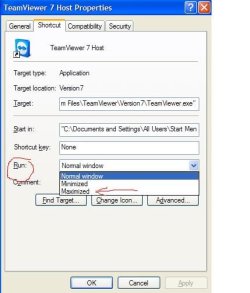
It's possible that newly installed programs open in a "normal" window by default. Go into your Start menu and find the program. Right-click the program > Properties > Shortcut tab. You should see a Properties dialog box similar to this:

maximizewindow.JPG

Under "Run:" use the drop down arrow > select Maximized > click Apply > click OK.

The next time you open the program it should open in a maximized window rather than the smaller normal window.
 

My Computer

Computer type
Laptop
Computer Manufacturer/Model Number
Sony Vaio VPCEB47GM Laptop
OS
Win 7 Pro 64-bit
CPU
Intel i5 2.4 Ghz
Memory
8GB DDR3
Graphics Card(s)
Intel HD 3000
Sound Card
IDT High Definition
Monitor(s) Displays
15.6 WGXA Anti-Glare LED
Screen Resolution
1280x800
Hard Drives
640Gb 7200rpm
Antivirus
MSE
Browser
Opera (primary) with IE9 backup
thanks guys!. the second option it was that correct! but not able' to expand
the software in the picture has been maybe thought to a small resolution.:confused:
thanks very kind
 

My Computer

Computer Manufacturer/Model Number
HP m9560ch
OS
windows 7
Sound Card
ESI-juli@
Antivirus
MSE
Browser
Mozilla Firefox
Salvo have you tried clicking on the edge of the window and hold down the left key and dragging the image out to the sides?
When you hover over the edge of that window it should show a double sided arrow that you drag as I said.

Mate sometimes the software doesn't always fill the screen anyway but if it happens with everything then give this a go.
not and possible it is stuck
 

My Computer

Computer Manufacturer/Model Number
HP m9560ch
OS
windows 7
Sound Card
ESI-juli@
Antivirus
MSE
Browser
Mozilla Firefox
You're very welcome. :thumbsup:
 

My Computer

Computer type
Laptop
Computer Manufacturer/Model Number
Sony Vaio VPCEB47GM Laptop
OS
Win 7 Pro 64-bit
CPU
Intel i5 2.4 Ghz
Memory
8GB DDR3
Graphics Card(s)
Intel HD 3000
Sound Card
IDT High Definition
Monitor(s) Displays
15.6 WGXA Anti-Glare LED
Screen Resolution
1280x800
Hard Drives
640Gb 7200rpm
Antivirus
MSE
Browser
Opera (primary) with IE9 backup
Back
Top