Installation Troubles

Kallb123

New member
Local time
12:39 AM
Messages
51
Location
Sheffield, UK
I tried to install W7 but when it tries to restart (any time) it will freeze. I think this cause something to go wrong as I have to press restart button on front of tower. When it starts back again it gets stuck on Completing Install and since many people say install takes 12-20 minutes I guess it can't take so long on my PC (check specs).
So instead I have followed this tutorial http://www.sevenforums.com/tutorials/7943-install-windows-7-fast-without-dvd-usb-device.html and I can get through it but I have problem. I have XP, so I cannot create the boot files properly. I have tried launching from W7 DVD and using the command prompt there and it says successfully created boot files. I activated the W7 hard drive (I have XP on one 320GB and W7 on other 320GB) as active partition. My PC still boots into Windows XP and I have nothing which lets me choose part from press any key to boot from cd or dvd which I don't want.

How can I get Windows 7 boot files (if it went wrong) or just get my PC to boot W7?
 

My Computer

Computer Manufacturer/Model Number
Homebuild
OS
Windows 7 Ultimate RC1 7100
CPU
Intel E8400 O.C. to 3.6GHz
Motherboard
Asus P5N-E SLI
Memory
4GB 800Mhz
Graphics Card(s)
Inno3D iChill 9800GTX O.C.
Monitor(s) Displays
20"
Screen Resolution
1280*1024
Hard Drives
2x 320GB Western Digital
PSU
750W
Internet Speed
1.5Mb/s
Disconnect one of your monitors, and try again.
 

My Computer

Computer type
PC/Desktop
Computer Manufacturer/Model Number
Self Build
OS
MS Windows 7 Professional 64-bit SP1
CPU
AMD FX(tm)-6100 Six-Core Processor Socket AM3+ (942)
Motherboard
ASUSTeK COMPUTER INC. SABERTOOTH 990FX (AM3r2)
Memory
8.00 GB Dual-Channel DDR3 @ 802MHz (11-11-11-36) 1.5Volts
Graphics Card(s)
NVIDIA GeForce GTX 560 Ti
Sound Card
Onboard Realtek HD
Monitor(s) Displays
shimian (1920x1080@60Hz)
Screen Resolution
1920*1080
Hard Drives
OCZ-AGIL ITY3 SATA Disk Device 120GB
PSU
Corsair TX 750
Case
Corsair
Cooling
WaterCooled
Keyboard
Microsoft Wired
Mouse
Logitech USB Optical TiltWheel Mouse
Internet Speed
Realtek PCIe GBE Family Controller 20MB*1MB
Antivirus
Avast
Browser
Firefox
Other Info
150GB Internal Hard Drive for Backing Up Important Files -
Hauppauge Nova-DT Dual DVB-T Tuner Device (+IR) -
USB PC Camera with Mic (SN9C105)
I took out 1 monitor, 2GB ram and XP hard drive. W7 tries to boot but it says
NTLDR is missing.
press Ctrl+Alt+Del to restart.

I have looked in the root of the W7 folder but i can't see any boot.ini or bootmgr. Can I copy these from my XP and edit them in notepad?

Edit:
boot.jpg


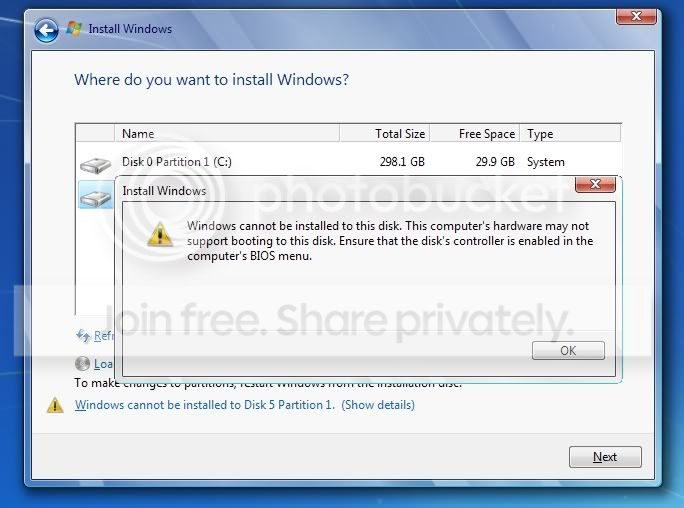
I've just started the W7 installer from the disk in XP and look what it says :s
What can I do?
 

My Computer

Computer Manufacturer/Model Number
Homebuild
OS
Windows 7 Ultimate RC1 7100
CPU
Intel E8400 O.C. to 3.6GHz
Motherboard
Asus P5N-E SLI
Memory
4GB 800Mhz
Graphics Card(s)
Inno3D iChill 9800GTX O.C.
Monitor(s) Displays
20"
Screen Resolution
1280*1024
Hard Drives
2x 320GB Western Digital
PSU
750W
Internet Speed
1.5Mb/s
after restarting pc it was ok. it started the install and got until completing install. when it restarted it got a BSOD, which said something about USB.
it has started up and is now continueing to complete install. it doesn't seem to be do anything though. i can bring up command prompt and when i go to root of the W7 drive and type dir it will tell that theres 295408048000 bytes remaining. this number seems to be going down but sometimes it goes up instead. is this normal? it started at about 295424blahblah so its going pretty slow at whatever its doing.

cancelled that. no way i can leave it to do what ever its doing, byte by byte.

I will format the hard drive and do the fast method again. I really need those boot files though. can i not download them from somewhere?
 
Last edited:

My Computer

Computer Manufacturer/Model Number
Homebuild
OS
Windows 7 Ultimate RC1 7100
CPU
Intel E8400 O.C. to 3.6GHz
Motherboard
Asus P5N-E SLI
Memory
4GB 800Mhz
Graphics Card(s)
Inno3D iChill 9800GTX O.C.
Monitor(s) Displays
20"
Screen Resolution
1280*1024
Hard Drives
2x 320GB Western Digital
PSU
750W
Internet Speed
1.5Mb/s
I unplugged everything I could grasp. Including:
2GB of RAM (out of 4GB)
Hauppagge TV Tuner
Keyboard + Mouse (replaced with PS/2)
Second Monitor
Floppy Drive
Memory Card Reader
And disabled anything that I didn't need in the BIOS (USB and 2.0 support)

Installation worked perfectly.
The TV Tuner doesn't work (it caused BSOD in XP also) and many people say that it is very unstable. I guess that was a waste of money. If your install fails try removing any of the above.


Windows 7 seems as though it will take over from XP since for me it has been awesome. One downpoint is that Company Of Heroes won't install properly, I have to use XP to play the game.
 

My Computer

Computer Manufacturer/Model Number
Homebuild
OS
Windows 7 Ultimate RC1 7100
CPU
Intel E8400 O.C. to 3.6GHz
Motherboard
Asus P5N-E SLI
Memory
4GB 800Mhz
Graphics Card(s)
Inno3D iChill 9800GTX O.C.
Monitor(s) Displays
20"
Screen Resolution
1280*1024
Hard Drives
2x 320GB Western Digital
PSU
750W
Internet Speed
1.5Mb/s
It appears that my Windows7 build 7100 (x64) installed OK until it gets to the "Welcome" screen and the next screen is black with only the build info displayed in the lower right, One time I, by chance, I got as far as the "fish" screen - only fish - no icons etc.
I installed the beta without a problem; I did an upgrade install.
I can get into Outlook etc thru launch of Task Manager - only problem seems to be the black screen and missing icons. I got to this forum via an email linked to a web site,
 

My Computer

Computer Manufacturer/Model Number
Self built
OS
windows7 rc build 7100
CPU
Intel Core 2 Duo E6600
Motherboard
Gigabyte GA-N680SLI-DQ6 rev.2
Memory
OCZ 8GB PC2 6400
Graphics Card(s)
EVGA 320 -P2-N811-AR GeForce 8800 GTS 320 MB
Monitor(s) Displays
Dell 24"
Hard Drives
2 X Seagate 7200.11 1.5 TB
PSU
CoolMax 700W
Case
Antec
Keyboard
das
Mouse
Logitech
Internet Speed
cable
post your system specs please.
 

My Computer

Computer Manufacturer/Model Number
Intel E8500
OS
Win7 build 7100, Win Bus 64bit, Mac OS X
Motherboard
Asus P5Q3 Deluxe WiFi
Memory
4gb DDR3 Gskill
Graphics Card(s)
EVGA Nvidia Geforce 9800GT
Sound Card
Onboard Soundmax
Monitor(s) Displays
8 yr old Princeton 17" LCD
Screen Resolution
1024 768
Hard Drives
3 Sata 2 Seagate 500gb
Case
Coolermaster
Keyboard
Microsoft USB
Mouse
Logitech USB
Solved

It appears that my Windows7 build 7100 (x64) installed OK until it gets to the "Welcome" screen and the next screen is black with only the build info displayed in the lower right, One time I, by chance, I got as far as the "fish" screen - only fish - no icons etc.
I installed the beta without a problem; I did an upgrade install.
I can get into Outlook etc thru launch of Task Manager - only problem seems to be the black screen and missing icons. I got to this forum via an email linked to a web site,
I downloaded the Windows7 x64 driver for the graphics card (EVGA) and all is fixed.
 

My Computer

Computer Manufacturer/Model Number
Self built
OS
windows7 rc build 7100
CPU
Intel Core 2 Duo E6600
Motherboard
Gigabyte GA-N680SLI-DQ6 rev.2
Memory
OCZ 8GB PC2 6400
Graphics Card(s)
EVGA 320 -P2-N811-AR GeForce 8800 GTS 320 MB
Monitor(s) Displays
Dell 24"
Hard Drives
2 X Seagate 7200.11 1.5 TB
PSU
CoolMax 700W
Case
Antec
Keyboard
das
Mouse
Logitech
Internet Speed
cable
Back
Top