Installation Won't Reboot

RedlightG20

New member
Local time
9:18 PM
Messages
5
Hello
I've been trying to install Windows 7 on a brand new computer. It's running RAID 0, and I'm using the latest drivers from my motherboard manufacturer.

Starting up the installation seems to work fine. It goes through the first phase of installation where I choose which partition I want to use, and it starts to copy files from the dvd, yada yada yada. After the "installing updates" section, a window pops up with the following message:

"Windows could not prepare the computer to boot into the next phase of installation. To install Windows, restart the installation."

It then kicks me back to the start of installation. If I start the install again, it does the same thing. If I reboot and restart installation, also the same.

If I try a startup repair, I get a message saying that Startup Repair cannot repair this computer automatically.

I've tried this on two builds--7000 and 7077. Both have the same result.

Here are my specs:
AMD Phenom II 940 X4 Black
Asus M4A79 Deluxe board
Crucial 4GB RAM
ATI Radeon 4870
Seagate Barracuda 1.5TB x 2 (in RAID 0)
 

My Computer

OS
what's an OS??
Is this the official Build 7000 release from M$?
 

My Computers

System One System Two

  • Computer type
    PC/Desktop
    Computer Manufacturer/Model Number
    The Beast Model A (homebrew)
    OS
    Windows 11 21H2 Current build
    CPU
    AMD Ryzen 9 3950X
    Motherboard
    MSI MEG X570 GODLIKE
    Memory
    4 * 32 GB - Corsair Vengeance 3600 MHz
    Graphics Card(s)
    EVGA GeForce RTX 3080 Ti XC3 ULTRA GAMING (12G-P5-3955-KR)
    Sound Card
    Realtek® ALC1220 Codec
    Monitor(s) Displays
    2x Eve Spectrum ES07D03 4K Gaming Monitor (Matte) | Eve Spec
    Screen Resolution
    3x 3840 x 2160
    Hard Drives
    3x Samsung 980 Pro NVMe PCIe 4 M.2 2 TB SSD (MZ-V8P2T0B/AM) } 3x Sabrent Rocket NVMe 4.0 1 TB SSD
    PSU
    PC Power & Cooling’s Silencer Series 1050 Watt, 80 Plus Plat
    Case
    Fractal Design Define 7 XL Dark ATX Full Tower Case
    Cooling
    SteelSeries Apex Pro Wired Gaming Keyboard
    Keyboard
    SteelSeries Apex Pro
    Mouse
    Logitech MX Master 3S | MX Master 3 for business
    Internet Speed
    AT&T LightSpeed Gigabit Duplex Ftth
    Antivirus
    Windows Defender + MB 3
    Browser
    Nightly (default) + Firefox (stable),Chrome, Edge
  • Computer type
    PC/Desktop
    System Manufacturer/Model Number
    Dell Latitude E5470
    OS
    ChromeOS Flex Dev Channel (current)
    CPU
    Intel(R) Core(TM) i5-6300U CPU @ 2.40GHz, 2501 Mhz, 2 Core(s), 4 Logical Processor(s)
    Motherboard
    Dell
    Memory
    16 GB
    Graphics Card(s)
    Intel(R) HD Graphics 520
    Sound Card
    Intel(R) HD Graphics 520 + RealTek Audio
    Monitor(s) Displays
    Dell laptop display 15"
    Screen Resolution
    1920 * 1080
    Hard Drives
    Toshiba 128GB M.2 22300 drive
    INTEL Cherryville 520 Series SSDSC2CW180A 180 GB SATA III SSD
    PSU
    Dell
    Case
    Dell
    Cooling
    Dell
    Keyboard
    Dell
    Mouse
    Logitech MX Master 3S (shared w. Sys 1) | Dell TouchPad
    Internet Speed
    AT&T LightSpeed Gigabit Duplex Ftth
Yep, I have an MSDN account and got it from there.

I should also note that I tried to install Vista Ultimate x64, and the installation does the exact same thing.

The only things I could think it could be are the 2 1.5TB drives I'm using in a RAID 0 config or some kind of BIOS setting.
 

My Computer

OS
what's an OS??
I'd say it was the RAID config....did your mobo come with a driver disk? You might need that in order to actually have Windows control the RAID group....
 

My Computers

System One System Two

  • Computer type
    PC/Desktop
    Computer Manufacturer/Model Number
    The Beast Model A (homebrew)
    OS
    Windows 11 21H2 Current build
    CPU
    AMD Ryzen 9 3950X
    Motherboard
    MSI MEG X570 GODLIKE
    Memory
    4 * 32 GB - Corsair Vengeance 3600 MHz
    Graphics Card(s)
    EVGA GeForce RTX 3080 Ti XC3 ULTRA GAMING (12G-P5-3955-KR)
    Sound Card
    Realtek® ALC1220 Codec
    Monitor(s) Displays
    2x Eve Spectrum ES07D03 4K Gaming Monitor (Matte) | Eve Spec
    Screen Resolution
    3x 3840 x 2160
    Hard Drives
    3x Samsung 980 Pro NVMe PCIe 4 M.2 2 TB SSD (MZ-V8P2T0B/AM) } 3x Sabrent Rocket NVMe 4.0 1 TB SSD
    PSU
    PC Power & Cooling’s Silencer Series 1050 Watt, 80 Plus Plat
    Case
    Fractal Design Define 7 XL Dark ATX Full Tower Case
    Cooling
    SteelSeries Apex Pro Wired Gaming Keyboard
    Keyboard
    SteelSeries Apex Pro
    Mouse
    Logitech MX Master 3S | MX Master 3 for business
    Internet Speed
    AT&T LightSpeed Gigabit Duplex Ftth
    Antivirus
    Windows Defender + MB 3
    Browser
    Nightly (default) + Firefox (stable),Chrome, Edge
  • Computer type
    PC/Desktop
    System Manufacturer/Model Number
    Dell Latitude E5470
    OS
    ChromeOS Flex Dev Channel (current)
    CPU
    Intel(R) Core(TM) i5-6300U CPU @ 2.40GHz, 2501 Mhz, 2 Core(s), 4 Logical Processor(s)
    Motherboard
    Dell
    Memory
    16 GB
    Graphics Card(s)
    Intel(R) HD Graphics 520
    Sound Card
    Intel(R) HD Graphics 520 + RealTek Audio
    Monitor(s) Displays
    Dell laptop display 15"
    Screen Resolution
    1920 * 1080
    Hard Drives
    Toshiba 128GB M.2 22300 drive
    INTEL Cherryville 520 Series SSDSC2CW180A 180 GB SATA III SSD
    PSU
    Dell
    Case
    Dell
    Cooling
    Dell
    Keyboard
    Dell
    Mouse
    Logitech MX Master 3S (shared w. Sys 1) | Dell TouchPad
    Internet Speed
    AT&T LightSpeed Gigabit Duplex Ftth
Yep, it was the RAID. Although I pointed Windows setup to the RAID driver I downloaded, it was giving this problem. I turned off the RAID array and setup goes on just fine. Thanks for your responses, John!
 

My Computer

OS
what's an OS??
The issue, though, is that it should work on the RAID too. Try *not* pointing it to the driver and see what happens....

And I am assuming that you used the appropriate driver (32bit for 32bit Win7 and 64bit for 64bit Win7)....
 

My Computers

System One System Two

  • Computer type
    PC/Desktop
    Computer Manufacturer/Model Number
    The Beast Model A (homebrew)
    OS
    Windows 11 21H2 Current build
    CPU
    AMD Ryzen 9 3950X
    Motherboard
    MSI MEG X570 GODLIKE
    Memory
    4 * 32 GB - Corsair Vengeance 3600 MHz
    Graphics Card(s)
    EVGA GeForce RTX 3080 Ti XC3 ULTRA GAMING (12G-P5-3955-KR)
    Sound Card
    Realtek® ALC1220 Codec
    Monitor(s) Displays
    2x Eve Spectrum ES07D03 4K Gaming Monitor (Matte) | Eve Spec
    Screen Resolution
    3x 3840 x 2160
    Hard Drives
    3x Samsung 980 Pro NVMe PCIe 4 M.2 2 TB SSD (MZ-V8P2T0B/AM) } 3x Sabrent Rocket NVMe 4.0 1 TB SSD
    PSU
    PC Power & Cooling’s Silencer Series 1050 Watt, 80 Plus Plat
    Case
    Fractal Design Define 7 XL Dark ATX Full Tower Case
    Cooling
    SteelSeries Apex Pro Wired Gaming Keyboard
    Keyboard
    SteelSeries Apex Pro
    Mouse
    Logitech MX Master 3S | MX Master 3 for business
    Internet Speed
    AT&T LightSpeed Gigabit Duplex Ftth
    Antivirus
    Windows Defender + MB 3
    Browser
    Nightly (default) + Firefox (stable),Chrome, Edge
  • Computer type
    PC/Desktop
    System Manufacturer/Model Number
    Dell Latitude E5470
    OS
    ChromeOS Flex Dev Channel (current)
    CPU
    Intel(R) Core(TM) i5-6300U CPU @ 2.40GHz, 2501 Mhz, 2 Core(s), 4 Logical Processor(s)
    Motherboard
    Dell
    Memory
    16 GB
    Graphics Card(s)
    Intel(R) HD Graphics 520
    Sound Card
    Intel(R) HD Graphics 520 + RealTek Audio
    Monitor(s) Displays
    Dell laptop display 15"
    Screen Resolution
    1920 * 1080
    Hard Drives
    Toshiba 128GB M.2 22300 drive
    INTEL Cherryville 520 Series SSDSC2CW180A 180 GB SATA III SSD
    PSU
    Dell
    Case
    Dell
    Cooling
    Dell
    Keyboard
    Dell
    Mouse
    Logitech MX Master 3S (shared w. Sys 1) | Dell TouchPad
    Internet Speed
    AT&T LightSpeed Gigabit Duplex Ftth
Yep, it was the RAID. Although I pointed Windows setup to the RAID driver I downloaded, it was giving this problem. I turned off the RAID array and setup goes on just fine. Thanks for your responses, John!

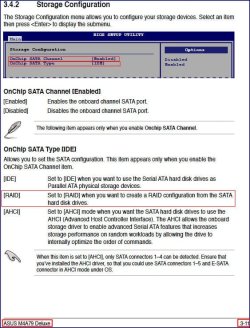
Is it something to do with your storage configuration?

Please check it again, just go to: BIOS>>>MAIN>>>Strorage Configuration
and tell what your configuration is.

The image is from the manual of your mobo, did you configure it correctly?

Snap1.jpg
 

My Computer

OS
Server 2008 R2 SP1, Win7 x64 Pro SP1
CPU
Intel Core 2 Duo E6700 @3.3GHz
Motherboard
ASUS P5W DH DELUXE
Memory
Transcend DDRII 800 4GB (2 x 2GB )
Graphics Card(s)
GeForce 7950GX2
Sound Card
Realtek ALC882M Integrated on board
Monitor(s) Displays
ACER AL2723 27" LCD
Screen Resolution
1920x1200
Hard Drives
WD 6401 AALS 640G x 1
Seagate 160 GB (Barracuda 7200.7) x 2
PSU
Zippy PSL-6720P(G1)720W
Case
Thermaltake Kandalf VA9000SWA
Cooling
Zalman CNPS9500
Keyboard
Standard
Mouse
Standard
Internet Speed
10M, Cable
Other Info
Above is one of my desktops.
The issue, though, is that it should work on the RAID too. Try *not* pointing it to the driver and see what happens....

And I am assuming that you used the appropriate driver (32bit for 32bit Win7 and 64bit for 64bit Win7)....

If I don't point it to the driver, it won't detect any disks. And yes, I am using x64 drivers with x64 OS.

Is it something to do with your storage configuration?

Please check it again, just go to: BIOS>>>MAIN>>>Strorage Configuration
and tell what your configuration is.

The image is from the manual of your mobo, did you configure it correctly?

Hi woolswell. The BIOS disk configuration is set to RAID. In the array configuration utility, I had tried to set the RAID stripe block to 64 KB and again to 128 KB, both resulted in the same issue.

I also know there are issues with the Seagate 1.5TB Barracuda drives with RAID, and I believe they have been worked out with firmware updates... however, I don't know what firmware version I have because the Seagate utilty that will tell me the version needs to run in Windows. I'll check it out when I get Windows installed without RAID and see if I can test a few more different settings and report back to hopefully help others out.

EDIT: Just loaded up Win7 and found out that my disks (CC1H firmware) are not affected and there are no firmware updates... at least for now ;)
 
Last edited:

My Computer

OS
what's an OS??
I didn't think it was a Drive issue per se - just a RAID issue in and of itself.

I understand you used x64 drivers in an x64 OS - but *which* x64 drivers, XP or Vista? that will also make a difference....
 

My Computers

System One System Two

  • Computer type
    PC/Desktop
    Computer Manufacturer/Model Number
    The Beast Model A (homebrew)
    OS
    Windows 11 21H2 Current build
    CPU
    AMD Ryzen 9 3950X
    Motherboard
    MSI MEG X570 GODLIKE
    Memory
    4 * 32 GB - Corsair Vengeance 3600 MHz
    Graphics Card(s)
    EVGA GeForce RTX 3080 Ti XC3 ULTRA GAMING (12G-P5-3955-KR)
    Sound Card
    Realtek® ALC1220 Codec
    Monitor(s) Displays
    2x Eve Spectrum ES07D03 4K Gaming Monitor (Matte) | Eve Spec
    Screen Resolution
    3x 3840 x 2160
    Hard Drives
    3x Samsung 980 Pro NVMe PCIe 4 M.2 2 TB SSD (MZ-V8P2T0B/AM) } 3x Sabrent Rocket NVMe 4.0 1 TB SSD
    PSU
    PC Power & Cooling’s Silencer Series 1050 Watt, 80 Plus Plat
    Case
    Fractal Design Define 7 XL Dark ATX Full Tower Case
    Cooling
    SteelSeries Apex Pro Wired Gaming Keyboard
    Keyboard
    SteelSeries Apex Pro
    Mouse
    Logitech MX Master 3S | MX Master 3 for business
    Internet Speed
    AT&T LightSpeed Gigabit Duplex Ftth
    Antivirus
    Windows Defender + MB 3
    Browser
    Nightly (default) + Firefox (stable),Chrome, Edge
  • Computer type
    PC/Desktop
    System Manufacturer/Model Number
    Dell Latitude E5470
    OS
    ChromeOS Flex Dev Channel (current)
    CPU
    Intel(R) Core(TM) i5-6300U CPU @ 2.40GHz, 2501 Mhz, 2 Core(s), 4 Logical Processor(s)
    Motherboard
    Dell
    Memory
    16 GB
    Graphics Card(s)
    Intel(R) HD Graphics 520
    Sound Card
    Intel(R) HD Graphics 520 + RealTek Audio
    Monitor(s) Displays
    Dell laptop display 15"
    Screen Resolution
    1920 * 1080
    Hard Drives
    Toshiba 128GB M.2 22300 drive
    INTEL Cherryville 520 Series SSDSC2CW180A 180 GB SATA III SSD
    PSU
    Dell
    Case
    Dell
    Cooling
    Dell
    Keyboard
    Dell
    Mouse
    Logitech MX Master 3S (shared w. Sys 1) | Dell TouchPad
    Internet Speed
    AT&T LightSpeed Gigabit Duplex Ftth
I didn't think it was a Drive issue per se - just a RAID issue in and of itself.

I understand you used x64 drivers in an x64 OS - but *which* x64 drivers, XP or Vista? that will also make a difference....

All the drivers I use are Vista.
 

My Computer

OS
what's an OS??
Hi guys,

Just wondering if anyone had a solution to this? I'm experiencing the same thing with near enough the same setup. Seems the installation program is happy with the raid drivers but they're not good enough to boot from.

I've tried the XP ones aswell and had no luck. I've used older ones from Asus's website, I've used new ones direct from AMD but still no luck.

Cheers

Stu
 

My Computer

Computer Manufacturer/Model Number
Custom
OS
windows 7 64bit
CPU
Phenom 9500
Motherboard
ASUS M3A79-T
Memory
6Gb
Graphics Card(s)
Nvidia 7900 GTX
Monitor(s) Displays
Viewsonic
Hard Drives
3 x Seagate Barracuda 1.5 TB
PSU
Corsair TX750W
Case
Lian Li
I'm bumping this.

I have the Seagate 1.5TB drives myself. I've been trying to install Windows 7 64bit onto a Raid 0 for around 3 days now. I've tried multiple raid drivers. Windows 7, xp, and vista, 32 bit and 64 bit. Still getting this error: "Windows could not prepare the computer to reboot....". I'm getting very frustrated can anyone help me?

The install screen is reading the Raid as a 3TB drive, which is good. I assume this means it is set up right in BIOS so I don't know if the problem resides in the driver or the hard drives.
 

My Computer

OS
Windows 7 64bit
CPU
Phenom x4 9950
Motherboard
MSI KA780G
Memory
6GB
Graphics Card(s)
MSI 5770
Hard Drives
Two 1.5TB's
I'd remove the RAID and one HD, set SATA controller to AHCI, install to single HD.

After install, plug back in the other HD to use forr data or storage including for a Win7 Backup image.
 
Back
Top